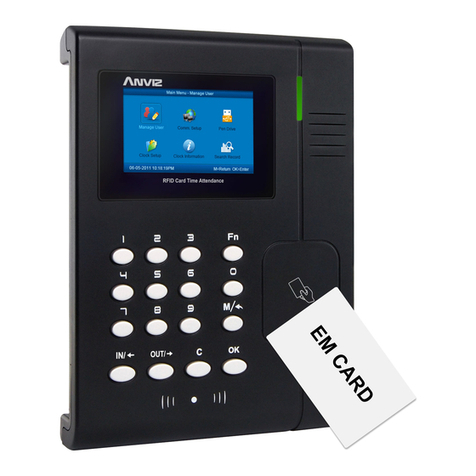
Anviz EP10 Manuel utilisateur

Fingerprint Time and Attendance System
User Guide
(V1.2)
ANVIZ yShanghai
Subject to change without notice.
1

1
Preface
Honorable customers,
Thanks for choosing products of our company. The product with world cutting edge
technologies—fingerprint recognition, computer communication, as well as
microelectronics, is considered to be combination of three technologies: electronics,
optics and computer communication. It is no doubt that it has become the first choice of
standalone time & attendance for enterprises with its strong function and veracity.
New generation BioNano fingerprint identification algorithm, which undergoes
researching for 10 years, with TI 300MHz high speed processor, all self-owned
intellectual property rights, unique function of healing the broken fingerprint lines and
intelligent fingerprint template update, is one of the most efficient and stable fingerprint
algorithm in the world.
Bio-office is a sub brand of Anviz USA. Bio-office series fingerprint products
combine fingerprint and traditional RFID technology. All models come with powerful
background time attendance management software which can support all kinds of
complicated shift and generate various reports. It is versatile, convenient and
multi-functional.
Please read this user manual carefully to have an initial understanding of functions
and basic knowledge of installation, debugging, maintenance, application and
management to better use this product.

2
Advantage of Fingerprint Time Attendance
yThree level-up
1. Management level-up
2. Profit level-up
3. Enterprise image level-up
yThree reductions
1. Employee dispute reduction
2. Work redundancy reduction
3. Environmental pollution reduction
yThree eliminations
1. Buddy punching elimination
2. Loss and damage elimination
3. Circular cost elimination
yFull function
The system can realize different functions such as attendance remark,
calculation and report printing. The remark can be made for reasons such as
business leave, absence, marriage holiday and etc.; the checking and calculation can
be made in accordance with different time periods, departments, individual or
combination due to various reasons for absence; the report generation and printing
function can be realized perfectly.
yFlexible Shift Maintenance
The software supports shift on week basis, rotation shifts etc. Various shifts,
public holidays, individual leave and overtime are available to meet the complicated
needs of every enterprise.
yStandalone
The machine can work without connecting to PC, convenient in operation and no
need to occupy any extra resource.
yMulti-communication in network
For large enterprise, multiple devices can be applied to do attendance
synchronously, which will convenient for large quantity of users and save time.

I
Contents
1 Product Introduction................................................................................................. 2
1.1 Product introduction.......................................................................................... 2
1.1.1 Product Features ....................................................................................... 2
1.1.2 Parameter.................................................................................................. 3
2 Operation Guide ...................................................................................................... 5
2.1 Keypad Introduction.......................................................................................... 5
2.2 Time attendance status..................................................................................... 5
2.3 User .................................................................................................................. 5
2.3.1 User enroll ................................................................................................. 6
2.3.2 User Deletion............................................................................................. 8
2.3.3 Verify Mode................................................................................................ 9
2.3.4 Admin Setup ............................................................................................ 10
2.3.5 Admin Clear............................................................................................. 12
2.4 Setup .............................................................................................................. 13
2.4.1 Device ID................................................................................................. 13
2.4.2 Time......................................................................................................... 14
2.4.3 Language ................................................................................................ 14
2.4.4 Net (Optional) .......................................................................................... 15
2.4.5 Precision.................................................................................................. 18
2.4.6 Volume .................................................................................................... 19
2.4.7 Auto Off ................................................................................................... 19
2.4.8 Auto Update............................................................................................. 20
2.4.9 Log Alert .................................................................................................. 20
2.4.10 Re-Verify................................................................................................ 21
2.4.11 Hardware Test........................................................................................ 22
2.5 USB Flash ...................................................................................................... 24
2.5.1 New Record Backup................................................................................ 24
2.5.2 All Records Backup ................................................................................. 24
2.5.3 User Backup ............................................................................................ 25
2.5.4 User Recovery......................................................................................... 26
2.6 System Info..................................................................................................... 27
2.7 T&A status setting........................................................................................... 28

II
2.8 T&A................................................................................................................. 28
2.9 Shut down....................................................................................................... 29
3 System Installation................................................................................................. 32
3.1 Operation Environment................................................................................... 32
3.2 System Installation.......................................................................................... 32
3.3 Uninstall the software ..................................................................................... 36
4 Background Management...................................................................................... 38
4.1 Log in System ................................................................................................. 38
4.2 System............................................................................................................ 39
4.2.1 Parameters Settings ................................................................................ 39
4.2.2 Administrators.......................................................................................... 41
4.2.3 Administrator’s Password Set.................................................................. 42
4.2.4 Modified Record Log ............................................................................... 43
4.2.5 Managing Log.......................................................................................... 43
4.2.6 Set Database Link ................................................................................... 44
4.2.7 Exit System.............................................................................................. 45
4.3 HR Management............................................................................................. 45
4.3.1 Department Management ........................................................................ 45
4.3.2 Employees Maintenance ......................................................................... 46
4.4 Attendance Management................................................................................ 49
4.4.1 Holiday List .............................................................................................. 49
4.4.2 Timetable and Shift.................................................................................. 50
4.4.3 Employee Scheduling.............................................................................. 56
4.4.4 Attendance Records ................................................................................ 58
4.4.5 Attendance Calculating and Report ......................................................... 60
4.5 Deal with Exceptions ...................................................................................... 67
4.5.1 Away on Business/ Leave........................................................................ 67
4.5.2 Append Record........................................................................................ 68
4.5.3 Append Record Collectively..................................................................... 69
4.5.4 Dealing with Collectively Late / Leaving .................................................. 69
4.6 Data Maintenance........................................................................................... 70
4.6.1 Import Employee List............................................................................... 70
4.6.2 Import Attendance Record ....................................................................... 71
4.6.3 Clear Obsolete Data ................................................................................ 71

III
4.6.4 Compress Database................................................................................ 72
4.6.5 Backup Database .................................................................................... 72
4.6.6 Initialize System....................................................................................... 72
4.7 External Program Management ...................................................................... 72
4.7.1 External Program Management............................................................... 72
4.7.2 Connect to Time Attendance Machine ..................................................... 73
5 Data Communication ............................................................................................. 75
5.1 T&A Machine Management ............................................................................ 76
5.1.1 Add Unit................................................................................................... 76
5.1.2 Modify Unit............................................................................................... 77
5.1.3 Delete Unit............................................................................................... 77
5.1.4 Right Key Menu ....................................................................................... 77
5.1.5 Synchronize Time .................................................................................... 78
5.1.6 Initialize Unit ............................................................................................ 79
5.1.7 Terminal Parameter Settings ................................................................... 79
5.1.8 Download new record.............................................................................. 81
5.1.9 Download all Record ............................................................................... 81
5.1.10 Clear Record ......................................................................................... 81
5.1.11 Backup Employee.................................................................................. 82
5.1.12 Resume Employee ................................................................................ 83
5.2 Record Supervision ........................................................................................ 83
5.2.1 Activate Realtime..................................................................................... 84
5.2.2 Prohibit real-time ..................................................................................... 84
5.3 Employees Management ................................................................................ 85
5.3.1 Add Employee ......................................................................................... 85
5.3.2 Modify Employee ..................................................................................... 89
5.3.3 Delete Employee ..................................................................................... 89
5.3.4 Transfer Department................................................................................ 89
5.3.5 Set Privilege ............................................................................................ 90
5.3.6 Copy Privilege ......................................................................................... 91
5.3.7 Download FP ........................................................................................... 92
5.3.8 Upload employee & FP............................................................................ 92
5.3.9 Delete from Unit....................................................................................... 93
5.3.10 Employee Checking............................................................................... 93

IV
5.3.11 Department management ...................................................................... 93
5.4 Record Management ...................................................................................... 94
5.4.1 Record Search......................................................................................... 95
5.4.2 Export Record.......................................................................................... 95
5.5 System settings .............................................................................................. 96
5.5.1 Basic parameter settings ......................................................................... 96
5.5.2 T&A Status setting ................................................................................... 97
5.5.3 Timing Downloading Record.................................................................... 98
5.5.4 Management PWD Setting ...................................................................... 98
5.5.5 Database linking setting........................................................................... 99
5.5.6 Exit system ............................................................................................ 100
5.6 User interface configuration .......................................................................... 100
5.6.1 Interface skin color ................................................................................ 100
5.6.2 Change the software language.............................................................. 100
5.6.3 Set quick access button......................................................................... 100
5.7 U Disk Management Program ...................................................................... 100
5.7.1 Read the data from the U disk ............................................................... 101
5.7.2 Modify the data in the U disk ................................................................. 102
5.7.3 Export data from the database .............................................................. 103
6 FQA ..................................................................................................................... 106
6.1 Fingerprint has enrolled but often gets failure in identification. ..................... 106
6.2 The machine cannot connect with PC. ......................................................... 106
6.3 No records found though employee have clocked in/out. ............................. 106
6.4 Clock’s time works fine, but FP scanner is off, employee cannot attendance107
6.5 We do not use the ID + fingerprint mode to verify......................................... 107
6.6 The unit beeps automatically when no one punches in/out. ......................... 107
7 Appendix.............................................................................................................. 109
7.1 Interface Illustration ...................................................................................... 109
7.2 Illustration for pressing fingerprint................................................................. 109

Chapter 1 Introduction
The main theme of this chapter is the feature of
this T&A, as well as function introduction.
1

1 Product Introduction
1.1 Product introduction
The Fingerprint Time and Attendance Machine is our new generation wall mounted
fingerprint time attendance machine which is released in 2010. It uses the USA TI
300MHz military high speed CPU and USA BioNano V10.0 core fingerprint algorithm
which is 30% higher in the idenitification speed compared with the last verion algorithm.
And the unique fingerprint positioning design is used in the terminal.
Thiss machine supports the plug&play USB communication. And the standard USB
power can be used as power input.
1.1.1 Product Features
yUSA TI 300MHz high speed CPU;
yUSA BioNano core fingerprint algorithm of high speed and stability;
yNew generation fully sealed, waterproof and dustproof fingerprint sensor;
yUser name display and human voice prompt;
yRealtime data transfer and WEB online tracking;
yIdentification method: FP, ID+FP, ID+PW;
yEP10: Standard (USB communication);
yEP20: Portable (USB communication + high capacity Lithium battery);
yEP30: TCP/IP (USB communication +TCP/IP);
yEP300: Advanced (TCP/IP + high capacity Lithium battery);
yFingerprint capacity: 2000; Record capacity: 50000;
yIdentification speed: <0.5 second;
2

3
ySize: 185(w)*130(h)*35(d)mm;
1.1.2 Parameter
Item Description
Register Mode Fignerprint, Password
Identification Time < 0.5s
FRR 0.001%
FAR 0.00001%
Working Current 0.2-0.5A
Sleeping Current 0.2A
Temperature -10℃-60℃
Humidity 20%-80%
Casing Material ABS Plastic
Scan Area 22mm*18mm
Color Black
Image Resolution 500DPI
Ce manuel convient aux modèles suivants
3
Table des matières
Autres manuels Anviz Contrôleurs d'accès IP

Anviz
Anviz OA200 Manuel utilisateur

Anviz
Anviz T5 Manuel utilisateur

Anviz
Anviz T5Pro Manuel utilisateur

Anviz
Anviz C2C Manuel utilisateur

Anviz
Anviz W 1 Manuel utilisateur

Anviz
Anviz T50 Manuel utilisateur

Anviz
Anviz C2 Manuel utilisateur

Anviz
Anviz VP30 Manuel utilisateur

Anviz
Anviz TC550 Manuel utilisateur

Anviz
Anviz M5 PRO Manuel utilisateur