
Procomp BVK1A Manuel utilisateur

Federal Communications Commission
(F.C.C) Statement
This device complies with Part 15 of the FCC Rules. Operation of this
device is subject to the following two conditions: (1) this device may not;
cause harmful interference, and (2) this device must accept any
interference received, including interference that may cause undesired
operation.
Accessories: This device has been tested and found to comply with the
limits of a Class B digital device, the accessories associated with this
equipment are as follows:
1. Shielded serial cable. (Can be obtained from multiple retail outlets)
2. Shielded printer cable. (Can be obtained from multiple retail outlets)
3. Shielded video cable. (Can be obtained from multiple retail outlets)
4. Shielded power cord. (Provided by manufacturer)
These accessories are required to ensure compliance with FCC Rules. It
is the responsibility of the user to provide and use these accessories
properly.
This equipment has been tested and found to comply with the limits of a
Class B digital device, pursuant to Part 15 of the FCC Rules. These limits
are designed to provide reasonable protection against harmful interference
in a residential installation. This equipment generates, uses and can
radiate radio frequency energy and, if not installed and used in accordance
with the instructions, may cause harmful interference to radio
communications. There is no guarantee that interference will not occur in
a particular installation. If this equipment does cause harmful interference
to radio or television reception, which can be determined by turning the
equipment off and on, you are encouraged to try to correct the
interference by one or more of the following measures:
1. Reorient / relocate the receiving antenna.
2. Increase the separation between the equipment and receiver.
3. Connect the equipment into an outlet on a circuit different from that
to which the receiver is connected.
4. Consult the dealer or an experienced radio/TV technician for help.

Caution: Changes or modifications not expressly approved by the
manufacturer could void the user’s authority to operate the equipment.
Disclaimer
The vendor makes no representations or warranties with respect to the
contents here of and specially disclaims any implied warranties of
merchantability or fitness for any purpose. Further the vendor reserves the
right to revise this publication and to make changes to the contents here of
without obligation to notify any party beforehand.
Duplication of this publication, in part or in whole, is not allowed without
first obtaining the vendor’s approval in writing.
Trademarks and Remarks
MS-DOS, Windows, Windows NT, and Windows 9X are products of
Microsoft Corp, with its ownership of trademark, and are distributed by
the vendor under a license agreement.
All trademarks used in this manual are the property of their respective
owners.
Copyright© 1999
All Rights Reserved
Canadian D.O.C. Statement
This digital apparatus does not exceed the Class B limits for radio noise
emissions from digital apparatus as set out in the radio interference regulations of
the Canadian Department of Communications.
Cet appareil numbérique n‘émet pas de bruits radioélectriques dépassant les
limites appliquées aux appareils numbériques de Class B préscrits dans le
réglement du brouillage radioélectrique edict par le minister Des Communications
du Canada.

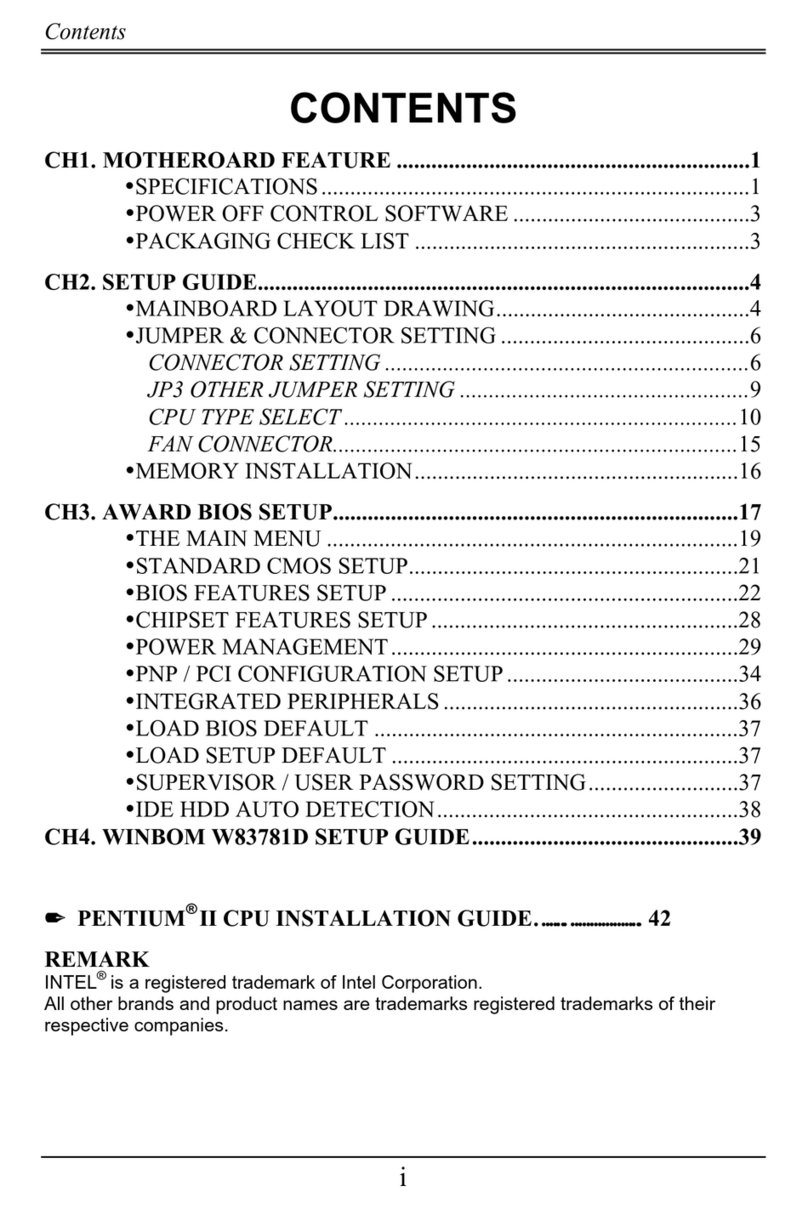
Contents
i
Introduction................................................................................ 1-1
1 Motherboard Description.......................................................1-2
1.1 Features...................................................................................................1-2
1.1.1 Hardware.........................................................................................1-2
1.1.2 Software..........................................................................................1-4
1.1.3 Attachments ....................................................................................1-4
1.2 Motherboard Installation ........................................................................1-6
1.2.1 Layout of Motherboard...................................................................1-6
1.3 Motherboard Connectors........................................................................1-7
1.3.1 Front Panel Connectors (PANEL1) ................................................1-8
1.3.2 Floppy Disk Connector (FDD1)....................................................1-10
1.3.3 Hard Disk Connectors (IDE1/IDE2).............................................1-10
1.3.4 ATX 20-pin Power Connector (CN1)...........................................1-11
1.4 Back Panel Connectors.........................................................................1-12
1.4.1 PS/2 Mouse / Keyboard CONN. : PS2_KBMS ............................1-12
1.4.2 USB Connectors : USB.................................................................1-13
1.5 Serial and Parallel Interface Ports.........................................................1-15
1.6 CPU Installation ...................................................................................1-18
1.6.1 CPU Installation Procedure...........................................................1-18
1.6.2 CPU Clock Selection : SW1 .........................................................1-22
1.7 Jumper Settings.....................................................................................1-22
1.7.1 CPU Fan Connector : FAN1.........................................................1-23

Contents
ii
1.7.2 System Fan Connector : FAN2 .....................................................1-24
1.7.3 Wake-On MODEM Header : WOM (Optional) ...........................1-24
1.7.4 Wake-On-LAN Header : WOL.....................................................1-24
1.7.5 AMR Code Primary/Secondary Selection : J1..............................1-24
1.7.6 CMOS Function Selection : JBAT................................................1-25
1.8 DRAM Installation ...............................................................................1-26
1.8.1 DIMM...........................................................................................1-26
1.8.2 How to install a DIMM Module....................................................1-28
1.9 Audio Subsystem..................................................................................1-29
1.9.1 CD Audio-In Connectors : CD_IN / J4.........................................1-30
1.9.2 Telephony Connector : J5.............................................................1-30
2. BIOS Setup ............................................................................. 2-1
2.1 Main Menu .............................................................................................2-3
2.2 Standard CMOS Features .......................................................................2-5
2.3 Advanced BIOS Features........................................................................2-8
2.4 Advanced Chipset Features...................................................................2-12
2.5 Integrated Peripherals...........................................................................2-15
2.6 Power Management Setup ....................................................................2-19
2.7 PnP/PCI Configurations........................................................................2-23
2.8 PC Health Status...................................................................................2-26
2.9 Load Fail-Safe Defaults........................................................................2-28
2.10 Load Optimized Defaults....................................................................2-29
2.11 Set Supervisor / User Password..........................................................2-30

Contents
iii
2.12 Save & Exit Setup...............................................................................2-32
2.13 Exit Without Saving............................................................................2-33
3. Software Setup........................................................................3-1
3.1 Software List...........................................................................................3-1
3.2 Software Installation...............................................................................3-2
3.3 Using Software .......................................................................................3-3
4. Trouble shooting..................................................................... 4-1

Chapter 1 Motherboard Description
1-1
Introduction
System Overview
Thanks for buying this product! This manual was written to help you start using this
product as quickly and smoothly as possible. Inside you will find adequate
explanations to solve most problems. In order for this reference material to be of
greatest use, refer to the “expanded table of contents” to find relevant topics.
This board incorporates the system board, I/O, and PCI IDE into one board that
provides a total PC solution. The mainboard, a AMD-AthlonTM processor based PC
ATX system, supports single processors with ISA Bus, PCI Local Bus, and AGP
Bus to support upgrades to your system performance. It is ideal for multi-tasking
and fully supports MS-DOS, Windows, Windows NT, Windows 2000, Novell,
OS/2, Windows95/98, UNIX, SCO UNIX etc. This manual also explains how to
install the mainboard for operation, and how to setup your CMOS configuration
with the BIOS setup program.

Chapter 1 Motherboard Description
1-2
1 Motherboard Description
1.1 Features
1.1.1 Hardware
CPU − Single Slot-A for AMD-AthlonTM processor Module-500MHz and
faster.
− 200MHz System Interface speed.
Speed − Support 33MHz PCI Bus speed.
− Support 4X AGP Bus.
DRAM Memory
− Supports 8/16/32/64.......MB DIMM module socket.
− Supports Synchronous DRAM (3.3V).
− Support a maximum memory size of 768MB with SDRAM.
Shadow RAM
− A memory controller provide shadow RAM and supports 8-bit ROM
BIOS.
Green Function
− Support power management operation via BIOS.
− Power down timer from 1 to 15 mins.
− Wakes from power saving sleep mode at the press of any key or any
mouse activity.
BUS Slots
− Provide one AGP slot and one AMR slot.
− Five 32-bit PCI bus and one ISA slot bus master slots.

Chapter 1 Motherboard Description
1-3
Flash Memory
− Support flash memory.
− Support ESCD Function.
IDE Built-in On Board
− Supports four IDE hard disk drives.
− Supports PIO Mode 4, Master Mode, high performance hard disk drives.
− Support Ultra DMA 33, 66 Bus Master Mode.
− Supports IDE interface with CD-ROM.
− Supports high capacity hard disk drives.
− Support LBA mode.
PCI-Based AC 97 Digital Audio Processor (Optional)
− AC 97 2.1 interface.
− 16 channels of high-quality sample rate conversion.
− 16x8 channel digital mixer.
− Stereo 10 band graphic equalizer.
− Sound Blaster® and Sound Blaster Pro® emulation.
− S/PDIF output (allows standard interface to consumer electronics).
− 64-voice wavetable.
− PC99 complaint and WHQL certified.
I/O Built-in On Board
− Supports one multi-mode Parallel Port.
(1) Standard & Bidirection Parallel Port.
(2) Enhanced Parallel Port (EPP).
(3) Extended Capabilities Port (ECP).
− Supports two serial ports, 16550 UART.
− Supports one Infrared transmission (IR).
− Supports PS/2 mouse and PS/2 keyboard.
− Supports 360KB, 720KB, 1.2MB, 1.44MB, and 2.88MB floppy disk
drivers.

Chapter 1 Motherboard Description
1-4
Universal Serial Bus
− Supports two back Universal Serial Bus (U.S.B.) Ports and two front
Universal serial Bus (U.S.B) Ports.
− Supports 48 MHz USB.
Hardware Monitor Function
− CPU Fan Speed Monitor.
− System and CPU Temperature Monitor.
− System Voltage Monitor.
Dimensions (ATX form-factor)
− 21.3 cm X 30.5 cm (W x L)
1.1.2 Software
BIOS − AWARD legal BIOS.
− Supports APM1.2.
− Supports USB Function.
− Supports ACPI.
Operating System
− Offers the highest performance for MS-DOS, OS/2, Windows, Windows
NT, Windows 2000, Windows 95/98, Novell, UNIX, SCO UNIX etc.
1.1.3 Attachments
− HDD Cable.
− FDD Cable.
− Flash Memory Writer for BIOS Update.
− Retention Kits for CPU.
− Sound and Hardware Monitor Setup Driver CD.
− IDE and Hardware Monitor Setup Drive CD.
− USB2 Cable (Optional).

Chapter 1 Motherboard Description
1-5
− Rear I/O Panel for ATX Case (Optional).
Table des matières
Autres manuels Procomp Carte mère

Procomp
Procomp BIW2A Manuel utilisateur

Procomp
Procomp BS61M Series Manuel utilisateur

Procomp
Procomp BVD2A Manuel utilisateur

Procomp
Procomp b598 Manuel utilisateur

Procomp
Procomp BIW1A Series Manuel utilisateur
Procomp
Procomp B683 Manuel utilisateur

Procomp
Procomp B687 Manuel utilisateur

Procomp
Procomp B785 Manuel utilisateur

Procomp
Procomp b686 Manuel utilisateur
Manuels Carte mère populaires d'autres marques


Telit Wireless Solutions
Telit Wireless Solutions SL869-3DR Manuel utilisateur

Gigabyte
Gigabyte GA-9IVDT Manuel utilisateur

Texas Instruments
Texas Instruments ADS8372EVM Manuel utilisateur

Commell
Commell MS-C73 Manuel utilisateur

IBT Technologies
IBT Technologies MB860 Manuel utilisateur

Nvidia
Nvidia TEGRA DG-04927-001_V01 Manuel utilisateur


