OneFex CS-IO1600DI Manuel utilisateur

1
/ 13
CS-IO1600DI User Manual
CS-IO1600DI
Serial I/O Module
Manual

2
/ 13
CS-IO1600DI User Manual
1PRODUCT INTRODUCTION............................................................................................... 5
1.1 Features ...........................................................................................................................................5
1.2 Parameter.........................................................................................................................................5
1.3 Item Selection .................................................................................................................................6
1.4 Dimension........................................................................................................................................6
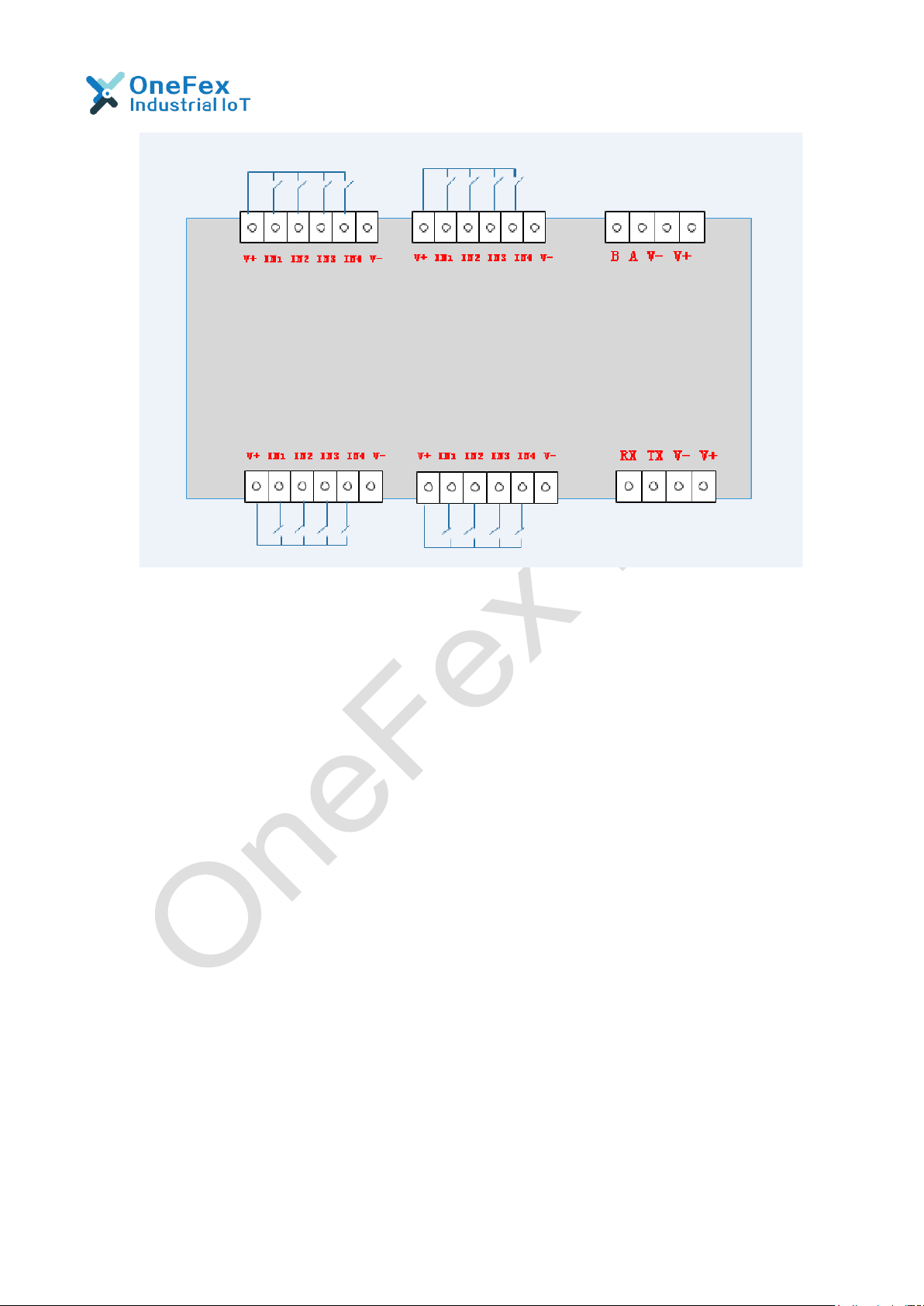
2.1 Terminal Definition.........................................................................................................................6
2.2 Communication Wiring..................................................................................................................7
2.2.1 RS485 Wiring ........................................................................................................................................ 7
2.2.2 RS232 Wiring ........................................................................................................................................ 7
2.3 DI Wiring ..........................................................................................................................................7
2.3.1 Active Signal Wiring.............................................................................................................................. 8
2.3.2 Passive Switch (dry contact) Wiring ..................................................................................................... 8
3PARAMETERS AND WORKING MODE CONFIGURATION................................... 9
3.1 Device and PC Connection Settings...........................................................................................9
3.2 Device Address...............................................................................................................................9
3.2.1 Introduction..........................................................................................................................................9
3.2.2 Device Communication Address Reading...........................................................................................10
3.2.3 Software Address Setting and Reading ..............................................................................................10
3.2.4 Baud Rate Reading and Setting ..........................................................................................................11
4DEVELOPMENT DATA INSTRUCTION........................................................................11
4.1 Communication Protocol Instruction .......................................................................................11
4.2 Modbus Register Instruction......................................................................................................12
4.3 Command List...............................................................................................................................13
4.4 Command Details.........................................................................................................................13
4.4.1 Optocoupler Input..............................................................................................................................13
5PRODUCT MAINTENANCE..............................................................................................15
5.1 Device Usage Environment ........................................................................................................15
5.2 FAQ.................................................................................................................................................15
5.2.1 RS485 /RS232 communication, no response when device control.................................................... 15
5.2.2 The relay can only be turned on but not turned off...........................................................................16
5.2.3 485 interface cannot be used to establish communication and control After the relay powered on.
16
5.2.4 Multiple devices on the 485 bus and close operation failed to send the broadcast address 254. ....16

3
/ 13
CS-IO1600DI User Manual
5.2.5 PLC and the device cannot communicate normally ...........................................................................17
5.2.6 How to restore the factory settings ...................................................................................................17
6AFTER-SALE SERVICE.....................................................................................................17
6.1 Commitment..................................................................................................................................17
6.2 Disclaimer......................................................................................................................................18
7UPDATE HISTORY...............................................................................................................18

4
/ 13
CS-IO1600DI User Manual
Notice
❖Please read this manual carefully before use and save it for reference.
❖Please follow to the operating procedures and precautions in this manual.
❖Please open the package carefully and check whether the device and
accessories have been damaged due to transportation when you receive the device.
Please contact us for return processing once damage occurs.
❖Please do not repair it yourself, and contact our technical support department
directly if the device fails.

5
/ 13
CS-IO1600DI User Manual
1 Product Introduction
CS-IO series products are serial I/O module using standard Modbus-RTU protocol,
supporting RS485/232. Support wide voltage power supply, multi-channel input and
output control, which can be widely used in various application scenarios such as
industrial production, agriculture, smart city and office buildings.
1.1 Features
◆DC 9-28V wide voltage power supply, support anti-reverse connection;
◆16* DI with optocoupler isolation, used for switch detection, supports dry and wet
contacts;
◆LED indication, 1 for power and working status;
◆SupportsRS485+RS232Communicationinterface,powerisolationplussignal
isolation,reliablecommunication;
◆Communication baud rate: 300bps~38400bps (, It is 9600 by default and
can be modified by software);
◆Support standard Modbus RTU protocol, read and write by registeraddress;
◆0-255; Bulit-in address DIP switch; Set address codes by software;
◆Support flash ON flash OFF;
◆Power-off memory: keep the original state once power off and on again.
◆Supporting setting software for setting parameters and IO control;
◆Support software and hardware customization.
1.2 Parameter
Paremater
Durability
100,000 times (Electrical)
10,000,000 times (Mechanical)
Data interface
RS485/RS232
Working Voltage
DC 9-28V
Power / work indication
1 red LED
(power, always on; working, flashing)
Working temperature
-40℃~85℃, Industrial Grade
Size
200*110*60mm
Weight
650g
Default communication format
9600,n,8,1, Even can be configured.
Baud rate
300~38400bps
Software support
Setting and control software;
Support various configuration software;
support Labviewd, etc.
Installation
35mm Din Rail Mounting / Screw Holes

6
/ 13
CS-IO1600DI User Manual
1.3 Item Selection
Item #
DO
DI
Analog
RS485
Address Dial
CS-IO101
1
1
0
RS485 * 1
Address Dial
CS-IO204
2
4
0
RS485 * 1
Address Dial
CS-IO222A
2
2
2(0-20mA)
RS485 * 1
Address Dial
CS-IO404A
4
0
4(0-20mA)
RS485 * 1
Address Dial
CS-IO404
4
4
0
RS485 * 1
Address Dial
CS-IO606
6
6
0
RS485 * 1
Address Dial
CS-IO808
8
8
0
RS485 + RS232
CS-IO1600DI
0
16
0
RS485 + RS232
Address Dial
CS-IO1600
16
0
0
RS485 + RS232
Address Dial
CS-IO3200
32
0
0
RS485 + RS232
Address Dial
1.4 Dimension
200*110*60mm
2 Wiring Instructions
2.1 Terminal Definition

7
/ 13
CS-IO1600DI User Manual
2.2 Communication Wiring
By default, its address is 1, and the DIP switches are in the off state.
The host computer software can use the default address 1 to
communicate with the device (or broadcast address 254, which is only
applicable when one device is mounted on the network).
2.2.1 RS485 Wiring
2.2.2 RS232 Wiring
2.3 DI Wiring
The switch input interface is compatible with wet and dry nodes, please pay
attention to the different connection methods of active and passive signals.
The internal optocoupler circuit of the switch value acquisition terminal is as
follows,
V-(DGND) is the negative common terminal of the optocoupler, and the sensor
signal can be connected to V+(VIN) and Inx respectively.

8
/ 13
CS-IO1600DI User Manual
2.3.1 Active Signal Wiring
It is suitable for measuring signals with voltage, such as level high and low, and
pulse output.
2.3.2 Passive Switch (dry contact) Wiring
It is suitable for collecting passive contact signals, such as switches and buttons.

9
/ 13
CS-IO1600DI User Manual
3 Parameters and Working Mode Configuration
3.1 Device and PC Connection Settings
The USB end of the USB to RS485/RS232 converter is directly connected to the
USB port of computer, and 485/232 end is wired according to the wiring method in
"Chapter 2.2 Communication Wiring".
Serial port number query method: Open "My Computer - Device Manager - Port
(COM and LPT)" and the COM number that appears after the USB to 485/232
device is inserted is the serial port number.
3.2 Device Address
3.2.1 Introduction
The Offset Address of this device is 1 by default, and the broadcast address is
254 to communicate, but 0 cannot be used.
Communication address = Hardware address (DIP switch address) + Offset
address.
The device’s Factory default settings of communication address is 1.
With DIP switch, users can quickly modify the device address.
(1)The address is "31" when all 5 dial codes are dialed above;
(2)The address is "0" When all t5 dial codes are dialed below;
(3)The leftmost 1 is the lowest digit in binary;;

10
/ 13
CS-IO1600DI User Manual
(4)DIP address table:
3.2.2 Device Communication Address Reading
After the device is connected normally, click "read address" on the serial relay
debugging software to read the current address of the device [only support
broadcast read address when there is one device on the bus].
3.2.3 Software Address Setting and Reading
Click "Read" or "Set" to read or set the software address of the device (address
parameters stored in the device).
Table des matières
Autres manuels OneFex Unité de contrôle
Manuels Unité de contrôle populaires d'autres marques

Festo
Festo Compact Performance CP-FB6-E Manuel de la liste des pièces

Elo TouchSystems
Elo TouchSystems DMS-SA19P-EXTME Manuel utilisateur

JS Automation
JS Automation MPC3034A Manuel utilisateur

JAUDT
JAUDT SW GII 6406 Series Guide rapide

Spektrum
Spektrum Air Module System Manuel utilisateur

BOC Edwards
BOC Edwards Q Series Manuel utilisateur