
G3D T-1000 Manuel utilisateur

The manual covers the most basic operations. For more information, please
check g3dsys.com.
3D Printer Manual v1.3
T-1000

CONTENTS
Introduction
Specifications
Package Contents
Safety
Getting to know the T-1000
Terms and conditions
Getting started
Setting the build plate
Setting the VAT
Powering on
Powering down
Connecting to printer wifi and accessing the G3D Web UI
Configuring the wifi connections
Connecting via ethernet
Resetting wifi connection
Updating the G3D Web UI
Printing objects with G3D Web UI
Uploading a new file
Deleting a file
Choosing a file
Positioning the build plate
Calibrating the VAT
Filling the VAT
Printing
Pause printing
Abort printing
Adjusting the xy resolution of projector
Focusing the projector
Raising the build plate
Removing the build plate
Removing the VAT
Print care and cleaning guide
Prints and cleaning materials
Removing print from the build plate
Cleaning the print
Curing the print
Cleaning the VAT
Cleaning the projector
Cleaning the T-1000
Troubleshooting
Contact
1
1
3
4
5
7
8
8
9
10
11
12
13
16
16
17
18
18
18
19
22
24
26
26
27
27
28
32
45
45
46
47
47
48
48
49
50
51
51
52
53
i

1 T-1000
SPECIFICATIONS
HARDWARE
Printer Technology
Build Volume(Max.)
Build Dimension(Max.)
Thickness per layer(Z axis)
Print Speed
Material
Printer Weight
Dimension
Input
Operating Temperature
SOFTWARE
Connectivity
System compatibility
Supported file
Max
Min
H
W
L
DLP/SLA
441 cu. in
7,225,344 cu. mm
7.06 in(L) x 5.29 in(W) x 11.81 in(H)
179.20 mm(L) x 134.40 mm(W) x 300.00 mm(H)
0.00472 in
120 µm
0.00029 in
7.50 µm
25 mins/in - 35mins/in
0.98 mins/mm - 1.38 mins/mm
Photopolymer
29 kg
63.9341 lbs
26.71 in
678.50 mm
17.86 in
453.60 mm
11.66 in
296.13 mm
110 - 220 VAC, 0.8A
50 Hz - 60 Hz
17ºC - 40ºC
62.6ºF - 104ºF
Wifi / USB / Ethernet
Windows / Mac / Linux
G3D, G3L / importable STL / importable OBJ
More formats coming soon.

T-1000 2
SPECIFICATIONS
XY RESOLUTION TO BUILD VOLUME
25 min/in
0.98 min/mm
32 min/in
1.26 min/mm
35 min/in
1.38 min/mm
35 min/in
1.38 min/mm
100 µm
125 µm
150 µm
175 µm
4.03 in x 3.02 in x 11.81 in
102.4 mm x 76.8 mm x 300 mm
5.04 in x 3.78 x 11.81 in
128 mm x 96 mm x 300 mm
6.05 in x 4.54 in x 11.81 in
153.6 mm x 115.2 mm x 300 mm
7.06 in x 5.29 in x 11.81 in
179.2 mm x 134.4 mm x 300 mm
149.97 cu. ln
2359296 cu. mm
224.96 cu. ln
3686400 cu. mm
323.94 cu. ln
5308416 cu. mm
440.92 cu. ln
7225344 cu. mm
Speed
Resolution Build Dimension Build Volume

PACKAGE CONTENTS
Be sure all items listed here were included with your printer.
VAT Build Plate
Resin Manual
t-1000
Clippers Scraper
3 T-1000

SAFETY
ELECTRICAL
• Do not modify or disassemble the printer.
• Ensure to discharge static electricity when you configure the printer or projector.
• Do not open front panel, rear panel and electronic panel while power is on.
OPERATION
• Keep printer in a well-ventilated area.
• Do not stare at the uv light for a long period of time during operation. It can
cause permanent loss of vision.
• Use recommended resin for the printer.
• Do not operate with wet hands.
• Uninterruptible power supply recommended.
GUIDELINES
• Do not expose printer to extremely high temperatures, such as direct sunlight,
flame or other sources of heat.
• Maintain the printer in a flat and sturdy surface.
• Keep printer dry.
• Do not use this printer for making illegal copies or to infringe copyright laws.
Please read the following safety precautions before operating the T-1000 3D
printer.
!
T-1000 4

GETTING TO KNOW THE T-1000
1
2
3
4
5
6
7
8
9
10
11
3
4
5
1
2
ACME thread
VAT
VAT stopper
Head stopper
Build plate
6Calibration lever
9
10
11 Power button
Wifi reset
8
Ethernet port
USB port
7Electronic panel
5 T-1000
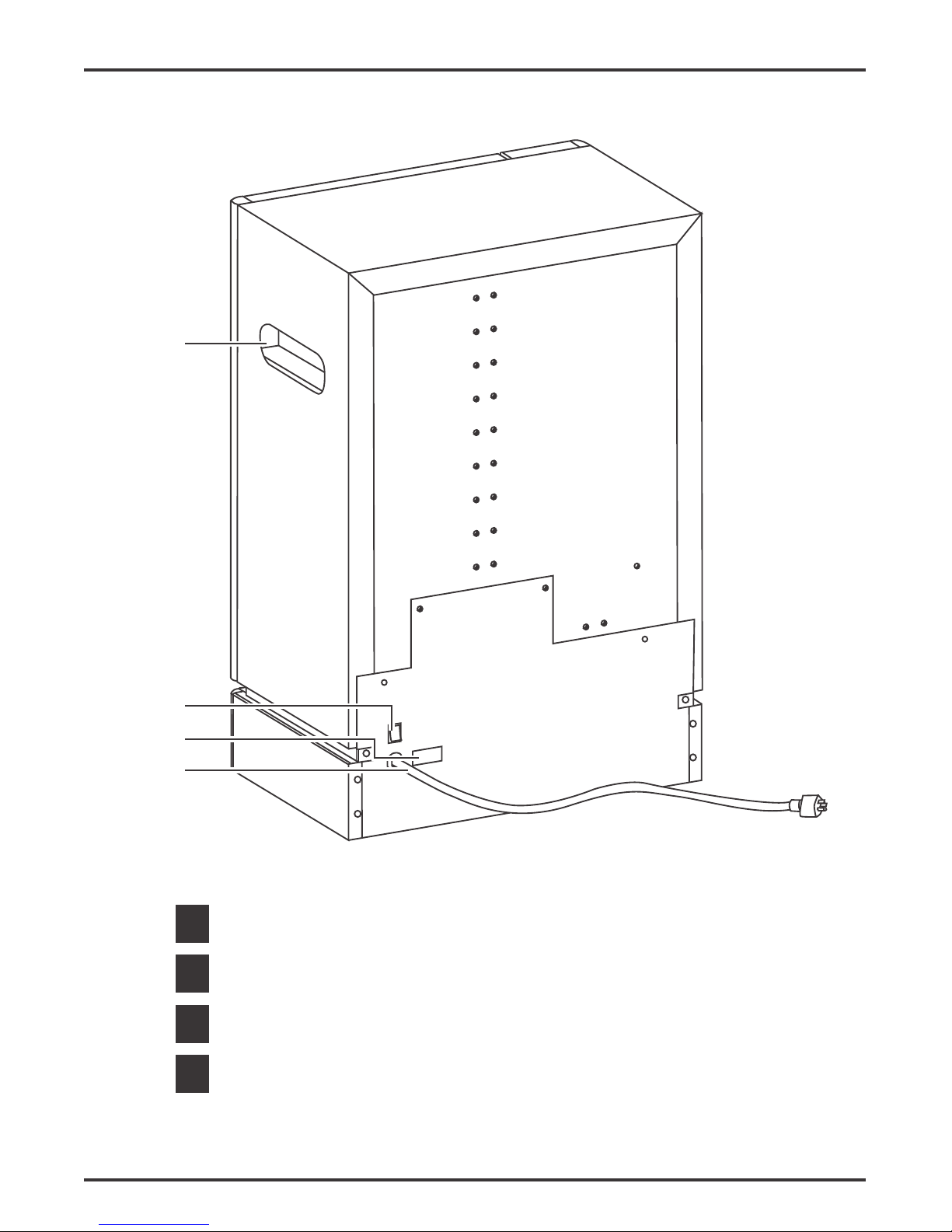
GETTING TO KNOW THE T-1000
13
14
15
12
Main switch
Fuse holder
Power cable
Handle
T-1000 6
13
14
15
12

TERMS AND CONDITIONS
88
Please be advised of the following terms regarding this manual: All information in this manual is subject
to change at any time without notice and is provided for convenience purposes only. G3D reserves the
right to modify or revise this manual in its sole discretion and at any time. You agree to be bound by
any modifications and/or revisions. Contact the G3D Support Team for up-to-date information. The
design of this manual and all text, graphics, information, content, and other material are protected by
copyright and other laws. All rights reserved. Certain trademarks, trade names, service marks, and
logos used in this manual are registered and unregistered trademarks, trade names and service marks
of G3D and its affiliates. Nothing contained in this manual grants or should be construed as granting,
by implication, estoppel, or otherwise, any license or right to use any marks without the written
permission of G3D. Any unauthorized use of any information, materials, or marks may violate copyright
laws, trademark laws, laws of privacy and publicity, and/or other laws and regulations.
DISCLAIMER. Neither G3D nor any of our affiliates warrants the accuracy or completeness of the
information, products, or services provided by or through this manual, which are provided “as is” and
without any express or implied warranties of any kind, including warranties of merchantability, fitness
for a particular purpose, or non-infringement of intellectual property. To the fullest extent permissible by
the applicable law, we hereby disclaim all liability for product defect of failure of for the claims that are
due to normal wear, product misuse or abuse, product modification, improper product selection,
non-compliance with any codes, or misappropriation. To the fullest extent permissible by the applicable
law, we hereby disclaim any and all responsibility, risk, liability, and damages arising out of death or
personal injury resulting from assembly or operation of our products. G3D assumes no responsibility,
nor will be liable, for any damages to, or any viruses or malware that may infect your computer,
telecommunication equipment, or other property caused by arising from your downloading of any
information or materials related to G3D products. The foregoing exclusing do not apply to the extent
prohibited by law: please refer to your local laws for any such prohibitions.
LIMITATIONS OF LIABILITY. In no event will G3D or any of our respective officers, directors,
employees, shareholders, affiliates, agents, successors, or assigns, nor any party involved in the
creation or production of our products, be liable to you or anyone else for any indirect, special, punitive,
incidental, or consequential damages (including, without limitation, those resulting from lost profits, lost
data, or business interruption) arising out of the use, inability to use, or the results of use of this manual,
whether based on warranty, contract, tort, or any other legal theory and whether or not advised of the
possibility of such damages. The foregoing limitations of liability do not apply to the extent prohibited
by law: please refer to your local laws for any such prohibitions.
CHOICE OF LAW; JURISDICTION. These terms will be governed by and construed in accordance
with the laws of the Philippines, without giving effect to any principles of conflicts of laws. Any action
seeking legal or equitable relief arising out of or relating to these terms or this manual will be brought
only in the courts of the Republic of the Philippines.
7 T-1000

GETTING STARTED
1. Remove the head stopper from the build plate assembly.
2. Insert the build plate.
3. Lock the head stopper.
SETTING THE BUILD PLATE
8T-1000
Autres manuels pour T-1000
3
Table des matières
Autres manuels G3D Imprimante 3D


