
Future Automation PS42 Manuel utilisateur
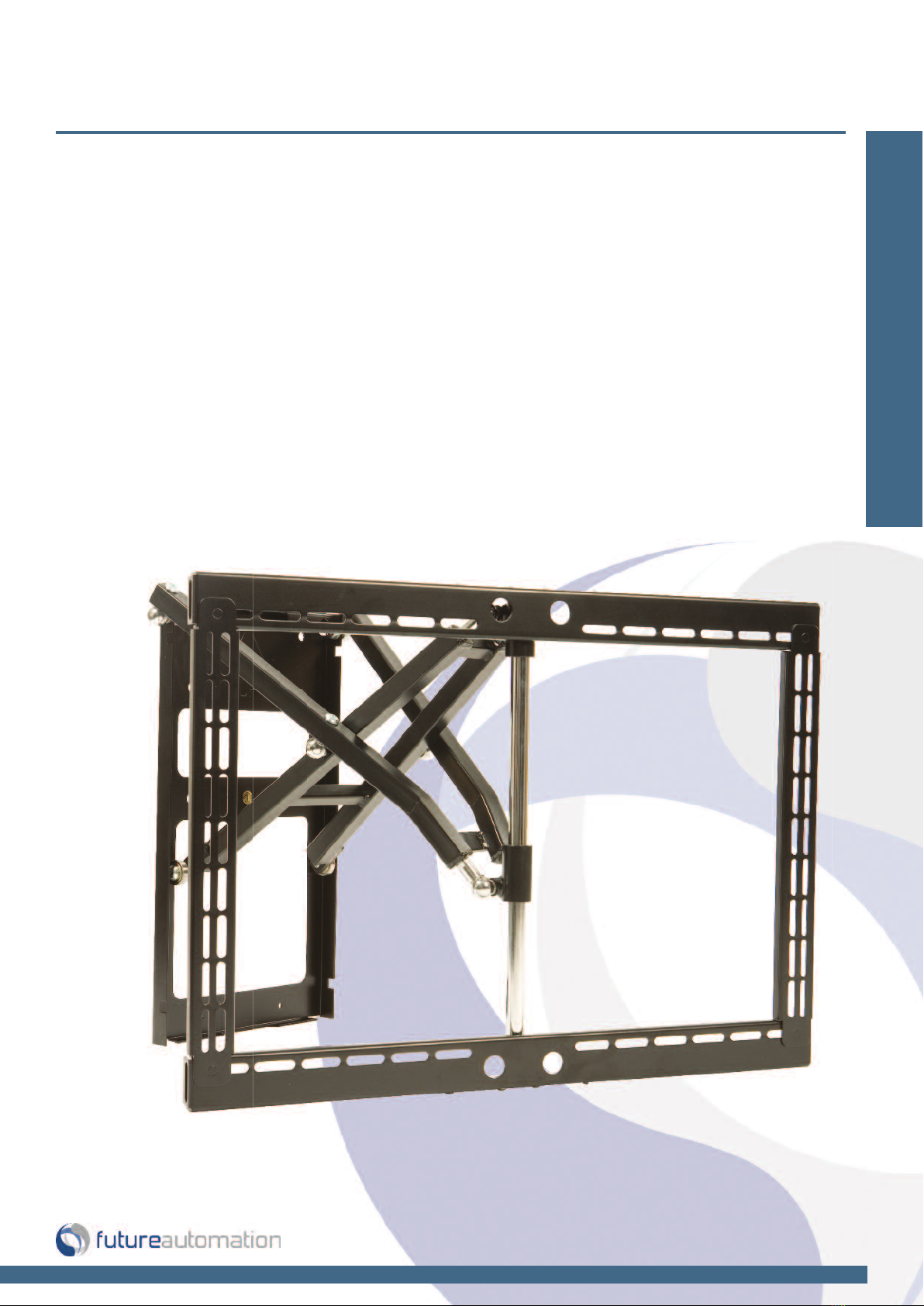
Wall Mounts
email [email protected] tel: +44 (0) 1438 833577 fax: +44 (0) 1438 833565 ISSUE 003
Installation Instructions
PS42-50 - Plasma Swivel Bracket
Design Highlights
-Unique Scissor Design Allows Easy One anded Operation
-Solid Steel Construction olds Screen Securely
-Bi-Directional Swivel up to 60 Degrees in Either Direction
Thank you for choosing
futureautomation

Introduction: Safety Information
Page 1 of 12 // email [email protected] tel: +44 (0) 1438 833577 fax: +44 (0) 1438 833565
PS42-50 - Plasma Swivel Bracket
Warnings:
1. Read all technical instructions fully before installation and use. It is the installer’s responsibility to ensure that all
documentation is passed on the end user and read fully before operation.
2. Keep all documentation.
3. Heed all warnings.
4. Follow all technical specifications and instructions during installation.
5. Do not use near water unless the product has been specifically designed to do so.
6. Clean only with a dry cloth.
7. Do not defeat the purpose of the polarized or grounding type plug. A polarized plug has two blades, one wider
than the other. A grounding type plug has two blades and a grounding prong. he wide blade or third prong are
provided for your safety. If the provided plug does not fit your outlet, consult an electrician or contact the
manufacturer.
8. Protect the power cord from being walked on or pinched, particularly at plugs, convenience receptacles, and the
point where the exit from the apparatus.
9. Unplug the apparatus during lightning storms or when unused for long periods of time.
10. Only use attachments/accessories specified by the manufacturer.
11. Refer all servicing to qualified personnel. Servicing is required regularly on an annual basis, when the apparatus is
damaged in any way, liquid has been spilled or objects have fallen into the apparatus, the apparatus has been
exposed to rain or moisture, does not operate normally, or has been dropped.
12. o completely disconnect the apparatus form the AC mains, disconnect the power cord plug from the AC
receptacle on the power control box.
13. o prevent overheating, do not cover the apparatus. Install in accordance with the instructions.
14. UK, Ireland and Hong Kong only – he power cord is supplied with a 13A plug having an earthing pin. he
apparatus is earthed and this pin is not required for safety, merely to operate the safety shutter of mains outlet.
15. No naked flames such as lit candles should be placed on the unit.
16. Observe and follow the local regulations when disposing of batteries.
17. Do not expose the unit to dripping or splashing fluids.
18. Do not place objects filled with liquid, such as vases, on the unit.
19. Do not expose the batteries to excessive heat such as sunshine, fire or the like.
20. For all mounted apparatus, the apparatus should be installed on solid wood, bricks, concrete or solid wood
columns and battens.
21. Always turn off power at source before putting on or taking off parts and cleaning.
22. Do not use outdoors unless marked for outdoor use.
23. Exceeding the weight capacity can result in serious personal injury or damage to equipment.
Future Sound & Vision trading as Future Automation intend to make this and all documentation as accurate as possible. owever, Future
Automation makes no claim that the information contained herein covers all details, conditions or variations, nor does it provide for every
possible contingency in connection with the installation or use of this product. The information contained in this document is subject to
change without prior notice or obligation of any kind. Future Automation makes no representation of warranty, expressed or implied,
regarding the information contained herein. Future Automation assumes no responsibility for accuracy, completeness or sufficiency of the
information contained in this document.
Safety Disclaimer
Important Safety Instructions
Explanation of graphical symbols
-(Electric Shock Symbol) = The lightning flash within an equilateral triangle is intended to alert you to the presence of un-insulated
“dangerous voltage” within the products enclosure that may be of sufficient magnitude to constitute an electric shock to persons
-(Caution Symbol) = The exclamation point within an equilateral triangle is intended to alert you to the presence of important
operating and maintenance (servicing) instructions in the literature accompanying the product
-(Tools Symbols) = The tools symbol within a coloured square are intended to highlight the required tools necessary for correct and
safe installation of the product. These are intended as a
guide only, and it is at the installer’s discretion as to which tools are used.
WARNING: RISK OF ELECTRIC S OCK, ONLY AUT ORIZED INSTALLERS TO OPEN T E POWER CONTROL BOX.
WARNING: To reduce the risk of fire or electric shock, do not expose electrical parts to rain or moisture, unless the
product has been specifically designed to do so.
WARNING: Failure to provide adequate structural strengthening, prior to installation can result in serious personal injury or damage to the
equipment. It is the installer’s responsibility to ensure the structure to which the component is affixed can support the four times the
weight of the component.
WARNING: Do not exceed the weight capacity. This can result in serious personal injury or damage to the equipment. It is the installer’s
responsibility to ensure that the total combined weight of all attached components does not exceed that of the maximum figure stated.
WARNING: Failure to provide adequate structural strength for this component can result in serious personal injury or damage to equip-
ment! It is the installer’s responsibility to make sure the structure to which this component is attached can support five times the combined
weight of allequipment. Reinforce the structure as required before installing the component.
Caution
Warning
Beware of
Moving Parts
Keep ands
Clear
Danger
Electricity

Introduction: Contents
Page 2 of 12 // email [email protected] tel: +44 (0) 1438 833577 fax: +44 (0) 1438 833565
PS42-50 - Plasma Swivel Bracket
Contents Page
Introduction
Safety Information 1
Contents 2
Contents 3
Tool Indicator Icons 3
Installation
Parts List 4
Package Contents 4
Stage 1
Before You Start Check 5
Removing the Uprights From the Frame 5
Stage 2
Upright Adjustment & Mounting 6
Stage 3
Mounting the Uprights to the Screen 7
Stage 4
Mounting the Screen to the Bracket 8
Stage 5
Screen Positioning 9
Stage 6
Fitting the Bracket to the Wall 10
Stage 7
Fixing the Screen & Uprights to the Bracket 11
Technical Overview 12

Introduction: Contents / Tool Indicator
Page 3 of 12 // email [email protected] tel: +44 (0) 1438 833577 fax: +44 (0) 1438 833565
PS42-50 - Plasma Swivel Bracket
ool Indicator Icons
1. 2. 3. 4. 5. 6.
1. - Drill 3. - Allen Keys 5. - Screwdrivers 7. - Pencil
2. - Tape measure 4. - Spirit Level 6. - Spanners 8. - Saw
7. 8.
Product Warranty
This product carries a warranty that covers the cost of labour and spare parts incurred by any defects in materials and workmanship under normal use
during a two year period from date of purchase. Support for any problems that are not hardware faults are excluded from the warranty entitlement.
This warranty does not affect your statutory consumer rights.
The following is excluded from warranty service:
• Malfunctioning caused by misuse or damage, accidental or otherwise, or service modification by persons not authorised by Future Automation,
or the use of any non Future Automation supplied parts;
• Any electrical, or other environmental work external to your Future Automation mechanism including power cuts, surges or lightning strikes;
• Additional items not supplied by Future Automation although they may have been supplied together by the retailer;
• Any 3rd party software products controlling your mechanism;
• Any transfer of ownership. Warranty is provided only to the initial purchaser;
• Compensation for loss of use of the product, and consequential loss of any kind;
• Use of the product over the specified weight capacity;
• Any damage to products during transit that is not checked and notified as “unchecked” or “damaged” upon receipt of delivery.
Any part of your system that needs to be replaced during a warranty repair becomes the property of Future Automation.

Installation: Package Contents
Page 4 of 12 // email [email protected] tel: +44 (0) 1438 833577 fax: +44 (0) 1438 833565
PS42-50 - Plasma Swivel Bracket
1.2
1.3
1.4
1
1.1
Package Contents
1 - Wall Bracket
1.1 - Wall Plate
1.2 - Scissor Arms
1.3 - Cross Members
1.4 - Uprights
Nuts & Bolts Multipack:
A range of nuts, bolts, washers
and spacers to help add in the
mounting for your screen
PS42 Plasma Swivel Bracket for 37” - 46” Screens
PS50 Plasma Swivel Bracket for 46” - 55” Screens
Installation: Stage 1
Page 5 of 12 // email [email protected] tel: +44 (0) 1438 833577 fax: +44 (0) 1438 833565
PS42-50 - Plasma Swivel Bracket
Before You Start
Prior to installation check the following:
-The product is in good condition
-No damage to any parts
-The bracket is in the closed position
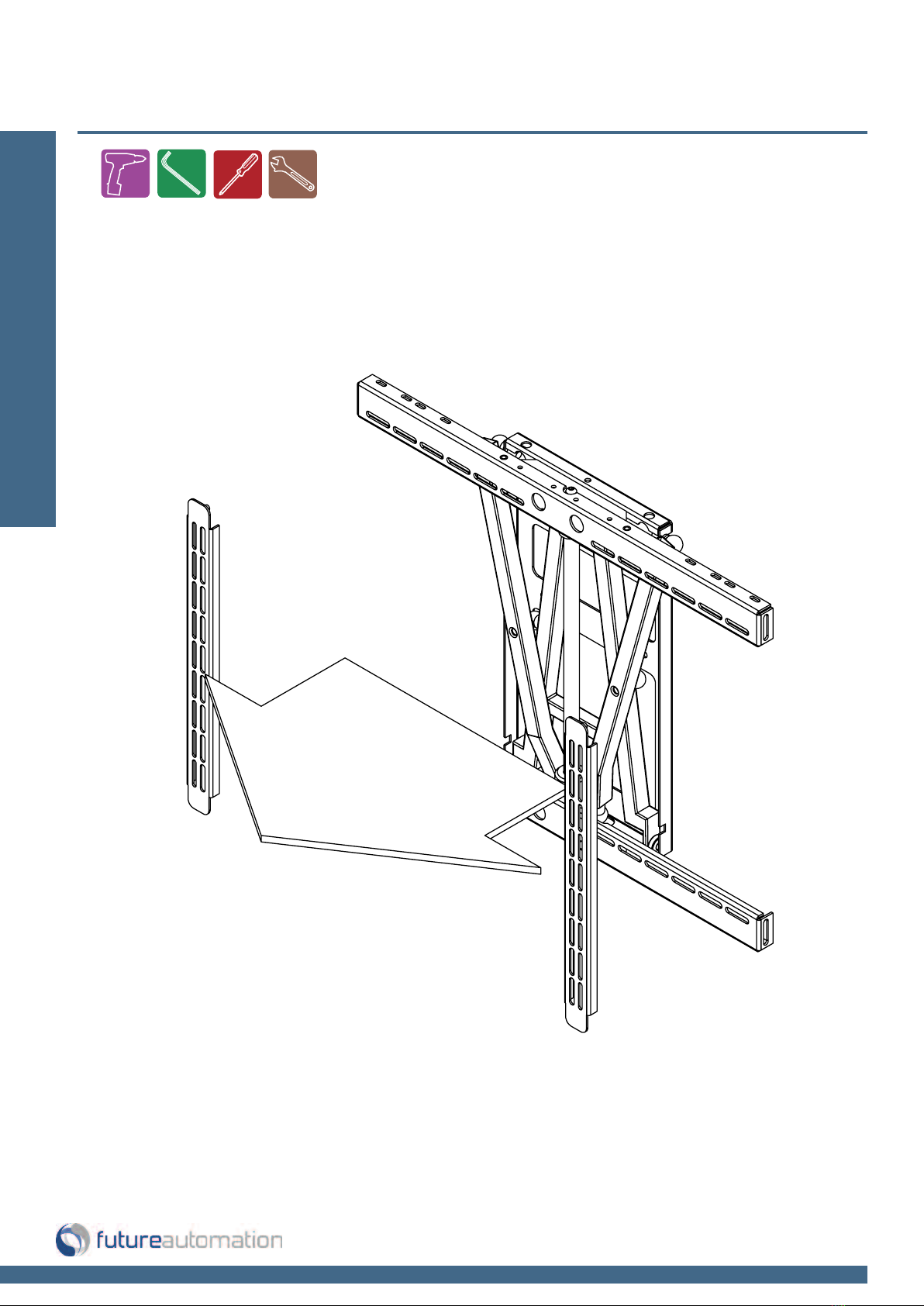
Removing the Uprights From the Bracket
The product is supplied with the uprights attached to the bracket.
These need to be removed to enable ease of attachment to the rear of the screen.
Simply undo the nuts on the rear of the cross members and the uprights can be
removed.

Upright adjustment and mounting
Installation: Stage 2
Page 6 of 12 // email [email protected] tel: +44 (0) 1438 833577 fax: +44 (0) 1438 833565
PS42-50 - Plasma Swivel Bracket
)/$7685)$&(
Firstly, place the screen face down on a flat suitable surface, such as carpeted floor.
Take care not to damage the screen.
The uprights are designed with
two rows of slots. One row is 7mm
wide, for smaller bolts. The other
is 9mm wide, for larger bolts.
Flat Surface
Once flat, lower the uprights onto the
back of the screen and bolt down to the
mounting points using suitable bolts.
Keep the uprights symmetrical in order to
maintain a central position for the screen.
Installation: Stage 3
Page 7 of 12 // email [email protected] tel: +44 (0) 1438 833577 fax: +44 (0) 1438 833565
PS42-50 - Plasma Swivel Bracket
Mounting the uprights to the screen
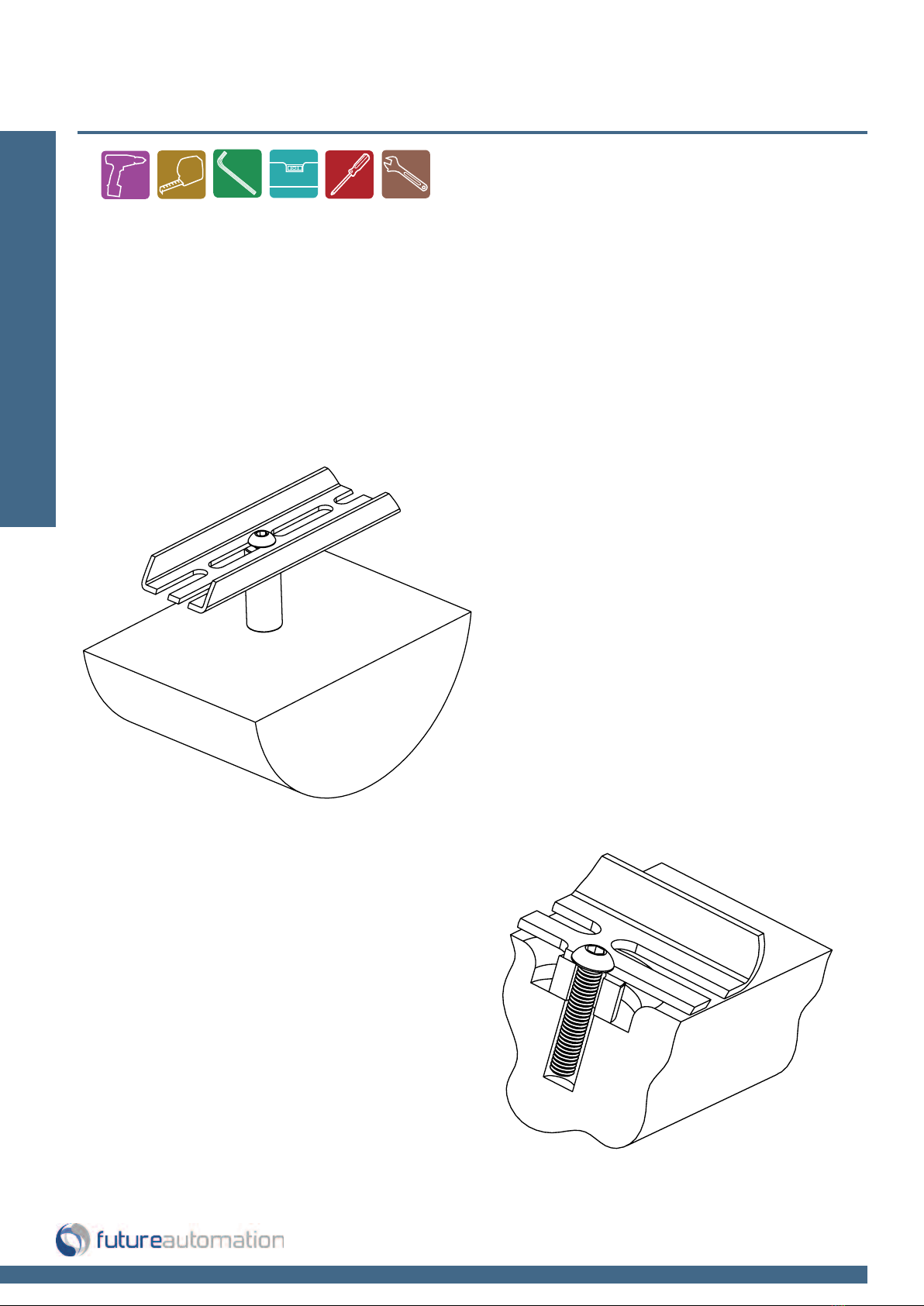
If the screen has mounting points which are recessed, it will be necessary to
use some of the provided spacers, in order to attach the uprights to the screen.
It is also recommended that a minimum of 15mm of bolt thread is screwed into
the case of the screen, without bottoming out.
It may be necessary to use spacers even if
the mounting points are not recessed. For
example, if the back panel is not flat, or to
allow for easier electrical connection.
It is also recommended that a
minimum of 15mm of bolt thread
is screwed into the case of the
screen, without bottoming out.
Installation: Stage 4
Page 8 of 12 // email [email protected] tel: +44 (0) 1438 833577 fax: +44 (0) 1438 833565
PS42-50 - Plasma Swivel Bracket
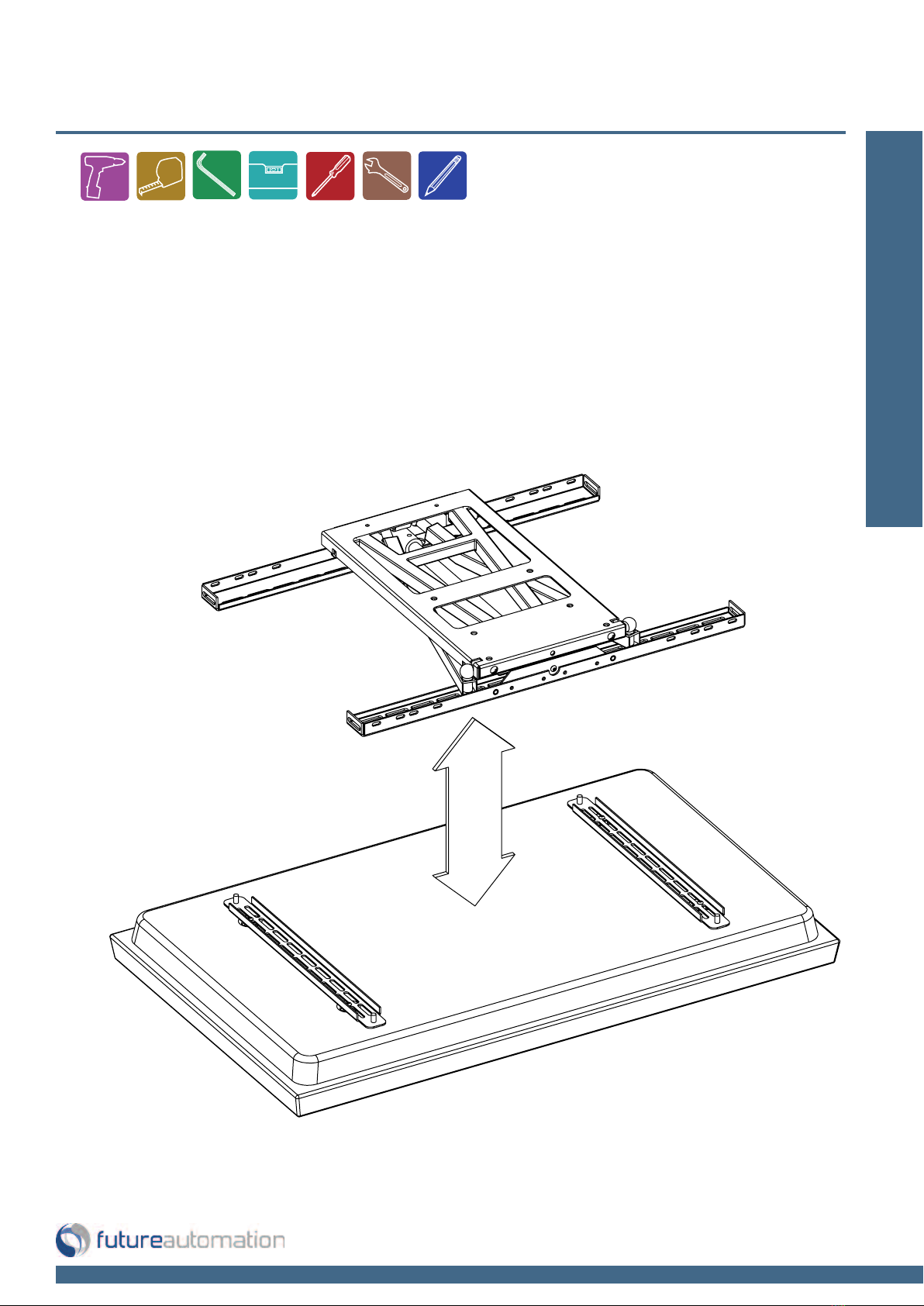
Mounting the frame to the screen
With the screen still face down,
lower the bracket down on to the
uprights and locate the slots on
the studs.

Installation: Stage 5
Page 9 of 12 // email [email protected] tel: +44 (0) 1438 833577 fax: +44 (0) 1438 833565
PS42-50 - Plasma Swivel Bracket
If when the frame is placed on the back of the screen,
the overlaying slots don't appear to locate with the bolts
on the uprights, it may be necessary to re-position the
uprights.
The uprights are designed to be able to accomodate
any width of mounting points. Simply remove the up-
rights. If, for example, the wider slots were previously on
the inside of the mounting points, turn the uprights
around so they are then on the outside.
Take this opportunity to measure the
distance from the top of the screen
down to the top mounting holes of
the wall plate. This will be useful
when gauging the position of the
screen, and hence the position of
the holes in the wall.
Screen positioning
Autres manuels pour PS42
1
Ce manuel convient aux modèles suivants
1
Table des matières
Autres manuels Future Automation Support TV

Future Automation
Future Automation PS80-M Manuel utilisateur

Future Automation
Future Automation PS Series Manuel utilisateur

Future Automation
Future Automation PS65-M Mode d’emploi

Future Automation
Future Automation PS42 Manuel utilisateur

Future Automation
Future Automation PS32-M Manuel utilisateur

Future Automation
Future Automation PS-VESA Series Manuel utilisateur

Future Automation
Future Automation TTR60 Manuel utilisateur

Future Automation
Future Automation DA Manuel utilisateur

Future Automation
Future Automation PS55-M Mode d’emploi

Future Automation
Future Automation PLH Manuel utilisateur


