
AVGear AVG-HDWP70TX-B Manuel utilisateur

AVG-HDWP70TX-B
The
AVG
-
HDWP70TX
-
B
is a Decora style
transmitter that installs in a double-gang wall
box to provide a convenient interface for
HDMI/VGA input sources.
Features
Selectable HDMI/VGA with audio
input
Supports VGA output resolution up to
1920 x1200
High bandwidth: 10.2Gbps
In-built scaler function, supports
scaling of HDMI/VGA signals to match
the native resolution of the display
Transmits HDMI signals up to 4K
Compliant with HDMI 1.4, supports
1080p 3D
HDCP compliant, equipped with
HDCP auto-tracking function
Provides auto-switching capability
Supports multiple control methods
including front panel buttons and
RS232, supports bi-directional RS232
pass-through control.
Supports firmware upgrade via USB.
DC 12V power output
Powered by local power pack or PoC
connection up to 60m
Aluminum design for efficient cooling

PLEASE READ THIS PRODUCT MANUAL CAREFULLY
BEFORE USING THIS PRODUCT.
This manual is only for operation instruction only, and
not to be used in a maintenance capacity. The functions
described in this version are current as at September
2015. Any changes of functions and operational
parameters will be updated in future manual versions.
Please refer to your dealer for the latest product details.
Version 1.2 1/12/15

AVG-HDWP70TX-B
SAFETY OPERATION GUIDE
In order to guarantee the reliable operation of the equipment, please abide by the
following procedures in installation, use and practice. Please save this manual for further
reference.
1. Unpack the equipment carefully and save the original box and packing material for
possible future shipment
2. Follow basic safety precautions to reduce the risk of fire, electrical shock and in ury to
persons.
3. Do not dismantle the housing or modify the module. It may result in electrical shock
or burns.
4. Using supplies or parts not meeting the products’ specifications may cause damage,
deterioration or malfunction.
5. Refer all servicing to qualified service personnel.
6. To prevent fire or shock hazard, do not expose the unit to rain, moisture or install this
product near water.
7. Do not put any heavy items on the extension cable in case of extrusion.
8. Do not remove the housing of the device as opening or removing housing may
expose you to dangerous voltage or other hazards.
9. Install the device in a place with adequate ventilation to avoid damage caused by
overheating.
10. Keep the module away from liquids.
11. Spillage into the housing may result in fire, electrical shock, or equipment damage. If
an ob ect or liquid falls or spills on to the housing, unplug the module immediately.
12. Do not use liquid or aerosol cleaners to clean this unit. Always unplug the power to
the device before cleaning.
13. Unplug the power cord when left unused for a long period of time.
14. Disposal Information: do not burn or mix with general household waste, please treat
as normal electrical wastes.

TABLE OF CONTENTS
Introduction..............................................................................................................1
Introduction to the AVG-HDWP70TX-B........................................................1.1
Features.......................................................................................................1.2
Package List................ ……………………………………………………………………2
Product Appearance................................................................................................3
Front Panel...................................................................................................3.1
Side Panel....................................................................................................3.2
Rear Panel...................................................................................................3.3
System Connection .................................................................................................4
System Application.......................................................................................4.1
Usage Precautions.......................................................................................4.2
Connection Diagram.....................................................................................4.3
Connection Procedure..................................................................................4.4
12V DC Output.............................................................................................4.5
PoCSolution.................................................................................................4.6
Operations................................................................................................................5
Operations of front panel buttons.................................................................5.1
RS232 Control..............................................................................................5.2
Installation/removal of RS232 Control Software........................................5.2.1
Basic Settings ...........................................................................................5.2.2
RS232 Communication Commands..........................................................5.2.3
Specification.............................................................................................................6
Panel Drawing ..........................................................................................................7
Troubleshooting & Maintenance ............................................................................8

AVG-HDWP70TX-B
1. Introduction
1.1.Introduction to the AVG-HDWP70TX-B
The AVG-HDWP70TX-B is a Decora style transmitter that installs in a double-gang wall box to
provide a convenient interface for HDMI / VGA input sources. It has 1 HDMI IN, 1 VGA IN, Audio
IN and 1 HDBaseT OUT with PoC. It supports VGA with a full HD scaler, and HDMI 1.4 with 4k&
3D. Input signals support auto-switching and manual-switching. The HDBaseT output supports
60m UHD video transmission with PoC, it enables bi-directional RS232 communication between
the Scaler Wall Plate HDBaseT Transmitter-B and a remote device.
With its PoC solution,AVG-HDWP70TX-B can be powered by a far-end PoC receiver.
1.2.Features
Selectable HDMI/ VGA with audio input
Supports VGA output resolution up to 1920x1200
High bandwidth: 10.2Gbps
In-built scaler function, supportsscalingHDMI/ VGA signals to match the native resolution of
the display
Transmits HDMI signals up to 4K
Compliant with HDMI 1.4, supports 1080p 3D
HDCP compliant, equipped with HDCP auto-tracking function
Provides auto-switching capability
Supports multiple control methods including front panel buttons, and RS232, supports bi-
directional RS232 pass-through control.
Supports firmware upgrading via USB.
DC 12V power output
Powered by local power pack or PoC connection up to 60m
Aluminum design for efficient cooling

2. Package List
1 x AVG-HDWP70TX-B
4 x Screws (for AVG-HDWP70TX-B)
3 x Pluggable Terminal Blocks (1 2-pin block, 1 3-pin block, and 1 4-pin block)
1 x Face Plate (Selectable)
4 x Screws (for the face plate)
1 x User Manual
Note: Please confirm if the product and the accessories are all included, if not, please contact your
dealer.
AVG-HDWP70TX-B
3. Product Appearance
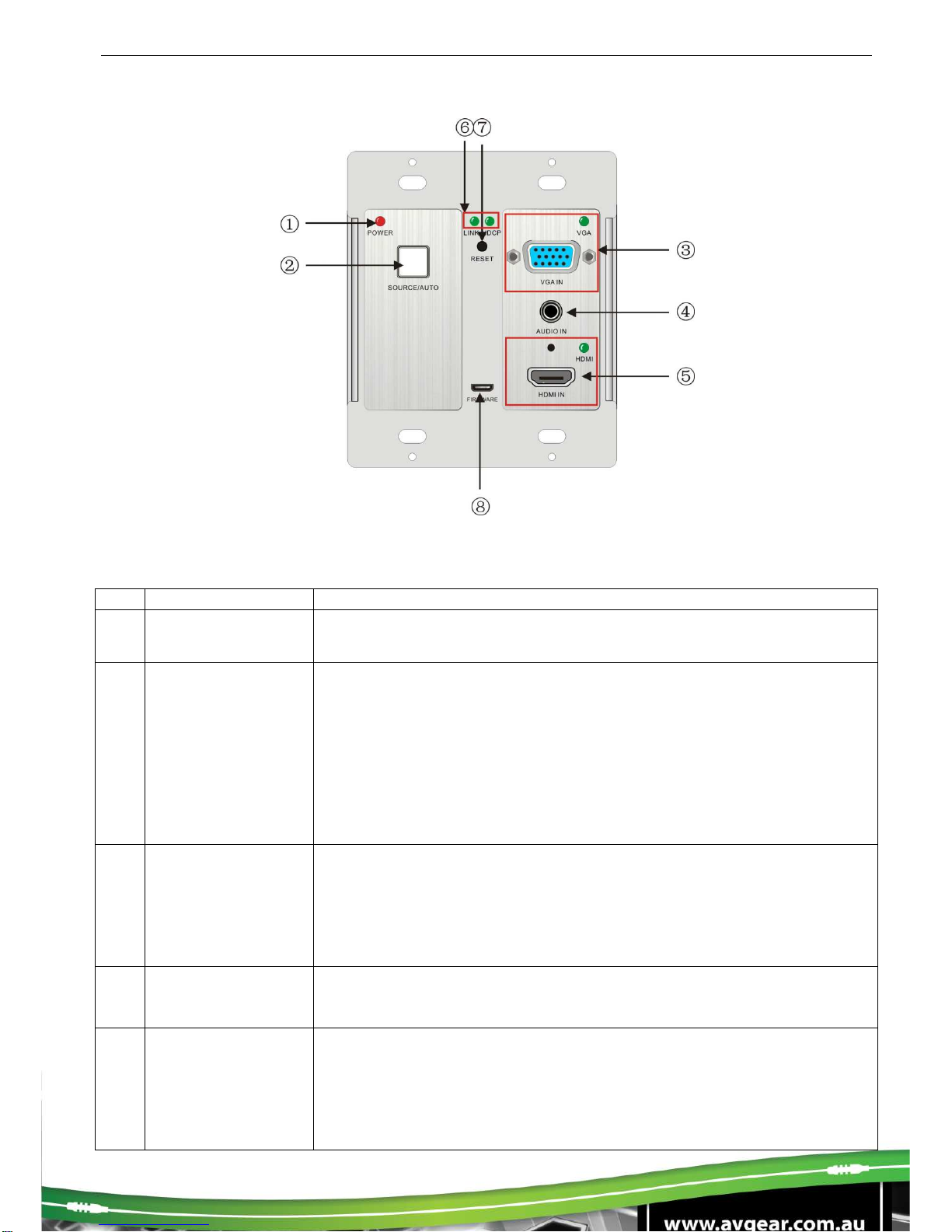
3.1. Front Panel
No.
Name
Description
①
Power indicator Illuminates red when power is on
②SOURCE/ AUTO
Used as video source selection button (with backlight off):
Press to select one source, press again to select next source,
switching circularly between HDMI and VGA. The indicator of the
selected input source will illuminate green.
Used as switching mode selection button (with backlight on):
Press and hold for 3 seconds or more to enter in Auto-switching
mode, the indicator illuminates green when in auto-switching mode.
Press and hold for 3 seconds or more again to enter in Manual-
switching mode.
③VGA IN
Connect with VGA source device.
The indicator:
illuminates yellow when there is VGA signal input
illuminates green when the signal source is chosen as input
source
turns off when there is no VGA input signal
④
AUDIO IN Connect with the audio output socket of VGA source device, delivers
synchronous audio with the VGA signal source when choosing VGA
as source signal.
⑤HDMI IN
Connect with HDMI source device.
The indicator:
illuminates yellow when there is HDMI signal input
illuminates green when the signal source is chosen as input
source
turns off when there is no HDMI input signal

⑥LINK &HDCP
LINK: Twisted Pair Link status indicator, illuminates green when
successfully connected.
HDCP: HDCP compliance indicator, illuminates green when the
source signals contains HDCP; blinks when there is no HDCP. Turns
off when there is no source signal.
⑦
RESET Press the button to reboot the HDBaseT Wallplate Transmitter
⑧
FIRMWARE
USB port, used for firmware update
Plug a flash disk or other storage device with update file
(MERGE.bin), and send the command 50698% to update the
firmware.
Note: Pictures shown in this manual are for reference only.
AVG-HDWP70TX-B
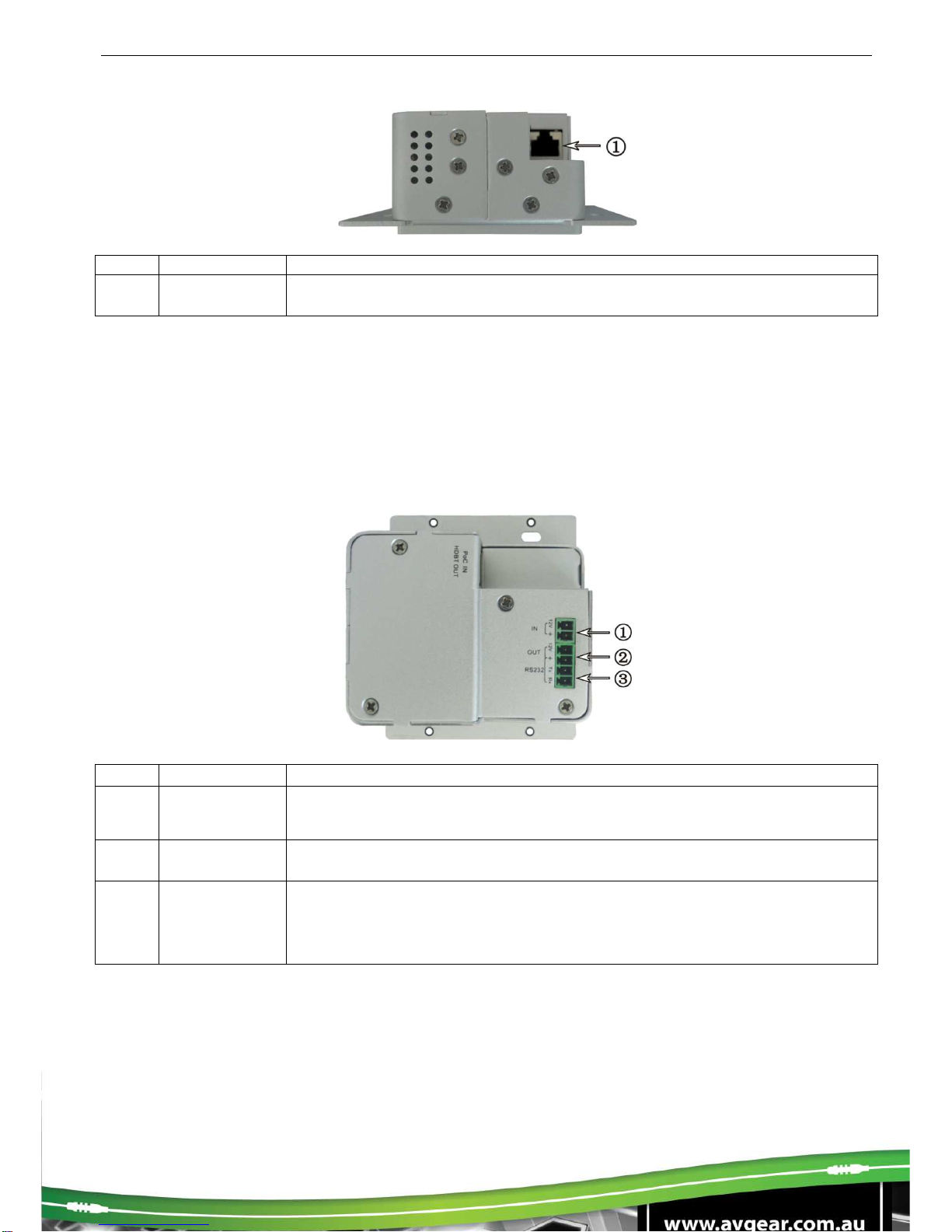
3.2.Side Panel
No. Name
Description
①HDBaseT
OUT RJ45 port, connect with receiver via a CAT5e/6 cable to deliver Audio/
Video signals, supports PoC
Note: Pictures shown in this manual are for reference only.
Note: AVG-HDWP70TX-B supports unidirectional PoC, i.e. it can be powered from the far-end
receiver but it can’t power the far-end receiver.
3.3. Rear Panel
No.
Name Description
①
Power In
Power in port, 2-pin pluggable terminal block, connect with DC 12V power
adapter
②Power Out
12V DC power output for powering 3
rd
party devices
③RS232
Serial port, connects with a far-end receiver, supports bi-directional
RS232 control (sends control signal from local or receives control signal
sent from far-end devices).
Note: Pictures shown in this manual are for reference only.
4. System Connection
4.1. System Applications
Reliable performance for control and transmission makes the AVG-HDWP70TX-Bideal in the IT
computer space, signal monitoring, big screen displays, conference systems, television broadcast,
education, banking and security institutions etc.
4.2.Usage Precautions
1. System should be installed in a clean environment with temperature and humidity maintained to
within equipment specification.
2. All of the power switches, plugs, sockets and power cords should be insulated and safe.
3. All devices should be connected before power is turned on.
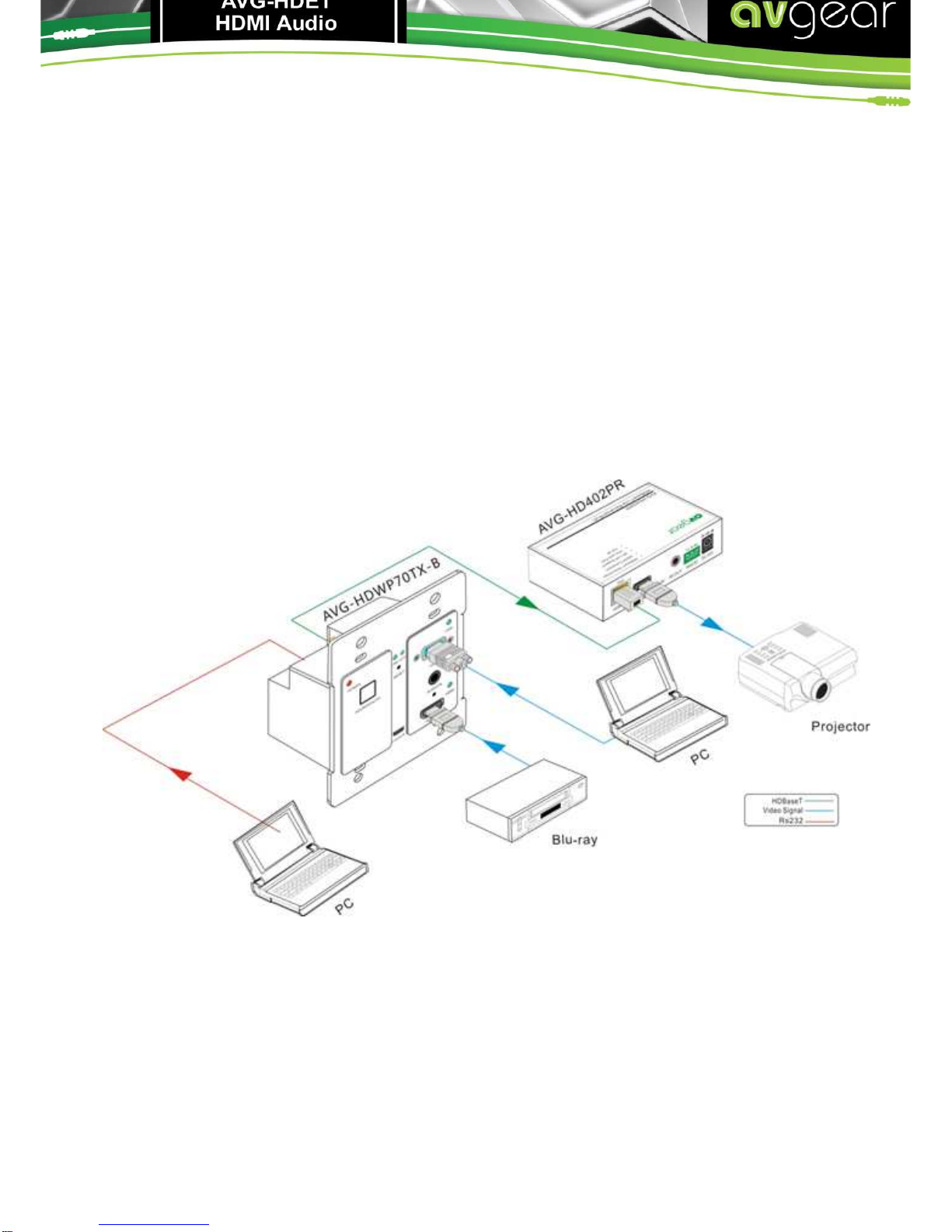
4.3.Connection Diagram
Note: Pictures shown in this manual are for reference only.
Autres manuels pour AVG-HDWP70TX-B
1
Table des matières
Autres manuels AVGear Émetteur


Manuels Émetteur populaires d'autres marques


Dejero
Dejero EnGo 3x Manuel utilisateur

Rosemount
Rosemount 4600 Manuel utilisateur

Speaka Professional
Speaka Professional 2342740 Manuel utilisateur

trubomat
trubomat GAB 1000 Manuel utilisateur

Teledyne Analytical Instruments
Teledyne Analytical Instruments LXT-380 Manuel utilisateur

Rondish
Rondish UT-11 Manuel utilisateur


