
TRG C8243 Manuel utilisateur

RADIO CONTROLLED WIRELESS WEATHER STATION
MODEL C8243
USER’S INSTRUCTIONS

2
QUICK START GUIDE
1. Insert two AA batteries into the transmitter and three
AA batteries into the receiver
2. Place the transmitter in desired location to obtain
weather information. (Transmitter can be placed up to
98 feet away from the receiver.)
3. The receiver and transmitter will automatically
synchronize with the time signal, via satellite, displaying
indoor/outdoor temperatures, date, time and weather
forecast. (Synchronization can take several hours.)
4. Change the time zone by pressing the “ALARM” key
and toggling between zones by pressing the “DOWN”
key. (A map will display your selected time zone.)
5. Change the temperature unit to °C for Celsius or °F
for Fahrenheit by pressing the “°C/°F” key.
TO MANUALLY SET THE CLOCK/CALENDAR
1. Press and hold the “TIME” key for 2 seconds until the
HOUR digit ashes.
2. Press the “UP” or “DOWN” key to change the value of
the ashing HOUR digit.
3. Press the time key again to toggle between: Hour >
Minute > Second > 12/24 Hr > Year >Month > Date >
Day language.
4. After you complete all settings, press the “TIME” key

3
to exit the setting mode, it will exit automatically in 30
seconds.
ALARM AND SNOOZE SETTING
1. Press the “ALARM” key to enter the alarm time mode.
2. In alarm time mode, press the “UP” key to turn on the
Alarm and Snooze with the bell icon [ ] and snooze
icon [ ] displayed together on the LCD.
3. Press and hold the “ALARM” key for 2 seconds to
enter the alarm time setting mode until the HOUR digit
ashes.
4. Press the “UP” or “DOWN” key to change the value of
the ashing HOUR digit.
5. Press the “ALARM” key again to toggle from Hour to
Minutes.
6. After you complete all settings, press the “ALARM”
key to exit the setting mode, or it will exit automatically
in 30 seconds.
TO CHANGE YOUR TIME ZONE
1. In normal time mode, press the “ALARM” key to enter
the alarm time mode.
2. In alarm time mode, press the “DOWN” key to toggle
between time zones: P=Pacic M=Mountain C=Central
E=Eastern. (A map will display your selected time zone.)

4
3. After you complete the setting, press the “TIME” key
to exit the setting mode, or it will exit automatically 30
seconds later without pressing any key.
TO CHANGE BATTERIES
WEATHER STATION TRANSMITTER
1. Remove the transmitter from the stand and open the
battery door.
2. Insert 2 AA size batteries into the battery
compartment.
3. Close the battery door.
WEATHER STATION RECEIVER
1. Remove the battery door and insert 3 AA batteries
into the battery compartment.
2. Close the battery door.
3. Press the “RESET” key located behind the table
stand with a small object (Pencil tip, paperclip, etc) to
re-start the clock. It will synchronize the channels of the
transmitter automatically.

5
OWNER’S MANUAL
The Weather Station is equipped with a variety of functions
to provide comprehensive weather information. The receiver
unit has a clear, easy-to-read display that shows the
weather forecast, minimum/maximum indoor and outdoor
temperature and moon phase, as well as the time and date.
The Weather Station is able to receive and display readings
from remote sensors. The 433 MHz technology means
no wire installation is required and sensors can be placed
anywhere you like. With the radio controlled function, the
current time and date are automatically synchronized with
the time signal transmitted from Germany (DCF77) / UK
(MSF) / USA (WWVB). The signal can cover a distance of
about 932 miles (1500 km) from the related transmitter.
Features
• Back Light
• Moon Phase and Weather Indicator
• Indoor Temperature
• Outdoor Temperature
• Clock
• Alarm/Snooze
• Calendar
• ˚C/˚F Mode
• Wall Mount
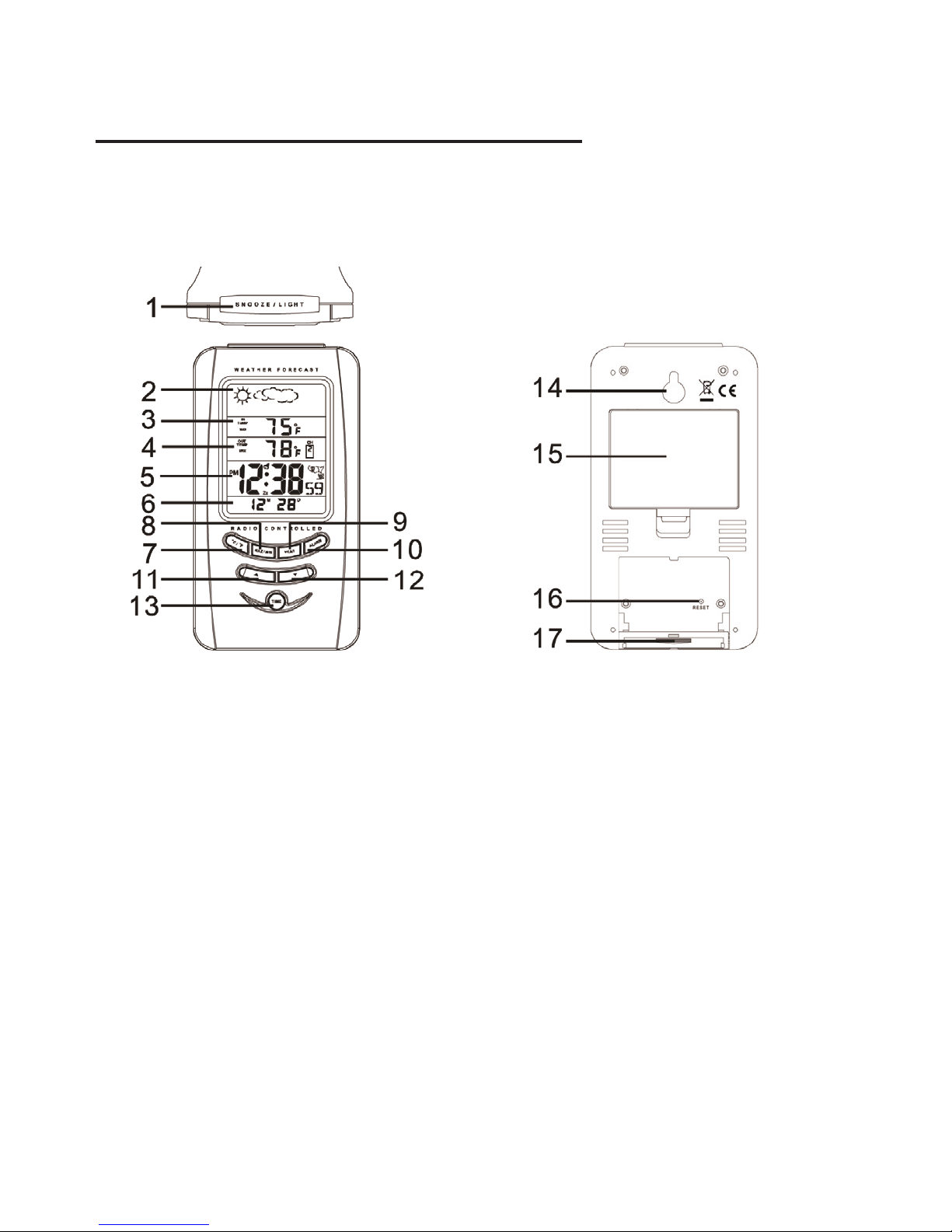
6
USING THE WEATHER STATION
1. SNOOZE/LIGHT
- Press once to turn on the back light for 5 seconds.
- Press to stop the alarm when it is sounding.
2. MOON PHASE AND WEATHER INDICATOR WINDOW
- Shows the phase of the moon and weather forecast indicators.
3. INDOOR TEMPERATURE DISPLAY
- Shows the current indoor temperature data and the
minimum and maximum recorded indoor temperatures.
WEATHER STATION RECEIVER

7
4. OUTDOOR TEMPERATURE DISPLAY
- Shows the current outdoor temperature data and the mini-
mum and maximum recorded outdoor temperatures.
5. CLOCK DISPLAY
- Displays the time, day of the week, signal quality indicator
and daylight savings time (DST) indicator.
6. CALENDAR WINDOW
- Displays the month, date and year.
7. °C/°F KEY
- In normal time mode or alarm time mode, press it to switch
between Celsius and Fahrenheit.
- Press and hold it for 3 seconds to receive the RC signal for
reception testing.
8. MAX/MIN KEY
- Press it to check the minimum and maximum temperature
records.
- Press and hold it for 3 seconds to delete the minimum and
maximum temperature records.
9. YEAR KEY
- Press it to switch between date/month and year display.

8
10. ALARM KEY
- Press it to stop the current alarm when the bell is ringing and
turn off the snooze function.
- Press it to switch between date/month and alarm time mode.
- In normal time mode, press it to enter the alarm time mode.
- Press and hold it for 2 seconds to enter the alarm
time setting mode.
11. TOGGLE UP KEY [ ]
- In setting mode, press it to increase the setting values.
- In normal time mode, press it to switch among channel 1, 2
and 3.
- In alarm time mode, press it to turn on/off the alarm
and snooze.
12. TOGGLE DOWN KEY [ ]
- In setting mode, press it to decrease the setting values.
- In normal time mode, press it to switch between second and
day of the week display.
- In alarm time mode, press it to select the time zone
(U.S. & Canadian version only).
13. TIME KEY
- In normal time mode or alarm time mode, press and hold it
for 2 seconds to enter the normal time setting mode.
14. WALL-MOUNTING HOLDER
- Use it to hang the main unit on the wall.

9
15. BATTERY COMPARTMENT
16. RESET
- Press it to set all values to default values.
- In case of malfunction, the unit may be required to reset.
17. TABLE STAND
- Use it to stand the clock on the desktop.
WEATHER STATION TRANSMITTER
1. SIGNAL QUALITY INDICATOR
- Flashes when the remote unit transmits a reading.
2. CHANNEL SLIDE SWITCH
- Assign the transmitter to channel 1, 2 or 3.
3. RESET
- Located behind the battery compartment.
- Press it to restart the transmitter.

10
4. BATTERY COMPARTMENT
- Accommodates 2 AA size batteries.
5. WALL-MOUNTING HOLDER
- Use it to hang the transmitter on the wall.
6. TABLE STAND
- Use it to stand the transmitter on the desktop.
BATTERY REPLACEMENT
When the LCD on the receiver becomes dim, replace the
batteries in the receiver with 3 AA size batteries. When
the low battery indicator “ ” appears in the Outdoor
Temperature window, it indicates that the battery power of
the transmitter is low. Replace the batteries in the transmitter
with 2 AA size batteries.
NOTE:
Attention! Please dispose of used unit or batteries in an
environmentally safe manner.
T
ransmitter’s low battery indicator
(shows on the main unit)
Table des matières
Manuels Station météorologique populaires d'autres marques


National Geographic
National Geographic VA Colour RC Manuel utilisateur

Renkforce
Renkforce 1208067 Manuel utilisateur

Levenhuk
Levenhuk Discovery Report WA40 Manuel utilisateur

Instant Transmission
Instant Transmission MA 10410 Manuel utilisateur

Lutron Electronics
Lutron Electronics PHB-318 Manuel utilisateur

WAREMA
WAREMA EWFS Weather station eco Manuel utilisateur