
TFA Dostmann WIRELESS 868 MHz TEMPERATURE STATION Manuel utilisateur

26
WIRELESS 868 MHz TEMPERATURE STATION
Instruction Manual
Cat. No. 30.3050.IT
Thank you for choosing this wireless temperature station from TFA.
BEFORE YOU USE IT
Pl as b sur to r ad th instruction manual car fully.
This information will help you to familiarise yourself with your new de ice, learn all of its functions
and parts, find out important details about its first use and how to operate it, and get ad ice in the
e ent of faults.
Following the instruction manual will pre ent damage to the de ice and loss of your statutory rights
arising from defects due to incorrect use.
W shall not b liabl for any damag occurring as a r sult of not following th s
instructions.
Lik wis , w tak no r sponsibility for any incorr ct r adings and for any
cons qu nc s which may r sult from th m.
Pl as tak particular not of th saf ty advic !
Pl as look aft r this manual for futur r f r nc .
SCOPE OF DELIVERY:
•
Temperature station (basic unit)
•
Outdoor transmitter
•
Instruction manual

27
FIELD OF OPERATION AND ALL OF THE BENEFITS OF YOUR NEW TEMPERATURE
STATION AT A GLANCE:
•
DCF Radio controlled time with manual setting option
•
Time reception ON/OFF
•
Daylight sa ing time (DST) function selectable (ON/OFF)
•
Time zone option –2h to +5h
•
Calendar display (month, date; year only in manual setting)
•
Temperature display in degrees Celsius (°C)
•
MIN/MAX indoor and outdoor temperature display with time and date of recordings
•
Manual reset of the MIN/MAX temperature records
•
Low battery indicator
•
Table standing or wall mounting
FOR YOUR SAFETY:
•
The product is exclusi ely intended for the field of application described abo e. The product
should only be used as described within these instructions.
•
Unauthorised repairs, modifications or changes to the product are prohibited.
•
The product is not to be used for medical purpose or for public information, but is intended
solely for home use.
Caution!
Risk of injury:

28
•
Keep this instrument and the batteries out of reach of children.
•
Batteries must not be thrown into the fire, short-circuited, taken apart or recharged. Risk of
explosion!
•
Batteries contain harmful acids. Low batteries should be changed as soon as possible to
pre ent damage caused by a leaking battery. Ne er use a combination of old and new
batteries together or batteries of different types. Wear chemical-resistant protecti e glo es
and glasses when handling leaked batteries.
! Important information on product saf ty!
•
Do not expose the instrument to extreme temperatures, ibration or shock.
•
The outdoor transmitter is protected against splash water, but is not watertight. Choose a
shady and dry position for the transmitter.

29
ELEMENTS:
Th t mp ratur station
Foldout
stand
Battery
compartment
co er
Function
keys
LCD
display
Hanging hole

30
Th t mp ratur transmitt r
•
Remote transmission of outdoor temperature to temperature station by
868 MHz signals
•
Casing protected against splash water
•
Wall mounting and table stand
•
Suitable for connection with sensor cable
for pool, freezer etc. (optional)
INSTALL AND REPLACE BATTERIES IN THE TEMPERATURE TRANSMITTER
The temperature transmitter uses 2 x AAA, IEC LR3, 1.5V batteries. To install
and replace the batteries, please follow the steps below:
1. Slide the battery co er downwards and remo e.
2. Insert the batteries, obser ing the correct polarity (see marking).
3.
Replace the battery co er.

31
INSTALL AND REPLACE BATTERIES IN THE TEMPERATURE STATION
The temperature station uses 2 x AAA, IEC LR3, 1.5V batteries. To
install and replace the batteries, please follow the steps below:
1. Remo e the co er at the back of the temperature station.
2. Insert batteries obser ing the correct polarity (see marking).
3. Replace compartment co er.
Batt ry r plac m nt
•
Replace the batteries when the battery symbol of the temperature station appears near the
indoor temperature display.
•
When the batteries of the transmitter are used up, the low battery icon appears near the
outdoor temperature display.
Not :
In the e ent of changing batteries in any of the units, all units need to be reset by following the
setting up procedures. This is because a random security code is assigned by the transmitter at
start-up and this code must be recei ed and stored by the temperature station in the first 3
minutes of power being supplied to it.

32
SETTING UP:
1.
First, insert the batteries into the transmitter (see “Install and r plac batt ri s in th
t mp ratur transmitt r” below).
2.
Within 30 seconds of powering up the transmitter, insert the batteries to the temperature
station (see “Install and r plac batt ri s in th t mp ratur station” below). Once the
batteries are in place, all segments of the LCD will light up briefly. Then the indoor
temperature and the time as 0:00 will be displayed. If they are not shown on LCD after 60
seconds, remo e the batteries and wait for at least 60 seconds before reinserting them.
Once the indoor data is displayed, user may proceed to the next step.
3.
After the batteries are inserted, the temperature station will start recei ing data signal from
the transmitter.
4.
In order to ensure sufficient 868 MHz transmission, the position between the temperature
station and the transmitter should not be more than 100 meters (see notes on “Positioning”
and “868 MHz R c ption”).
5.
Once the remote temperature has been recei ed and displayed on the temperature station,
the DCF time code reception is automatically started. This takes typically between 3-5
minutes in good conditions.
DCF-77 RADIO CONTROLLED TIME
The time base for the radio-controlled time is a Cesium Atomic Clock operated by the Physikalisch
Technische Bundesanstalt Braunschweig which has a time de iation of less than one second in
one million years. The time is coded and transmitted from Mainflingen near Frankfurt ia frequency
signal DCF-77 (77.5 kHz) and has a transmitting range of approximately 1,500 km. Your radio-

33
controlled temperature station recei es this signal and con erts it to show the precise time in
summer or wintertime. The quality of the reception depends greatly on the geographic location. In
normal cases, there should be no reception problems within a 1500km radius of Frankfurt.
Once the outdoor temperature is displayed on the temperature station, the DCF tower icon in the
clock display will start flashing in the upper left corner. This indicates that the clock has detected
that there is a radio signal present and is trying to recei e it. When the time code is recei ed, the
DCF tower becomes permanently lit and the time will be displayed.
DCF reception is done twice daily at 02:00 and 03:00 am. If the reception is not successful at
02:00 am, then the next reception takes place the next hour and so on until 06:00am, or until the
reception is successful. If the reception is not successful at 06:00 am, then the next attempt will
take place the next day at 02:00 am.
If the tower icon flashes, but does not set the time or the DCF tower does not appear at all, then
please take note of the following:
•
Recommended distance to any interfering sources like computer monitors or TV sets is a
minimum of 1.5 - 2 meters.
•
Within ferro-concrete rooms (basements, superstructures), the recei ed signal is naturally
weakened. In extreme cases, please place the unit close to a window and/ or point its front
or back towards the Frankfurt transmitter.
•
During nighttime, the atmospheric disturbances are usually less se ere and reception is
possible in most cases. A single daily reception is adequate to keep the accuracy de iation
below 1 second.

34
FUNCTION KEYS:
T mp ratur station:
The temperature station has four easy to use function keys.
SET k y (S tting):
•
Press and hold to enter the setting mode for the following settings: time zone, time reception
(RCC ON/OFF), daylight sa ing time (DST ON/OFF), manual time and calendar settings.
+ k y
•
To make adjustment for arious settings
•
To display the calendar (display returns to time display automatically after 5 seconds)
IN k y
•
To toggle between the MIN/MAX and current indoor temperature
•
Press and hold to reset the MIN/MAX indoor temperature records
•
Press to exit the manual setting mode
SET key
OUT
key
+ key
IN key
35
OUT k y
•
To toggle between the MIN/MAX and current outdoor temperature
•
Press and hold to reset the MIN/MAX outdoor temperature records
•
Press to exit the manual setting mode
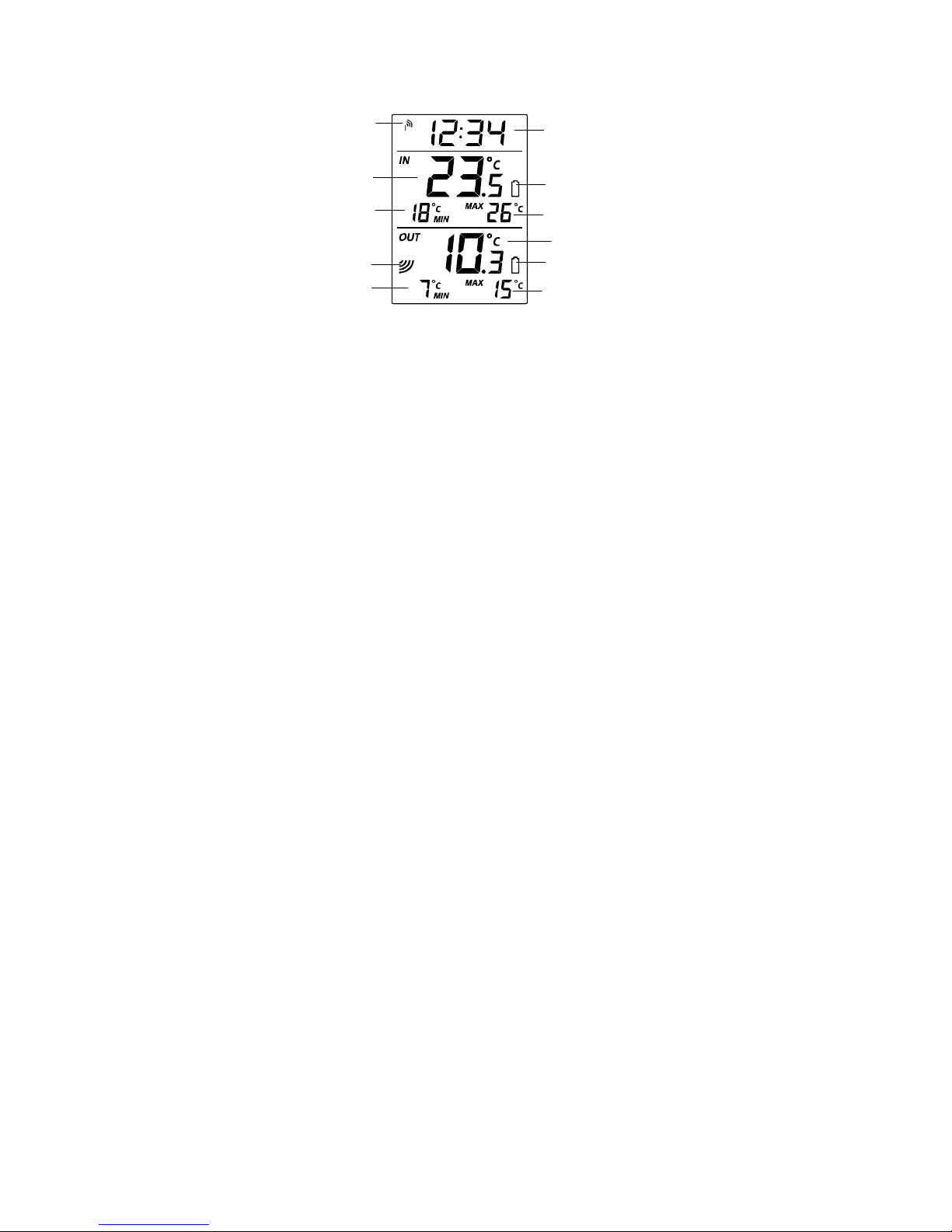
LCD SCREEN:
Low battery icon
(temperature station)
Outdoor temperature
MAX indoor
temperature
MIN i
ndoor
temp
erature
Time
reception
icon
Outdoor signal
reception icon*
MAX outdoor
temperature
MIN
outdoor
temp
erature
Ind
oor
temperature
Low battery icon
(transmitter)
Time
Ce manuel convient aux modèles suivants
1
Table des matières
Autres manuels TFA Dostmann Station météorologique

Manuels Station météorologique populaires d'autres marques


National Geographic
National Geographic VA Colour RC Manuel utilisateur

Renkforce
Renkforce 1208067 Manuel utilisateur

Levenhuk
Levenhuk Discovery Report WA40 Manuel utilisateur

Instant Transmission
Instant Transmission MA 10410 Manuel utilisateur

Lutron Electronics
Lutron Electronics PHB-318 Manuel utilisateur

WAREMA
WAREMA EWFS Weather station eco Manuel utilisateur