
TeleEye DT-103G Manuel utilisateur

Tele
Eye DT Series
Dialup CCTV Transmitter
DT-103G
DT-103P
DT-103D
Installation Guide

Notice:
Signal Communications Limited reserves the right to make improvements to the
product described in this manual at any time and without notice.
This manual is copyrighted. All rights are reserved. This manual may not be copied,
reproduced or translated in whole or part without prior consent from Signal
Communications Limited.
Tele
Eye is a trademark of Signal Communications Limited and is registered in China,
Hong Kong, US and other countries.
All other trademarks are the property of their respective owners.
Copyright (c) 2004 Signal Communications Limited (A member of
Tele
Eye
Group). All rights reserved.
Version 1.01
Limits of Liability and Disclaimer of Warranty
Signal Communications Limited has taken care in preparation of this manual, but
makes no expressed or implied warranty of any kind and assume no responsibility for
errors or omissions. No liability is assumed for incidental or consequential damages in
connection with or arising out of the use of the information or accessories contained
herein.
Features and specifications are subject to change without prior notice.

Table of Contents
SECTION 1
INTRODUCTION 1
•Features 2
SECTION 2
INSTALLATION OF
Tele
Eye Dialup CCTV
A. Removing the Package 3
B.PanelDescription 4
GSM version : DT-103G 4
PSTN version : DT-103P 5
ISDN version : DT-103D 6
C. Connecting to
Tele
Eye Dialup CCTV 8
GSM version : DT-103G 8
PSTN version : DT-103P 10
ISDN version : DT-103D 11
D. Audio Connection of
Tele
Eye Dialup CCTV 13
E. Aux Port Connection of
Tele
Eye Dialup CCTV 14
F.
Tele
Eye Dialup CCTV Configuration 16
G. Remote Monitoring with
Tele
Eye Dialup CCTV 17
APPENDIX A
Q & A 18
APPENDIX B
PHONE JACK PIN ASSIGNMENT 20
SECTION C
DT-103G LED STATUS 21
SECTION D
SPECIFICATIONS 22

Tele
Eye Dialup CCTV Installation Guide Page 1
Introduction
1
INTRODUCTION
Tele
Eye Dialup CCTV is a series of all-in-one remote video and audio
transmitters to allow you looking after your remote premises via PSTN, ISDN or
GSM network.
With built-in modem and audio design,
Tele
Eye Dialup CCTV is extremely easy
to install. By simply hooking up video cameras, microphone and telephone line to
the
Tele
Eye Dialup CCTV transmitter, you can monitor your premises anytime
you want. Fast image update rate of up to 10fps at 33.6kbps can be achieved.
Tele
Eye Dialup CCTV is ideal for alarm verification. The system can handle and
verify alarm events by dialing back to the control center, recording video and
alerting security personnel automatically. The remote public addressing allows
broadcasting of warning message to deter illegal activity. When deploying the
system with
Tele
Eye Central Monitoring Station CMS01, you can manipulate
hundreds of remote sites effectively in one central location.
With
Tele
Eye Dialup CCTV, you just dial and see what’s happening there!
SECTION

Tele
Eye Dialup CCTV Installation Guide Page 2
Introduction
Features
zDifferent connection models – PSTN, ISDN & GSM
z4 video & alarm inputs
zBuilt-in modem design
zResolution up to 640x480 pixels
zRemote audio transmission (DT-103P and DT-103D only)
zAuto dial-up upon alarm event
zPre- & post-alarm video recording
zRemote telemetry control
zSelf diagnostic & recovery
zEasy installation & configuration

Tele
Eye Dialup CCTV Installation Guide Page 3
Installation of
Tele
Eye Dialup CCTV
2
INSTALLATION OF
Tele
Eye Dialup
CCTV
A
A.
.
R
Re
em
mo
ov
vi
in
ng
g
t
th
he
e
P
Pa
ac
ck
ka
ag
ge
e
After removing the package, make sure you have the following items:
1.
Tele
Eye Dialup CCTV transmitter
2. Software CD
3. AC to DC Power Adapter
4. 4-wire telephone cable (DT-103P and DT-103D only)
5. External antenna adapter cable (DT-103G only)
6. External antenna and SIM removal forceps (DT-103G only)
7. Warranty card
8. Serial number and registration code card
9. Installation Guide
SECTION
1 2 3 7 & 8 & 9
4 5 6

Tele
Eye Dialup CCTV Installation Guide Page 4
Installation of
Tele
Eye Dialup CCTV
B
B.
.
P
Pa
an
ne
el
l
D
De
es
sc
cr
ri
ip
pt
ti
io
on
ns
s
GSM Version : DT-103G
1. Video input connectors
-totally 4 input video channels (CH1-CH4)
-input video signal is 1Vp-p
2. SIM card slot
-Slot for inserting the SIM card with metal contacts upwards
3. Blue indication Light Emitting Diodes (LED)
-Power (PWR) LED turns on when power is up
4. Green/Red indication Light Emitting Diodes (LED)
-L1, L2, L3 LEDs dedicated for GSM status indication
5. External antenna connector
-FME female connector for connecting to external antenna
6. Aux port
-RS485 interface for Telemetry control
-4 alarm channels input for alarm notification
-1 pair of switch channel for control
6
7
1
2
3
4
5
Tele
Eye Dialup CCTV Installation Guide Page 5
Installation of
Tele
Eye Dialup CCTV
7. Power supply
-DC jack for 12V DC, 1A power input
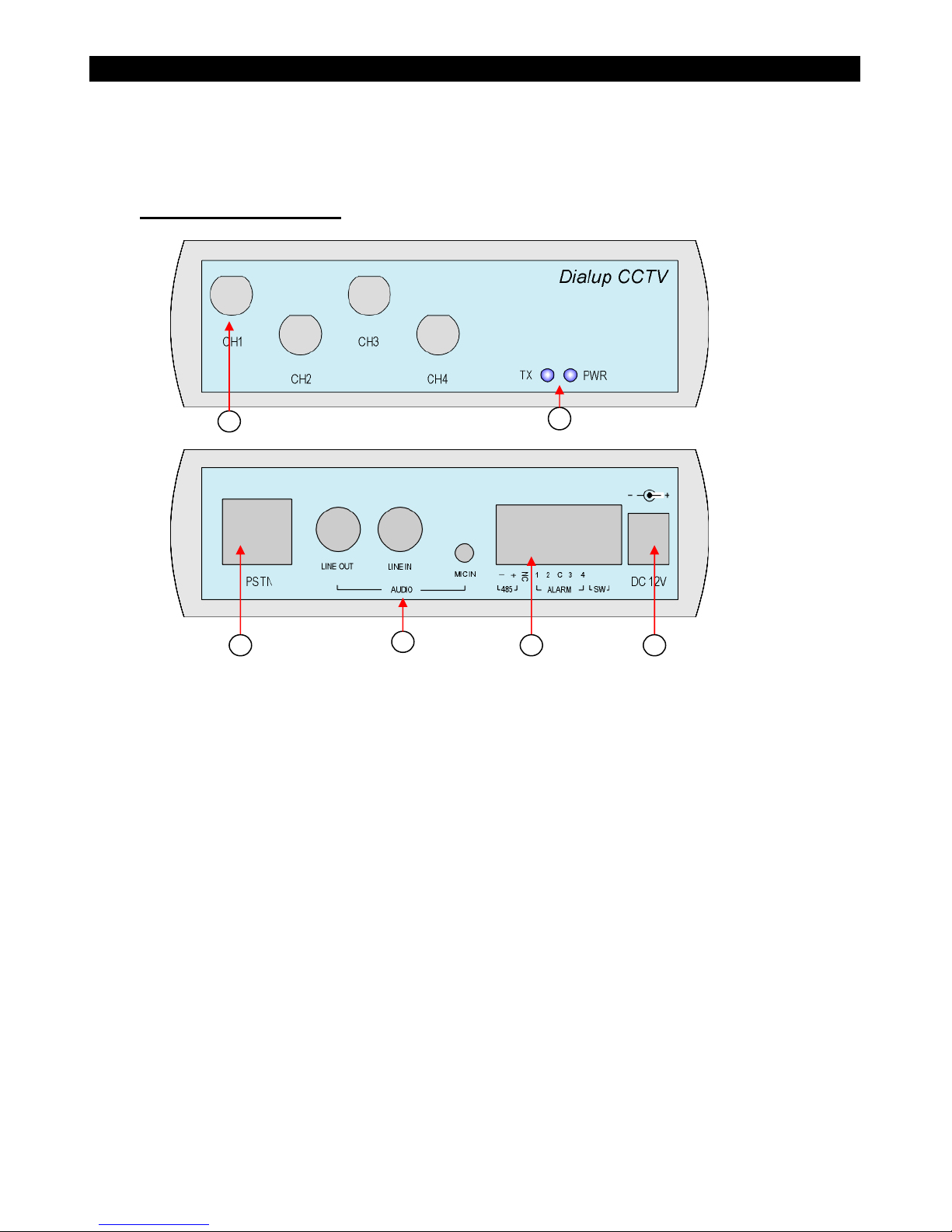
PSTN Version : DT-103P
1. Video input connectors
-totally 4 input video channels (CH1-CH4)
-input video signal is 1Vp-p
2. Indication Light Emitting Diodes (LED)
-Power (PWR) LED turns on when power is up
-Transmit (TX) LED turns on when data is transmitted
3. PSTN phone jack
-RJ45 phone jack for connecting
Tele
Eye Dialup CCTV to PSTN network.
See Appendix B for details.
4. Audio connectors
-Line in audio source for transmitting audio to
Tele
Eye III+ Reception
Software
-Line out audio output for speaker
-Mic in audio source for transmitting microphone audio to
Tele
Eye III+
Reception Software
1
2
3
4
5
6

Tele
Eye Dialup CCTV Installation Guide Page 6
Installation of
Tele
Eye Dialup CCTV
5. Aux port
-RS485 interface for Telemetry control
-4 alarm channels input for alarm notification
-1 pair of switch channel for control
6. Power supply
-DC jack for 12V DC, 1A power input
ISDN Version : DT-103D
1. Video input connectors
-totally 4 input video channels (CH1-CH4)
-input video signal is 1Vp-p
2. Indication Light Emitting Diodes (LED)
-Power (PWR) LED turns on when power is up
-Transmit (TX) LED turns on when data is transmitted
3. ISDN phone jack
-RJ45 phone jack for connecting
Tele
Eye Dialup CCTV to ISDN network.
See Appendix B for details.
4. Audio connectors
-Line in audio source for transmitting audio to
Tele
Eye III+ Reception
Software
1
2
3
4
5
6

Tele
Eye Dialup CCTV Installation Guide Page 7
Installation of
Tele
Eye Dialup CCTV
-Line out audio output for speaker
-Mic in audio source for transmitting microphone audio to
Tele
Eye III+
Reception Software
5. Aux port
-RS485 interface for Telemetry control
-4 alarm channels input for alarm notification
-1 pair of switch channel for control
6. Power supply
-DC jack for 12V DC, 1A power input
Ce manuel convient aux modèles suivants
2
Table des matières
Autres manuels TeleEye Émetteur


Manuels Émetteur populaires d'autres marques


Dejero
Dejero EnGo 3x Manuel utilisateur

Rosemount
Rosemount 4600 Manuel utilisateur

Speaka Professional
Speaka Professional 2342740 Manuel utilisateur

trubomat
trubomat GAB 1000 Manuel utilisateur

Teledyne Analytical Instruments
Teledyne Analytical Instruments LXT-380 Manuel utilisateur

Rondish
Rondish UT-11 Manuel utilisateur


