SDN Power over Ethernet (PoE) Gateway
Part Number: 1860326
The SDN Power over Ethernet (PoE) Gateway is a low-voltage power distribution and network-connected module that utilizes
PoE (Power over Ethernet) technology to power and control the Somfy® 24V RS485 motorization offer for shades and draperies.
SETUP READ AND FOLLOW ALL SAFETY INSTRUCTIONS
GATEWAY MUST BE INSTALLED BY A QUALIFIED TECHNICIAN.
(CHECK WITH LOCAL AND NATIONAL CODES FOR PROPER INSTALLATION)
CAUTION — Observe precautions for handling
electrostatic sensitive gateways.
WARNING — Risk of Electric Shock. Do not handle
energized gateway with wet hands or when standing
on wet or damp surfaces.
WARRANTY — voided if gateway has been modified
from its original configuration.
Do not use outdoors.
Use only with Class 2 Power Unit – 60VDC maximum.
Conforms to UL1310 standard – Certified to CSA
standard C22.2 NO. 223.
Mounting pattern is shown below.
1
2
3
4
5
6
7
Mounting Hole Location
Holes For Stand-alone
Metal Gateway
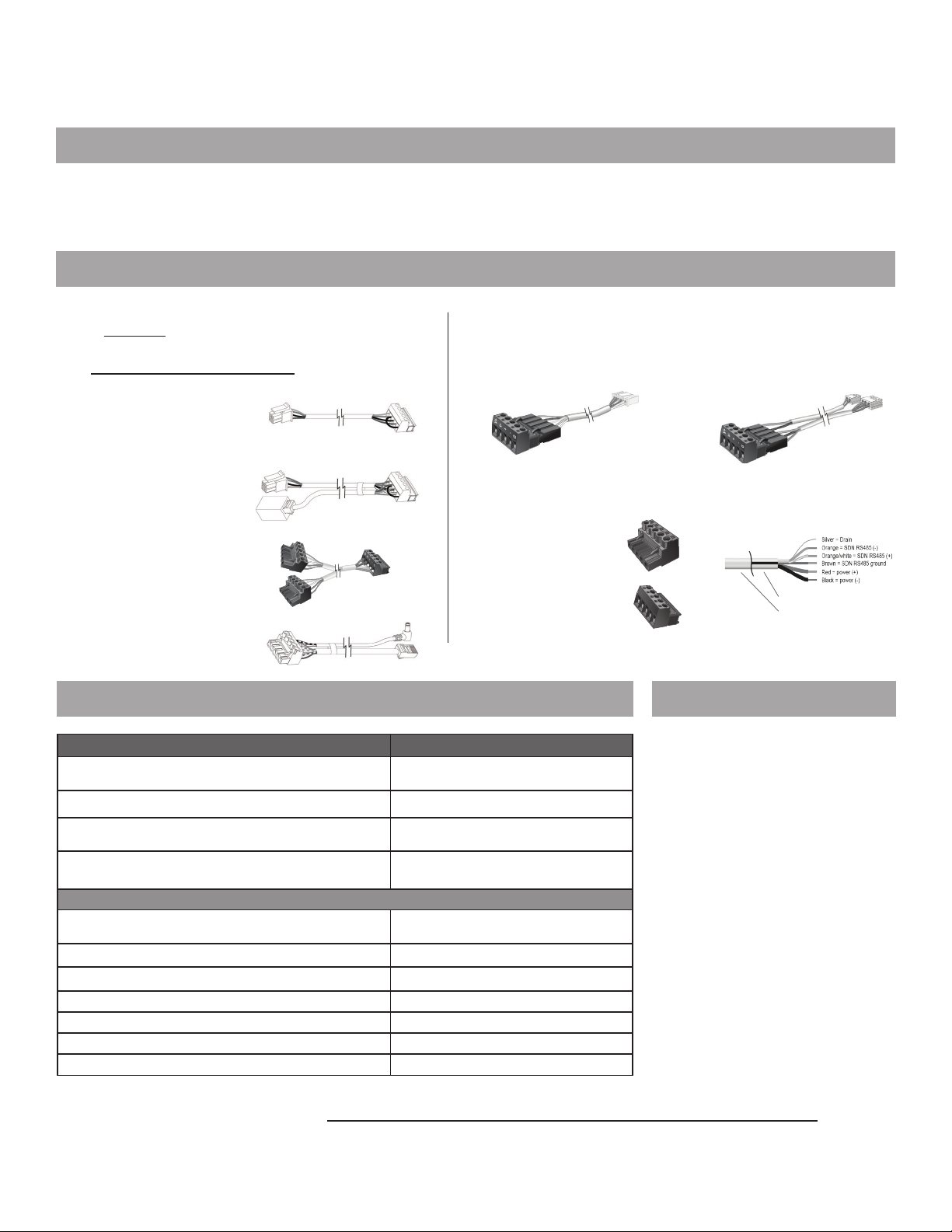
Snap in the wire harness male connector into the female connector as shown below:
Use two #8 self-tapping screws to mount the PoE Gateway as shown
(screws not provided)
All motors and wiring need to be connected to Gateway prior to powering
the SDN PoE Gateway
On the front top side of the PoE Gateway connect PoE CAT cable until you hear a
“CLICK”. Use a UTP (unshielded twisted pair) CAT5E or CAT6 cable*. The maximum
length of cable should not exceed 100 meters.
8
9
10
Installation Guide for PoE Gateway
READ AND FOLLOW ALL SAFETY INSTRUCTIONS
Mounting pattern is shown below.
Mounting Hole Location Holes For 180852
Standalone Metal Gateway
Snap in the wire harness male connector into the female connector as shown below:
Use two #8 self-tapping screws to mount the PoE Gateway as shown
(screws not provided).
On the front top side of the PoE Gateway connect PoE CAT cable until you hear a
“CLICK”. Use a UTP
(unshielded twisted pair)
CAT5E or CAT6 cable*. The maximum length
of cable
should not exceed 100 meters.
*Please note the Power LED indicator will turn on once you have power. The LINK and ACTIVE indicators will blink on and off
rapidly once you have network connection.
SAVE THESE INSTRUCTIONS FOR FUTURE REFERENCE
Installation Guide for PoE Gateway
READ AND FOLLOW ALL SAFETY INSTRUCTIONS
Mounting pattern is shown below.
Mounting Hole Location Holes For 180852
Standalone Metal Gateway
Snap in the wire harness male connector into the female connector as shown below:
Use two #8 self-tapping screws to mount the PoE Gateway as shown
(screws not provided).
On the front top side of the PoE Gateway connect PoE CAT cable until you hear a
“CLICK”. Use a UTP
(unshielded twisted pair)
CAT5E or CAT6 cable*. The maximum length
of cable
should not exceed 100 meters.
*Please note the Power LED indicator will turn on once you have power. The LINK and ACTIVE indicators will blink on and off
rapidly once you have network connection.
SAVE THESE INSTRUCTIONS FOR FUTURE REFERENCE
!*Please note the Power LED indicator will turn on once you have power. The LINK
and ACTIVE indicators will blink on and off rapidly once you have network connection.
11
FIGURE 1. CONNECTION INFORMATION
This device could be used in other configurations than
listed below. For specification information on individual
products, see related product information. Follow all
SDN wiring standards for distance limitations.
CONNECTIONS AND INDICATORS
Notes:
• Control up to 4 low-voltage RS485 motors from
a SDN PoE Gateway.
• When operating motors as a group, motors will
cascade individually.
• Aligned operation available with
Sonesse® 30 RS485 DC (maximum 2 motors)
• Total wiring between SDN PoE Gateway and all
motors should not exceed 240 . when using
Liberty AV 9020126 cable.
• Total wiring between Network switch and SDN PoE Gateway
should not exceed 300 . using Category 5e cable.
ELEMENT FUNCTION
1Ethernet Input Power and Data Input
from PoE system
2SDN Output to motors Power and Data output to Somfy
24V DC SDN RS485 motors
LED Indicators
LABEL ELEMENT COLOR FUNCTION ON FUNCTION OFF
PWR Power Green Powered No Power
ACT Active
Ethernet Green Ethernet
Active
No Ethernet
Activity
LINK Communication
Link Orange Linked
(blinks)
Not Linked
(not blinking)
1
2
1
PWR
ACT
LINK
Side view
2
Side view
12 Download and install Programming Soware from this link.
https://www.somfysystems.com/support/tools/configuration-tools-soware
NOTE: Ref. # 1870445 includes the SDN Power over Ethernet (PoE) Gateway and PoE Gateway to Motor Adapter Cable (9025010) sold as a kit.