
Smart Motor Devices Skyone Manuel utilisateur

3D printer Skyone
User manual
2017 December

Safety precautions
- Keep the printer out of magnetic and electric field exposure.
- Electric equipment repair shall be provided only by professionals in an authorized service center. Any
inappropriately implemented repair could lead to reducing the equipment lifetime.
It is strongly recommended to read and understand operating rules before using the 3D printer.
Attention:
- The printer must be set at a flat stable surface.
- Sky One installation site should be located at a dry light place.
- It is not allowed to use the printer in dusty or moist environments.
- The printing nozzle of the printer and the heated platform heat up to high temperature. To avoid burning
do not touch them while the printer is working. After the printer has finished printing wait at least 5-7
minutes in order to let them get cold.
- There are moving parts in the printer. Please avoid foreign objects of getting into the actuating
mechanisms of the printer while it is working. It may cause injuries and damage the equipment.
- As the equipment operates using the technology of fused deposition modeling, it is possible that
characteristic smell of plastic will occur during the printing process. It is a technological feature of the
equipment.
- Printer electronics are sensitive to voltage surges and variations. It is strongly recommended to assure the
stability of the power supply source. If there is no such source available, please get one.
- Usage of low quality and unapproved consumable materials may impact printed object quality and may
adversely affect or damage the feeding system of the 3D printer.
- In the event of a malfunction or operating failures turn the printer off and contact the service center.
- It is prohibited to place foreign objects on to the printer.
- Children admission to the printer during operating process without adult supervision is prohibited.
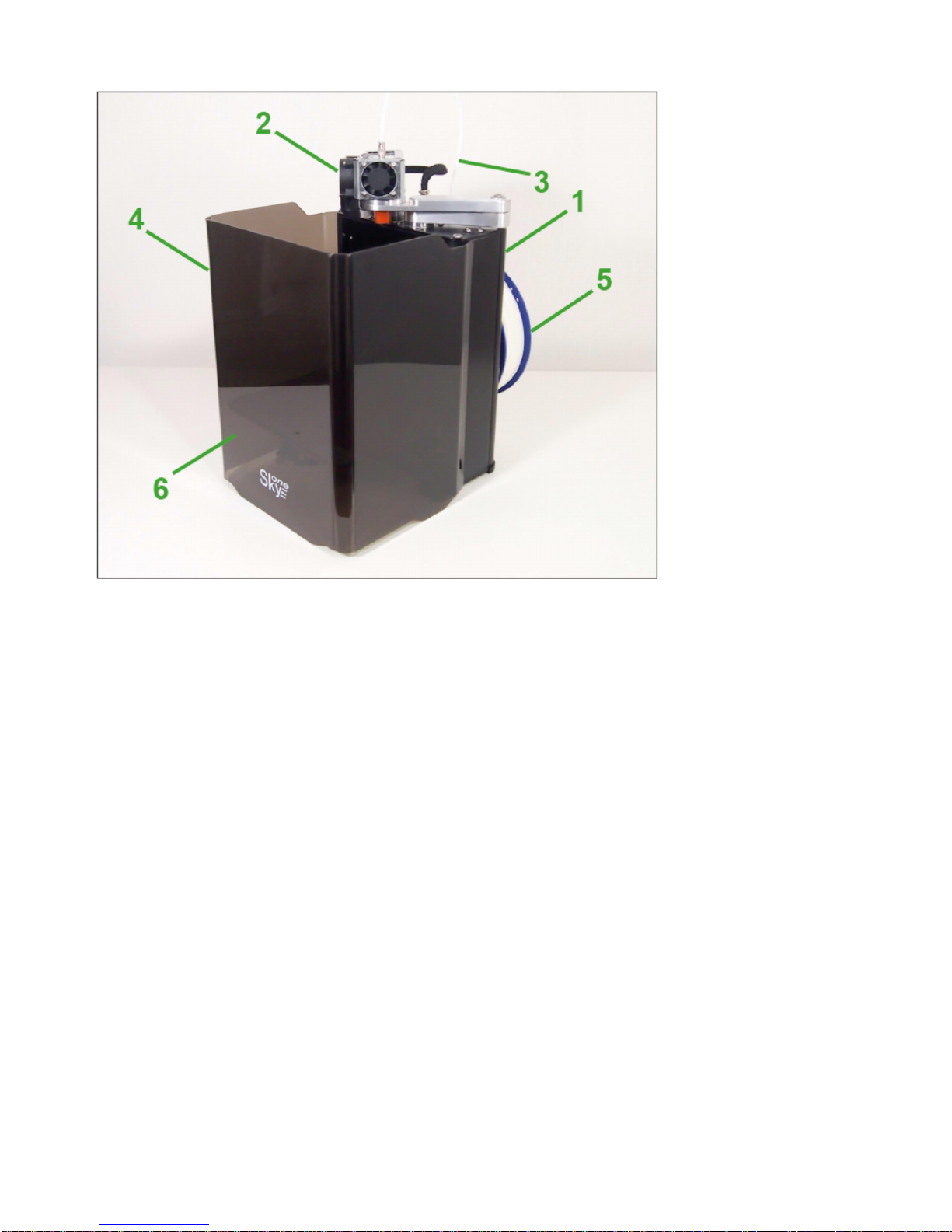
Description of the 3D printer
1 – Case
3 – Filament feeder tube
5 – Spool of filament
2 – Extruder
4 - Organic glass protection screen
6 – Table
Technical characteristics
- Printing technology FDM (Fused Deposition Modeling).
- Max power draw 300W.
- Print area 140x200x200mm.
- Displacement limits 150x210x210mm.
- Layer Thickness from 0.1mm.
- Filament diameter from 1.75mm.
- Nozzle diameter 0.4mm (optionally from 0.3mm to 1mm can be chosed).
- Extruder maximum temperature 260°С.
- Table maximum temperature 110°С.
- Control software Repetier-Host.
- Supported 3D models file formats STL, OB, Simplify 3D.
- Table incremental step along axis Z 0.0075mm.
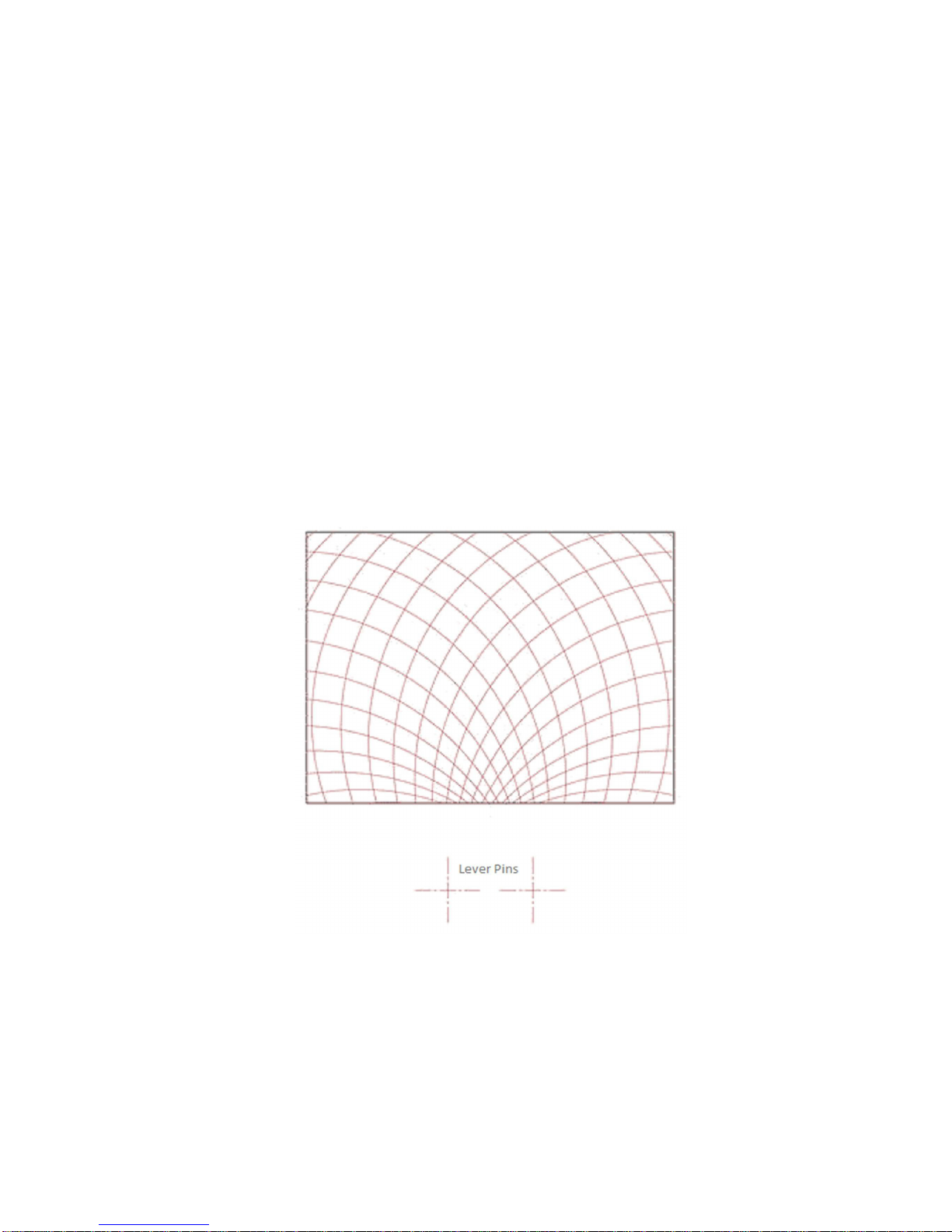
- Angle step of operating mechanism of the SCARA system is 0.0450 degree or 0°2’42”, reduction
gradient at working surface X-Y axises is given below in the figure.

Package Contents
- Coordinate machine SkyOne 1 pcs
- A heated platform with glass surface 1 pcs
- Direct extruder with nozzle diameter 0.4mm 1 pcs
- Organic glass protection screen 1 pcs
- A spool of PLA filament 1 pcs
- Spray for better adhesion of the work surface 1 pcs
- A power cable 1 pcs
- USB A-B cable 1 pcs
- User manual 1 pcs
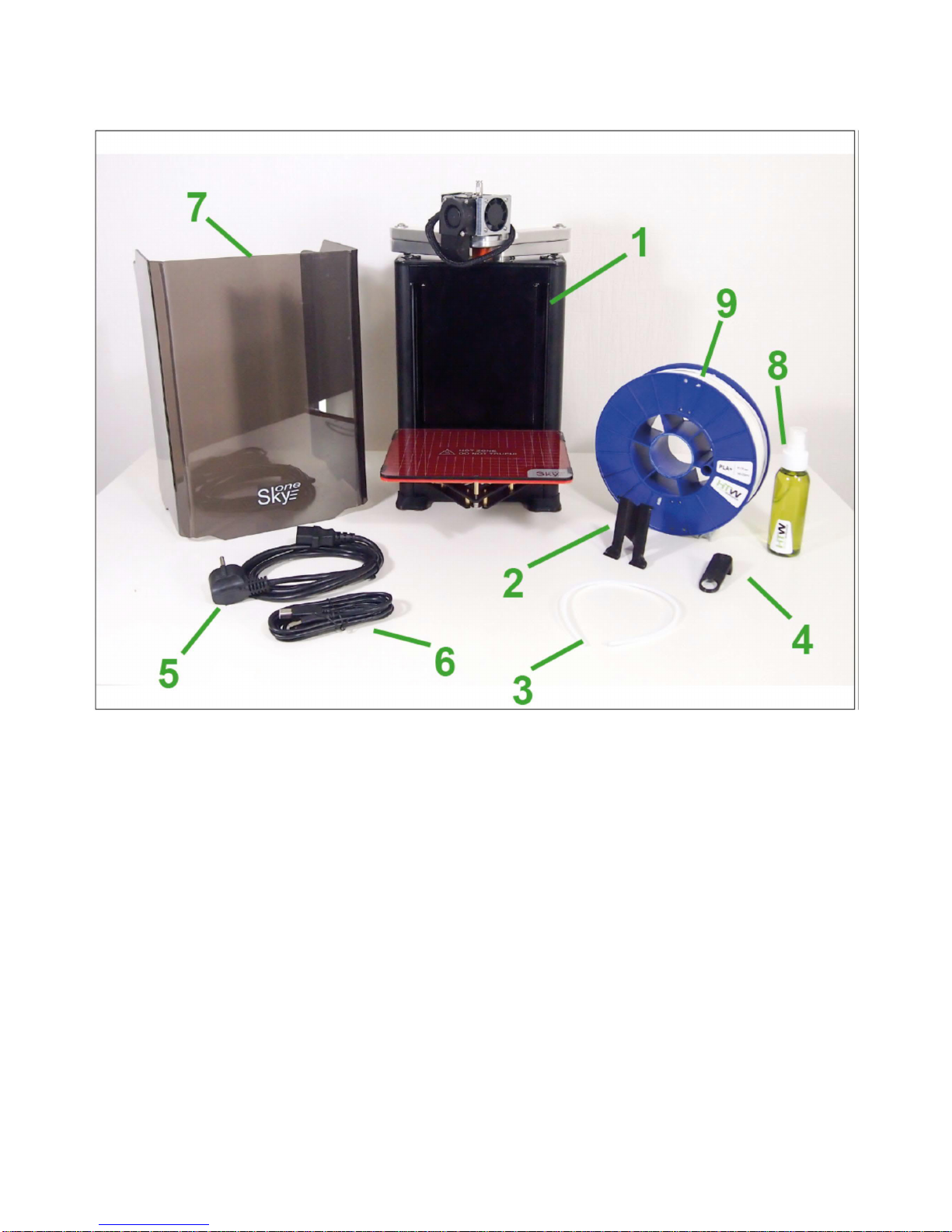
Preparation to work
1. Unpack the printer and components kit from the package
1 – 3D printer SkyOne
2 – Holder for fixing the spool
3 – Filament feeder tube
4 – Feeder tube holder
5 – Power cable
6 – USB cable
7 – Protective screen
8 – Spray for better adhesion
9 – Spool of PLA filament
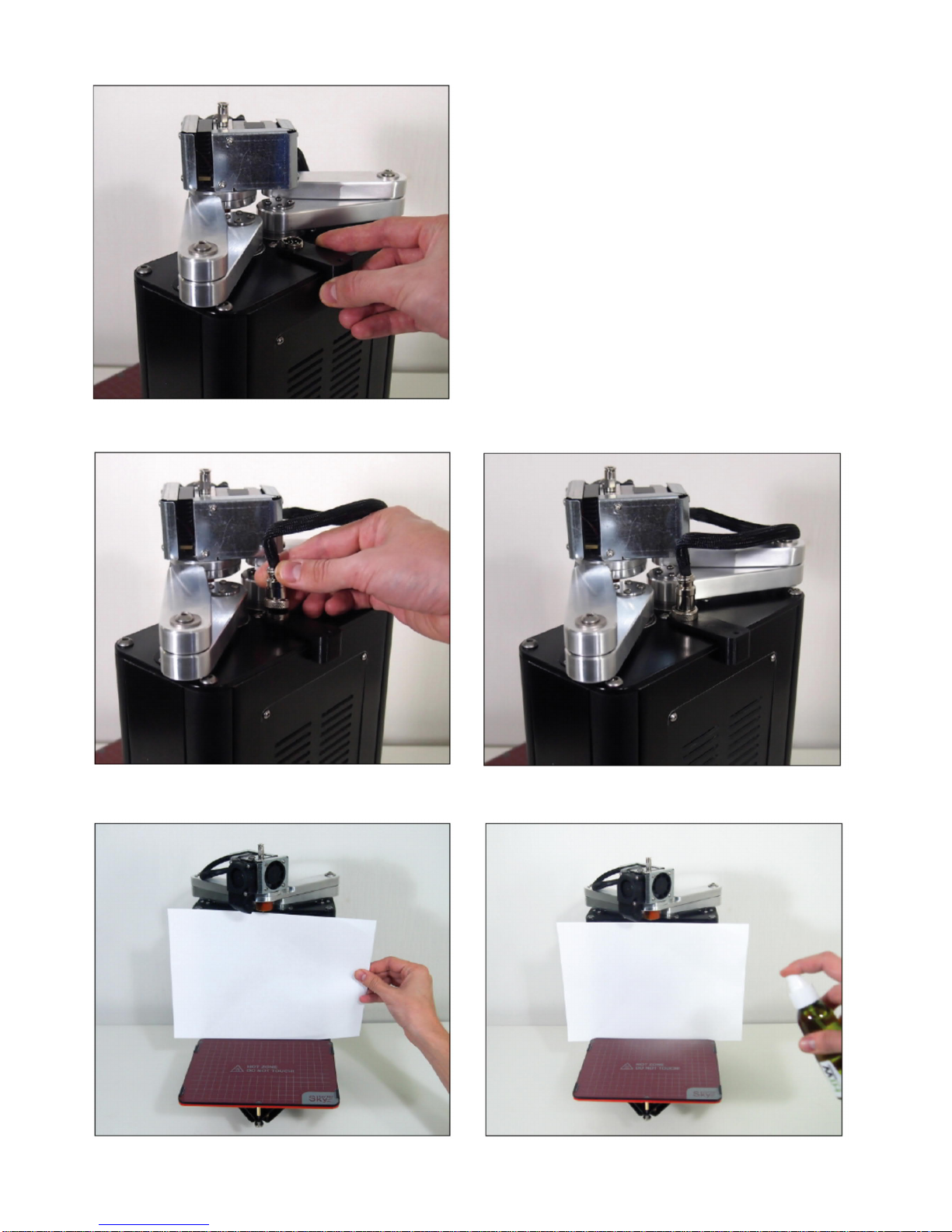
2. Attach the holder for the filament feeder tube
3. Plug in the extruder connector
Spray the adhesion lack evenly on the printing platform. If you do not remove the table from the printer, use
a sheet of paper to protect the printer from the spray.
Note:
To remove the table from the printer, please, undo 4 knurled bolts from the bottom of the printing plate and
pull.
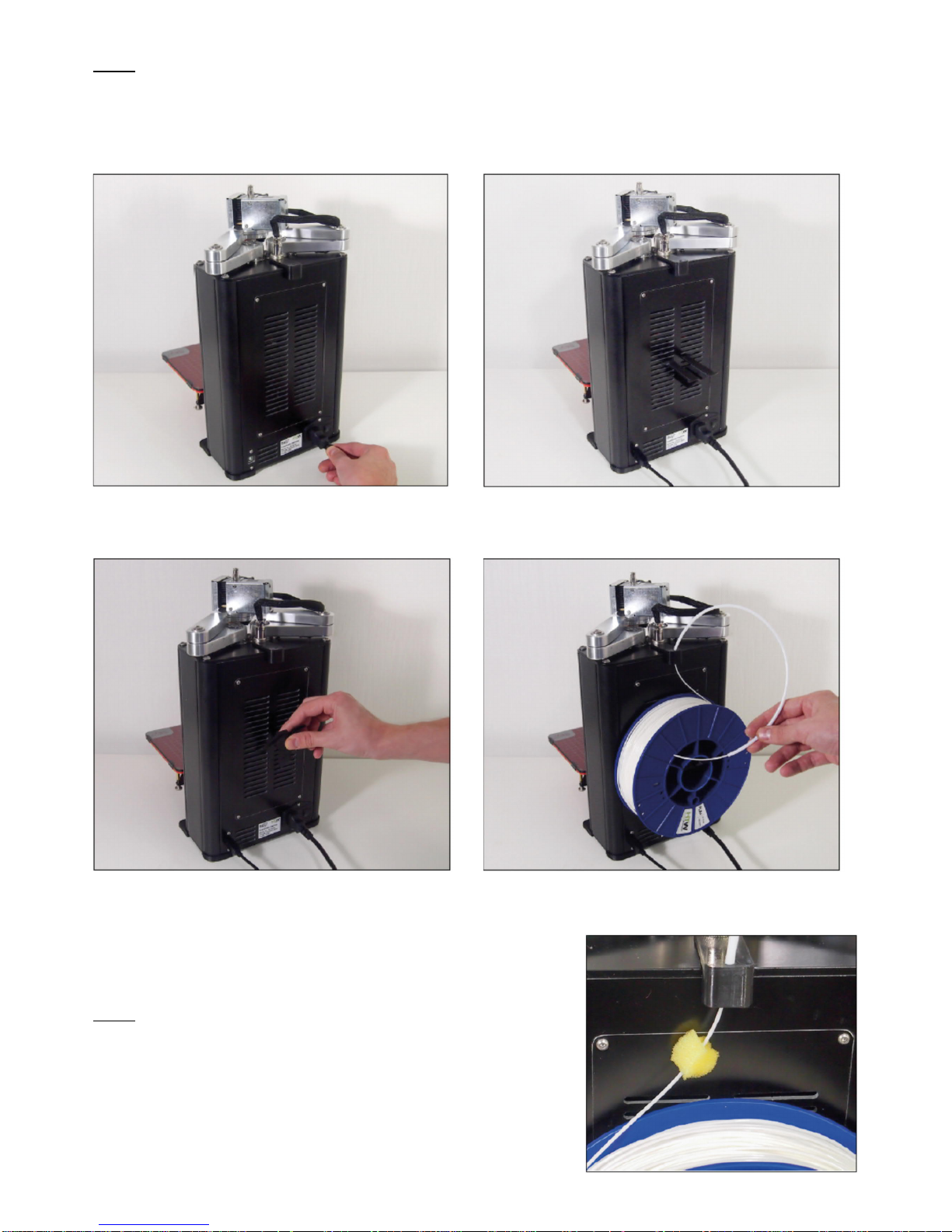
4. Connect the power cable and USB cable
5. Attach the holder and put on it the spool with plastic.
6. Filament loading
Feed the end of the plastic filament through the feeder tube holder
and the guide tube so that it appears about 10cm out the other
side.
Note:
To extend the extruder and nozzle lifetime it is recommended to
run the plastic filament through a piece of polyurethane foam
soaked in paraffinic or silicon oil.

Push the jutting out M6 bolt and insert the plastic thread about 8 cm into the hole.
Insert the guide tube into the collet fixture till locking.
7. Install the protective screen
3D printer SkyOne without protective screen 3D printer SkyOne with protective screen
Note:
The protective screen is necessary to avoid influences of foreign air flows,(i.e. from an open window) on
printing process when using plastics with large thermal-expansion coefficients.
Attention:
To avoid overturning the printer do not place any objects under the moving platform.
Software installation
When the connected to a computer printer is switched on, installation of electronic chip FTDI driver will be
launched. The installation will take up to several minutes. If the driver installation is not launched
automatically, download the driver from the website www.ftdichip.com/Drivers/VCP.htm and install it
manually.
Install the software Repetier-Host. Please, download the installation pack from the website
www.repetier.com/download-now.
3D printer SkyOne is tested on the software Repetier-Host. We do not guaranty stable work in case of
usage of another software.
Note:
The Windows user name should be spelt out in the Latin alphabet. If necessary, create additional profile in
the system.
Adjustment of Repetier-Host
After installing the software it is necessary to adjust connection parameters and printer mechanical
parameters. The printer should be assembled, connected to the computer with an USB cable, the electronic
chip FTDI driver should be installed by this time.
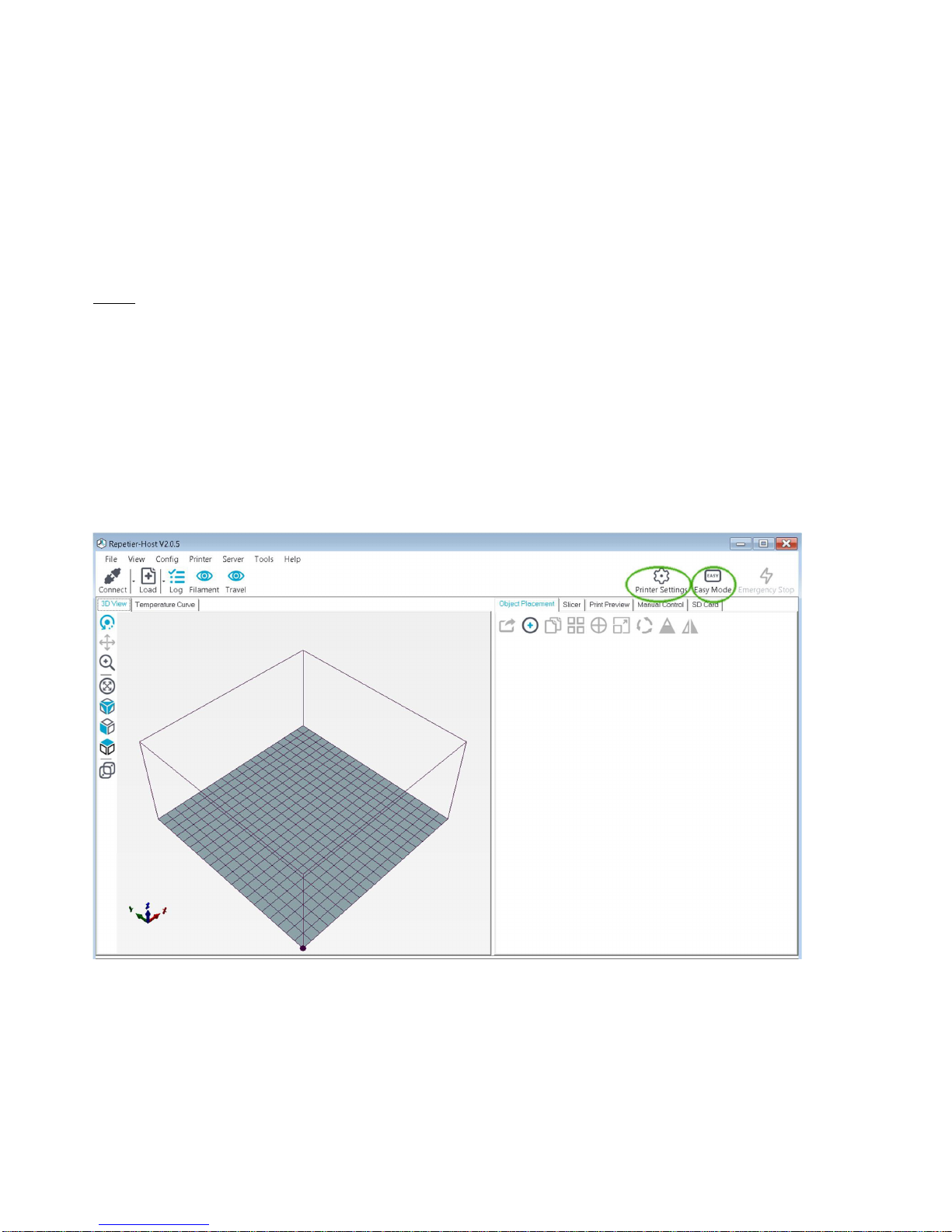
Launch Repetier-Host software, deactivate mode “Easy mode” by clicking the button at the right top corner
(indication icon should blink off) and enter the printer settings (please, see the picture below).
Table des matières


