
Scaime eNod4-B Manuel utilisateur

NU-eNod4B-ETH-E-236708-D.docx
SCAIME SAS – Technosite Altéa – 294, Rue Georges Charpak – 74100 JUVIGNY - FRANCE
Tél. : +33 (0)4 50 87 78 64 – www.scaime.com
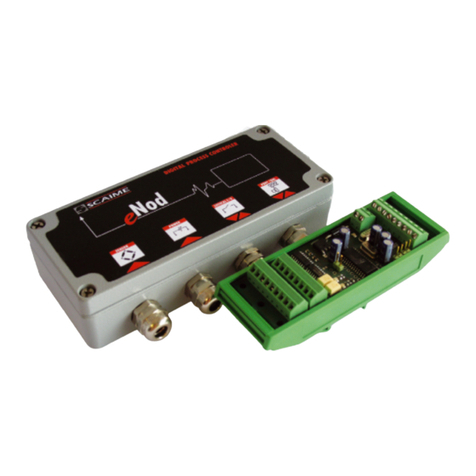
eNod4-B ETHERNET
Digital Process Transmitter
Characteristics and functioning

2
SCAIME Manual : NU-eNod4B-ETH-E-236708-D.docx
1 SAFETY INSTRUCTIONS ............................................................................................ 5
1.1 Getting started ................................................................................................ 5
1.2 Protection ........................................................................................................ 6
1.3 Power supply ................................................................................................... 6
1.4 Grounding ....................................................................................................... 6
1.5 Installation ....................................................................................................... 6
1.6 Maintenance .................................................................................................. 6
1.7 Caution ............................................................................................................ 6
2 ENOD4 PRODUCT RANGE ...................................................................................... 7
2.1 General presentation ..................................................................................... 7
2.2 Versions ........................................................................................................... 7
2.2.1 Communication protocol versions ........................................................ 7
2.2.2 IO+ version ............................................................................................... 7
2.2.3 Bluetooth® version ................................................................................... 7
2.3 eNodView Software ........................................................................................ 8
2.4 eNodApp - Mobile Application .................................................................... 8
3 GENERAL CHARACTERISTICS ................................................................................. 9
3.1 Dimensions ...................................................................................................... 9
3.2 Electrical characteristics ............................................................................. 11
3.3 Legal for trade ............................................................................................... 12
4 CONNECTIONS ..................................................................................................... 14
4.1 Cabling basic rules ...................................................................................... 15
4.1.1 Prevent Electrostatic Discharges ......................................................... 15
4.1.2 Prevent Electromagnetic disturbances ............................................... 16
4.2 Power supply connection ............................................................................ 17
4.3 Load-cell wiring ............................................................................................ 17
4.4 IO+ version .................................................................................................... 17
4.5 Inputs / outputs connections ....................................................................... 18
4.5.1 Typical connections .............................................................................. 19
4.6 JB4 option ...................................................................................................... 19
4.6.1 Specifications ........................................................................................ 20
4.6.2 Excitation trimming procedure ............................................................ 20
4.6.3 Spring terminal connections ................................................................ 21
4.7 220V option ................................................................................................... 21
5 COMMUNICATION ............................................................................................... 22
5.1 Communication Interface connections ..................................................... 22
5.1.1 Process control communication .......................................................... 22
5.1.2 PC communication ............................................................................... 22
5.1.3 AUX Communication (for HMI) ............................................................ 22
5.2 Communication address selection ............................................................ 22
5.3 Communication rate selection ................................................................... 23
5.4 Communication protocols ........................................................................... 23
5.5 Simultaneous functioning of communications .......................................... 24
5.6 Bluetooth® Communication (Optional) ...................................................... 25
6 CALIBRATION AND SCALE ADJUSTMENT ............................................................. 26
6.1 Physical calibration ...................................................................................... 26
6.2 Theoretical calibration ................................................................................. 26
6.3 Scale adjustment coefficient ...................................................................... 26
6.4 Gravity correction ........................................................................................ 26
6.5 Scale interval ................................................................................................ 26
7 FILTERS ................................................................................................................... 27

3
SCAIME Manual : NU-eNod4B-ETH-E-236708-D.docx
7.1 Filtering related to the A/D conversion rate .............................................. 27
7.2 Bessel low pass filter ..................................................................................... 27
7.3 Notch filter ..................................................................................................... 27
7.4 Moving average filter ................................................................................... 27
8 MEASUREMENT AND STATUS ................................................................................ 28
8.1 Gross measurement ..................................................................................... 28
8.2 Net measurement ......................................................................................... 28
8.3 Tare value ...................................................................................................... 28
8.4 Factory calibrated points ............................................................................ 28
8.5 Logical IN/OUT level ..................................................................................... 28
8.6 Preset Tare value .......................................................................................... 28
8.7 Measurement status ..................................................................................... 28
8.8 Weighing diagnosis ...................................................................................... 28
8.8.1 Global weighing diagnosis .................................................................. 28
8.8.2 Sensor input control .............................................................................. 28
9 INPUTS FUNCTIONING .......................................................................................... 29
9.1 Inputs assignment: ........................................................................................ 29
9.2 General functions ......................................................................................... 29
9.2.1 None ....................................................................................................... 29
9.2.2 Tare ......................................................................................................... 29
9.2.3 Cancel tare ............................................................................................ 29
9.2.4 Zero ......................................................................................................... 29
9.2.5 Transmit measurement ......................................................................... 29
9.2.6 Measurement window .......................................................................... 30
9.2.7 Sensor input control .............................................................................. 30
9.3 Functions attached to an operating mode: .............................................. 30
10 OUTPUTS FUNCTIONING ..................................................................................... 31
10.1 Outputs assignment: ................................................................................... 31
10.2 General functions: ...................................................................................... 31
10.2.1 None: .................................................................................................... 31
10.2.2 Set point: .............................................................................................. 31
10.2.3 Motion: .................................................................................................. 32
10.2.4 Defective measurement: .................................................................... 32
10.2.5 Input image: ........................................................................................ 32
10.2.6 Level on request: ................................................................................. 32
10.3 Functions attached to an operating mode: ............................................ 32
10.4 Optional analog output (IO+ version) ...................................................... 32
11 BELT WEIGHER OPERATING MODE ..................................................................... 34
11.1 Introduction and Overview ........................................................................ 34
11.2 Totalization cycle description ................................................................... 35
11.2.1 Cycle options ....................................................................................... 35
Batch mode ...................................................................................................... 35
Clear totalization .............................................................................................. 35
PID Activation ................................................................................................... 35
11.2.2 Weight section length (mm) ............................................................... 36
11.2.3 Conveyor inclination (degrees) ......................................................... 36
11.2.4 Minimum load to totalize (weight unit/meter) .................................. 37
11.2.5 Pulses factor speed sensor (Pulses/meter) ....................................... 37
11.2.6 Measurement time factor for speed (x250ms) ................................. 37
11.2.7 Constant belt speed (m/s) ................................................................. 37
11.2.8 Flow correction factor ......................................................................... 37

4
SCAIME Manual : NU-eNod4B-ETH-E-236708-D.docx
11.3 Belt calibration ............................................................................................ 37
11.3.1 Speed sensor calibration .................................................................... 37
11.3.2 Static weight calibration ..................................................................... 38
11.3.3 Material Test (Dynamic weight calibration or correction factor) ... 38
11.4 Calibration of flow rate .............................................................................. 38
11.5 Totalization .................................................................................................. 38
11.6 Alarms .......................................................................................................... 39
11.6.1 Minimum flow rate limit value (0.1%) ................................................ 39
11.6.2 Maximum flow rate limit value (0.1%) ............................................... 39
11.6.3 Minimum belt load limit value (0.1%) ................................................ 39
11.6.4 Maximum belt load limit value (0.1%) .............................................. 39
11.6.5 Minimum control output limit value (0.1%) ....................................... 39
11.6.6 Maximum control output limit value (0.1%) ...................................... 39
11.6.7 Minimum belt speed limit value (0.1%) ............................................. 40
11.6.8 Maximum belt speed limit value (0.1%) ........................................... 40
11.6.9 Inhibit time of speed alarms at start (ms) ......................................... 40
11.6.10 Inhibit time of speed alarms in service (ms) ................................... 40
11.6.11 Errors counter ..................................................................................... 40
11.7 Inputs assignments ..................................................................................... 40
Start / Stop dosing (and batch) ...................................................................... 41
Belt running motion detection ......................................................................... 41
Clear/Reset totalization and errors counter................................................... 41
Dynamic zero .................................................................................................... 41
Belt Fault ............................................................................................................ 41
12 ENODTOUCH – HUMAN MACHINE INTERFACE (OPTION) ................................ 42
12.1 Online functioning ...................................................................................... 42
12.1.1 Startup screens .................................................................................... 42
12.1.2 Multi-eNod screens ............................................................................. 43
12.1.3 Main screen ......................................................................................... 47
12.1.4 Main setup menu ................................................................................ 50
12.2 Belt parameter configuration (eNod4-B) ................................................. 70
12.2.1 Flow Rate .............................................................................................. 71
12.2.2 Dosing Alarms ...................................................................................... 72
12.2.3 Conveyor ............................................................................................. 74
12.2.4 Speed ................................................................................................... 75
12.2.5 Batch dosing ........................................................................................ 76
12.2.6 PID ......................................................................................................... 77
12.2.7 Flow Rate Calibration .......................................................................... 78

5
SCAIME Manual : NU-eNod4B-ETH-E-236708-D.docx
1 SAFETY INSTRUCTIONS
Important information
Be sure to read this manual thoroughly before starting the PRODUCT. This manual is part of the PRODUCT and comes with it.
Rules for the prevention of risks and accidents as well as safety rules must be observed!
The PRODUCT is manufactured in accordance with the current state of the art and in accordance with safety regulations laws
of the Labour Code.
The general safety requirements must be observed during all phases of operation and repair of equipment. Non-compliance
of written warnings in this manual is contrary to the requirements of safe operation and normal operation of the PRODUCT.
As a user of this product, it is necessary to strictly follow in your work environment, all warnings and requirements necessary
to perform safely any operation on the PRODUCT.
This symbol means that there is a risk of electrisation that can lead to death or serious injuries instructions are
not followed.
This symbol means that there is a risk of danger that can lead to injuries if safety instructions are not followed.
Earth protection connection
WEEE 2002/96/CE Waste of electrical and electronic equipment directive imposes to final users the management
of electrical and electronic equipment (EEE). For the purpose, it is mandatory for them to selectively collect their
EEE depositing them in dedicated places.
DANGER
Danger: dangerous situation that can lead immediately to death or serious injuries.
WARNING
Warning: situation potentially dangerous that could lead to death.
CAUTIOUS
Cautious: situation potentially dangerous that could lead to injuries.
1.1 Getting started
WARNING
Security provided by this product is provided for use for its intended purpose. Maintenance can only be performed by
qualified staff.

6
SCAIME Manual : NU-eNod4B-ETH-E-236708-D.docx
1.2 Protection
WARNING
The PRODUCT, with 220V option, must be linked to a protection device. This one must comply to the standards in force in the
country (NFC 15-100 in France) and must be part of the building in which the PRODUCT has been installed. The circuit
breaker must be 16 Amps and should have a response curve of type C.
WARNING
The mains plug of the PRODUCT serves as disconnecting device. Consequently, it must be connected near the device and
easily accessible.
1.3 Power supply
WARNING
The PRODUCT, with 24VDC version, must be powered by a power supply in accordance to EN 60950-1. It must be located
close to the PRODUCT.
1.4 Grounding
DANGER
To minimize any risk of electric shock, frame and all parts of the equipment must be connected to Earth.
1.5 Installation
The PRODUCT must be fitted on a support by using the mounting brackets at the rear of the box.
1.6 Maintenance
The PRDUCT can be cleaned using a damp slightly cloth.
DANGER
For your safety, before any technical intervention or cleaning, it is imperative that the equipment is turned off and not
plugged in. It is forbidden to replace components with power cable connected.
1.7 Caution
When installing, moving, or handling this product or peripherals connected to it, refer to the instructions below to connect
and disconnect the various cords.
Connection:
Disconnection:
1.
Turn off the units.
2. Start by connecting all cords to the units.
3. Connect the interface cables to the connectors.
4. Connect the power cords into outlet.
5. Turn on the units.
1.
Turn off the
units.
2. Disconnect the power cords from the outlets.
3. Disconnect the interface cables from the connectors.
4. Disconnect all cabled from the units.

7
SCAIME Manual : NU-eNod4B-ETH-E-236708-D.docx
2 ENOD4 PRODUCT RANGE
2.1 General presentation
eNod4 is a high speed digital process transmitter with programmable functions and powerful signal processing capabilities.
eNod4 offers operating modes for advanced process control both static and dynamic.
Quick and accurate:
Analog to digital conversion rate up to 1920 meas/s with maximum scaled resolution of ±500 000 points.
Digital filtering and measurement scaling.
Measurement transmission up to 1 000 meas/s.
Easy to integrate into automated system:
USB, RS485 and CAN communication interfaces supporting ModBus RTU, CANopen® and PROFIBUS-DPV1
(depending on version) communication protocols.
Digital Inputs/Outputs for process control.
Setting of node number by rotary switches and communication baud rate by dip switches.
Integrated selectable network termination resistors.
Wiring by plug-in terminal blocs.
2.2 Versions
2.2.1 Communication protocol versions
Strain gauges load-cell conditioner with CANopen® and ModBus RTU communication.
Strain gauges load-cell conditioner with Profibus DP-V1 and ModBus RTU communication.
Strain gauges load-cell conditioner with Modbus TCP and ModBus RTU communication.
Strain gauges load-cell conditioner with EtherNet/IP and ModBus RTU communication.
Strain gauges load-cell conditioner with Profinet IO and ModBus RTU communication.
Strain gauges load-cell conditioner with EtherCAT and ModBus RTU communication.
EDS, GSD, ESI and GSDML configuration files for above protocols can be downloaded from our web site:
http://www.scaime.com
2.2.2 IO+ version
In conjunction with all communication protocol versions, eNod4 can supports an opto-insulated board fitted with:
2 additional digital inputs and 1 speed sensor dedicated input.
0-5V or 0-10V analog output voltage.
4-20mA, 0-24mA, 0-20mA or 4-20mA with alarm at 3.6mA analog output current.
2.2.3 Bluetooth® version
In conjunction with all communication protocol versions and IO+ version, eNod4 can supports a communication board that
allows to exchange information via Bluetooth®.
Radio information
Wireless communication Bluetooth® Low Energy 4.2
Max. RF output power -16.9 dBm
Frequency range 2.4 – 2.4835 GHz

8
SCAIME Manual : NU-eNod4B-ETH-E-236708-D.docx
2.3 eNodView Software
So as to configure eNod4, SCAIME provides eNodView software tool. eNodView is the software dedicated to eNod devices
and digital load cell configuration from a PC. This simple graphical interface allows accessing the whole functionalities of
eNod4 for a complete setting according to the application.
eNodView features and functions:
eNod4 control from a PC
Calibration system
Modification/record of all parameters
Measure acquisition with graphical display
Numerical filters simulation
Frequential analysis FFT
Process control
Network parameter
eNodView software is available in English and French version and can be downloaded from our web site:
http://www.scaime.com or ordered to our sales department on a CD-ROM support.
2.4 eNodApp - Mobile Application
So as to configure eNod4, SCAIME provides eNodApp application through the Google Play Store. eNodApp is the application
dedicated to eNod devices (fitted with the Bluetooth® option) configuration from an Android device. This simple graphical
interface allows accessing most of the functionalities of eNod4 for a quick setting according to the application.
eNodApp features and functions:
eNod4 control from an Android device
Calibration system
Modification/record of all parameters
eNodApp application is available in English and French version and can be downloaded from the Google Play Store.

9
SCAIME Manual : NU-eNod4B-ETH-E-236708-D.docx
3 GENERAL CHARACTERISTICS
3.1 Dimensions

10
SCAIME Manual : NU-eNod4B-ETH-E-236708-D.docx
Autres manuels pour eNod4-B
3
Table des matières
Autres manuels Scaime Émetteur




Manuels Émetteur populaires d'autres marques


Dejero
Dejero EnGo 3x Manuel utilisateur

Rosemount
Rosemount 4600 Manuel utilisateur

Speaka Professional
Speaka Professional 2342740 Manuel utilisateur

trubomat
trubomat GAB 1000 Manuel utilisateur

Teledyne Analytical Instruments
Teledyne Analytical Instruments LXT-380 Manuel utilisateur

Rondish
Rondish UT-11 Manuel utilisateur


