Polaroid PlaySmart Manuel utilisateur

Quick Start Guide

2
Quick Start Guide
1
3
Insert
Insert
PTFE Tube PTFE Tube
Quick Start Guide
Contents
Remove the printer and the contents
from the box.
3D Printer Filament Power Cable
Heated Print Bed PTFETube Precise Filament
Holder & Scale
Quick Start Guide Nozzle kit SD card
Insert one end of the PTFE tube into the printer
head and the other end into the extruder.
Printer
Extruder
To detach the PTFE tube, press the plastic cap
downwards and withdraw the tube. If the tube
does not easily release remove the connector as
well by twisting it.
Tip
2
Switch on
Plug in
Connect the Power Cable at the back of
the printer and switch on the printer.
Please follow the instructions on the LCD
screen.
4
Deutsch
German
Français
French
English
English
Nederlands
Duth
Español
Spanish
Italiano
Italian
Set up your printer

3
5
Twist around
until it breaks
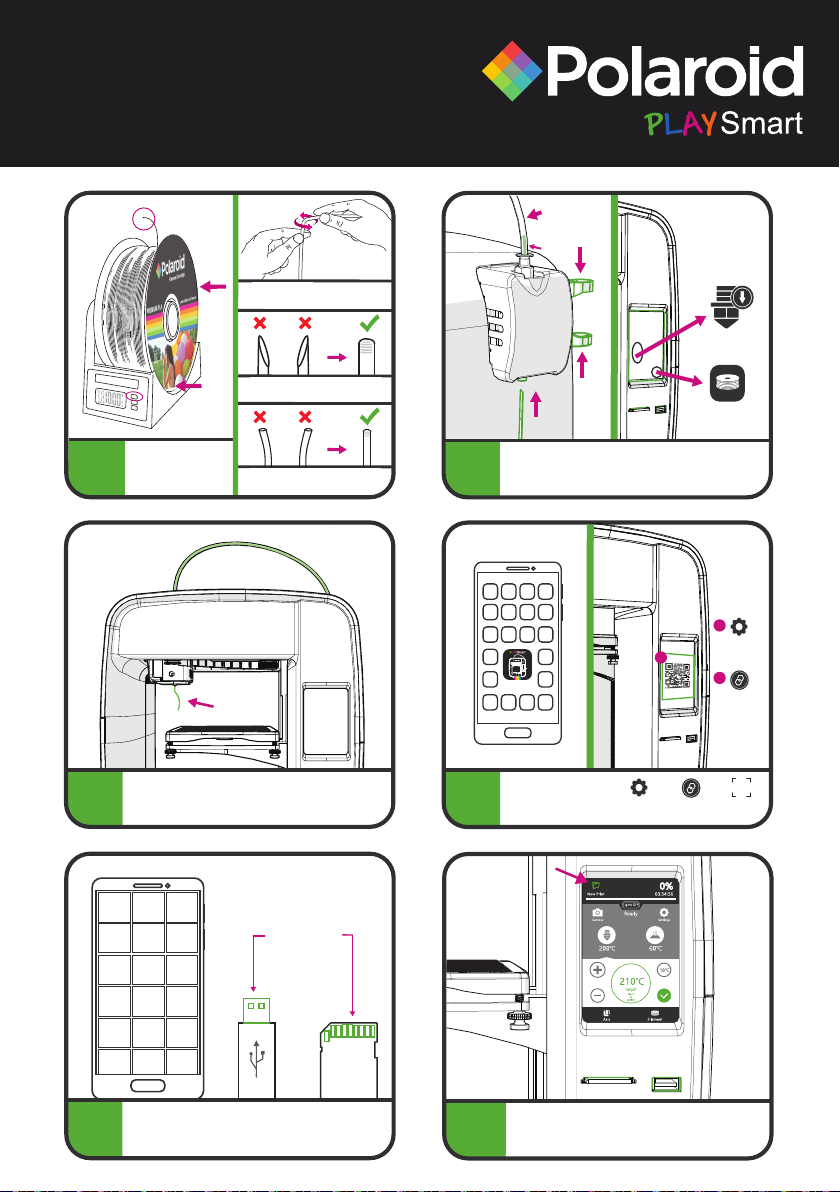
Place the filament
onto the Precise
Filament Holder &
Scale and switch it on.
Top of filament should NOT be
angled.
Keep filament straight when
loading.
Twist off 5cm of filament as
shown above.
10
For further information please visit:
www.polaroid3d.com/playsmart3dprinter
This product is distributed and sold by Environmental Business Products Ltd. ©2019 All Rights Reserved.
Polaroid, Polaroid & Pixel, Polaroid Color Spectrum, and Polaroid Classic Border Logo are trademarks of PLR IP Holdings, LLC, used
under license. PLR IP Holdings, LLC does not manufacture this product or provide any Manufacturer’s Warranty or support.
Made in China.
9Download or design your model (.STL) and then
slice using the Polaroid SmartPrep Software
(www.polaroid3d.com/software). Save to SD card
or USB and then print from the printer.
Insert your SD card or USB and go to ‘New Print’
to start your print.
Gcode files
8Download the Polaroid
PlaySmart App to print
remotely, and then
connect your printer:
Polaroid PlaySmart
3D Printer
Setting
Setting
Pair the
Printer
Pair the
Printer
1
2
3
Scan
QR-code
7Remove any residue of filament from the nozzle
before you start printing.
6
Filament
Load
Squeeze
together
Squeeze
together
Filament
(2cm)
Insert lament
PTFE Tube
Slightly squeeze the levers on the side of the
extruder together and slide the filament up from the
bottom until approx. 2cm is visible in the PTFE tube.
Press ‘Filament’, then ‘Load’ on the LCD screen.

4
Guide de démarrage rapide
1
3
Insérer
Insérer
Tube en PTFE
Tube en PTFE
Guide de démarrage rapide
Contenu
Déballez l'imprimante et le contenu de la boîte.
Imprimante 3D Filament Câble d'alimentation
Plateau d'impression
chauffé Tube en PTFE Support et balance de
précision pour filament
Guide de démarrage
rapide Kit de buse Carte SD
Insérez une extrémité du tube en PTFE dans la
tête d'impression et l'autre extrémité dans
l'extrudeuse.
Imprimante
Extrudeuse
Pour libérer le tube en PTFE, appuyez sur le
capuchon en plastique et retirez le tube. Si vous ne
parvenez pas à libérer le tube facilement, retirez
également le connecteur en le faisant tourner.
Conseil
2
Mise sous tension
Branchement
Branchez le câble d'alimentation au dos de
l'imprimante et allumez l'imprimante.
Veuillez suivre les instructions qui s'affichent
sur l'écran LCD.
4
Deutsch
German
Français
French
English
English
Nederlands
Duth
Español
Spanish
Italiano
Italian
Installez votre imprimante

5
10
Pour plus d'informations, visitez le site :
www.polaroid3d.com/playsmart3dprinter
This product is distributed and sold by Environmental Business Products Ltd. ©2019 All Rights Reserved.
Polaroid, Polaroid & Pixel, Polaroid Color Spectrum, and Polaroid Classic Border Logo are trademarks of PLR IP Holdings, LLC, used
under license. PLR IP Holdings, LLC does not manufacture this product or provide any Manufacturer’s Warranty or support.
Made in China.
9Téléchargez ou créez votre modèle (.STL) puis procédez
au découpage des couches à l'aide du logiciel Polaroid
SmartPrep (www.polaroid3d.com/software).
Enregistrez-le sur la carte SD ou une clé USB puis
imprimez à partir de l'imprimante.
Insérez votre carte SD ou clé USB et sélectionnez
« New Print » (Nouvelle impression) pour lancer
votre impression.
Fichiers Gcode
8Téléchargez l'application
Polaroid PlaySmart pour
pouvoir effectuer des
impressions à distance
puis connectez votre imprimante :
Polaroid PlaySmart
3D Printer
Configuration
Configuration
Appariement de
l'imprimante
Appariement de
l'imprimante
1
2
3
Numérisation
du code QR
7Retirez tout résidu de filament de la buse avant
de lancer l'impression.
6
Filament
Chargement
Pression sur
les leviers
Pression sur
les leviers
Filament
(2cm)
Insertion du lament
Tube en PTFE
Appuyez légèrement sur les leviers sur le côté de
l'extrudeuse et faites glisser le filament du bas vers le
haut jusqu'à ce qu'environ 2 cm de filament soient
visibles dans le tube en PTFE. Appuyez sur « Filament »
puis « Load » (Charger) sur l'écran LCD.
5
Tournez jusqu'à
ce qu'il casse
Placez le filament sur
le Support et balance
de précision pour
filament et allumez-le.
Le dessus du filament ne doit
PAS être coudé.
Gardez le filament droit lors du
chargement.
Débranchez 5 cm de filament
comme indiqué ci-dessus.

6
Schnell Start Anleitung
1
3
Einfügen
Einfügen
PTFE Düse
PTFE Düse
Schnell Start Anleitung
Paketinhalt
Nehmen Sie den Drucker und den weiteren Inhalt
aus der Verpackung.
3D-Drucker Filament Netzkabel
Heizdruckbett PTFE Düse Präzise Filament
Halter & Waage
Schnell Start
Anleitung Düsensatz SD-Karte
Führen Sie ein Ende der PTFE-Röhre in den
Druckkopf und das andere Ende in den
Extruder ein.
3D-Drucker
Extruder
Zum Entfernen der PTFE-Röhre drücken Sie die
Kunststoffkappe nach unten und ziehen Sie die Röhre
heraus. Wenn sich die Röhre nur schwer lösen lässt,
entfernen Sie auch den Anschluss, indem Sie ihn drehen.
Tipp
2
Einschalten
Anschließen
Schließen Sie das Netzkabel an der Rückseite des
Druckers an und schalten Sie den Drucker ein.
Befolgen Sie die Anweisungen auf dem
LCD-Bildschirm.
4
Deutsch
German
Français
French
English
English
Nederlands
Duth
Español
Spanish
Italiano
Italian
Richten Sie Ihren Drucker ein

7
10
Weitere Informationen finden Sie unter:
www.polaroid3d.com/playsmart3dprinter
This product is distributed and sold by Environmental Business Products Ltd. ©2019 All Rights Reserved.
Polaroid, Polaroid & Pixel, Polaroid Color Spectrum, and Polaroid Classic Border Logo are trademarks of PLR IP Holdings, LLC, used
under license. PLR IP Holdings, LLC does not manufacture this product or provide any Manufacturer’s Warranty or support.
Made in China.
9Laden Sie Ihr Modell (.STL) herunter oder gestalten Sie
es, und schneiden Sie es dann mit der Polaroid
SmartPrep-Software (www.polaroid3d.com/software).
Speichern Sie es auf einer SD-Karte oder einem
USB-Stick und drucken Sie es anschließend aus.
Stecken Sie die SD-Karte oder den USB-Stick ein
und navigieren Sie zu „Neuer Druck“, um den
Druckvorgang zu starten.
GCODE-Dateien
8Laden Sie die Polaroid
PlaySmart-App herunter,
um aus der Ferne zu
drucken, und verbinden
Sie dann Ihren Drucker:
Polaroid PlaySmart
3D Printer
Einstellung
Einstellung
Koppeln des
Druckers
Koppeln des
Druckers
1
2
3
QR-Code
scannen
7Entfernen Sie sämtliche Filament-Rückstände
von der Düse, bevor Sie mit dem Drucken
beginnen.
6
Filament
Laden
Zusammendrücken
Zusammendrücken
Filament
(2cm)
Filament einsetzen
PTFE Düse
Drücken Sie die Hebel an der Seite des Extruders leicht
zusammen und schieben Sie das Filament von unten
nach oben, bis ca. 2 cm in der PTFE-Röhre sichtbar sind.
Drücken Sie auf dem LCD-Bildschirm auf „Filament“
und anschließend auf „Laden“.
5
Dreh dich herum,
bis es bricht
Setzen Sie das Filament
auf den präzisen
Filament-Halter mit
Waage und schalten
Sie ihn ein.
Die Oberseite des Filaments
darf NICHT abgewinkelt sein.
Halten Sie das Filament beim
Laden gerade.
5 cm Filament wie oben gezeigt
abdrehen.

8
Guida rapida
1
3
Inserire
Inserire
Tubo PTFE
Tubo PTFE
Manuale di avviamento veloce
Contenuto
Rimuovere la stampante ed i contenuti dalla
scatola.
Stampante 3D Filamento Cavo di
Alimentazione
Letto di stampa
caldo Tubo PTFE Supporto e bilancia di
Filamento Precise
Guida rapida Scatola degli ugelli Scheda SD
Inserire un capo del tubo PTFE nella testa della
stampante e l’altro capo nell’estrusore.
Stampante
Estrusore
Per staccare il tubo PTFE, premere il cappuccio di
plastica verso il basso e rimuovere il tubo. Se il
tubo non viene rilasciato facilmente rimuovere il
connettore ruotandolo.
Consiglio
2
Accendere
Connettere
Connettere il cavo di alimentazione al retro
della stampante ed accendere la stampante.
Per Favore seguire le istruzioni sullo
Schermo LCD.
4
Deutsch
German
Français
French
English
English
Nederlands
Duth
Español
Spanish
Italiano
Italian
Impostare la stampante

9
10
Per maggiori informazioni visitare:
www.polaroid3d.com/playsmart3dprinter
This product is distributed and sold by Environmental Business Products Ltd. ©2019 All Rights Reserved.
Polaroid, Polaroid & Pixel, Polaroid Color Spectrum, and Polaroid Classic Border Logo are trademarks of PLR IP Holdings, LLC, used
under license. PLR IP Holdings, LLC does not manufacture this product or provide any Manufacturer’s Warranty or support.
Made in China.
9Scaricare o disegnare il modello (.STL) e poi
utilizzare il Polaroid SmartPrep Software
(www.polaroid3d.com/software). Salvare nella
carta SD o USB e poi stampare dalla stampante.
Inserire la carta SD o USB ed andare a ‘Nuova
Stampa’ per iniziare a stampare.
Gcode Files
8Scarica la Polaroid
PlaySmart App per
stampare da remoto, a
poi connetti la stampante:
Polaroid PlaySmart
3D Printer
Impostazioni
Impostazioni
Accoppiare la
Stampante
Accoppiare la
Stampante
1
2
3
Scannerizzare
il QR-code
7Rimuovere ogni residuo di filamento
dall’erogatore prima di iniziare a stampre.
6
Filamento
Caricare
Premere
insieme
Premere
insieme
Filamento
(2cm)
Inserire Filamento
Tubo PTFE
Premere leggermente le leve sul lato dell’estrusore
insieme e fare scorrere il filamento dal basso verso l’altro
fino a che non e’ visibile per circa 2 cm nel tubo PTFE.
Premere ‘Filamento’ e poi ‘Carica’ sullo schermo LCD.
5
Girare intorno
fino a quando
non si rompe
Posizionare il
filamento nel Precise
Filament Holder &
Scale ed accendere.
La parte superiore del filamento
NON deve essere angolata.
Mantenere il filamento dritto
durante il caricamento.
Svitare 5 cm di filamento come
mostrato sopra.

10
Guía de Inicio Rápido
1
3
Insertar
Insertar
Tubo de PTFE
Tubo de PTFE
Guía de inicio rápido
Contenido
Retire la impresora y el contenido de la caja.
Impresora 3D Filamento Cable de
alimentación
Cama de impresión
caliente Tubo de PTFE Soporte y balanza de
filamento Precise
Guía de inicio rápido Caja de boquillas Tarjeta SD
Inserte un extremo del tubo de PTFE en el cabezal
de la impresora y el otro extremo en la extrusora.
Impresora
Extrusora
Para desmontar el tubo de PTFE, presione la tapa
de plástico hacia abajo y retire el tubo. Si el tubo
no se suelta fácilmente, retire también el
conector girándolo.
Consejo
2
Encender
Enchufar
Conecte el cable de alimentación en la parte
posterior de la impresora y encienda la
impresora.
Siga las instrucciones en la pantalla LCD.
4
Deutsch
German
Français
French
English
English
Nederlands
Duth
Español
Spanish
Italiano
Italian
Configure su impresora
Autres manuels pour PlaySmart
1
Table des matières
Langues :
Autres manuels Polaroid Imprimante 3D