
Penpower Technology mini ScanEYE? Manuel utilisateur

Penpower mini ScanEYEⅡ
User Manual
Edition: Released in July, 2006

PenPower Technology Ltd.
Software User License Agreement
You are licensed to legally use this software program (“the Software”) by PenPower
Technology Ltd (“PenPower”) under this license agreement (“The Agreement”). If you
do not agree with any of the provisions in this Agreement, please do not install, copy or
use the Software. By using the Software, you are deemed to fully understand and accept
the provisions of this Agreement.
1. Intellectual Property
All intellectual property rights in the Software, together with all information and
documents included in the packaging for the Software (including but not limited to
copyrights), are property of PenPower, and are protected by relevant laws and regula-
tions.
2. License to Use
You are authorized to use the Software on one (1) single computer only. You may not
use the Software on any other machines other than the said single computer.
3. Authority to Copy
The Software and all documents included with the Software, and copyright thereof,
are property of PenPower. You are licensed to make one (1) copy of the Software for
your personal backup purposes. All other acts of copying are strictly prohibited.
You may not sell, lease, dissemble, reverse engineer, copy, translate, adapt or derive
the Software, or obtain the source code of the Software by any other means. You may
not use the Software for any purposes other than those permitted under this Agree-
ment.
4. Business Users
If you need to install or use the Software on more than one (1) computer, please con-
tact PenPower or our local distributor to purchase a license for the additional use.
5. Liability
You agree to indemnify PenPower against all losses, costs, debts, settlement pay-
ments or other expenses (including but not limited to attorneys fees) arising from your
breach of this Agreement, and you agree to compensate PenPower for all of the above-
mentioned damages.
6. No Warranty
Effectiveness of a packaged software in handling information is closely related to its
software and hardware environment. The Software is published following careful de-
velopment and product testing by PenPower, but PenPower is not able to conduct tests
based on all possible combinations of software and hardware environment. Therefore,

PenPower is unable to promise nor warrant that there will be absolutely no risk of loss
or damage of information, or any other kind of loss, during installation and/or execu-
tion of the Software. You must be fully aware of your risks in using the Software.
PenPower will provide you with the Software and support services in respect of the
Software to the maximum extent permitted by law. However, PenPower does not war-
rant that the Software and information included in the package of the Software contain
no defects or errors. PenPower is not liable for any indirect, special or incidental
loss arising from the Software, including but not limited to loss of prots, damage to
business reputation, cessation of work, hardware malfunction or damage, or any other
commercial damage or loss arising from commercial use of the Software.
7. Limitation of Liability and Damages
The maximum amount of compensation payable by PenPower, in respect of any dam-
age incurred by you for any reason under this Agreement, is limited to the amount you
have already paid to PenPower in respect of the Software.
Under no circumstances will PenPower be held liable for the possibility of loss, not-
withstanding PenPower may be aware of the possibility of such loss.
8. Prohibition Against Sublicense
You are prohibited to assign the license in respect of the Software granted to you
under this Agreement, or to grant a sublicense to another person.
9. Jurisdiction
With regards to any disputes arising from thisAgreement, PenPower and you agree
that the court having jurisdiction over the business location of PenPower will be the
court in the rst instance.
10. Miscellaneous
In the event that any provision of this Agreement is found to be invalid at law, such in-
validity will not affect the validity of any other provisions, or the legal enforceability
of such other provisions.
In the event that the Software cannot be executed under conditions of normal use, due
to any damage to the original disk/s, PenPower will replace the disk/s free of charge.

CONTENTS
Chapter 1 Product Features............................................................................1-1
Chapter 2 Installation.....................................................................................2-1
2.1 System Requirements..................................................................................2-1
2.2 Hardware Specication...............................................................................2-1
2.3 Software Installation....................................................................................2-2
2.4 Hardware Installation..................................................................................2-3
Chapter 3 Character Input..............................................................................3-1
3.1 Open Penpower mini ScanEYE II..............................................................3-1
3.2 Scan Direction.............................................................................................3-2
3.3 Scanning Vertically Aligned Text.................................................................3-2
3.4 Scanning Horizontal Text............................................................................3-3
3.5 Scanning Horizontal or Vertically Aligned Text...........................................3-4
3.6 Reading Aloud as You Scan.........................................................................3-4
3.7 UI language settings....................................................................................3-4
3.8 Traditional/Simplied Chinese Recognition...............................................3-5
3.9 Practise........................................................................................................3-6
3.10 Using Balloon UI.......................................................................................3-7
Correct a Certain Charccter..................................................................................3-7
Candidates...........................................................................................................3-7
Pre-emptive linking..............................................................................................3-8
Character Combination.......................................................................................3-9
Character Split.....................................................................................................3-9
Displaying Original Form......................................................................................3-10
Punctuation in Ballon UI........................................................................................3-10
Online Translation...................................................................................................3-12
Chapter 4 Penpower TransEYE......................................................................4-1
4.1 Open Penpower TransEYE..........................................................................4-1
4.2 English Character Dictionary Lookup.........................................................4-2
4.3 Chinese Character Dictionary......................................................................4-2

4.4 English Phrasal Dictionary...........................................................................4-3
4.5 Chinese Phrasal Dictionary..........................................................................4-3
4.6 Translating Scanned Input...........................................................................4-5

Chapter 1 Product Features 1-1
Chapter 1 Product Features
Chinese/English/Japanese Scan and Translation Pen
Penpower mini ScanEYE II, the best input device, scans and recognizes Traditional
Chinese, Simplied Chinese, English and Japanese into your computer via the USB
interface. Whenever you come across any particular words or sentences that you do not
understand, mini ScanEYE II will scan and translate for you.
With an ergonomic design, the brand new mini ScanEYE II provides a comfortable
handle which ts all left and right-handed users. Scan away effortlessly with the transpar-
ent scan tip. Where you see, where you scan.
Features
· Abrand new ergonomic design
Provide a comfortable handle which ts all left and right-handed users. Scan away ef-
fortlessly with its transparent scan tip. Where you see, where you scan.
· The best input and translation device
Connects to the USB port and bundle in a 3 in 1 function of scan, recognition and
translation. When scanning, it instantaneously recognizes and translates horizontal or
vertical aligned characters, doing away with all the complex usage procedures.
· Huge recognition boundary
It can recognize 13060 Traditional Chinese characters, 6763 Simplied Chinese char-
acters, 4184 Hong Kong characters, 3580 Japanese characters, English words, numbers
and punctuation.
· Multiple language recognition system
The adjustable multiple language recognition system provides Traditional Chinese,
Simplied Chinese, Hong Kong characters, English and Japanese recognition kernels.
· Balloon Interface
Balloon interface offers you a non-interference environment. All scan results will di-
rectly transfer to the desired application. Balloon interface pops up and provides online
translator, pronunciation, candidate words and related words whenever you need.

mini ScanEYE II
1-2
· Correction and pre-emptive computing
Spell-check function which predicts characters while correcting alignment now em-
powers you with a more accurate scanning ow.
· Continuous scanning and recognition
Multi-thread architecture allows you to scan continuously without pause while recogni-
tion is being done on the y.
· Bi-directional Chinese to English document translation
Translate phrases or characters from English to Chinese or vice versa and have your
complete Chinese document translated into English right away, with a read back func-
tion which reads out your document to you aloud.

2-1
Chapter 2 Installation
Function button:
When scanning words, the function button can be used as Enter function. It also works
as checking next word in the Penpower Transeye.
Chapter 2 Installation
2.1 System Requirements
· Pentium II 300 CPU or above
· 128MB of RAM
· 220MB of available hard disk space
· Windows 2000/XP
· USB port
2.2 Hardware Specication
· Dimensions: 131mm x 31mm x 19mm
· Weight: 45g (excludes USB cable)
· Interface: USB 2.0
· Scanning speed: 15 cm/sec
· Character size: 5~22 pt
Scan tip
Function Button

mini ScanEYE II
2-2
2.3 Software Installation
1. Insert the Penpower mini Scaneye II setup cd into your cd-rom drive. If the computer
does not auto-run the cd, you can go to D:\setup.exe where D: (may not be D: on
your computer) is your cd-rom. Then Select an installation language and click OK to
install. Then click on Next to continue.
3. Please select the type of the miniScayEYE II, then click Next to continue.
4. Please choose to installtion the Hong Kong characters or not, then click Next to contin-
ue.
2. Key in your user name, company name
and click Next to continue.
2-3
Chapter 2 Installation
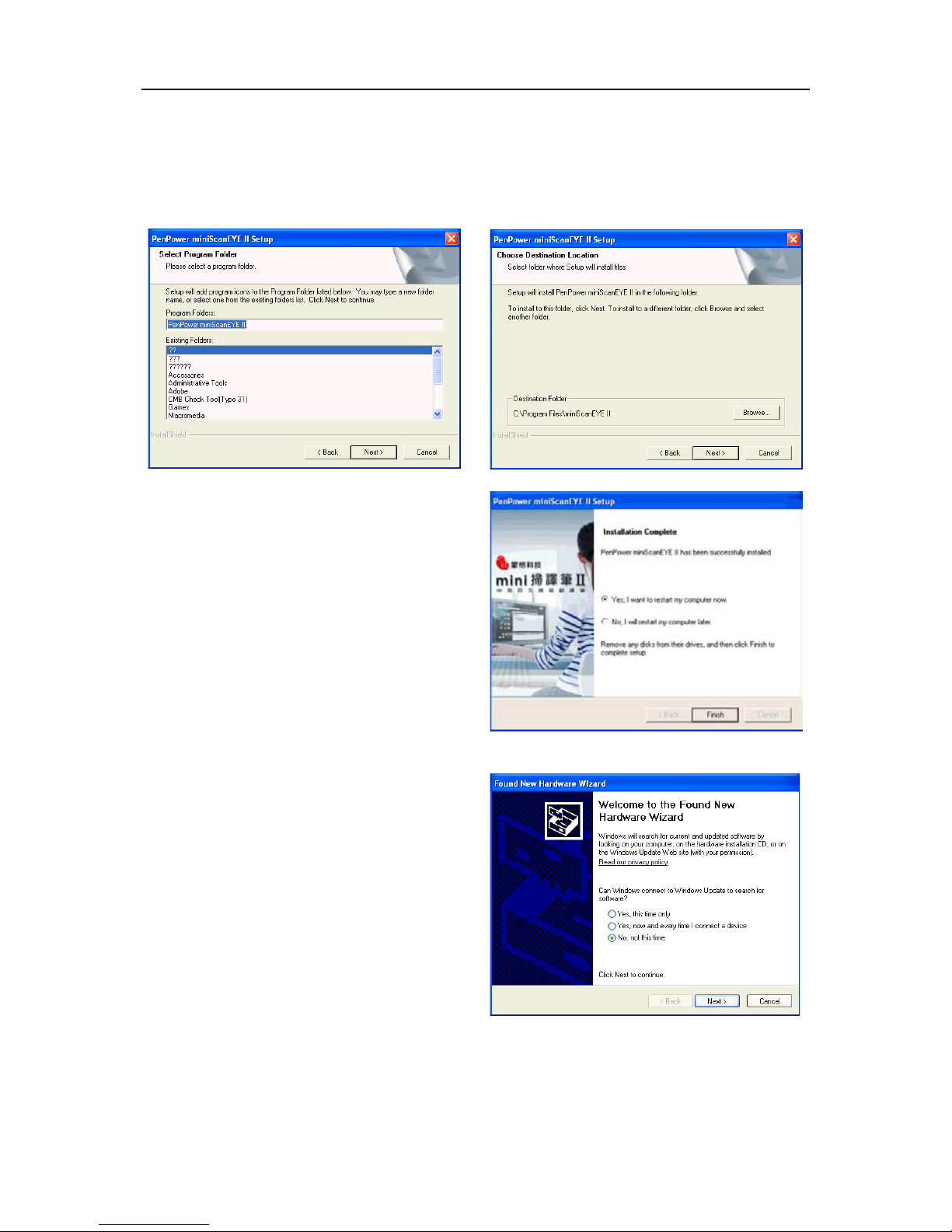
5. Choose the destination folder to install the software. This is usually left as default.
Click Next to continue.
6. Choose the folder that you want to install mini ScanEYE II to in Program Files. This
is usually left as default. Click Next to continue.
7. The installtion process will run and it
will prompt you to restart the computer
when the installtion process is nished.
Tick Yes, restart computer mow and
click on Finish to end the installation.
2.4 Hardware Installation
1. Plug in the mini ScanEYE II into your
computer’s USB port and a window
will appear, welcoming you to the
hardware installation wizard. Select
[No, not this time] and click Next to
continue.
Note: Some computers may shut down accidentally after connection. This is due to lack
of power to support several USB devices. To avoid this problem, connect your
mini ScanEYE and other USB devices to an extra-powered USB hub.
Table des matières
Autres manuels Penpower Technology Scanner

Penpower Technology
Penpower Technology WorldPenScan X Manuel utilisateur

Penpower Technology
Penpower Technology WorldPenScan Series Manuel utilisateur

Penpower Technology
Penpower Technology WorldPenScan Series Manuel utilisateur

Penpower Technology
Penpower Technology WorldPenScan Manuel utilisateur

Penpower Technology
Penpower Technology WorldPenScan Manuel utilisateur

Penpower Technology
Penpower Technology WorldPenScan Go Manuel utilisateur

Penpower Technology
Penpower Technology Super ScanEYE Manuel utilisateur


