
MicroNet SP3501AM Manuel utilisateur

User’s Manual
VDSL CO / CPE Modem
Model No.: SP3501AM/SP3501AS
http://www.micronet.info

Table of Contents
Chapter 1 Introduction................................................................................. 1
1.1Package Contents............................................................................ 1
1.2Key Features.................................................................................... 1
Chapter 2 Installation................................................................................... 3
2.1Hardware Installation........................................................................ 3
2.2Pre-installation Requirements.......................................................... 3
2.3Cabling Requirements...................................................................... 3
2.4Connecting the Modem.................................................................... 4
2.5Connecting the RJ-11/RJ-45 Ports................................................... 4
Chapter 3 Physical Description .................................................................. 6
3.1LED Definition .................................................................................. 6
3.2Modem Rear Connectors................................................................. 6
Chapter 4 Speed Configuration ................................................................. 7
4.1Fixed/Auto Speed Function...............................................................7
4.2Speed mode limitation...................................................................... 7
Chapter 5 Appendix..................................................................................... 8
5.1Cable Requirements......................................................................... 8
5.2Specifications................................................................................. 10
5.3Troubleshooting.............................................................................. 11
5.4Other Issues................................................................................... 12

Chapter 1 Introduction
Micronet SP3501AM / SP3501AS delivers cost-effective and high-
performance broadband access to multiunit building environments, such as
enterprise, campus, hospital, hotel, and telecom. With QAM-based 4-band
VDSL technology, the VDSL solution dramatically extends Ethernet and
supports 5M/15M/25Mbps symmetrical bandwidth over existing telephone-
grade wiring up to 1.9/1.3/0.8KM.
1.1 Package Contents
Prior to the installation of the device, please verify the following items are in
the package:
yVDSL Modem
¾SP3501AM VDSL CO Modem
¾SP3501AS VDSL CPE Modem
yQuick Installation Guide
yManual CD
yRJ-11 Cable
yRJ-45 Cable
yPower Adapter
1.2 Key Features
yCompliant with ETSI, ITU, ANSI standards
yCompliant with IEEE802.3 10BASE-T and IEEE802.3u 100BASE-TX
standards
ySupport 1 x RJ-11 VDSL port and 1 x RJ-11 Telephone port
ySupport 1 x RJ-45 Ethernet port of 10/100M
yQAM-based 4-band VDSL
yData rate up to symmetrical bandwidth of 25Mbps
yWiring range up to 1.9KM
1

yFixed/Auto speed function for VDSL link
yBuilt-in POTS/ISDN splitter (SP3501AM) for POTS/ISDN telephone
service
2

Chapter 2 Installation
2.1 Hardware Installation
This section describes how to install the Modem and establish network
connections. Users may install the Modem on any level surface. However,
please take note of the following minimum site requirements.
2.2 Pre-installation Requirements
Prior to the start of actual hardware installation, make sure users can provide
the right operating environment, including power requirements, sufficient
physical space, and proximity to other network devices that are to be
connected.
Verify the following installation requirements:
yPower requirements: DC 5V/1A or above.
yThe Modem should be located in a cool dry place with at least 10cm
of space at the front and back for ventilation purpose.
yPlace the Modem out of direct sunlight, and away from heat sources
or areas with a high amount of electromagnetic interference.
2.3 Cabling Requirements
Before making any connections to the Modem, note the following rules:
Connection Type Cable Requirements Maximum Length
Ethernet Port (RJ-45) y100 Mbps: Cat 5 UTP
y10 Mbps: Cat 3-4 UTP 100 meters max for MUX
or HUB to endpoint.
3
VDSL Port (RJ-11)
y24-26 Gauge phone wiring
yDo not recommend 28 or
above Gauge
y5M/5M: 1.9km
y15M/15M: 1.3km
y25M/M: 800m
2.4 Connecting the Modem
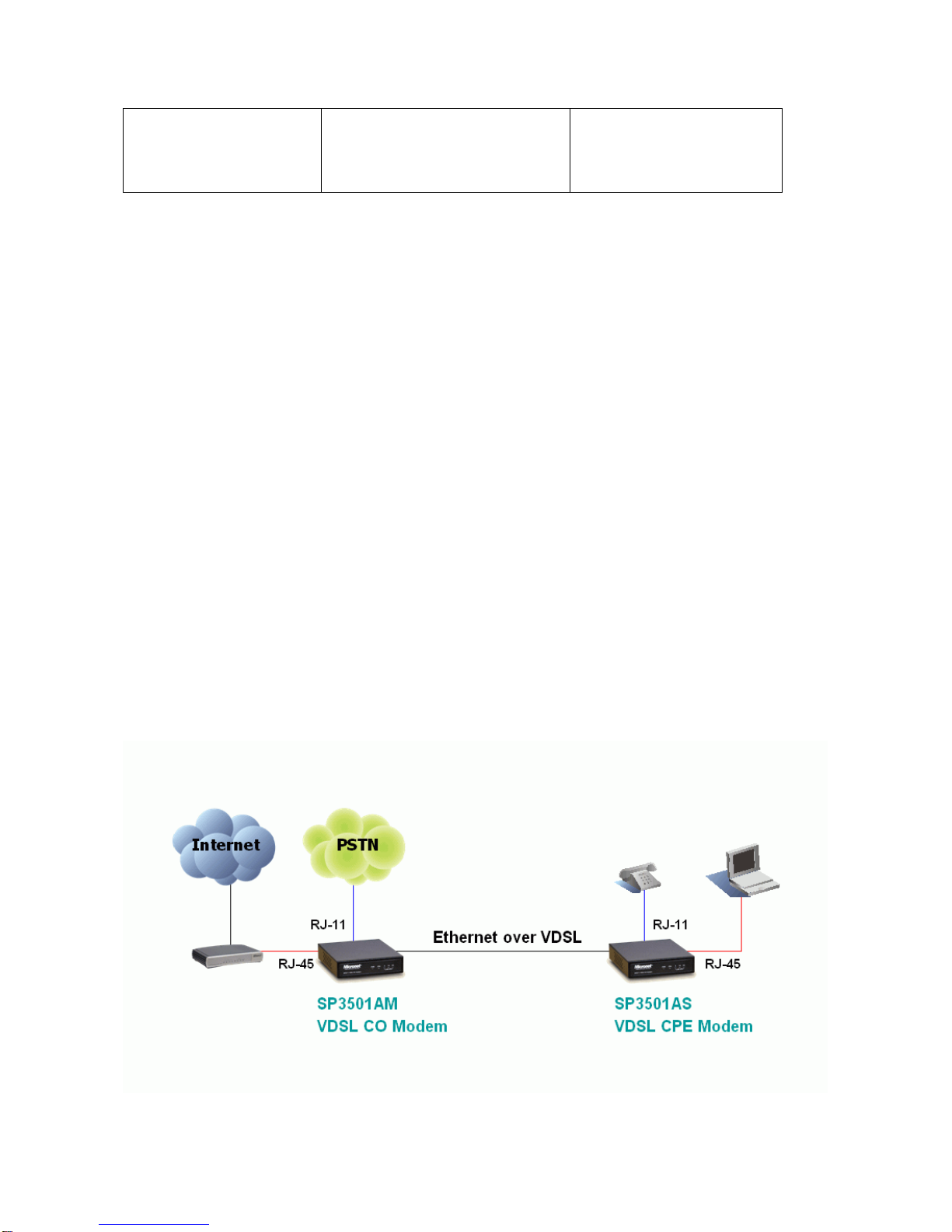
yThe Modem provides a single Ethernet port, which support connection
through Ethernet operation.
yNetwork devices attached to the Ethernet port must support auto-
negotiation, 10Base-T or 100Base-TX. Otherwise, the network device
must always operate at half duplex.
yThe RJ11 Line port is used to connect to the wall RJ-11 modular
socket (outlet), which is used to connect both master and slave
modem (Point to point solution).
yThe RJ11 Phone port of the Modem can be connected to a telephone
for users sharing the single telephone wire for making calls and
accessing the internet simultaneously.
2.5 Connecting the RJ-11/RJ-45 Ports
4

yThe Modem’s RJ-11 ports are easy-to-use and do not require
installation of additional wiring. Every RJ-11 modular phone jack in the
home can become a port on the LAN.
yNetworking devices can be installed on a single telephone wire that
can span within 1.9km or 800m (depend on speed) between the two
farthest points.
ySP3501AM/S Modem has embedded Splitter between every VDSL
side (Line) and POTS (Phone) side. It permits user to deliver
broadband service on the same lines as Plain Old Telephone Service
(POTS), PBX, ISDN traffic and VDSL Signal.
yWhen inserting a RJ-11 plug, be sure the tab on the plug clicks into
position to ensure that it is properly seated.
yDo not plug a RJ-11 phone jack connector into the Ethernet port (RJ-
45 port). This may damage the modem. Instead, use only twisted-pair
cables with RJ-45 connectors that conform to Ethernet standard.
yMake sure that the cables are all connected before powering on
devices.
5

Chapter 3 Physical Description
SP3501AM/SP3501AS front view
SP3501AM/SP3501AS rear view
3.1 LED Definition
LED Status Operation
PWR
(Power LED) Steady Green Device is powering on or reset ok
Steady Green Lights up steadily to show good
linkage
Eth
(Ethernet LED) Flashing Green Flashing to show data transmission
5/15/25
LINE SPD
(VDSL LED) Steady Green Lights up steadily to show good
linkage at 5M/15M/25Mbps
3.2 Modem Rear Connectors
Connectors Description Type
Line Connecting to the VDSL Modem via a RJ-11 cable RJ-11
Phone Connecting to the telephone, Fax or ISDN modem RJ-11
Ethernet Connecting to an Ethernet network device RJ-45
FG Frame ground can be connected to a ground bus bar
6

Chapter 4 Speed Configuration
4.1 Fixed/Auto Speed Function
SP3501AM/S is a 4-band VDSL solution which supports auto and manual
speed function and real plug & play. It can support 5M/15M/25M symmetrical
data service depend on installation environment.
If the cable length is unsure, then auto selection of the data speed at the
default setting is recommended. Power must be unplug before changing of
data speed, then power on and wait for VDSL to link again at the correct data
speed function.
For definitions of selectors, please refer to the following table:
At quick glance, it is easy to see that the DIP switch pin 1 is switch ON where
it is in auto-speed and that is also the default mode.
To set the data speed to 25Mbps simply switch ON pin 2 while the other pins
are in reset mode.
To change it to 15Mbps, switch ON the pin 3 while the other pins are in reset
mode and for 5Mbps switch on the pin 4 while other are in reset mode.
Remember that no two pins can be activated at the same time or it will result
in error and for data speed of 5Mbps.

Table shows the summary of DIP switch configuration.
DIP Switch Configuration
Note:
1. Don’t switch on or off all pins as it will make the VDSL modem functionless.
2. Before selecting the data speed, the power must be turned off for safety
purposes.
4.2 Speed mode limitation
y5M/5M mode within 1.9km (6333ft)
y15M/15M mode within 1.3km (4333ft)
y25M/25M mode within 800m (2666ft)
Ce manuel convient aux modèles suivants
1
Table des matières
Autres manuels MicroNet Modem


Manuels Modem populaires d'autres marques

Davicom
Davicom DM562AP Manuel utilisateur

EpiValley
EpiValley TATA indicom SXC-1080 Manuel utilisateur

Zte
Zte WiMAX Manuel utilisateur

Intelimax
Intelimax MA-2060 Manuel utilisateur

SMC Networks
SMC Networks D3CM1604V Manuel d'utilisation et d'entretien

Telstra
Telstra Wi-Fi 4G Advanced Pro X Manuel utilisateur


US Robotics
US Robotics 3453C Manuel utilisateur

MaxTech
MaxTech Plug & Play Internal Voice/FAX/Data/SVD... Manuel utilisateur

Zte
Zte MF823 Manuel utilisateur

Four-Faith
Four-Faith F1403 Manuel utilisateur

Sierra Wireless
Sierra Wireless AIRLINK MP595W Manuel utilisateur

Gemtek
Gemtek WiMAX WIXFBR-103 Manuel utilisateur