
Intelbras Smart TX 4020 Manuel utilisateur

User manual
TX 4020 Smart
English

TX 4020 Smart
Universal transmitter
Congratulations, you have just purchased a product with Intelbras quality and safety.
The TX 4020 Smart universal transmitter was developed to facilitate the installation of wired sensors in your daily life, as
it allows a wired sensor to communicate wirelessly with the alarm center. With digital and SMD assembly technology, it is
compatible with all Intelbras wired sensors and the majority of wired sensors available on the market.Works in FSK or OOK
modulation. Carefully read the information in this manual for correct use of the transmitter.

Care and safety
» LGPD – Data processing by Intelbras: Intelbras does not access, transfer, capture or carry out any type of processing of
personal data using this product.
» This product is intended for indoor and semi-open environments.
» Avoid installing the transmitter directly under metal surfaces to avoid changes in its operating characteristics.
» Please conrm that the installation location is stable and appropriate.
» Wireless communication technology, when exposed to environments with high power radiation, may suffer interference
and have its performance impaired, for example: locations close to TV towers, AM/FM radio stations, amateur radio
stations, etc.
» Do not expose the TX 4020 Smart magnetic sensor directly to sunlight, rain and humidity.
» For your safety, test the product and systems at least once a week. This is necessary due to changing environmental
conditions, electrical or electronic outages, and tampering. Take all necessary precautions for the safety and security of
your property.

Summary
1. Technical specications 5
2. Features 5
3. Product 6
4. Sensor opening 6
5. Registering the TX 4020 Smart transmitter 7
6. TX 4020 Smart transmitter supervision adjustment 7
7. Installation 8
7.1. Connection between TX 4020 Smart and wired sensor ...............................................9
7.2. Application ...............................................................................9
8. Battery 10
9. Test 10
10. Homologation 10
Warranty term 11

5
1. Technical specications
Operating voltage 3 V Lithium battery, model CR2032
RF Range 100 meters without barrier
Transmission frequency 433.92 MHz
Modulation Supervised (FSK) or unsupervised (OOK)
OOK baud rate 2 KBps (open source)
Anti jamming Against external interference
Installation environment Internal and semi-open
Operating Temperature -10°C to 50°C
Transmitter dimensions (W × H × D) 40×49.7×20.8 mm
2. Features
» Low battery indication;
» Easy installation;
» Key for registration;
» Supervised (FSK) or unsupervised (OOK);
» Long-lasting lithium battery;
» Transmission frequency 433.92 MHz.

6
3. Product
LD1
1
2
3
44
5
6
7
8
1. Transmitter cover
2. Light conductor (LED)
3. Base
4. Screw hole for xing
5. Battery contact
6. Registration button
7. Jumper (OOK/FSK)
8. Cable connector
4. Sensor opening
To access the TX 4020 Smart board for registration and battery replacement, simply push the hole and remove the cover.
This way the plate will be exposed and ready for handling.
Orifício para
abertura
Opening lid
Remove the board, then insert the battery (model CR2032), respecting polarity.
LD1
LD1
CR2032
3V
7
5. Registering the TX 4020 Smart transmitter
To register the TX 4020 Smart transmitter code in the alarm center, follow the procedure below:
Insert the LITHIUM 3 Vcc - CR 2032 battery, then enter the command to register the wireless device in the alarm center
that will be used (Check the procedure in the alarm center manual).Then press the CH1 key for approximately 2s, observing
whether the LED lights up, if the LED lights up it indicates that transmission has occurred, if it does not light up, check the
battery and repeat the procedure.
Note:
to register using the CH1 key, the transmitter must not be connected to the wired sensor. If the transmitter is already
connected to a wired sensor, simply trigger the sensor and observe whether the transmitter LED lights up, if the LED lights
up it indicates that there has been a transmission, if it does not light up, check the connection between the sensor and the
transmitter or check the battery and repeat the procedure.
» Low battery sensor: the TX 4020 Smart has a battery level meter, which measures the voltage and noties you of the
best time to change it. If the alarm center is Intelbras, the sensor low battery warning will be indicated on the product
panel. The sensor sends a low battery warning in both OOK and FSK modulations.
6. TX 4020 Smart transmitter supervision adjustment
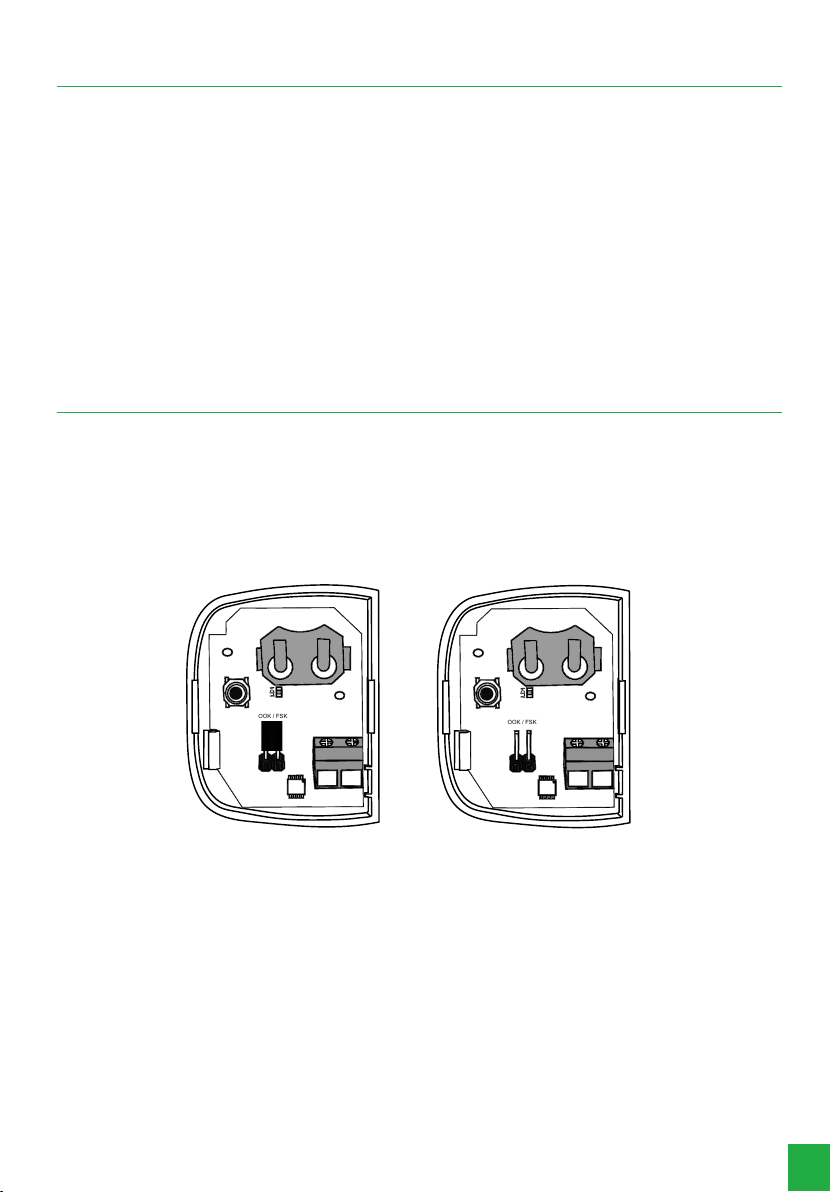
The TX 4020 Smart transmitter allows you to select between supervised (FSK) and unsupervised (OOK) modes. To switch
between supervision modes, simply remove the battery from the transmitter, open the OOK/FSK jumper indicated on the
board (and then replace the battery); once this is done, the transmitter will operate in supervised mode (FSK). Changing
from supervised mode (FSK) to unsupervised mode (OOK) is also simple, just remove the battery from the transmitter, close
the OOK/FSK jumper terminals again and replace the battery, once this is done the transmitter will return to operating in
the unsupervised mode (OOK). Factory default: unattended (OOK).
In FSK modulation, the transmitter transmits opening and closing and periodically performs supervision.
LD1
LD1
OOK / FSK
OOK / FSK
Com Jumper
OOK
Sem Jumper
FSK
With Jumper OOK Without FSK Jumper

8
7. Installation
The TX 4020 Smart transmitter can be xed using double-sided tape or a screw. If the option with double-sided tape is
chosen, clean the surface that will be in direct contact with the tape and then stick it to the base of the product. If you are
going to use screws, simply open the transmitter and use the holes for the screw located on the base of the product, as
shown in the following gure.
Instalação com parafuso Instalação com fita dupla face
Fita
Screw installation Installation with double-sided tape
To close the transmitter, position the cover on the base and press where the latches are located.
Trava
Trava
Lock
Lock

9
7.1. Connection between TX 4020 Smart and wired sensor
Use an external source to power the wired sensor, then connect the alarm output cable (normally closed (NC)) of the wired
sensor to the TX 4020 Smart universal transmitter terminal, as shown in the following gure:
LD1
TX 4020 SMART
SENSOR COM FIO
FONTE
ALARME
TX 4020 Smart
Wired sensor
Power
Alarm
Maximum distance 1 m
The maximum recommended wiring distance for installation between the TX 4020 Smart and the sensor connected to
it is 1 meter.
Note: the ohmic resistance of the cable is very low for this distance, so you can use a cable of your choice. Once this is
done, install the TX 4020 Smart transmitter in a location where it is fully protected against sunlight, rain and humidity.
7.2. Application
Central de alarme ou
receptor de RF
SENSOR DETECTANDO
TX 4020 SMART TRANSMITINDO
STATUS DO SENSOR
Sensor detecting
External source
Alarm center or RF
receiver
TX 4020 Smart transmitting
Sensor Status

10
8. Battery
Use only quality batteries, with the correct size for the device. The battery model must be CR2032, using one (1) battery
per transmitter.
This product has an internal battery. After their useful life, the batteries must be delivered to an authorized technical assistance
service provided by Intelbras or directly disposed of in an environmentally appropriate manner, avoiding environmental and health
impacts. If you prefer, the battery as well as other unused Intelbras brand electronics can be disposed of at any Green Eletron
collection point (electronic waste manager to which we are associated). In case of doubt about the reverse logistics process, please
contact us at (48) 2106-0006 or 0800 704 2767 (from Monday to Friday from 8 am to 8 pm and on Saturdays from 8 am to 6 pm)
9. Test
Once installed and in operation, check whether the alarm center is receiving triggering information from the wired sensor
installed on the TX 4020 Smart. If any failure occurs, it is necessary to reposition the transmitter or the alarm center. Make
sure to take all precautions and follow the installation recommendations to obtain the best operating performance of the
product.
10. Homologation
This equipment is not entitled to protection against harmful interference and may not cause interference to duly authorized
systems. For more information on the approved product, visit the website:
https://www.gov.br/anatel/pt-br.
Table des matières
Autres manuels Intelbras Émetteur


Manuels Émetteur populaires d'autres marques


Dejero
Dejero EnGo 3x Manuel utilisateur

Rosemount
Rosemount 4600 Manuel utilisateur

Speaka Professional
Speaka Professional 2342740 Manuel utilisateur

trubomat
trubomat GAB 1000 Manuel utilisateur

Teledyne Analytical Instruments
Teledyne Analytical Instruments LXT-380 Manuel utilisateur

Rondish
Rondish UT-11 Manuel utilisateur


