
IEMAI MAGIC-HT-L Manuel utilisateur

Print More Materials, All For Application
HIGH-TEMPERATURE SERIES
3D PRINTER
MAGIC-HT-L
Operating Instructions
www.iemai3d.com
* Please read this manual carefully before starting to operate.
This device is a Class A product. Use in a general indoor environment
may cause radio interference and therefore requires the user to take
appropriate protective measures.

Print More Materials, All For Application
The contents of this operating instructions may be updated periodically. Scan the QR code or visit the
link below to get the latest version.
www.iemai3d.com/index.php/download/

Print More Materials, All For Application
Content
1.Overview..................................................................................................................................................................... 1
1.1 Machine Overview..............................................................................................................................................1
1.2 Precautions..........................................................................................................................................................2
1.3 Safety................................................................................................................................................................... 3
2. Detailed Parameter...................................................................................................................................................... 4
2.1. Specification.......................................................................................................................................................4
2.2 Device Layout..................................................................................................................................................... 6
2.3 Interactive Interface............................................................................................................................................8
3.Device Usage............................................................................................................................................................... 12
3.1 Unboxing for The First Time ............................................................................................................................12
3.2 Hardware Check............................................................................................................................................... 13
4. Print Operation...........................................................................................................................................................14
4.1 Use of The Printing Platform........................................................................................................................... 14
4.2 How to Calibrate...............................................................................................................................................15
4.3 Unload Filament............................................................................................................................................... 16
4.4 Start Printing..................................................................................................................................................... 18
5. Function Introduction ................................................................................................................................................ 19
5.1 Power Failure Recovery....................................................................................................................................19
5.2 Filament Absent Warning................................................................................................................................ 19
5.3 Temperature Setting of The Constant Temperature Chamber....................................................................20
5.3 Model Removal .................................................................................................................................................21
5.5 PEEK Material Printing Precautions.................................................................................................................22
5.6 PC-based WIFI LAN Control............................................................................................................................23
6. Maintenance and Care.............................................................................................................................................. 24
6.1 Maintenance of Linear Guide and Ball Screw ................................................................................................ 24
6.2 Adjustment of Belt Looseness.........................................................................................................................25
6.3 Dust Removal from Electrical Box Fans.......................................................................................................... 26
6.4 Nozzle Maintenance ........................................................................................................................................ 27
6.5 Equal Height Adjustment for Dual Print Heads.............................................................................................29
6.6 Dual Print Head Nozzle Spacing Adjustment Method................................................................................. 30
6.7 Print Head Disassembly and Maintenance.................................................................................................... 31
6.8 Steps to Disassemble The Nozzle ...................................................................................................................32
7. Common Problems and Their Solutions..................................................................................................................33
7.1 Movement.........................................................................................................................................................33
7.2 Temperature..................................................................................................................................................... 33
7.3 Print....................................................................................................................................................................34
7.4 Clean Up Carbon Blockage ............................................................................................................................. 34
8. Appendix:.................................................................................................................................................................36
Appendix A..............................................................................................................................................................36
Appendix B..............................................................................................................................................................37

Print More Materials, All For Application
1
1.Overview
1.1 Machine Overview
IEMAI high-performance 3D printer MAGIC-HT-L is a 3D printing device based on the principle
of fused filament deposition (FFF) technology, with a printing temperature of up to 450°C, a hot bed
temperature of 150°C, and a chamber temperature of 90°C. It supports most polymer 3D printing
materials on the market, including PEEK, PEKK, PPSU, PEI 1010/ 9085 and other high-performance
materials, nylon, PC, ABS, PETG, ASA, TPU and other engineering materials, PLA class of
general-purpose materials, as well as composite reinforcement materials of the above materials
(carbon fiber, glass fiber, flame retardant, anti-static, etc.).
MAGIC-H- L is equipped with dual print heads that can support the printing of support materials,
including water-soluble material PVA, limonene-soluble material HIPS, easy-peel support material
and high-temperature resistant support material. Our modular design, such as the printhead and the
platform, can be disassembled easily, creating conditions for easy maintenance.

Print More Materials, All For Application
2
1.2 Precautions
First of all, thank you for choosing IEMAI 3D Printer!
This device is a Professional equipment, please read this manual carefully before starting to use,
this manual contains important information about the installation, operation, maintenance, and
common problems of the 3D printer, the company is not responsible for all losses caused by violation
of the cautions and operating procedures given in this manual。
Consumables: Please use the filament provided by our company or the third-party filament of
official authorized brand or choose the high-quality filament provided by other regular filament
manufacturers, and users should be responsible for the loss caused by using low-quality filament.
Please keep the consumables sealed and moisture-proof if not in use for a long time; please bake and
dry them in advance before using them again.
Software: Please use a 64-bit system with Windows 7 or above to run the software, more than 4G
of RAM and more than 1G of GPU, please use a computer with a higher configuration if possible.
Installation Site Requirements: Installation Site≥1200*1300*1200mm (L*W*H)。
Installation Power Requirements:200~250 V, 50~60 Hz, 2500w,Electric cable 1.5 m2 or more.
Operating Environment: 15-30°C, 10-90% Relative Humidity, non-condensation
Storage Environment: 25-55°C, 10-90% Relative Humidity, non-condensation

Print More Materials, All For Application
3
1.3 Safety
The device has a specialized motion structure, control system and electrical control parts, users
need to pay careful attention to the safety label when using it to prevent burns, pinching, electric
shock, or other safety problems.
The maximum temperature of the print head of this equipment can reach 450°C,
its heating is strictly prohibited to touch
The maximum temperature of the printing platform of this equipment can reach
150 °C, its heating is strictly prohibited to touch
The maximum temperature of the chamber of this equipment can reach 90°C,
and it is strictly forbidden to touch it when it is heated.
Ensure that the power supply grounding terminal is well grounded to prevent the
printer from not working properly or posing a risk of electric shock
Do not disassemble the case without permission, be careful of electric shock
When the printer is working, it is forbidden to move in the printing area to
prevent collision, belt turning in, etc.

Print More Materials, All For Application
4
2. Detailed Parameter
2.1. Specification

Print More Materials, All For Application
5
Print More Materials, All For Application
6
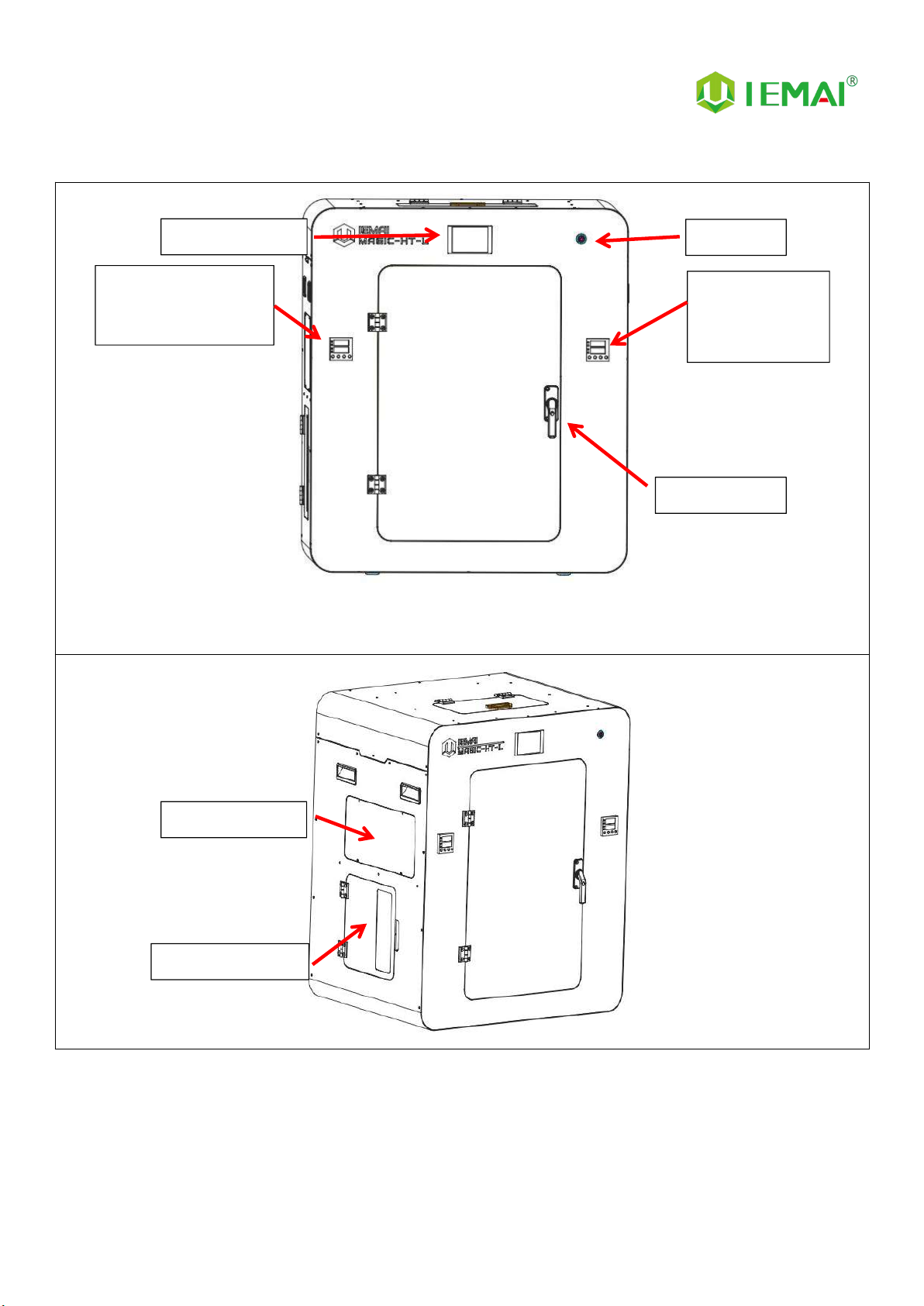
2.2 Device Layout
Switch
Control Panel
Left Chamber
Temperature
Controller
Door Handle
Left Chamber
Left Filament Box
Right Chamber
Temperature
Controller

Print More Materials, All For Application
7
Right Chamber
SD Card
USB Port
Right Filament
Box
Motherboard Window
Power Input
Switch
Top Window
Table des matières
Autres manuels IEMAI Imprimante 3D


