
Hall Technologies DSCV2-70-TX-UK Manuel utilisateur

Hall Technologies June 3, 2022 Page 1 of 14
!
!
!
Hall Technologies • 1234 Lakeshore Dr Suite #150 Coppell, TX 75019 • halltechav.com
DSCV2-70-TX-UK
4K UHD In-Wall Transmitter with USB host and CEC Triggering
User Manual
Version: V1.0.0

Hall Technologies June 3, 2022 Page 2 of 14
Important Safety Instructions
1. Do not expose this apparatus to rain, moisture, dripping or splashing and that
no objects filled with liquids, such as vases, shall be placed on the
apparatus.
2. Do not install or place this unit in a bookcase, built-in cabinet or in another
confined space. Ensure the unit is well ventilated.
3. To prevent risk of electric shock or fire hazard due to overheating, do not
obstruct the unit’s ventilation openings with newspapers, tablecloths,
curtains, and similar items.
4. Do not install near any heat sources such as radiators, heat registers, stoves,
or other apparatus (including amplifiers) that produce heat.
5. Do not place sources of naked flames, such as lighted candles, on the unit.
6. Clean this apparatus only with dry cloth.
7. Unplug this apparatus during lightning storms or when unused for long
periods of time.
8. Protect the power cord from being walked on or pinched particularly at
plugs.
9. Only use attachments / accessories specified by the manufacturer.
10. Refer all servicing to qualified service personnel.

Hall Technologies June 3, 2022 Page 3 of 14
Table of Contents
Introduction ............................................................................................................................... 4
Overview ......................................................................................................................... 4
Features .......................................................................................................................... 4
Package Contents .......................................................................................................... 5
Specifications ................................................................................................................. 6
Panel Description ........................................................................................................... 8
Front Panel .......................................................................................................... 8
Rear Panel ........................................................................................................... 9
Wiring ....................................................................................................................................... 11
Automatic Switching ............................................................................................................... 12
Device Control ......................................................................................................................... 12
!

Hall Technologies June 3, 2022 Page 4 of 14
Introduction
Overview
This product is a 3 x 1 auto switching HDBaseT 2.0 transmitter that supports long distance
transport of HDMI, USB-C and high-speed USB 2.0 signals up to 40m/131ft using a Cat
5e/6/6a/7 cable. It is 4K compatible with a max resolution of 4K@60Hz/4:2:0 8bit deep color.
The PoH feature enables the transmitter to be powered by an HDBT receiver.
The transmitter allows you to automate the display power ON by using pre-loaded RS232
commands whenever a video signal is introduced to the system. It will also turn the display
power OFF after a specified amount of time has passed when no video signal is present. It gives
you the ability to turn the display ON or OFF as well and switch from one input to another
manually using the control buttons on the transmitter panel.
This product is ideal for situations where USB must be extended alongside HDMI for display
interactivity for items such as interactive whiteboards or projectors.
Note: The transmitter must be used with an HDBaseT 2.0 receiver (e.g., DSCV-70-RX, sold
separately) to complete the extension circuit.
Features
! Two HDMI inputs, One USB-C input and one HDBT output
! Transmits 4K@60Hz (YUV 4:2:0 color sub-sampling) up to 40m/131ft and 1080P@60Hz
signal up to 70m/230ft via a Cat 6a/7 cable
! Transmits 4K@60Hz (YUV 4:2:0 color sub-sampling) signal up to 35m/115ft and
1080P@60Hz signal up to 60m/197ft via a Cat 5e/6 cable
! Supports automatic switching
! Additional analog audio input pass-through allows for audio distribution to the HDBT receiver
side
! High-speed USB 2.0 pass through over HDBT up to 70m/230ft
! PoH capable – can be powered by receiver with PSE module
! Firmware upgrade through Micro USB port

Hall Technologies June 3, 2022 Page 5 of 14
Package Contents
! 1 x Transmitter
! 1 x Wall Plate Plastic Panel (2‐Gang UK, with Screws)
! 1 x USB B to A Cable
! 1 x Phoenix Male Connector (3.5mm, 4 Pins)
! 4 x Mounting Screws
! 1 x User Manual

Hall Technologies June 3, 2022 Page 6 of 14
Specifications
Technical
Input/Output Port
2 x HDMI IN, 1 x USB-C, 1 x AUDIO IN (Unbalanced stereo
3.5mm), 1 x USB HOST, 1 x HDBT OUT,
1 x RS232 (4-Pin 3.5mm Phoenix connector),
1 x UPDATE (Micro USB, covered by the front panel)
Input Video Signal
HDMI (4K@60Hz YUV 4:2:0, HDCP 2.2), USB-C DP Alt mode
Output Video Signal
HDBT 2.0
Input/Output Resolution
Supported
HDMI:
VESA:
800x6008, 1024x7688, 1280x7208, 1280x7688,
1280x8008, 1280x9608, 1280x10248, 1360x7688,
1366x7688, 1440x9008, 1600x9008, 1600x12008,
1680x10508, 1920x10808, 1920x12008, 2560x14408,
2560x16008
SMPTE:
3840x2160P2,5,8(YUV4:2:0), 4096x2160P2,5,8(YUV4:2:0)
USB-C: Same as above
1 = at 23.98 Hz, 2 = at 24 Hz, 3 = at 25 Hz, 4 = at 29.97 Hz, 5 = at
30 Hz, 6 = at 50 Hz, 7 = at 59.94 Hz, 8 = 60 Hz
Audio Format
HDMI/USB-C: Fully supports audio formats in HDMI 2.0
specification, including PCM 2.0/5.1/7.1, Dolby TrueHD, Dolby
Atmos, DTS-HD Master Audio and DTS:X
AUDIO IN: Stereo
Maximum Pixel Clock
340MHz
Maximum Data Rate
10.2Gbps
Control Method
Auto Switching, Front panel buttons, API commands
General
Operating Temperature
0°C to 45°C (32°F to 113°F)
Storage Temperature
-20°C to 70°C (-4°F to 158°F)
Humidity
10% to 90%, non-condensing

Hall Technologies June 3, 2022 Page 7 of 14
General
ESD Protection
Human-body Model:
±8kV (Air-gap discharge)/
±4kV (Contact discharge)
Power Supply
PoH, powered by connected receiver with PSE module; or
local power supply through the 12V phoenix connector
Power Consumption (Max)
7.8W
Device Dimension (WxHxD)
146mm x 38.5mm x 86mm/5.75” x 1.52” x 3.39”
Product Weight
0.3kg/0.66lbs
Transmission Distance
Note: T568B straight-through Category cable is recommended.
Cable Type
Range
Supported Video
Cat 5e/6
60m/197ft
1080P@60 36bpp
Cat 6a/7
70m/230ft
Cat 5e/6
35m/115ft
4K@30Hz 4:4:4 24bpp
4K@60 4:2:0 24bpp
Cat 6a/7
40m/131ft
Hall Technologies June 3, 2022 Page 8 of 14
Panel Description
Front Panel
ID
Name
Description
1&2
HDMI IN 1-2
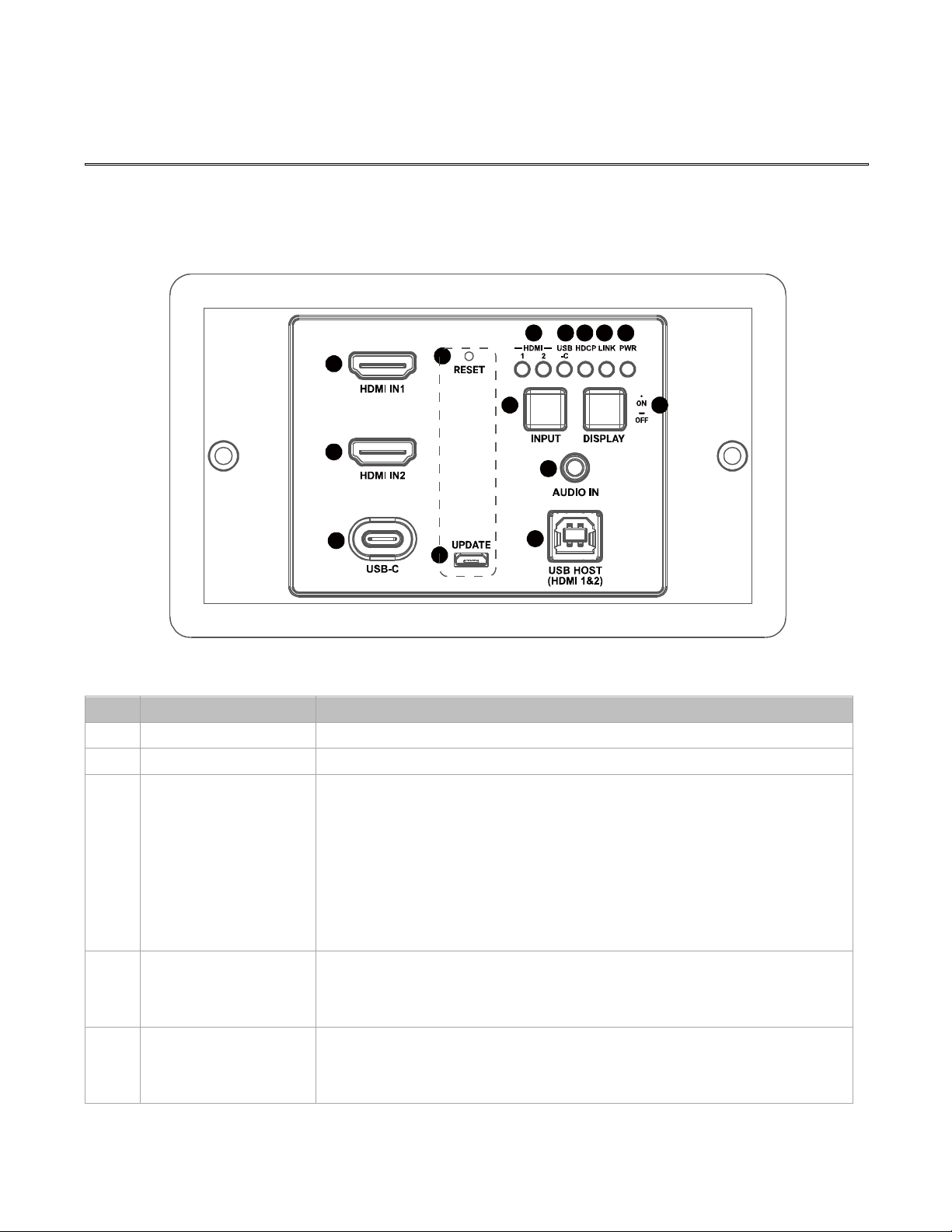
HDMI inputs 1&2. Connect to HDMI sources.
3
USB-C
USB-C input. Connect to a USB-C source.
4
RESET
Use this button to reset device.
When the transmitter is powered on, use a pointed stylus to
hold down this button for five or more seconds and then
release, the transmitter will reboot and restore to its factory
defaults.
Note: You may need to detach the plastic front panel from the
device to have access to this button.
5
UPDATE
Micro USB port for firmware update or RS232 serial control.
Note: You may need to detach the plastic front panel from the
device to have access to this port.
6
HDMI LEDs (1-2)
! On: Corresponding HDMI input signal is being transmitted.
! Off: No HDMI signal is being transmitted or signal is
unstable.
1
2
3
678910
11
13
14
5
4
12
Hall Technologies June 3, 2022 Page 9 of 14
ID
Name
Description
7
USB-C LED
! On: Corresponding USB-C input signal is being transmitted.
! Off: No USB-C signal is being transmitted or signal is
unstable.
8
HDCP LED
! On: Video signal is being transmitted.
! Off: No video signal is being transmitted.
9
LINK LED
! On: HDBT link is normal.
! Off/Blinking: No HDBT link or link error.
10
POWER LED
! On: The transmitter is powered on.
! Off: The transmitter is powered off.
11
INPUT Selection
Button
Input selection button. Press this button to select input among
HDMI and USB-C sources.
12
DISPLAY ON/OFF
Button
Display On/Off button.
! Display On: Short press to turn on the display device.
! Display Off: Hold press for at least 3 seconds to turn off the
display device.
13
AUDIO IN
Pass-through audio input. Connect to an audio source.
14
USB HOST
(HDMI 1&2)
USB-B input. Connect to a USB host device.
Rear Panel
15
16

Hall Technologies June 3, 2022 Page 10 of 14
ID
Name
Description
15
HDBT OUT
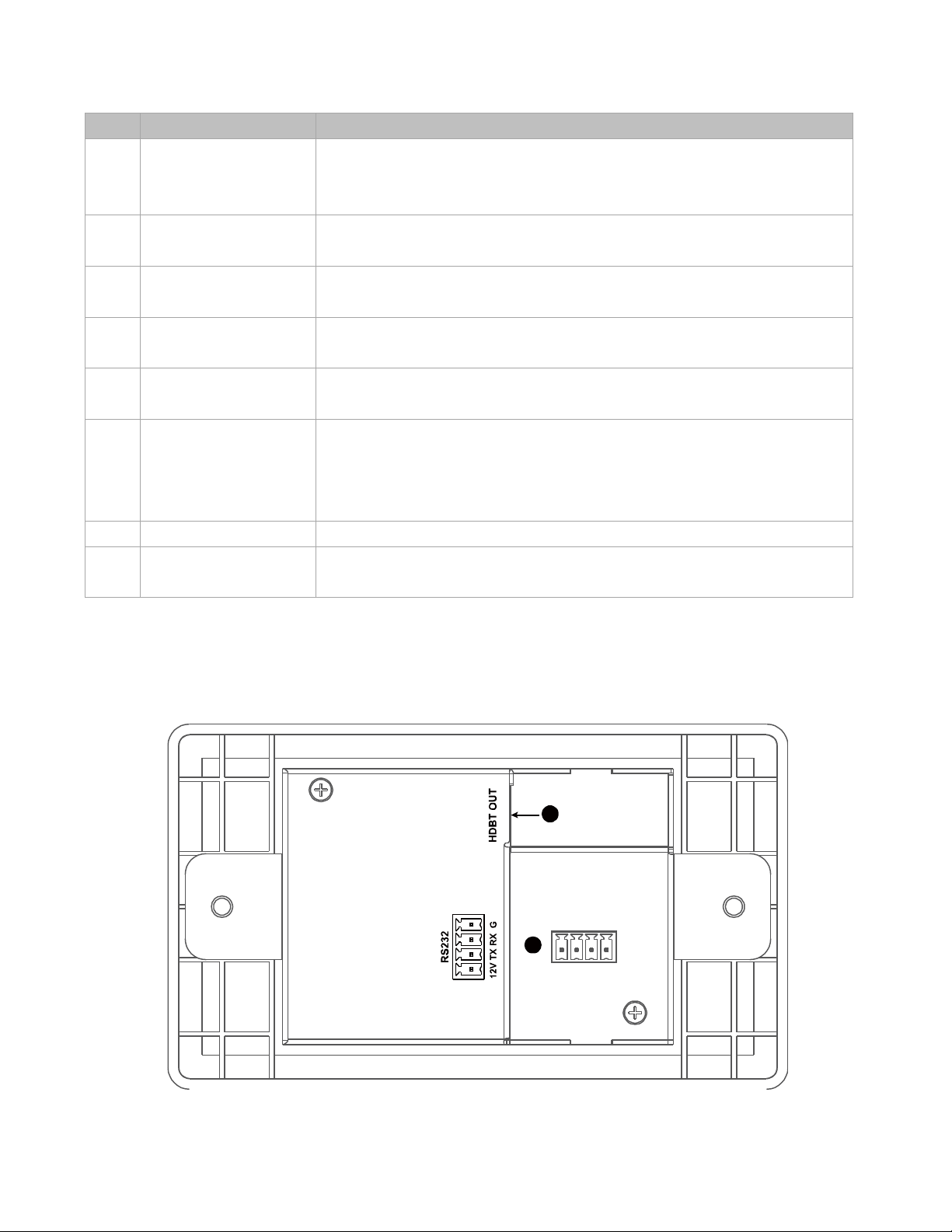
HDBaseT Output. Connect to an HDBT receiver.
16
RS232
! Pins TX, RX and G are used to connect to a third-party device for
controlling this transmitter.
! Pins 12V and G are used for providing 12V power (max 5W) to the
third-party device or for connecting a local 12V power adapter.
Table des matières
Autres manuels Hall Technologies Émetteur


Manuels Émetteur populaires d'autres marques


Dejero
Dejero EnGo 3x Manuel utilisateur

Rosemount
Rosemount 4600 Manuel utilisateur

Speaka Professional
Speaka Professional 2342740 Manuel utilisateur

trubomat
trubomat GAB 1000 Manuel utilisateur

Teledyne Analytical Instruments
Teledyne Analytical Instruments LXT-380 Manuel utilisateur

Rondish
Rondish UT-11 Manuel utilisateur


