
Ancona AN-2340 Manuel utilisateur

Use & Care Manual
AN-2340
27/01/2015 MAAN-2340-01

ENGLISH
Use & Care Manual
Table of Contents
Page
Safety Precautions ................................................... 4
Safety Instructions ................................................... 5
Safety for the Oven .................................................... 5
Features of your Oven ............................................. 6
The Control Panels ................................................... 7
Electronic programmer ............................................... 7
General Oven Information ....................................... 7
Oven Modes .............................................................. 8
General Oven Tips .................................................... 9
Preheating the Oven .................................................. 9
Operational Suggestions ............................................ 9
Utensils ...................................................................... 9
Oven Condensation and Temperature ....................... 9
High Altitude Baking ................................................... 9
120/240 vs. 120/208 Volt Connection ......................... 9
Oven Racks ................................................................ 9
Oven Extendable Racks (Optional) .......................... 10
Control Setting ....................................................... 11
Bake Tips and Techniques ..................................... 12
Bake Chart ............................................................... 12
Convection Bake Tips and Techniques ................ 13
Convection Bake Chart ............................................ 14
Convection Broil Tips and Techniques ................. 15
Convection Broil Chart ............................................. 15
Broil Tips and Techniques ..................................... 16
Broil Chart ................................................................ 16
General Oven Care ................................................. 17
How to Use the Oven Cleaning Chart ....................... 17
Cleaning Chart ......................................................... 17
Oven Finishes / Cleaning Methods ....................... 18
Do-it-Yourself Maintenance Oven Door Removal .....
.................................................................................. 19
Replacing an Oven Light ....................................... 20
To Replace a Light Bulb ............................................ 20
Solving Baking Problems ...................................... 21
WARRANTY ............................................................. 23
2

ENGLISH
Use & Care Manual
3
General Appliance and Oven
Safety Precautions
3

ENGLISH
Use & Care Manual
General Appliance and Oven
Safety Instructions
Safety for the Oven
arm
t s
cause
E
this list of
always t
instructions in i
ventilation to the
after self-cleaning the
Other surfaces of the appliance may become hot
enough to cause burns - among these surfaces are
(identification of surfaces - for example, oven vent
openings and surfaces near these openings, oven
doors, and windows of oven doors).
4

ENGLISH
Use & Care Manual
Features of your Oven
Cooling Vents Halogen Light Broil Element
Control Panel
Halogen Light
Convection Fan
and Element
(not visible)
Door Gasket
Bake Element
(not visible)
Model and
Serial Plate
Rack Levels
1
2
3
4
Extendable Rack (optional)
Pan Stop Bottom Frame
Stop
Slide Arm
Handle
Oven Rack Back
Oven Rack Front
Broiler pan Racks
Broiler Pan
A
T
O
U
(optional)
5

ENGLISH
Use & Care Manual
The Control Panels
General Oven Information
Convection Fan
Component Cooling Fan
Electronic programmer
The programmer operates in the 12 hour mode.
A minute minder
B duration
C end time
D manual
E display time down
F display time up
NOTES
When using buttons E or F, the displayed time is
automatically.
All programmes are set approx 1 second after adjusting
the settings.
Warning lights
– Yellow: W/L lights up when the selector switch
knob is out of position “0”.
– Red: W/L lights up when the thermostat
switches on the oven top and sole
elements, the grill element or the round
one (hot-air).
6

ENGLISH
Use & Care Manual
Oven Modes
Convection Broil Bake
Convection Bake with ring heating
element
Broil
Thaw
No heating element used, only the convection fan is
used to defrost foods.
Down Convection Bake
Bottom convection cooking; the bottom element
and the fan are on
and pastry.
Down Bake
Bottom conventional system; heating comes from the
bottom element only. Use this mode to complete
the cooking.
Convection Bake
Convection Bake uses the top element, bottom
element and convection fan
7
ENGLISH
Use & Care Manual
General Oven Tips
Preheating the Oven
Operational Suggestions
Utensils
Oven Condensation and Temperature
High Altitude Baking
120/240 vs. 120/208 Volt Connection
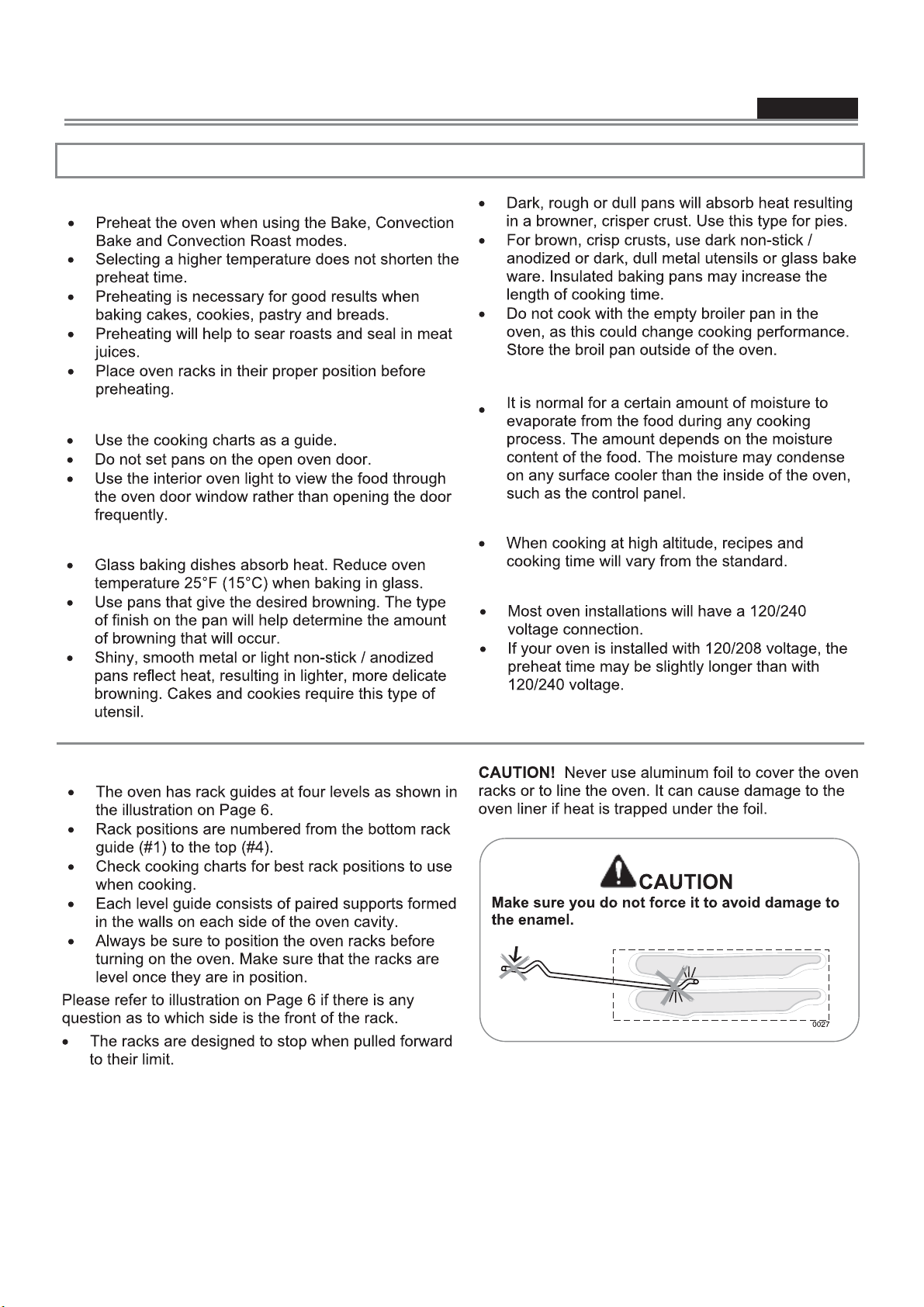
Oven Racks
8
ENGLISH
Use & Care Manual
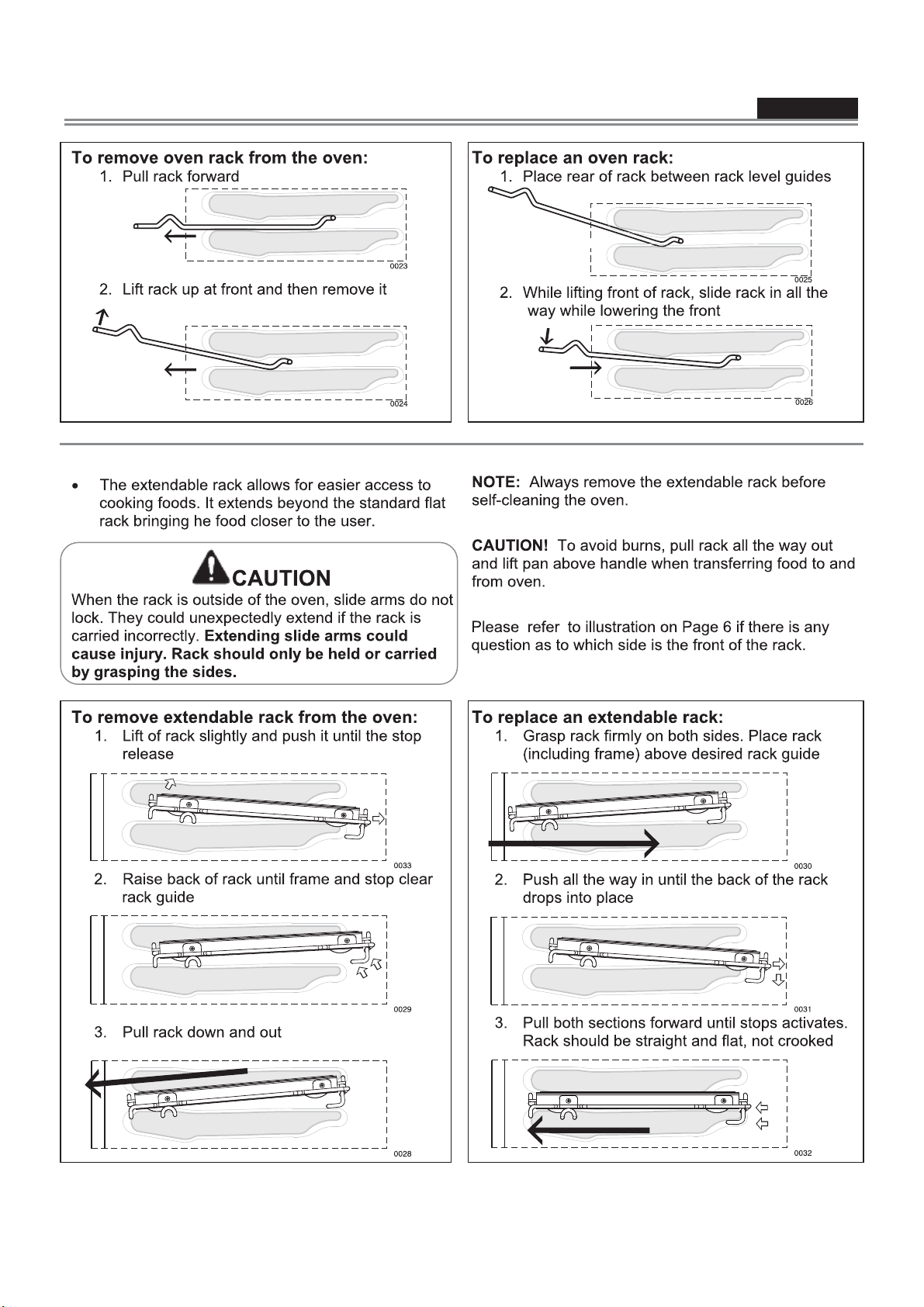
Oven Extendable Racks (Optional)
9

ENGLISH
Use & Care Manual
ACTION RESULT
To set time of day
Switch on Electricity supply.
Press in button D then adjust the time using buttons E and F. Correct time displayed.
Set Minute Minder
Press button A. The display reads 0.00.
Using buttons E and F adjust to the time interval required.
The display reads the time interval required.
At the end of the timed period the beeper will sound. The bleeper will
sound.
The bleeper is cancelled by pressing any of the buttons.
At any time during the countdown, the time remaining can be
displayed by pressing button A.
The beeper is cancelled.
Full Auto Cooking
Set the oven to the required function and temperature.
Press button B and set the duration - the length of time you wish the
food to cook - using buttons E and F. The word AUTO will appear.
Press button C to set the end time - the time you wish the food to
The oven will now automatically switch itself on, cook, and switch off
at the required time.
At the end of the cooking period, the beeper will sound.
Turn control knobs to the 0 position and press button D twice. The beeper stops and the programmer is returned to the manual
mode.
To check remaining Cooking Duration
During any auto cooking you can check the remaining cooking time
by pressing button B. The time remaining is displayed.
To check the cooking end
During any auto cooking you can check the time the oven is going to
switch OFF by pressing button C.
Semi automatic cooking using Duration
Turn the oven to the required function and temperature.
Press button B and set the duration - the length of time you wish the
food to cook – using buttons E and F.
The word AUTO will appear, and the cooking symbol will
stay on. The oven will be on until the end of the duration time
whereupon the bleeper will sound.
Turn control knobs to the 0 position and press button D twice. The beeper stops and the programmer is returned to the manual
mode.
Semi automatic cooking using End Time
Turn the oven to the required function and temperature.
Press button C and using buttons E and F adjust the time at which
The word AUTO will appear, and the cooking symbol will
stay on. The oven will be on until the end of the duration time
whereupon the beeper will sound.
Turn control knobs to the 0 position and press button D twice. The beeper stops and the programmer is returned to the manual
mode.
To cancel a program
Press button B and adjust the time displayed using button E to read:
00.00.
Turn control knobs to the 0 position and press button D.
The program will be automatically cancelled.
Control Setting
10
Autres manuels pour AN-2340
1
Table des matières
Autres manuels Ancona Four


