
Amazon B005EJH6Z4 Manuel utilisateur

Wireless Mouse
Souris sans Fil
Funk-Maus
Mouse Wireless
Ratón Inalámbrico
Draadloze Muis
ワイヤレスマウス
B005EJH6Z4, B07TCQVDQ4, B07TCQVDQ7, B01MYU6XSB,
B01N27QVP7, B01N9C2PD3, B01MZZR0PV, B01NADN0Q1

English. . . . . . . . . . . . . . . . . . . . . . . . . . 3
Français . . . . . . . . . . . . . . . . . . . . . . . . 17
Deutsch . . . . . . . . . . . . . . . . . . . . . . . . 30
Italiano . . . . . . . . . . . . . . . . . . . . . . . . 45
Español . . . . . . . . . . . . . . . . . . . . . . . . 57
Nederlands . . . . . . . . . . . . . . . . . . . . . 69
日本語
. . . . . . . . . . . . . . . . . . . . . . . . 81

EN
3
Table of Contents
1. Important Safeguards ���������������������������������������������� 4
2. Symbols Explanation ������������������������������������������������ 4
3. Battery Warnings ������������������������������������������������������ 5
4. Product Description �������������������������������������������������� 8
5. Before First Use ��������������������������������������������������������� 9
6. Installing batteries/Pairing ������������������������������������� 9
7. Operation ���������������������������������������������������������������� 10
8. Cleaning and Maintenance ������������������������������������� 11
8�1 Cleaning ������������������������������������������������������ 11
8�2 Storage �������������������������������������������������������� 11
9. FCC Compliance Statement ������������������������������������ 12
10. Canada IC Notice ���������������������������������������������������� 13
11.SimpliedEUDeclarationofConformity ������������ 14
12. Disposal (for Europe only) ������������������������������������ 14
13. Battery Disposal ���������������������������������������������������� 15
14.Specications ���������������������������������������������������������� 15
15. Feedback and Help ������������������������������������������������ 16

EN
4
1. Important Safeguards
Read these instructions carefully and retain them for
future use� If this product is passed to a third party, then
these instructions must be included�
CAUTION
Avoid looking directly into the sensor�
2. Symbols Explanation
This symbol stands for “Conformité Européenne”,
which declares “Conformity with EU directives,
regulations and applicable standards”� With the
CE-marking, the manufacturer conrms that
this product complies with applicable European
directives and regulations�

EN
5
This symbol stands for “United Kingdom
Conformity Assessed”� With the UKCA-marking,
the manufacturer conrms that this product
complies with applicable regulations and
standards within Great Britain�
3. Battery Warnings
DANGER Risk of explosion!
Risk of explosion if the battery is replaced by an incorrect type�
NOTICE
2 AAA batteries required (included)�
»When used correctly, primary batteries provide a safe and
dependable source of portable power� However, misuse or abuse
may result in leakage, re, or rupture.
»Always take care to install your batteries correctly observing
the “+” and “-” marks on the battery and the product� Batteries
that are incorrectly placed into some equipment may be short-
circuited, or charged� This can result in a rapid temperature rise
causing venting, leakage, rupture and personal injury�
»Always replace the whole set of batteries at one time, taking

EN
6
care not to mix old and new ones or batteries of dierent types.
When batteries of dierent brand or type are used together, or
new and old batteries are used together, some batteries may
be over-discharged due to a dierence of voltage or capacity.
This can result in venting, leakage, and rupture and may cause
personal injury�
»Remove discharged batteries from product promptly to avoid
possible damage from leakage� When discharged batteries are
kept in the product for a long time, electrolyte leakage may
occur causing damage to the product and/or personal injury�
»Never dispose of batteries in re. When batteries are disposed
of in re, the heat build-up may cause rupture and personal
injury� Do not incinerate batteries except for approved disposal
in a controlled incinerator�
»Never attempt to recharge primary batteries� Attempting to
charge a non-rechargeable (primary) battery may cause internal
gas and/or heat generation resulting in venting, leakage,
rupture and personal injury�
»Never short circuit batteries as this may lead to high
temperatures, leakage, or rupture� When the positive (+) and
negative (–) terminals of a battery are in electrical contact with
each other, the battery becomes short-circuited� This may result
in venting, leakage, rupture and personal injury�
»Never heat batteries in order to revive them� When a battery is

EN
7
exposed to heat, venting, leakage and rupture may occur and
cause personal injury�
»Remember to switch o products after use. A battery that has
been partially or completely exhausted may be more prone to
leak than one that is unused�
»Never attempt to disassemble, crush, puncture or open
batteries� Such abuse may result in venting, leakage, and
rupture, and cause personal injury�
»Keep batteries out of the reach of children, especially small
batteries that could be easily ingested�
»Immediately seek medical attention if a cell or battery has been
swallowed� Also, contact your local poison control center�

EN
8
4. Product Description
OFF
ON
A
B
C
D
E
F
G
ALeft button ESensor
BRight button FBattery cover
CScroll wheel GNano receiver
DON/OFF switch

EN
9
5. Before First Use
DANGER Riskofsuocation!
Keep any packaging materials away from children – these
materials are a potential source of danger, e.g. suocation.
»Remove all the packing materials�
»Check the product for transport damages�
6. Installing batteries/Pairing
AAA
AAA
-
+
-
+
OFF
ON
AAA
AAA
-
+
-
+
OFF
ON
1
23
4
* Observe correct polarity (+ and –)�
EN
10
AAA
-
+
AA
OFF
ON
5
6
7
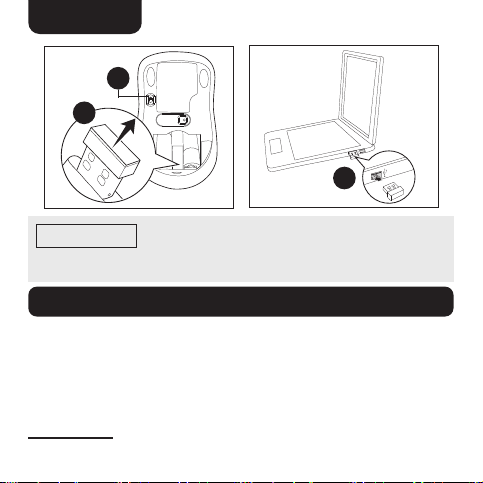
NOTICE
The nano receiver automatically pairs with the
product� If the connection fails or is interrupted, switch the
product o and reconnect the nano receiver.
7. Operation
»Left button(A): Left click function according to your computer
system settings�
»Right button(B): Right click function according to your
computer system settings�
»Scroll wheel(C): Rotate the scroll wheel to scroll up or down on
the computer screen� Click function according to your computer
system settings�
Autres manuels pour B005EJH6Z4
1
Ce manuel convient aux modèles suivants
7
Table des matières
Langues :
Autres manuels Amazon Souris


