Watermark AUT-WT1 Manuel utilisateur

INSTALLATION FOR
WALL MOUNT AUTOMATIC FAUCET
Rev. 2/20
P a g e | 1
AUT-WT1
AUT-WTM2
AUT-WP3
AUT-WPM4
AUTOMATIC TOUCH ON/OFF
AUTOMATIC METERED TOUCH
AUTOMATIC TOUCHFREE
AUTOMATIC METERED TOUCHFREE
Features:
•Can be used with most Watermark wall mount spouts and finishes
•No visible sensor –turns the spout itself into the sensor
•Battery operated –no need for hardwiring
•Safety timeout so water doesn’t run indefinitely (WT1 and WP3 only)
•Metered option to satisfy local codes for public bathrooms
•No temperature control –water should be pre-tempered
Specifications:
•Working water pressure: 20 PSI to 85 PSI
•Working water temperature: 45°F to 120°F
•Working environmental temperature: 35°F to 100°F
•Flow Rate: 1.2 GPM
•IP55 water and dust protection
•6V CR-P2 lithium battery (included)
•12 second metering cycle (WTM2 and WPM4 only) provides 0.24 gallons per cycle
•Shipping weight (lbs.): 10
•Shipping dimension (in.): 29 x 12 x 4
Note:
•DO NOT USE PLUMBER’S PUTTY ON ANY OF THE BRASS COMPONENTS
This will cause the finish to tarnish and void the warranty. A non-corrosive Alkoxy Silicone is
recommended.
•DURING SWEATING OF LINES DO NOT OVERHEAT CASTING
Overheating may cause damage to internal mechanism and void the manufacturer’s warranty as well
as increase the risk of scalding.
•COPPER ADAPTORS MAY BE REQUIRED TO COMPLETE YOUR INSTALLATION
•Not for use with metallic sinks or counters.
Diagram A - Dimensions

INSTALLATION FOR
WALL MOUNT AUTOMATIC FAUCET
Rev. 2/20
P a g e | 2
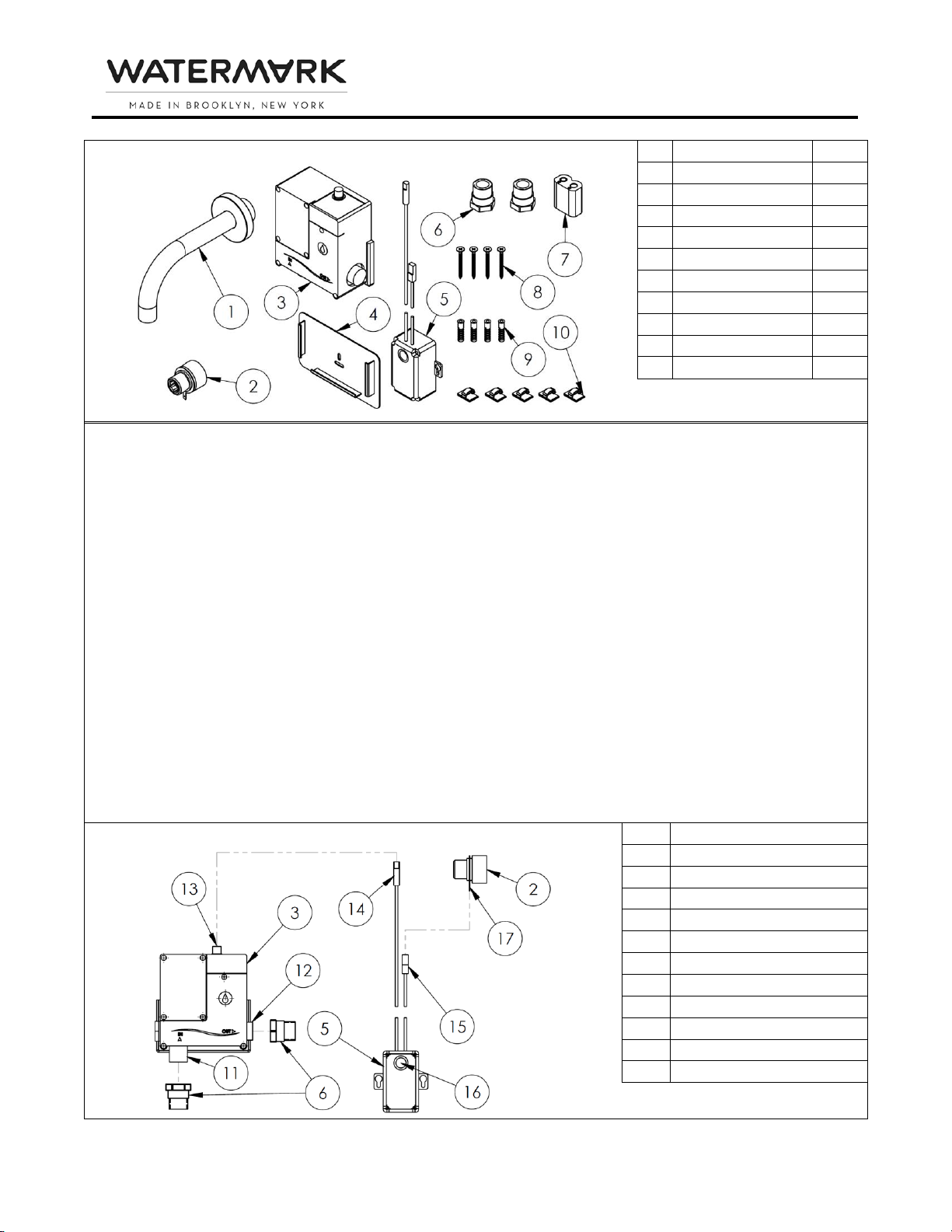
Diagram B –Parts Checklist
#
Description
Qty.
1
Spout Assembly
1
2
Spout Adapter
1
3
Solenoid Valve
1
4
Solenoid Bracket
1
5
Electrical Box
1
6
Solenoid Adapter
2
7
Battery
1
8
Wood Screw
4
9
Drywall Anchor
4
10
Wall Clip
5
Installation
1. Flush the lines of all dirt and debris.
Note: Failure to completely flush lines will cause valve failure and will void the warranty.
2. Close water supply.
Note: Refer to Diagrams A and B for Steps 3 –4.
3. Position Electrical Box (5) so the top is within 12” of the desired spout position and secure with 2
Wood Screws (8). Drywall Anchors (9) may be used if securing to drywall.
4. Position Solenoid Bracket (4) so the top of Solenoid Valve (3) is withing 28” of the top of Electrical
Box (5). Secure with 2 Wood Screws (8). Drywall Anchors (9) may be used if securing to drywall.
Note: There must be access to Electrical Box (5) and Solenoid Valve (3) after the wall is closed and
installation is complete.
Note: Refer to Diagrams B and C for Steps 5 –8.
5. Connect Solenoid Adapters (6) to Solenoid Inlet (11)and Solenoid Outlet (12).
6. Slide Solenoid Valve (3) into Solenoid Bracket (4). Solenoid should be oriented with inlet on bottom
and outlet on right, as shown.
7. Connect Solenoid Wire (14)to Solenoid Wire Connector (13). Run Sensor Wire (15)to the spout
connection and connect to Connecting Tab (17)on Spout Adapter (2).
8. Route Sensor Wire (15)and Solenoid Wire (14)so they do not come in contact with each other, with
the piping or with any other metal. Wall Clips (10) may be used to assist with wire routing.
Diagram C –Sensor and Solenoid Adapter Connections
#
Description
2
Spout Adapter
3
Solenoid Valve
5
Electrical Box
6
Solenoid Adapter
11
Solenoid Inlet
12
Solenoid Outlet
13
Solenoid Wire Connector
14
Solenoid Wire
15
Sensor Wire
16
Red LED/White Button
17
Connecting Tab

INSTALLATION FOR
WALL MOUNT AUTOMATIC FAUCET
Rev. 2/20
P a g e | 3
Note: Refer to Diagrams B, C and D for Steps 9 –10.
9. Connect the premixed water supply to Solenoid Adapter (6) on Solenoid Inlet (11) using nipples and
fittings as needed.
10. Connect nipples and fittings from Solenoid Adapter (6) on Solenoid Outlet (12)to Spout Adapter (2):
a. Spouts from Group A require the male side of Spout Adapter (2) to extend ½” beyond the
finished wall. See Diagram D, Group A.
b. Spouts from Group B require the male side of Spout Adapter (2) to be recessed ½” behind the
finished wall. See Diagram D, Group B.
c. Spouts from Group C require the female side of Spout Adapter (2) to be recessed ½” behind
the finished wall. See Diagram D, Group C.
d. Make sure Sensor Wire (15)does not wrap around the nipple.
e. Connecting Tab (17) may be bent for easier installation or for better clearance.
Diagram D –Plumbing Connections
Group A
Flush Connection ½” NPT Female
Group B
Recess Connection ½” NPT Female
Group C
Recess Connection ½” NPT Male
#
Description
#
Description
#
Description
1
Spout Assembly
3
Solenoid Valve
11
Solenoid Inlet
2
Spout Adapter
6
Solenoid Adapter
12
Solenoid Outlet
Note: Refer to Diagrams B and C for Steps 11 –20.
11. Loosen 4 screws on front of Electrical Box (5) to remove front cover. Insert Battery (7) into Electrical
Box (5) (+ to +).
12. Red LED (16) will light and initial calibration will begin. After about 5 seconds, Red LED (16) turns off
indicating initial calibration is complete.
13. Open water supply and activate faucet so water runs through Spout (1). Make sure solenoid operates
correctly and check all connections for leaks:
a. For WT1, touch Spout Adapter (2) to turn on. Remove hand and check for leaks. Touch again
to turn off.
b. For WTM2, touch Spout Adapter (2) to turn on. Remove hand and check for leaks. Flow will
turn off automatically after about 12 seconds.
c. For WP3, move hand near Spout Adapter (2) to turn on and leave hand near Spout Adapter
(2) while checking for leaks. Remove hand to turn off.

INSTALLATION FOR
WALL MOUNT AUTOMATIC FAUCET
Rev. 2/20
P a g e | 4
d. For WPM4, move hand near Spout Adapter (2) to turn on. Remove hand and check for leaks.
Flow will turn off automatically after about 12 seconds.
14. Remove Battery (7) and turn supply back off.
15. Once solenoid has been tested, proceed to close wall. Make sure to leave access to Electric Box (5)
and to Solenoid Valve (3).
16. Connect Spout (1) to Spout Adapter (2). Refer to Diagram D.
17. Replace Battery (7) into Electrical Box (5) (+ to +).
18. Red LED (16) will light and initial calibration will begin. After about 5 seconds, Red LED (16) turns off
indicating initial calibration is complete. Replace front cover and tighten screws.
Note: Do not touch the faucet during initial calibration. If faucet is touched, remove battery and
return to Step 17.
19. Open water supply and activate faucet so water runs through Spout (1). Check all connections for
leaks.
20. Activate faucet 10 times for final calibration:
a. For WT1, touch Spout (1) to turn on. Remove hand and allow to run for 10 seconds. Touch
again to turn off. Wait 10 seconds before next activation.
b. For WTM2, touch Spout (1) to turn on. Remove hand and allow to run until it turns off
automatically, about 12 seconds. Wait 10 seconds before next activation.
c. For WP3, move hand near Spout (1) to turn on and leave hand near Spout (1) to allow to run
for 10 seconds. Remove hand to turn off. Wait 10 seconds before next activation.
d. For WPM4, move hand near Spout (1) to turn on. Remove hand and allow to run until it turns
off automatically, about 12 seconds. Wait 10 seconds before next activation.
Note: Sensor continuously learns environment as it is used. It may take up to a week of regular use to fully
calibrate.
Cleaning
1. To clean the spout, press once on White Button (16) to enter cleaning mode for 30 seconds. Red LED
(16) will begin flashing twice repeatedly.
2. During this time, spout may be cleaned without water turning on by touch or proximity.
3. When cleaning mode ends, Red LED (16) will stop flashing and operation will return to normal.
Troubleshooting
Red LED Code
Meaning
Remedy
Solid Light
Calibration
Wait for light to turn off. Do not touch faucet until light turns off.
1 Flash
Battery level is low
Replace battery (type CR-P2)
2 Flashes
Cleaning mode or safety
timeout is activated
Wait for light to stop flashing
3 Flashes
Bad connection
Check installation. Make sure sensor wire and solenoid wire are
not touching each other or any metal. Make sure sink and
counter are not metallic. Remove and replace battery, wait for
Red LED to turn off and follow Step 20 above.
Malfunction
Cause
Remedy
Faucet does not
turn on
Sensor stop
Check Electrical Box for flashing Red LED. Follow instructions above.
Water supply is off
Turn water supply on.
Faucet turns on
by itself
Sensitivity too high
Adjust sensitivity. Press and hold the White Button until Red LED is
permanently lit, about 10 seconds. When finger is removed, Red
LED will light in a series of flashes to indicate sensitivity level. 1
flash is the lowest and 5 flashes is the highest. Press the white

INSTALLATION FOR
WALL MOUNT AUTOMATIC FAUCET
Rev. 2/20
P a g e | 5
button 1 time for each level to be changed. When desired level is
reached, wait for series of flashes from Red LED to confirm level.
Note: Level should be adjusted 1 step at a time and tested.
Faucet functions
intermittently
Calibration not
complete
Follow Step 20 above. It may take up to one week of regular use for
sensor to fully learn environment.
Sensitivity too low
Adjust sensitivity. Press and hold the White Button until Red LED is
permanently lit, about 10 seconds. When finger is removed, Red
LED will light in a series of flashes to indicate sensitivity level. 1
flash is the lowest and 5 flashes is the highest. Press the white
button 1 time for each level to be changed. When desired level is
reached, wait for series of flashes from Red LED to confirm level.
Note: Level should be adjusted 1 step at a time and tested.
Bad connection
Check installation. Make sure sensor wire and solenoid wire are not
touching each other or any metal. Make sure sink and counter are
not metallic. Remove and replace battery, wait for Red LED to turn
off and follow Step 20 above.
Faucet does not
turn off
Sensitivity too high
Adjust sensitivity. Press and hold the White Button until Red LED is
permanently lit, about 10 seconds. When finger is removed, Red
LED will light in a series of flashes to indicate sensitivity level. 1
flash is the lowest and 5 flashes is the highest. Press the white
button 1 time for each level to be changed. When desired level is
reached, wait for series of flashes from Red LED to confirm level.
Note: Level should be adjusted 1 step at a time and tested.
Bad connection
Check installation. Make sure sensor wire and solenoid wire are not
touching each other or any metal. Make sure sink and counter are
not metallic. Remove and replace battery, wait for Red LED to turn
off and follow Step 20 above.
For technical support, please call 718-257-2800
Ce manuel convient aux modèles suivants
12
Table des matières
Autres manuels Watermark Appareil de salle de bains

Watermark
Watermark PB-8524 Manuel utilisateur

Watermark
Watermark aquaBUBBLER ABS14 Manuel utilisateur

Watermark
Watermark Elements 21 Series Manuel utilisateur

Watermark
Watermark Rainey RNS4 Manuel utilisateur

Watermark
Watermark Edge 35-2-ED1-PC Manuel utilisateur

Watermark
Watermark Lily LLD4 Manuel utilisateur

Watermark
Watermark SH-35WF Manuel utilisateur

Watermark
Watermark Beverly Roosevelt CRY4 Manuel utilisateur