
UGREEN US222 Manuel utilisateur

US222
User Manual • Uživatelský manuál •
Užívateľský manuál • Használati utasítás •
Benutzerhandbuch

2
English
3 –8
Čeština
9 –14
Slovenčina
15 –20
Magyar
21 –26
Deutsch
27 –32

3
Dear customer,
Thank you for purchasing our product. Please read the following instructions carefully
before first use and keep this user manual for future reference. Pay particular attention
to the safety instructions. If you have any questions or comments about the device,
please contact the customer line.
✉www.alza.co.uk/kontakt
✆+44 (0)203 514 4411
Importer Alza.cz a.s., Jankovcova 1522/53, Holešovice, 170 00 Prague 7, www.alza.cz

4
Thank you for purchasing the UGREEN products. For optimum operation, please read
this manual carefully before use.
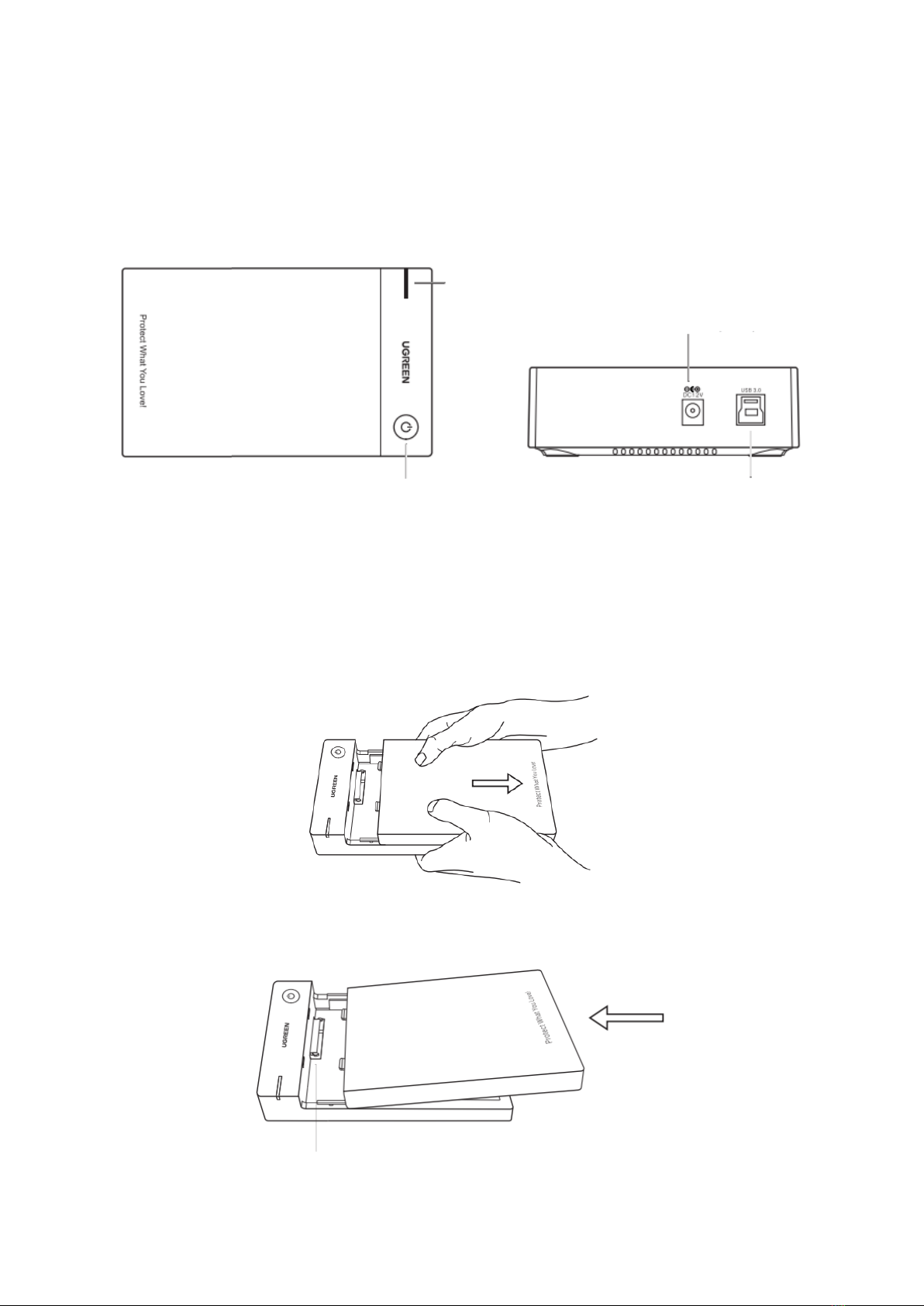
Product Details
How It Works
Connect
Step 1: Slide back the front panel to remove it.
Step 2: Place your 3.5-inch hard drive in the enclosure slot with aligning the interface,
push hard your hard drive to insert the SATA port.
LED Indicator
Front Panel
Power Button
DC 5.5 mm
Power Jack (12V)
USB 3.0
Type B Port
SATA Port

5
Step 3: Push hard the front panel from the bottom to re-cover it.
Step 4: Connect this unit to your computer by the provided USB 3.0 Type A to B cable
and use the provided power adapter to power this unit.
Step 5: Press the power button to turn on this unit.
Disconnect
Step 1: Use Safely Remove Hardware option on the right bottom tray of your computer.
Step 2: Press the power button to turn off this unit.
Step 3: Unplug the USB 3.0 Type A to B cable from this unit and your computer.
Step 4: Unplug the power adapter from power source.
Step 5: Remove the front panel, slide back the hard drive to disconnect with SATA port,
and take it out.
UK Plus

6
Safety Notes
•Works with 12V±5% power supply and exceeding the standard voltage range may
cause damage to the product or cause potential safety problems.
•Do NOT disconnect the hard drive enclosure or the hard drive during data
transferring in case of files missing or the disk damage.
•When the product is not used for a long time, please turn off the power supply or
unplug the power supply to avoid the potential safety hazard caused by leakage.
•Please backup hard drive data in advance before hard drive partition or
formatting.
•Avoid using this unit in extreme high or low temperatures and humid
environments.
•Falling down, squeezing, impacting and throwing may damage this unit.
•Keep out of children reach. Do not let children play with it as a toy.
•Wet hand is no allowed to touch power to avoid shock.
•Do not modify, repair od disassemble devices, if so, please contact the
manufacturer.
Package Contents
1 x USB 3.0 to 3.5-Inch SATA External Hard Drive Enclosure
1 x USB 3.0 Type A to B cable
1 x Power Adapter
1 x User Manual

7
Warranty Conditions
A new product purchased in the Alza.cz sales network is guaranteed for 2 years. If you
need repair or other services during the warranty period, contact the product seller
directly, you must provide the original proof of purchase with the date of purchase.
The following are considered to be a conflict with the warranty conditions, for
which the claimed claim may not be recognized:
•Using the product for any purpose other than that for which the product is intended
or failing to follow the instructions for maintenance, operation, and service of the
product.
•Damage to the product by a natural disaster, the intervention of an unauthorized
person or mechanically through the fault of the buyer (e.g., during transport,
cleaning by inappropriate means, etc.).
•Natural wear and aging of consumables or components during use (such as
batteries, etc.).
•Exposure to adverse external influences, such as sunlight and other radiation or
electromagnetic fields, fluid intrusion, object intrusion, mains overvoltage,
electrostatic discharge voltage (including lightning), faulty supply or input voltage and
inappropriate polarity of this voltage, chemical processes such as used power
supplies, etc.
•If anyone has made modifications, modifications, alterations to the design or
adaptation to change or extend the functions of the product compared to the
purchased design or use of non-original components.
8
EU Declaration of Conformity
This product complies with the legal requirements of the following European Union
directives: 2014/30/EU and 2011/65/EU including amendments 2015/863/EU.
WEEE
This product must not be disposed of as normal household waste in accordance with
the EU Directive on Waste Electrical and Electronic Equipment (WEEE - 2012/19 / EU).
Instead, it shall be returned to the place of purchase or handed over to a public
collection point for the recyclable waste. By ensuring this product is disposed of
correctly, you will help prevent potential negative consequences for the environment
and human health, which could otherwise be caused by inappropriate waste handling of
this product. Contact your local authority or the nearest collection point for further
details. Improper disposal of this type of waste may result in fines in accordance with
national regulations.

9
Vážený zákazníku,
Děkujeme vám za zakoupení našeho produktu. Před prvním použitím si prosím pečlivě
přečtěte následující pokyny a uschovejte si tento návod k použití pro budoucí použití.
Zvláštní pozornost věnujte bezpečnostním pokynům. Pokud máte k přístroji jakékoli
dotazy nebo připomínky, obraťte se na zákaznickou linku.
✉www.alza.cz/kontakt
✆+420 255 340 111
Dovozce Alza.cz a.s., Jankovcova 1522/53, Holešovice, 170 00 Praha 7, www.alza.cz
10
Děkujeme, že jste si zakoupili výrobky UGREEN. Pro optimální provoz si před použitím
pečlivě přečtěte tento návod.
Podrobnosti o produktu
Jak to funguje
Připojení
Krok 1: Odsuňte přední panel a sejměte jej.
Krok 2: Umístěte 3,5palcový pevný disk do adaptéru a zarovnejte rozhraní, zatlačte na
pevný disk a zasuňte jej do portu SATA.
Indikátor LED
Přední panel
Tlačítko napájení
DC 5,5 mm
Napájecí konektor
(12V)
Port USB 3.0 Typ
B
Port SATA
Table des matières
Langues :
Manuels Matériel informatique populaires d'autres marques

EMC2
EMC2 VNX Series Manuel du propriétaire

Panasonic
Panasonic DV0PM20105 Manuel utilisateur

Mitsubishi Electric
Mitsubishi Electric Q81BD-J61BT11 Manuel utilisateur

Gigabyte
Gigabyte B660M DS3H AX DDR4 Manuel utilisateur

Raidon
Raidon iT2300 Manuel utilisateur

National Instruments
National Instruments PXI-8186 Manuel utilisateur


