
TTikorea TCB-880H Manuel utilisateur

INSTRUCTION MANUAL
www.ttikorea.co.kr
25W MOBILE CB TRANSCEIVER
Downloaded from www.cbradio.nl

CONTENTS
3
3
3
6
1.
2.
3.
4.
5.
6.
7.
8.
9.
10.
11.
12.
13.
14.
15.
11
12
12
13
14
15
15
16
17
18
19
1)
2)
3)
4)
5)
6)
7)
8)
9)
10)
11)
12)
13)
14)
15)
16)
17)
18)
19)
20)
21)
6
6
7
8
8
8
9
9
9
9
10
10
10
10
10
10
10
11
11
11
11
Introduction
Supplied Accessories
Installation
Transceiver Controls and Functions
LCD Display
Microphone
Menu Setting Mode
How to Operate the Transceiver
Band Selection
Trouble Shooting
CE Declaration
Safety Requirement
Specification
Restrictions on the use
Freequency Table
Channel Selector
Dual Watch
Memory Channel Selectors
Emergency Button
LCD Display
Scan/Lock Button
AM/FM and LCR Button
CB/PA Selector
ANL/OFF Selector
Local/DX selector
Volume and Power On/Off Knob
Quick Up/Quick Down Selector
Microphone Gain Knob
RF Gain Knob
Squelch Control knob
Microphone Jack
Antenna Connector
S-Meter
PA Jack
EXT Jack
Power 13.8V DC
ENGLISH

ENGLISH
1. Introduction
1 unit
1 unit
1 unit
1 unit
2 pieces
3 pieces
2 pieces
1 piece
TCB-880H transceiver is designed to have a good performance
in any conditions that the transceiver operates, using rugged
build chassis, PCB’s and components. This transceiver is also
designed for users’ convenience, implementing human ergono-
mics to locate the knobs and buttons in the proper places. The
combination of well designed knobs and buttons as well as user
friendly graphic layouts will lead users to quickly adapt themsel-
ves for the easy operation. The newly applied menu mode will
make professional users more satisfactory with pleasure. The
elegant and luxury blue LED light supporting the face design
will go well with any vehicles.
This instruction manual has been designed to enable you to get
the best use from your CB Transceiver, therefore you are reco-
mmended to take a few minutes to read this instruction manual
before initial use of your CB Transceiver.
Your transceiver is supplied with a full range of accessories to
help you get started and virtually benefit from all the features
straight away.
TCB-880H transceiver
Microphone with cord
Power cable
Radio mounting bracket
Radio mounting thumb screw with rubber washer
Mounting screw with washer (for transceiver bracket)
Mounting screw with washer (for microphone bracket)
Microphone mounting bracket
2. Supplied Accessories
Plan the location of the transceiver and microphone first, which
is most convenient for the operation. The transceiver should
normally be mounted horizontally, but may be mounted
vertically. The bracket supplied can be fitted above or below the
case allowing the TCB-880H to be cradled by the bracket or
suspended from it.
3. Installation
3
TCB-880H

Consider that this location of the transceiver should not
interfere with the driver and passengers. Choose a spot where
the microphone and all controls are easily accessible.
1) Put the mounting bracket on the proper location where you
are going to install.
2) Drill holes and fix mounting bracket on the location.
3) Connect the antenna cable plug to the standard receptacle
on the transceiver, which
is marked "ANT".
4) Connect the power cable directly to the vehicle battery or
fuse box of the car. Be careful to make sure of the polarity of
the battery first and connect the cable.(Red: Positive Pole(+),
Black: Negative Pole(-). The same colours are shown on the
battery and in the fuse box of the car.)
5) Connect the power cable to the transceiver cable.
6) Mount the microphone bracket on one side of the transceiver,
or near it using two screws included.
7) Connect the microphone to the transceiver’s microphone
receptacle. Now you are
ready to operate the
transceiver.
ENGLISH
4
TCB-880H


4. Transceiver Controls and Functions
1) Channel Selector
Turn right or left, and this allows you to select the
channel one by one that you like to use.
2) Dual Watch
Press momentarily this button, and this allows you
to monitor two channels that you pre-selected and
memorized. You may select the emergency
channel. To stop this function, press momentarily
again this button.
1
15 1416 1113 12
7 8 9 103 52 64
17 18 19 20 21
ENGLISH
6
TCB-880H

ENGLISH
3) Memory Channel Selectors
Momentary press allows you to directly access the
pre-memorized channels (Memory Recall).
The LCD displays one of the memory number icons
(M1, M2, M3 and M4).
To set the dual watch for the first time, press this button
momentarily while you are on the current (primary) channel.
The DW icon will be blinking.
Select another channel that you like to use as sub-channel (se-
condary channel) during the icon’s blinking using the channel
selector or quick up/quick down selector. Press this button
momentarily again to activate the dual watch. The icon stops
blinking and keeps being displayed. The dual watch starts.
To memorize channels (Memory Store), first select the channel
that you are going to memorize and press one of the memory
channel selectors for more than 3 seconds. This will make the
channel memorized and at the same time the transceiver starts
to operate on the same channel.
To return to the previous channel operation, momentarily press
the memory channel selector, or use the channel selector or
quick up/quick down selector.
When you select a channel and the channel is same as one of
the memorized channels, the matching memory number icon
blinks.
To change the dual watch channels, press the DW button
during dual watch operation. The dual watch stops.
If you press the PTT button whilst receiving a signal in dual
watch mode the transceiver will transmit on the currently
displayed channel. If you press the PTT button when no signal
is present the transceiver will transmit on the primary channel.
Emergency Scan : Press dual watch button for about two (2)
seconds. The transceiver starts the emergency scanning. The
transceiver visits the emergency channel once in every second
during this scanning. Press the scan button to deactivate this
scanning.
7
TCB-880H

4) Emergency Button
Pressing this button will lead you to the emergency
channel, "CH 9" and the EMG icon will be
displayed. The channel selector, quick up/quick
down selector and any memory channel selectors
will not work. To return to the previous operation mode,
momentarily press the emergency button again.
5) LCD Display
Most of the operational
information is displayed.
Please see item no. 5 for the
details of information.
6) Scan/Lock Button
Scan : Press this button momentarily to start
scanning upward to catch any channels that are
occupied by others.
To activate/deactivate the channel scan, press the Scan button
briefly. The Scan icon will appear when the channel scan is
active. Scanning will only stop when you deactivate the scan
function.
Turn the channel selector counter-clockwise during scanning in
order to change the scanning direction.
The transceiver will scan through the whole transceiver
channels. If your transceiver detects a valid signal the scan will
pause for the period that has been set by the menu mode
setting (continuously receiving or 1-99 seconds for scan
receive time and immediate response or 1-99 seconds for scan
delay time).
If you press the PTT button when your transceiver detects a
signal, the radio will transmit on the same channel. Scanning
will resume after the scan receive time and/or the scan delay
time. Use the channel selector or quick up/quick down selector
to resume scanning immediately.
ENGLISH
8
TCB-880H

ENGLISH
7) AM/FM and LCR Button
When the transceiver is used in UK, UE, or EC
freequency band modes this button activates or
deactivates Last Channel Recall function. In all
other modes (where national regulations permit
this), this button allows user to switch between AM and FM
modes by momentarily pressing this button.
8) CB/PA Selector
This selector should be on CB location in order to
operate the CB transceiver. To make a public
announcement, the PA can be selected. In this
case only the PTT button works and you can speak
through the PA speakers.
9) ANL/OFF Selector
By selecting the ANL location, the transceiver can
reduce such impulsive noise as generated by
engine of your vehicle or external sources. This
works only when the transceiver is in AM mode.
10) Local/DX selector
To receive weak signals, locate the selector on the
DX position. While the transceiver is in the location
where the signal is very strong, location the
selector on the Local position. This gives
attenuation to get better audio sound.
Lock : Press this button for more than 2 seconds to activate
and deactivate the keypad lock function. This function locks
only the channel selector, quick up/quick down buttons, AM/FM
button and scan button. Other buttons and selectors work
normal.
If you press the PTT button during scanning, the radio will
return to your original channel. Scanning will resume after the
scan receive time and/or the scan delay time. Use the channel
selector or quick up/quick down selector to resume scanning
immediately.
9
TCB-880H
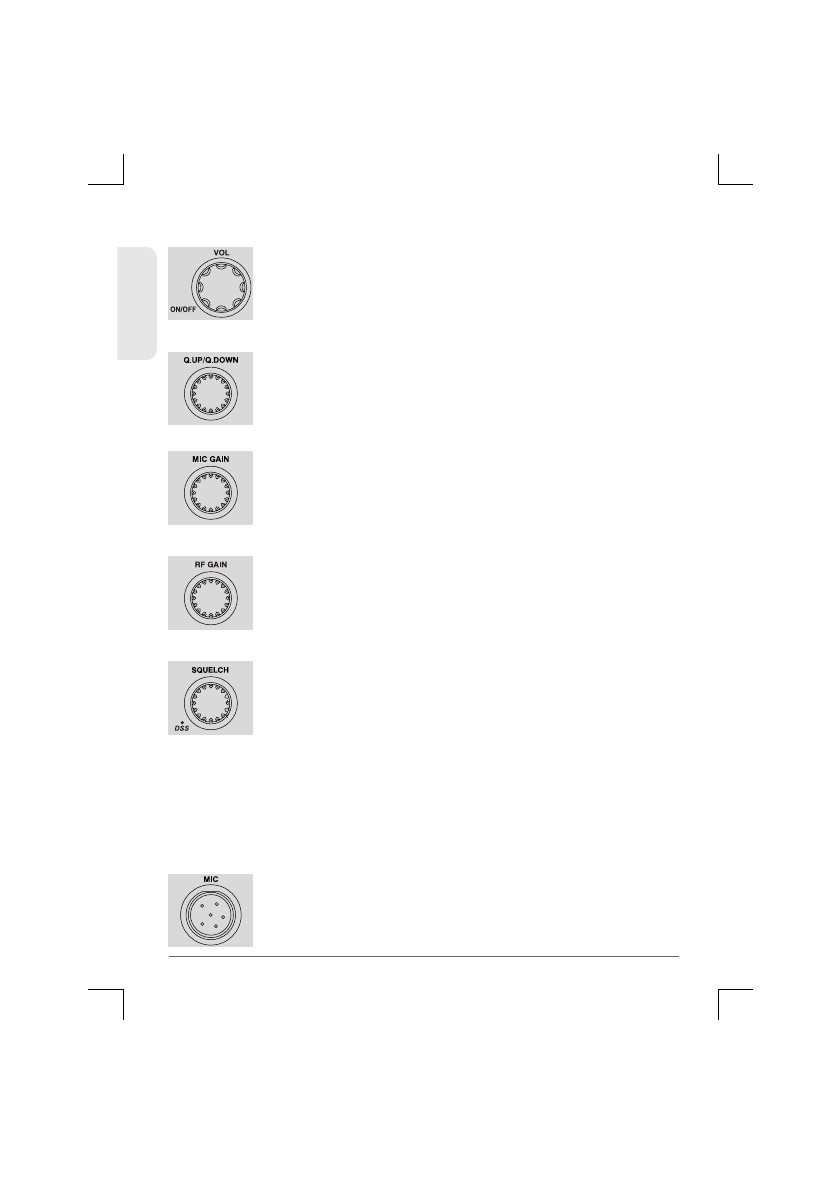
12) Quick Up/Quick Down Selector
Turn this selector clockwise to increase channel
numbers by 10 steps. Turning this selector counter
-clockwise reduces the channels by 10 steps.
13) Microphone Gain Knob
Turn this knob clockwise and counter-clock until
you get better microphone gain while you move the
microphone to the optimum distance from your
mouth.
14) RF Gain Knob
Turn this knob clockwise until you get better RF
gain. You may need to decrease the sensitivity by
turning the knob counter-clockwise when there is a
very strong signal.
15) Squelch Control knob
16) Microphone Jack
Insert the microphone into this jack. Use the guide
for easy connection.
11) Volume and Power On/Off Knob
To switch on the transceiver turn this knob
clockwise. After clicking sound the transceiver is
switched on. The more you turn this knob
clockwise, the bigger the audio sound grows.
ENGLISH
10
TCB-880H
Main Squelch Control: Turn this knob counter-
clockwise until you hear the background noise and
then turn the knob a little clockwise until the noise
disappears. In this way, you get the best receive
sensitivity.
DSS(Dynamic Squelch System): Control if you like to use the
Dynamic squelch system, turn this knob counter clockwise until
hearing the click sound. To return to the manual squelch turn this
knob clockwise until hearing the click sound and then follow the
manual squelch setting procedure.
Table des matières
Autres manuels TTikorea Émetteur-récepteur


