
Totem TM-P2BX Manuel utilisateur

TM-P2BX User’s Manual
Introduction
A. Specifications
System C ipset Intel 82440 BX chipset.
CPU Intel Pentium II processors, support
233/266/300/333 (Ex. Cl 66MHz) MHz.
300/350/400/ 450/ 500 (Ex. Cl 100MHz) MHz
Memory Expandable to 768MB (3 ban s) with three 168-
pin DIMM soc et {support 3.3 V EDO (66MHz
only) / SDRAM (66MHz/ 100MHz)}.
I/O Winbond 83977, two high speed 16550
compatible serial ports, one Multi-Mode.
Parallel Port support SPP/EPP/ECP standard
mode.
Two onboard PCI IDE Ports (32-bit data transfer).
LS-120/ ZIP FDD, IrDA/ ASK IR/ Consumer IR.
Dual USB ports
Support two 360/720KB/1.2/1.44/2.88MB floppy
dis devices.
One PS/2 Mouse port.
BIOS Award System BIOS installed in soc et (Flash
and PnP).
Expansion slots One AGP slot, five PCI Master Slots and two 16-
bit ISA Slots.
Voltage Auto 1.8V-3.5V
Dimension 4-layer PCB, size (300mm x 190mm).
Ot ers Support BIOS setting CPU type (Jumper-less),
CPU Auto Temperature Sensor & Music Alarm,
voltage monitor and CPU Fan monitor, Bus
Master/ Ultra DMA/33, ACPI, AGP Bus, Keyboard
Power On, PS/2 Mouse Power On, Modem Ring
On, LAN wa e up, Debug sensor on board.
1
TM-P2BX User’s Manual
Setup Guide
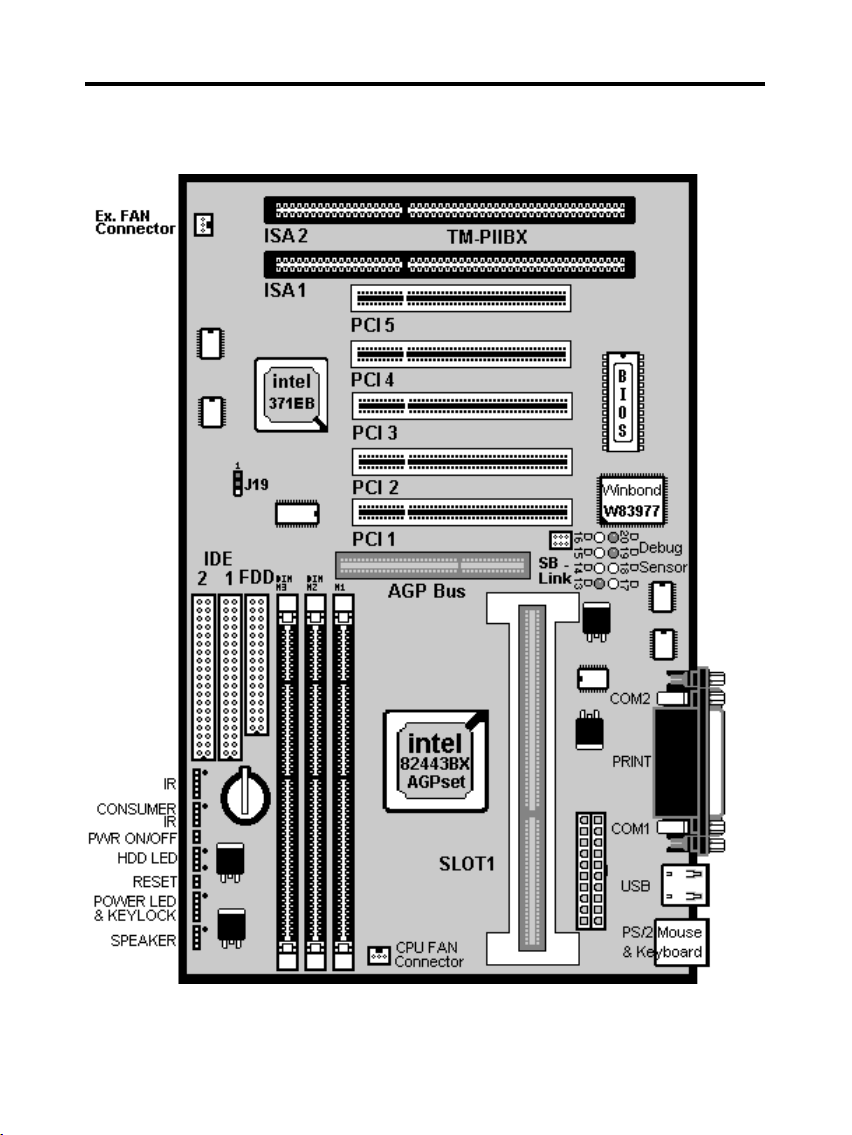
A. Layout Diagram
2

TM-P2BX User’s Manual
B. Smart Debug On Board
When the CPU, DRAM, Cache RAM, FDD or VGA card have not been
properly installed, user can isolate those basic problems through the Debug
Sensor LED and instructions from the manual. To Professional system
engineers or maintenance engineers, the Debug Sensor can wor as an 80
Port Debug Sensor Card.
Error code Display Message Solution
C1 None Can’t detect
DRAM
1. Reinstall or replace the SDRAM.
2. Reinstall or replace the BIOS.
C6 None Can’t detect
DRAM
1. Reinstall or replace the SDRAM.
2. Reinstall or replace the BIOS.
OD None Can’t detect
VGA card
1. Reinstall or replace the VGA card.
2. Replace the BIOS.
4E Yes Can’t detect
Floppy dis
1. Replace t e BIOS. (if no screen)
2. Enter the BIOS Setup menu to reset.
3. Chec that the FDD cable and the power
connector are properly connected.
4. Reconnect the FDD cable or replace the FDD.
61 Yes L2 cache
problem 1. Enter BIOS Setup to disable the external
cache.
3

TM-P2BX User’s Manual
C. CPU Voltage and Frequencies
ROM PCI/ISA BIOS (2A69KTJ9)
CHIPSET FEATURE SETUP
AWARD SOFTWARE, INC
Auto Configuration : Enabled Auto Detect DIMM/ PCI Clk : Enabled
EDO DRAM Speed Selection : 60ns CPU Speed : Manual
EDO CASx# MA Wait State : 2 CPU Ratio : X 2.5
EDO RASx# Wait State : 2 CPU Frequency : 100 MHz
SDRAM RAS-to CAS Delay : 3 Spread Spectrum : Disabled
SDRAM RAS Precharge
Time
: 3 CPU Warning Temperature : Disabled
SDRAM CAS latency Time : Auto Current CPU Temperature : 28℃/ 82℉
DRAM Data Integrity Mode : Non-ECC Current SYSFAN Speed :4285 RPM
System BIOS Cacheable : Enabled Current CPUFAN Speed :4000 RPM
Video BIOS Cacheable : Enabled Current Vin3 (V) : 2.88V
Video RAM Cacheable : Disabled
8 Bit I/O Recovery Time : 1
16 Bit I/O Recovery Time : 1
Memory Hole At 15M-16M : Disabled
Passive Release : Enabled Esc : Quit Selection : Item
Delayed Transaction : Disabled F1 : Help PU/PD/+/- : Modify
AGP Aperture Size (MB) : 64 F5 : Old Values (Shift) F2 : Color
F6 : Load BIOS Default
F7 : Load Setup Default
Dear Customers:
Than you for your patronage of our products. The board you bought is a
jumper-less mainboard. The ratio and frequency of the CPU shall be set in
BIOS and the wor ing voltage for the CPU shall be automatically detected.
Please read carefully the following instructions:
1. Power on the installed system and press the "DEL" ey to enter BIOS
Setup. Select "Chipset Features Setup" and press <Enter>.
2. Select "CPU Speed" and press "PgUp" or "PgDn" to set the CPU ratio
and frequency. The available options are Intel PII
233MHz (66X3.5), 266MHz (66X4), 300MHz (66X4.5), 333MHz (66X5),
366MHz (66X5.5), 400MHz(66X6), 433MHz(66X6.5), 466MHz(66X7),
500MHz(66X7.5).
250MHz(100X2.5), 300MHz(100X3), 350MHz(100X3.5), 400MHz(100X4),
450MHz(100X4.5), 500MHz(100X5), 550MHz(100X5.5), 600MHz(100X6)
4

TM-P2BX User’s Manual
and "Manual".
To set the CPU manually, please note the following:
CPU Speed: "Manual" (you can manually set the CPU ratio and frequency)
CPU Ratios: x3.5, x4, x4.5, x5, x5.5, x6, x6.5, x7, x7.5
CPU Frequency: 66, 68, 75, 83, 100, 103, 112, 133Mhz
Several options are provided for the CPU external cloc . You are
recommended to restore to the default setting in case of instability when the
external cloc exceeds 66MHz.
NOTE: System failure may occur if the CPU frequency is set incorrectly. To
solve this problem. Press the "Insert" ey on the eyboard to clear the
previously set frequency (i. c., restore the default frequency), and then
reboot the system.
Switch voltage is applied, ma ing the temperature lower and voltage
steadier.
You don’t need to adjust Voltage in Pentium II mainboard. It will
automatically send out one VID (Voltage Identification) to the mainboard
power supply to as for the voltage it needs.
The CPU type default setting is Intel Pentium II 250MHz=100 MHz*
2.5.
Intel Pentium II CPU famil
CPU Ext. cl Ratio L1 cache L2 cache Pac age
Intel Pentium II – 450MHz 100MHz X4.5 32KB 512KB SECC 1
Intel Pentium II – 400MHz 100MHz X4 32KB 512KB SECC 1
Intel Pentium II – 350MHz 100MHz X3.5 32KB 512KB SECC 1/ 2
Intel Pentium II – 300MHz 100MHz X3 32KB 512KB SECC 1
Intel Pentium II – 333MHz 66MHz X5 32KB 512KB SECC 1
Intel Pentium II – 300MHz 66MHz X4.5 32KB 512KB SECC 1
Intel Pentium II – 266MHz 66MHz X4 32KB 512KB SECC 1
Intel Pentium II – 233MHz 66MHz X3.5 32KB 512KB SECC 1
5

TM-P2BX User’s Manual
D. EDO/ SDRAM Installation Procedures:
A 168-pin DIMM can support up to 768MB 3.3V EDO (66MHz) /
SDRAM (66MHz/ 100MHz).
You are recommended to use SDRAMs. With SPD that are compliant
with PC-100. This will enable BIOS to detect the SDRAM speed,
thereby fully bring into play the efficiency of the SDRAM.
To avoid compatibility and reliability problems, you are recommended to
6

TM-P2BX User’s Manual
test the 168-pin SDRAMs before buying them since the PCB
specifications differ.
First, verify the wor ing voltage of the EDO/ SDRAM module in either
DIMM soc et.
P2BX only supports 3.3V EDO/ SDRAM module. The following
illustration shows you the difference between 3.3V and 5V to ensure
your correct selection of 3.3V DIMM module for using.
You can set up the BIOS “Chipset Feature Setup” to the best wor ing
condition basing on the type of EDO/ SDRAM you are using.
The BIOS DRAM default setting is 60 ns. Change the BIOS “Chipset
Feature Setup” default setting to 50ns for better performance, if the
chipset is mar ed 50ns.
Change nothing if EDO RAM is used. BIOS automatically detect the
RAM type.
MEMO for Installing System:
⊕ Concerning memory setup, you can find how to from “C ipset
Feature Setup” under BIOS setup. However, to avoid system unstable
or system hang, user without engineering bac ground is not suggested
to change BIOS set up.
⊕ If system boot failure, please clean DIMM soc et (wit clean oil) or
polish Gold-Finger of DRAM with soft eraser, and try again.
The Dual Inline Memory Module (DIMM) must be 3.3 Volt and
Unbuffered Synchronous DRAM (SDRAM) 8MB, 16MB, 32MB, 64MB,
128MB or 256MB. The following illustration shows the type of DIMM
Module.
7

TM-P2BX User’s Manual
168-PIN SDRAM DIMM Notc Key Definitions
E. Ot er Jumper Settings
Speaker: Connect to the system’s spea er for beeping.
Keylock: Keyboard loc switch and Power LED connector.
Reset: Short to restart system.
HDD LED: LED ON when on board PCI IDE hard dis activates.
POWER SW (FOR ATX POWER SUPPLY):
The button should be a momentary switch that is normally open.
Pushing the ATX Power Switch will immediately change the system
status. Before or during “POST”, you need to hold the button for four
seconds in order to turn off the system.
J19: Clear CMOS
Turn off the system and short pins 2-3 to clear CMOS. Then short pins
1-2 before turning it on.
8

TM-P2BX User’s Manual
J19
1-2 Normal operation(Default).
2-3 for clearing CMOS Data.
CPU Cooler Fan connector
This is the connector for CPU cooler. Never use the jumper to short the
connector. Serious damages caused this way will not be warrantied.
Creative SB-Link
It is used to connect the AWE64 or other compatible sound cards so
that they are made compatible with the ISA-compatible SB16 sound
cards.
9

TM-P2BX User’s Manual
F. Note to BIOS Update
Do not update the BIOS if no abnormalities occur. However, if BIOS
update is needed, consult your dealer first. Prior to updating your BIOS,
you are recommended to save the original BIOS values.
1. Download the AWARD BIOS Flash Utility file (Awdflas .exe)
2. Download the BIOS file used by your mainboard(e.g., BXV110N.BIN)
3. Reboot your system (but do not run Himem.sys and Emm386.exe)
to
execute the new BIOS program.
4. Execute these commands: Awdflas BXV110N.BIN
5. When this message displays: "Do you want to save BIOS (Y/N)?"
Type "N"
6. When this message displays: "Are you sure to program (Y/N)?"
Type "Y"
7. Turn off power to your system to clear the CMOS data.
8. Turn on the power to test if your system is running normal.
10
Table des matières
Autres manuels Totem Carte mère


Manuels Carte mère populaires d'autres marques


Telit Wireless Solutions
Telit Wireless Solutions SL869-3DR Manuel utilisateur

Gigabyte
Gigabyte GA-9IVDT Manuel utilisateur

Texas Instruments
Texas Instruments ADS8372EVM Manuel utilisateur

Commell
Commell MS-C73 Manuel utilisateur

IBT Technologies
IBT Technologies MB860 Manuel utilisateur

Nvidia
Nvidia TEGRA DG-04927-001_V01 Manuel utilisateur


