Top Global 3G Kiosk Manuel utilisateur

Top Global USA. ----MB5000 User Guide
MobileBridge Gateway Series
MB5000
Wireless Cellular Data Gateway
User Guide
Version 1.1.26
(Firmware v1.1.26)
2007-06-08
Top Global USA, any modification of this product will not issue a separate notice.
All Rights Reserved.
- 1 -

Top Global USA. ----MB5000 User Guide
Federal Communication Commission Interference Statement
This equipment has been tested and found to comply with the limits for a Class B digital
device, pursuant to Part 15 of the FCC Rules. These limits are designed to provide
reasonable protection against harmful interference in a residential installation. This
equipment generates,uses and can radiate radio frequency energy and, if not installed
and used in accordance with the instructions, may cause harmful interference to radio
communications. However, there is no guarantee that interference will not occur in a
particular installation. If this equipment does cause harmful interference to radio or
television reception, which can be determined by turning the equipment off and on, the
user is encouraged to try to correct the interference by one of the following measures:
- Reorient or relocate the receiving antenna.
- Increase the separation between the equipment and receiver.
- Connect the equipment into an outlet on a circuit different from that to which the
receiver is connected.
- Consult the dealer or an experienced radio/TV technician for help.
This device complies with Part 15 of the FCC Rules. Operation is subject to the following
two conditions: (1) This device may not cause harmful interference, and (2) this device
must accept any interference received, including interference that may cause undesired
operation.
FCC Caution: Any changes or modifications not expressly approved by the party
responsible for compliance could void the user's authority to operate this equipment.
IMPORTANT NOTE:
FCC Radiation Exposure Statement:
This equipment complies with FCC radiation exposure limits set forth for an
uncontrolled environment. This equipment should be installed and operated with
minimum distance 20cm between the radiator & your body.
This transmitter must not be co-located or operating in conjunction with any other antenna
or transmitter.
Top Global declares that MB5000 (FCC ID: SUMMB5000 ) is limited in CH1~CH11 for
2.4GHz by specified firmware controlled in U.S.A.
- 2 -

Top Global USA. ----MB5000 User Guide
CONTENT
CONTENT.......................................................................................................................................3
1INTRODUCTION....................................................................................................................5
2INSTALLING THE MB5000..................................................................................................6
2.1 VERIFY KIT CONTENTS......................................................................................................6
2.2 WRITE DOWN PRODUCT IDENTIFICATION..........................................................................8
2.3 POWER ON THE MB5000 ...................................................................................................8
2.4 LED INDICATORS...............................................................................................................9
2.5 INITIALIZE THE MB5000 UNIT ........................................................................................10
3MANAGEMENT....................................................................................................................15
3.1 OVERVIEW.......................................................................................................................15
3.2 PAGE STRUCTURE............................................................................................................17
3.2.1 Shortcut..................................................................................................................17
3.3 PAGE OPERATION.............................................................................................................19
3.4 CONFIGURATION PAGES DESCRIPTION.............................................................................20
3.4.1 System ...................................................................................................................20
3.4.2 Interfaces ...............................................................................................................26
3.4.3 Service ...................................................................................................................41
3.4.4 Firewall...................................................................................................................45
3.4.5 Security Services..................................................................................................51
3.4.6 Tools .......................................................................................................................54
3.4.7 Status .....................................................................................................................60
3.4.8 Diagnostics ............................................................................................................62
4TROUBLESHOOTING........................................................................................................65
4.1 OVERVIEW.......................................................................................................................65
4.2 INTRODUCTION................................................................................................................65
5DEFAULT SETTINGS .........................................................................................................76
- 3 -

Top Global USA. ----MB5000 User Guide
FOREWORD
This section describes the objectives, audience and conventions of the Top Global
MB5000 User Guide.
Objectives
This document explains the steps for initial setup and basic configuration of the MB5000.
This document also provides troubleshooting information and detailed specifications.
Audience
This document is for the person installing and configuring the MB5000 for the first time.
The installer should be familiar with network structures, terms and concepts.
Conventions
This document uses the following conventions to convey instructions and information:
■Tools and keywords are in boldface type.
Note
Means reader take note. Notes contain helpful suggestions or references to
materials not contained in this manual.
Warning
The warning symbol means danger. You are in a situation that could
cause bodily injury. Before you work on any equipment, be aware of the
hazards involved with electrical circuitry and be familiar with standard
practices for preventing accidents.
Obtaining Documentation
The following sections explain how to obtain documentation from Top Global.
World Wide Web
You can access the latest Top Global documentation on the World Wide Web at the
following URL: http://www.topglobalusa.com/support1.asp
Special comment
This device is a general Wireless router, and it can act as a WWAN router only after
inserting a WWAN PC card.
- 4 -

Top Global USA. ----MB5000 User Guide
1 Introduction
MB5000 is the most cost effective 3rd generation (3G) cellular solution for SMB, Small
Office and Home Office (SOHO) Internet access and for Enterprise WAN back up. The
products are simple to use and easily scalable. MB5000 is a 3G router based on our
MobileBridge™ platform technology.
This guide will help you to know how to connect MB5000, set it up, and configure it to
work.
The MB5000 comes with three different models:
1) The Red-Box (MB5000R), the only MB5000 model comes with built-in Wi-Fi capability
2) Kiosk Router (MB5000K), default DHCP/NAT enabled for always-on wireless Internet
connection
3) Cellular Bridge (MB5000C), default in Bridge Mode, require a router or CPE to initiate
PPPoE in order to establish the Internet connection.
- 5 -

Top Global USA. ----MB5000 User Guide
2 Installing the MB5000
Installing the MB5000 is easy. Follow the quick steps below to power up your wireless
network:
Verify kit content;
Write down product SN and MAC from back label;
Power up the MB5000;
Monitoring LED Indicators;
Initialize the MB5000 unit
2.1 Verify Kit Contents
The MB5000 comes with three different models, only the RedBox MB5000R has built-in
Wi-Fi and it is enabled by default. Wi-Fi is not available in both the Kiosk Router MB5000K
and Cellular Bridge MB5000C.
1) The RedBox (MB5000R), this model comes with built-in Wi-Fi capability
2) Kiosk Router (MB5000K), DHCP/NAT is enabled by default for always-on wireless
internet
3) CellBridge (MB5000C), Bridge Mode is enabled by default, which requires a router or
CPE to initiate PPPoE in order to establish internet connectivity.
- 6 -

Top Global USA. ----MB5000 User Guide
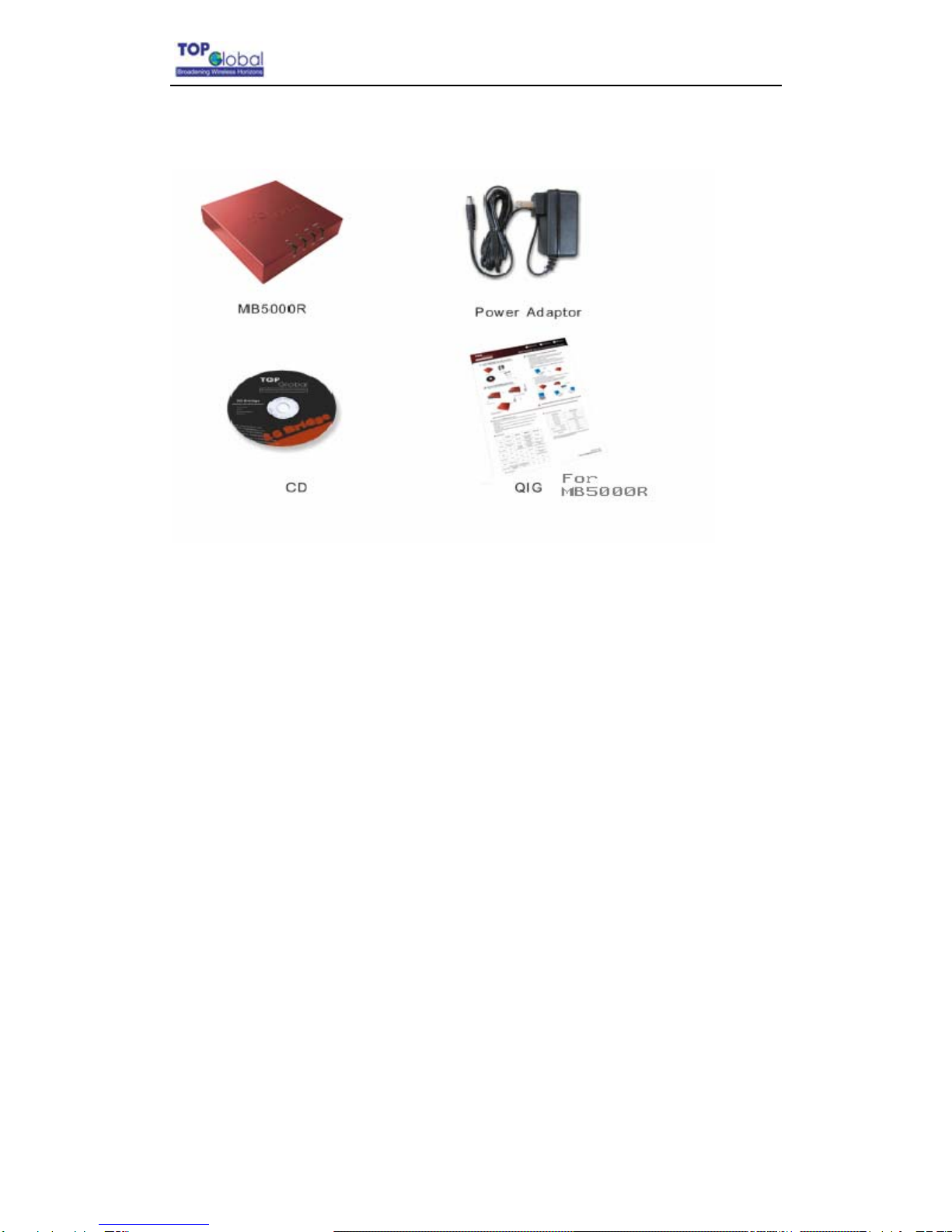
MB5000R kit includes the following components, similar to those depicted in Figure 2-1.
Figure2-1 MB5000R Kit Contents
1. MB5000R router (Top View)
2. Power Adaptor
3. CD
4. QIG (Quick Installation Guide)
The MB5000K and MB5000C are available for OEM/ODM customers and are only
intended for vertical and enterprise market. Thus they are available in bulk shipment only.
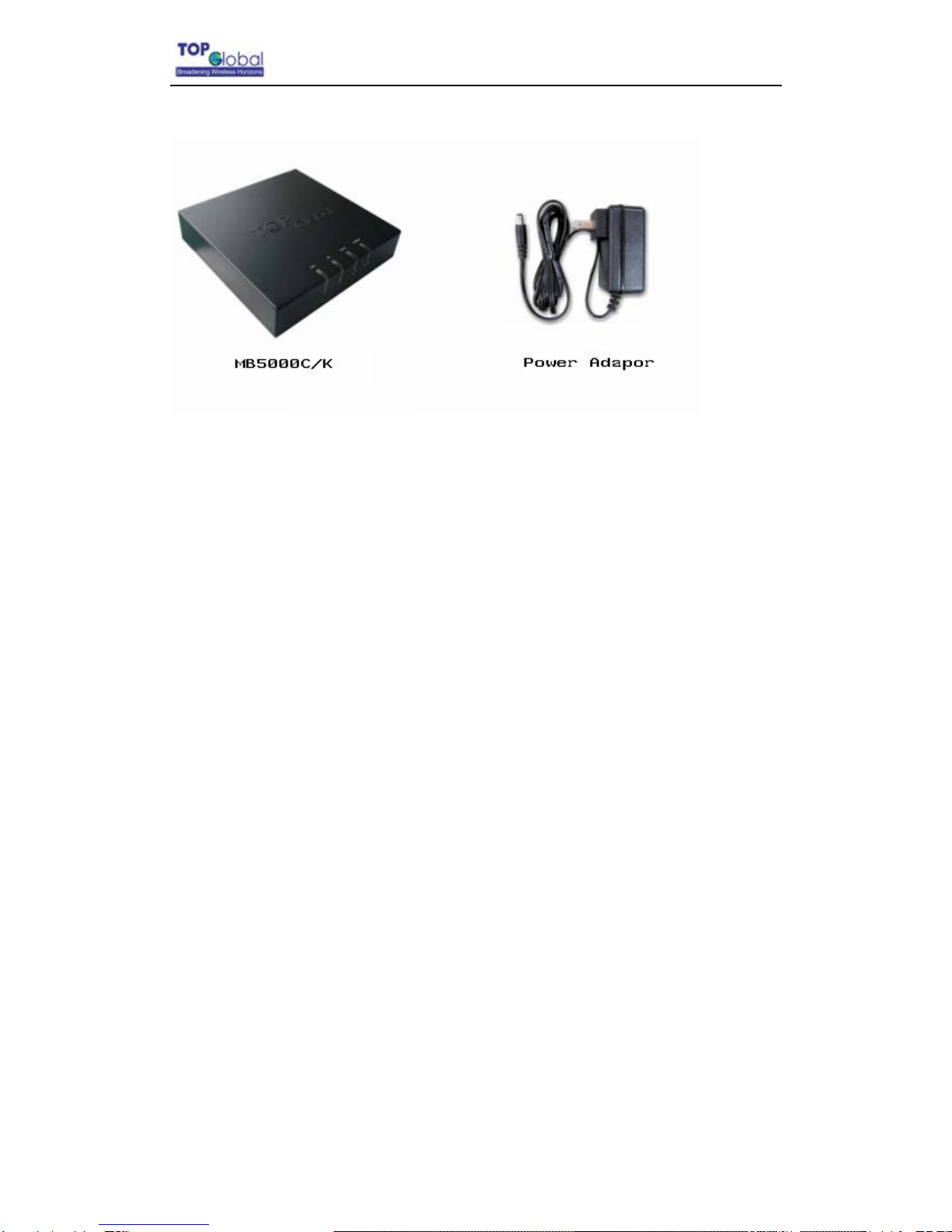
MB5000C/K kit includes the following components, similar to those depicted in Figure 2-2.
- 7 -

Top Global USA. ----MB5000 User Guide
Figure2-2 MB5000C/K Kit Contents
1. MB5000C/K router (Top View)
2. Power Adaptor
2.2 Write Down Product Identification
Before you proceed with your MB5000 installation, please write down and keep the
following MB5000 information on the MB5000 label:
zSerial Number
zMAC address
2.3 Power on the MB5000
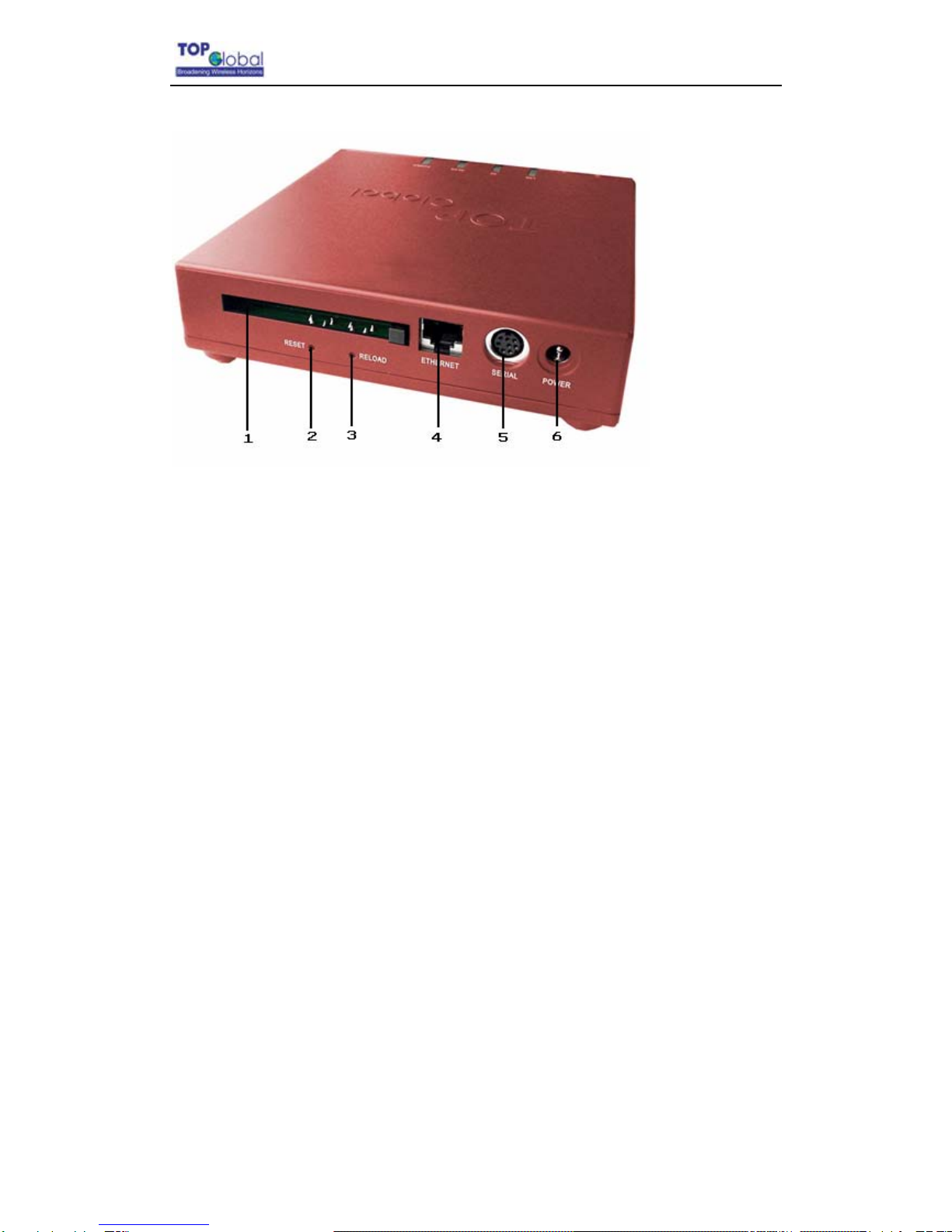
Power on the MB5000 (refer to Figure 2-3).
- 8 -

Top Global USA. ----MB5000 User Guide
Figure2-3 MB5000 Ports description
1. PC Card Slot
2. Reset Button
3. Reload Button
4. Ethernet LAN Interface (RJ45)
5. Console Port (RS232)
6. Power jack
The MB5000 power supply accepts any input AC voltage in the range of 100-240 VAC.
2.4 LED Indicators
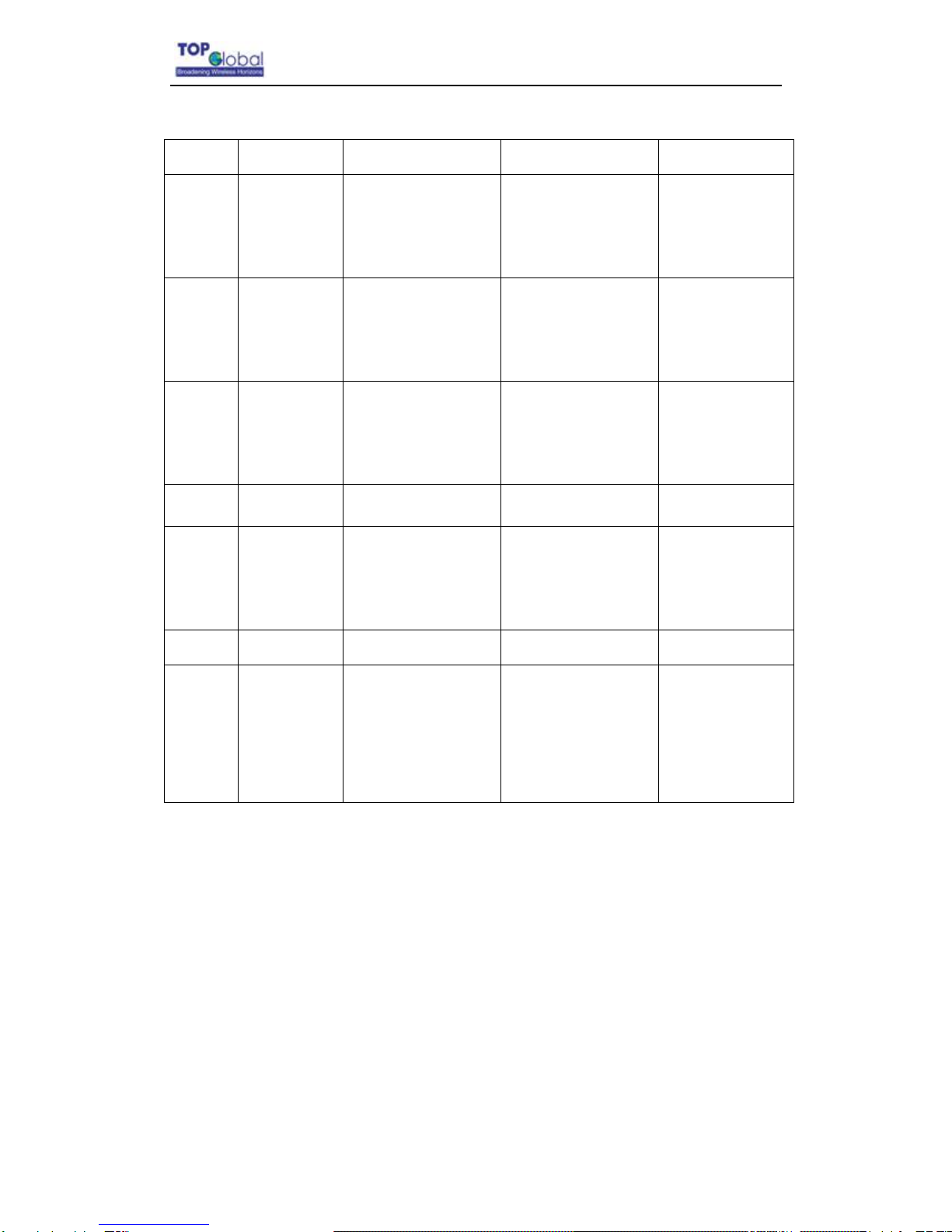
MB5000 has four two-color LEDs to indicate the working status. The following table shows
the status when the MB5000 is configured successfully and running properly.
- 9 -

Top Global USA. ----MB5000 User Guide
Table 2-1 Normal LED Indications
Power WLAN WWAN Ethernet
Off Power off Disabled Card inserted;
No Internet
connection
No cable
Green Normal Enabled Card inserted;
Internet connection
established.
100Mbps mode
Green
Blink
N/A Enabled and data
transmission
Card inserted;
Internet connecting
100Mbps mode,
with data
transmission
Red N/A N/A No card 10Mbps mode
Red
Blink
N/A N/A N/A 10Mbps mode,
with data
transmission
Amber System error N/A N/A N/A
Amber
Blink
System
booting or
Upgrading
firmware
WLAN enabled with
error.
N/A N/A
2.5 Initialize the MB5000 Unit
1. Connect MB5000 with your computer, there are two ways to connect MB5000 with
your computer:
I. Connect your computer to MB5000 using an Ethernet cable or a hub and
your computer is set with “Automatic IP” configuration.
II. Alternatively, you can connect your computer to MB5000 with wireless LAN
(available for MB5000R only).
- 10 -
Autres manuels pour 3G Kiosk
1
Ce manuel convient aux modèles suivants
1
Table des matières
Autres manuels Top Global Porte
Manuels Porte populaires d'autres marques

LST
LST M500RFE-AS Manuel utilisateur

Kinnex
Kinnex Media Gateway Manuel utilisateur

2N Telekomunikace
2N Telekomunikace 2N StarGate Manuel utilisateur

Mitsubishi Heavy Industries
Mitsubishi Heavy Industries Superlink SC-WBGW256 Manuel utilisateur

ZyXEL Communications
ZyXEL Communications ZYWALL2 ET 2WE Manuel utilisateur

Telsey
Telsey CPVA 500 - SIP Manuel utilisateur