Timewatch ULTraFace 331 Manuel utilisateur

ULtraFace 331 Face Recognion Terminal
User Manual
Page 1 of 68

Contents
Chapter 1 Overview .................................................................................................................... 1
1.1 Overview ................................................................................................................................ 1
1.2 Features ................................................................................................................................. 1
Chapter 2 Appearance ................................................................................................................ 2
Chapter 3 Installaon ................................................................................................................. 3
3.1 Installaon Environment ........................................................................................................ 3
3.2 Base Mounng ....................................................................................................................... 3
3.3 Install with Gang Box ............................................................................................................. 4
Chapter 4 Wiring ........................................................................................................................ 7
4.1 Terminal Descripon .............................................................................................................. 7
4.2 Wire Normal Device ............................................................................................................... 8
4.3 Wiring with Power Cable ....................................................................................................... 9
Chapter 5 Acvaon ................................................................................................................. 10
5.1 Acvate via Device ............................................................................................................... 10
5.2 Acvate via SADP ................................................................................................................. 11
5.3 Acvate Device via Client Soware ...................................................................................... 12
Chapter 6 Basic Operaon ........................................................................................................ 13
6.1 Select Language ................................................................................................................... 13
6.2 Set Applicaon Mode .......................................................................................................... 13
6.3 Set Administrator ................................................................................................................. 14
6.4 Login .................................................................................................................................... 15
6.4.1 Login by Administrator ................................................................................................ 15
6.4.2 Login by Acvaon Password ...................................................................................... 17
6.5 Communicaon Sengs ...................................................................................................... 17
6.5.1 Set Wired Network Parameters .................................................................................. 17
6.5.2 Set Wi-Fi Parameters ................................................................................................... 18
ULtraFace 331 Face Recognion Terminal User Manual
Page 2 of 68

6.5.3 Set RS-485 Parameters ................................................................................................ 19
6.6 User Management ............................................................................................................... 20
6.6.1 Add Face Picture ......................................................................................................... 20
6.6.2 Add Card ..................................................................................................................... 22
6.6.3 Add Password .............................................................................................................. 23
6.6.4 Set Authencaon Mode ............................................................................................ 24
6.6.5 Search and Edit User ................................................................................................... 24
6.7 Data Management ............................................................................................................... 24
6.7.1 Delete Data ................................................................................................................. 25
6.7.2 Import Data ................................................................................................................. 25
6.7.3 Export Data ................................................................................................................. 25
6.8 Identy Authencaon ........................................................................................................ 26
6.8.1 Authencate via Face .................................................................................................. 26
6.8.2 Authencate via Mulple Credenal .......................................................................... 26
6.9 Basic Sengs ....................................................................................................................... 27
6.10 Set Biometric Parameters .................................................................................................. 28
6.11 Set Access Control Parameters .......................................................................................... 29
6.12 Time and Aendance Status Sengs ................................................................................ 31
6.12.1 Disable Aendance Mode via Device ....................................................................... 31
6.12.2 Set Manual Aendance via Device ........................................................................... 31
6.12.3 Set Auto Aendance via Device ................................................................................ 32
6.12.4 Set Manual and Auto Aendance via Device ............................................................ 34
6.13 System Maintenance .......................................................................................................... 35
6.14 Video Intercom .................................................................................................................. 36
6.14.1 Call Client Soware from Device ............................................................................... 36
6.14.2 Call Center from Device ............................................................................................ 37
6.14.3 Call Device from Client Soware ............................................................................... 37
6.14.4 Call Room from Device .............................................................................................. 38
x
ULtraFace 331 Face Recognition Terminal User Manual
Page 3 of 68

xi
ULtraFace 331 Face Recognition Terminal User Manual
Chapter 7 Operaon via Web Browser ...................................................................................... 39
7.1 Login .................................................................................................................................... 39
7.2 Live View .............................................................................................................................. 39
7.3 Person Management ............................................................................................................ 40
7.4 Search Event ........................................................................................................................ 41
7.5 Conguraon ....................................................................................................................... 42
7.5.1 Set Local Parameters ................................................................................................... 42
7.5.2 View Device Informaon ............................................................................................. 42
7.5.3 Set Time ...................................................................................................................... 42
7.5.4 Set DST ........................................................................................................................ 43
7.5.5 Upgrade and Maintenance ......................................................................................... 43
7.5.6 Change Administrator's Password ............................................................................... 45
7.5.7 Network Sengs ......................................................................................................... 45
7.5.8 Set Video and Audio Parameters ................................................................................ 47
7.5.9 Set Video Intercom Parameters .................................................................................. 48
7.5.10 Set Access Control and Authencaon Parameters .................................................. 49
7.5.11 Set RS-485 Parameters .............................................................................................. 50
7.5.12 Set Image Parameters ............................................................................................... 51
7.5.13 Set Supplement Light Brightness .............................................................................. 52
7.5.14 Set Biometric Parameters ......................................................................................... 53
7.5.15 Set Noce Publicaon ............................................................................................... 54
Chapter 8 Client Soware Conguraon ................................................................................... 56
8.1 Conguraon Flow of Client Soware ................................................................................. 56
8.2 Device Management ............................................................................................................ 56
8.2.1 Add Device .................................................................................................................. 57
8.2.2 Reset Device Password ................................................................................................ 64
8.3 Group Management ............................................................................................................. 64
8.3.1 Add Group ................................................................................................................... 65
Page 4 of 68

8.3.2 Import Resources to Group ......................................................................................... 65
8.3.3 Edit Resource Parameters ........................................................................................... 66
8.3.4 Remove Resources from Group .................................................................................. 66
8.4 Person Management ............................................................................................................ 66
8.4.1 Add Organizaon ........................................................................................................ 66
8.4.2 Congure Basic Informaon ....................................................................................... 67
8.4.3 Issue a Card by Local Mode ......................................................................................... 68
8.4.4 Upload a Face Photo from Local PC ............................................................................ 70
8.4.5 Take a Photo via Client ................................................................................................ 70
8.4.6 Collect Face via Access Control Device ....................................................................... 71
8.4.7 Congure Access Control Informaon ........................................................................ 72
8.4.8 Customize Person Informaon .................................................................................... 73
8.4.9 Congure Resident Informaon .................................................................................. 74
8.4.10 Congure Addional Informaon ............................................................................. 74
8.4.11 Import and Export Person Idenfy Informaon ........................................................ 75
8.4.12 Import Person Informaon ....................................................................................... 75
8.4.13 Import Person Pictures ............................................................................................. 75
8.4.14 Export Person Informaon ........................................................................................ 76
8.4.15 Export Person Pictures .............................................................................................. 76
8.4.16 Get Person Informaon from Access Control Device ................................................ 77
8.4.17 Move Persons to Another Organizaon .................................................................... 77
8.4.18 Issue Cards to Persons in Batch ................................................................................. 78
8.4.19 Report Card Loss ....................................................................................................... 78
8.4.20 Set Card Issuing Parameters ...................................................................................... 79
8.5 Congure Schedule and Template ....................................................................................... 80
8.5.1 Add Holiday ................................................................................................................. 80
8.5.2 Add Template .............................................................................................................. 81
8.6 Set Access Group to Assign Access Authorizaon to Persons .............................................. 82
xii
ULtraFace 331 Face Recognition Terminal User Manual
Page 5 of 68

8.7 Congure Advanced Funcons ............................................................................................ 84
8.7.1 Congure Device Parameters ...................................................................................... 84
8.7.2 Congure Remaining Open/Closed ............................................................................. 89
8.7.3 Congure Mul-Factor Authencaon ....................................................................... 90
8.7.4 Congure Card Reader Authencaon Mode and Schedule ...................................... 92
8.7.5 Congure First Person In ............................................................................................. 94
8.7.6 Congure An-Passback ............................................................................................. 95
8.7.7 Congure Other Parameters ....................................................................................... 96
8.8 Congure Linkage Acons for Access Control .................................................................... 102
8.8.1 Congure Client Acons for Access Event ................................................................. 102
8.8.2 Congure Device Acons for Access Event ............................................................... 103
8.8.3 Congure Device Acons for Card Swiping ............................................................... 104
8.9 Door Control ...................................................................................................................... 105
8.9.1 Control Door Status ................................................................................................... 105
8.9.2 Check Real-Time Access Records .............................................................................. 106
8.10 Event Center .................................................................................................................... 107
8.10.1 Enable Receiving Event from Devices ..................................................................... 107
8.10.2 View Real-Time Events ............................................................................................ 107
8.10.3 Search Historical Events .......................................................................................... 110
8.11 Time and Aendance ....................................................................................................... 113
8.11.1 Congure Aendance Parameters .......................................................................... 113
8.11.2 Add General Timetable ........................................................................................... 118
8.11.3 Add Shi .................................................................................................................. 120
8.11.4 Manage Shi Schedule ........................................................................................... 123
8.11.5 Manually Correct Check-in/out Record ................................................................... 126
8.11.6 Add Leave and Business Trip ................................................................................... 127
8.11.7 Calculate Aendance Data ...................................................................................... 128
8.11.8 Aendance Stascs .............................................................................................. 129
xiii
ULtraFace 331 Face Recognition Terminal User Manual
Page 6 of 68

Appendix A. Tips When Collecng/Comparing Face Picture .................................................... 133
Appendix B. Tips for Installaon Environment ........................................................................ 135
Appendix C. Dimension .......................................................................................................... 136
Appendix D. Communicaon Matrix and Device Command .................................................... 137
xiv
ULtraFace 331 Face Recognition Terminal User Manual
Page 7 of 68

Chapter 1 Overview
1.1 Overview
Face recognion terminal is a kind of access control device for face recognion, which is mainly
applied in security access control systems, such as logisc centers, airports, university campuses,
alarm centrals, dwellings, etc.
1.2 Features
• 3.97-inch LCD touch screen
• 2 MP wide-angle dual-lens
• Face an-spoong
• Face recognion distance: 0.3 m to 1.5 m
• Suggested height for face recognion: between 1.4 m and 1.9 m
• Deep learning algorithm
• 300 face capacity, 1500 card capacity (when connecng external card reader), 150,000 event
capacity, and 20,000 captured pictures storage
• Face recognion duraon < 0.2 s/User; face recognion accuracy rate ≥ 99%
• Capture linkage and captured pictures storage
• Transmits card and user data from or to the client soware via TCP/IP protocol and saves the
data on the client soware
• Imports pictures from the USB ash drive to the device or export pictures, events, from the
device to the USB ash drive
• Stand-alone operaon
• Manage, search and set device data aer logging in the device locally
• Connects to one external card reader via RS-485 protocol
• Connects to secure door control unit via RS-485 protocol to avoid the door opening when the
device is destroyed
• Audio prompt
• Watchdog design and tamper funcon
1
ULtraFace 331 Face Recognition Terminal User Manual
Page 8 of 68

Chapter 2 Appearance
Refer to the following contents for detailed informaon of the face recognion terminal:
Figure 2-1 Face Recognion Terminal Diagram
Table 2-1 Descripon of Face Recognion Terminal
No. Name Descripon
1 Display Screen 3.97-inch LCD touch screen.
2 Supplement Light Supplement light camera.
3 Camera 1 Recording or capturing videos or pictures.
4 Camera 2 Recording or capturing videos or pictures.
5 microUSB Interface Connect to USB ash drive via a microUSB to
USB cable.
6 Tamper Aer installaon, if the device is disassembled,
a tamper alarm will be triggered.
7 Network Interface Connect to Ethernet.
8 Wiring Terminals Connect to other external devices, including RS-
485 card reader, door lock, etc.
9 Debugging Port The debug terminal is used for debugging only.
2
ULtraFace 331 Face Recognition Terminal User Manual
Page 9 of 68

Chapter 3 Installaon
3.1 Installaon Environment
• Avoid backlight, direct sunlight, and indirect sunlight.
• For beer recognion, there should be light source in or near the installaon environment.
Note
For details about installaon environment, see Tips for Installaon Environment.
3.2 Base Mounng
Place the device on the desk or other ats by using the mounng bracket.
Steps
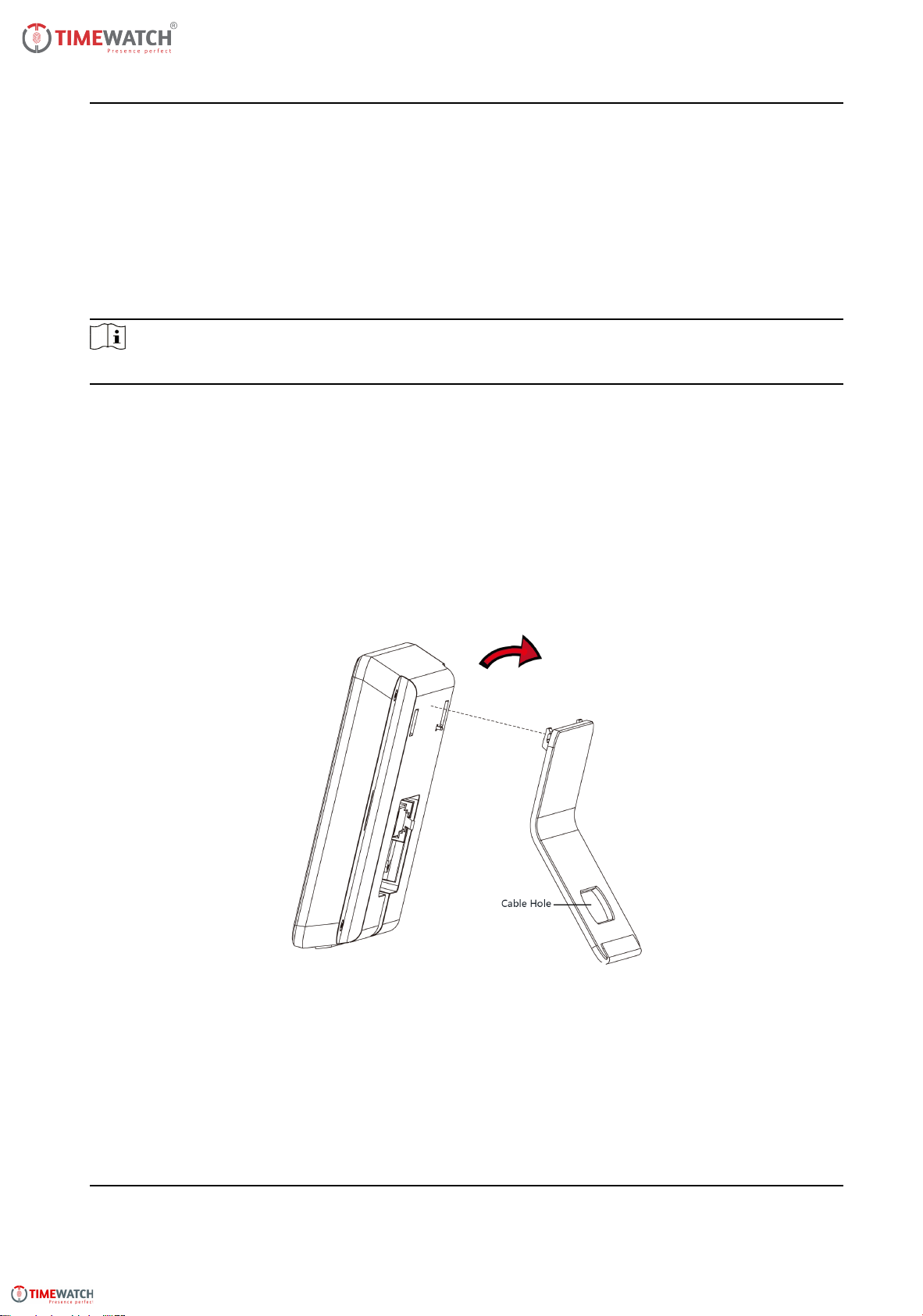
1. Route the cables through the cable hole of the bracket, and connect the terminals with external
devices' cables.
2. Align the device two holes with the two buckles on the bracket.
3. Hang the device on the bracket and make sure the buckle in the middle of the bracket is
inserted in the groove on the device back.
Figure 3-1 Base Mounng
4. Place the assembled device and bracket on the desk or other ats.
3
ULtraFace 331 Face Recognition Terminal User Manual
Page 10 of 68
Autres manuels pour ULTraFace 331
1
Table des matières
Autres manuels Timewatch Terminal tactile
Manuels Terminal tactile populaires d'autres marques

Wincor Nixdorf
Wincor Nixdorf iPOS plus Advanced Manuel utilisateur

Ingenico
Ingenico AXIUM EX4000 Manuel utilisateur

Heisei Electronics
Heisei Electronics Q-POS 815 Manuel utilisateur

Amano
Amano MTX-15 Manuel utilisateur

FLOWBIRD
FLOWBIRD CWT Compact Touch Manuel utilisateur

Demco
Demco SP7 Manuel utilisateur