Thinkcar Pros+ Manuel utilisateur

Version: V1.00.001
Statement: THINKCAR owns the complete intellectual property rights for the software
used by this product. For any reverse engineering or cracking actions against the software,
THINKCAR will block the use of this product and reserve the right to pursue their legal
liabilities.
THINKCAR

www.mythinkcar.com
THINKTOOL Pros+/Pros
I
IC Requirement
This device contains licence-exempt transmitter(s)/receiver(s) that comply with Innovation,Science and
Economic Development Canada’ s licence-exempt RSS(s). Operation is subject to the following two
conditions:
(1)This device may not cause interference.
(2)This device must accept any interference,including interference that may cause undesired operation
of the device.
L'émetteur/récepteur exempt de licence contenu dans le présent appareil est conforme aux CNR
d'Innovation,Sciences et Développement économique Canada applicables aux appareils radio exempts
de licence. L 'exploitation est autorisée aux deux conditions suivantes :
1)L'appareil ne doit pas produire de brouillage;
2)L'appareil doit accepter tout brouillage radioélectrique subi, même si le brouillage est susceptible d'en
compromettre le fonctionnement.
IC WARNING
Cet équipement est conforme aux limites d’exposition aux rayonnements ISED établies pour un
HQYLURQQHPHQWQRQFRQWU{Op/¶XWLOLVDWHXU¿QDOGRLWVXLYUHOHVLQVWUXFWLRQVVSpFL¿TXHVSRXUVDWLVIDLUHOHV
normes. Cet émetteur ne doit pas être co-implanté ou fonctionner en conjonction avec toute autre antenne
ou transmetteur.
Le dispositif portatif est conçu pour répondre aux exigences d’exposition aux ondes radio établie par
ledéveloppement énergétique DURABLE. Ces exigences un SAR limite de 1,6 W/kg en moyenne pour un
gramme de tissu. FHUWL¿FDWLRQGHSURGXLWjXWLOLVHUORUVTX¶LOHVWFRUUHFWHPHQWSRUWpVXUOHFRUSV

www.mythinkcar.com THINKTOOL Pros+/Pro
II
FCC Requirement
&KDQJHVRUPRGL¿FDWLRQVQRWH[SUHVVO\DSSURYHGE\WKHSDUW\UHVSRQVLEOHIRUFRPSOLDQFHFRXOGYRLGWKH
user’ s authority to operate the equipment.
This device complies with Part 15 of the FCC Rules. Operation is subject to the following two conditions:
(1) this device may not cause harmful interference, and
(2) this device must accept any interference received, including interference that may cause undesired
operation.
Note: This equipment has been tested and found to comply with the limits for a Class B digital device,
pursuant to Part 15 of the FCC Rules. These limits are designed to provide reasonable protection
against harmful interference in a residential installation. This equipment generates, uses, and can
radiate radio frequency energy, and if not installed and used in accordance with the instructions, may
cause harmful interference to radio communications. However, there is no guarantee that interference
will not occur in a particular installation. If this equipment does cause harmful interference to radio
RUWHOHYLVLRQUHFHSWLRQZKLFKFDQEHGHWHUPLQHGE\WXUQLQJWKHHTXLSPHQWRႇDQGRQWKHXVHULV
encouraged to try to correct the interference by one or more of the following measures:
– Reorient or relocate the receiving antenna.
– Increase the separation between the equipment and receiver.
±&RQQHFWWKHHTXLSPHQWLQWRDQRXWOHWRQDFLUFXLWGLႇHUHQWIURPWKDWWRZKLFKWKHUHFHLYHULVFRQQHFWHG
– Consult the dealer or an experienced radio/TV technician for help.
FCC WARNING
This equipment complies with FCC radiation exposure limits set forth for an uncontrolled environment. End
XVHUPXVWIROORZWKHVSHFL¿FRSHUDWLQJLQVWUXFWLRQVIRUVDWLVI\LQJ5)H[SRVXUHFRPSOLDQFH7KLVWUDQVPLWWHU
must not be co-located or operating in conjunction with any other antenna or transmitter.
The mobile device is designed to meet the requirements for exposure to radio waves established by the
Federal Communications Commission (USA). These requirements set a SAR limit of 1.6 W/kg averaged
RYHURQHJUDPRIWLVVXH
For body operation, this device has been tested and meets FCC RF exposure guidelines when used with
any accessory that contains no metal and that positions a minimum of 15mm from the body. Use of other
accessories may not ensure compliance with FCC RF exposure guidelines.

www.mythinkcar.com
THINKTOOL Pros+/Pros
III
Copyright Information
Copyright © 2020 by THINKCAR TECH CO., LTD(hereinafter referred to as “THINKCAR”). All rights
reserved. No part of this publication may be reproduced, stored in a retrieval system, or transmitted in any
form or by any means, electronic, mechanical, photocopying and recording or otherwise, without the prior
written permission of THINKCAR. The information contained herein is designed only for the use of this
unit. THINKCAR is not responsible for any use of this information as applied to other units.
1HLWKHU7+,1.&$5QRULWVDႈOLDWHVVKDOOEHOLDEOHWRWKHSXUFKDVHURIWKLVXQLWRUWKLUGSDUWLHVIRUGDPDJHV
losses, costs, or expenses incurred by purchaser or third parties as a result of: Accident, misuse, or abuse
RIWKLVXQLWRUXQDXWKRUL]HGPRGL¿FDWLRQVUHSDLUVRUDOWHUDWLRQVWRWKLVXQLWRUIDLOXUHWRVWULFWO\FRPSO\ZLWK
THINKCAR operating and maintenance instructions. THINKCAR shall not be liable for any damages or
problems arising from the use of any options or any consumable products other than those designated as
Original THINKCAR Products or THINKCAR Approved Products.
Formal statement: The names of other products mentioned in this manual are intended to explain how to
use this equipment, and the registered trademark ownership still belongs to the original company.
This equipment is designed for professional technicians or maintenance personnel.
Trademark
THINKCAR is a registered trademark of THINKCAR TECH CO., LTD in China and other overseas
countries. All other THINKCAR trademarks, service marks, domain names, logos, and company names
referred to in this manual are either trademarks, registered trademarks, service marks, domain names,
ORJRVFRPSDQ\QDPHVRIRUDUHRWKHUZLVHWKHSURSHUW\RI7+,1.&$5RULWVDႈOLDWHV,QFRXQWULHVZKHUH
any of the THINKCAR trademarks, service marks, domain names, logos and company names are not
registered, THINKCAR claims other rights associated with unregistered trademarks, service marks,
domain names, logos, and company names. Other products or company names referred to in this manual
may be trademarks of their respective owners. You may not use any trademark, service mark, domain
name, logo, or company name of THINKTOOL or any third party without permission from the owner of the
applicable trademark, service mark, domain name, logo, or company name.
You may contact THINKCAR TECH INC by visiting the website at www.mythinkcar.com, or writing to
THINKCAR TECH CO., LTD., Room 2606, Block#4, Tian'an Cloud Park, Bantian, Longgang District,
Shenzhen, China, to request written permission to use Materials on this manual for purposes or for all
other questions relating to this manual.
Safety Precautions and Warnings
To avoid personal injury, property loss, or accidental damage to the product, read all of the information in
this section before using the product.
Handle equipment carefully
Do not drop, bend, or puncture the tool, or insert extra objects into or place heavy objects on
the device. The vulnerable components inside may be damaged.
Do not disassemble or modify the equipment

www.mythinkcar.com THINKTOOL Pros+/Pro
IV
The device is a sealed device with no user-serviceable parts inside. All internal repairs must be performed
E\DQDXWKRUL]HGPDLQWHQDQFHRUJDQL]DWLRQRUTXDOL¿HGWHFKQLFLDQ$WWHPSWVWRGLVDVVHPEOHRUPRGLI\WKH
device will void the warranty.
Do not try to replace the internal battery
The internal rechargeable lithium battery must be replaced by an authorized maintenance organization or
TXDOL¿HGWHFKQLFLDQ&RQWDFWWKHGHDOHUIRUIDFWRU\UHSODFHPHQW
Adapter information
Avoid immersing the device in water or placing it in a location where it may absorb moisture or other liquids.
During normal use, the charging device may become hot. Please ensure that there is good ventilation
while charging device.
If any of the following situation occurs, please unplug the charging device:
The charging device is exposed to rain, liquid or in an environment with excessive overlap.
The charging device showed physical damage.
Cleaning the charging device.
Data and Software Protection
'RQRWGHOHWHXQNQRZQ¿OHVRUFKDQJHWKHQDPHVRI¿OHVRUGLUHFWRULHVFUHDWHGE\RWKHUVRWKHUZLVHWKH
device software may not run.
Note: Access to network resources makes the device vulnerable to computer viruses, hackers, spyware, and
other malicious behaviors, and may damage the device, software, or data. To make ensure that you are using
¿UHZDOOVDQWLYLUXVVRIWZDUHDQGDQWLVS\ZDUHVRIWZDUHWRSURYLGHDGHTXDWHSURWHFWLRQIRU\RXUFRPSXWHUDQG
keep these software up to date.
Precautions on Using this tool
To make sure the ignition switch should be in the OFF position when plugging and unplugging the
diagnostic connector.
.HHSWKHFRQQHFWRULQWKHVWRUDJHER[RQWKHEDFNRIWKHPDLQXQLWZKHQWKHYHKLFOHGLDJQRVLVLV¿QLVKHG
Gently press the diagnostic connector to pop up the diagnostic connector. Do not pull or use sharp
objects to pry the diagnostic connector.
Precautions on Operating Vehicle’s ECU
Do not disconnect battery or any wiring cables in the vehicle when the ignition switch is on, as this could
avoid damage to the sensors or the ECU.
Do not place any magnetic objects near the ECU. Disconnect the power supply to the ECU before
performing any welding operations on the vehicle.
Use extreme caution when performing any operations near the ECU or sensors. Ground yourself when
you disassemble PROM, otherwise ECU and sensors can be damaged by static electricity.
When reconnecting the ECU harness connector, be sure it is attached firmly, otherwise electronic
elements, such as ICs inside the ECU, can be damaged.

www.mythinkcar.com
THINKTOOL Pros+/Pros
V
Content
1. Quick Start Manual ............................................................................................................1
1.1 Initial Use ............................................................................................................................................. 1
1.1.1 Turn on the Machine ........................................................................................................................ 1
1.1.2 Language Setting ............................................................................................................................. 1
1.1.3 Connect WIFI.................................................................................................................................... 1
1.1.4 Choose Time Zone ........................................................................................................................... 2
1.1.5 User Agreement................................................................................................................................ 2
1.1.6 Create an Account ............................................................................................................................ 2
1.1.7 VCI activation ................................................................................................................................... 3
1.2 Diagnosis Flowchart ............................................................................................................................ 3
1.3 Function menu ..................................................................................................................................... 4
1.4 Charging .............................................................................................................................................. 5
1.5 Battery ................................................................................................................................................. 5
1.6 VCI Connections.................................................................................................................................. 5
1.7 Printer Installation ................................................................................................................................ 6
2. Introduction ........................................................................................................................6
3URGXFW3UR¿OH ..................................................................................................................................... 6
2.2 Components & Controls ...................................................................................................................... 7
2.3 Function Modules ................................................................................................................................ 8
2.4 Parameters ........................................................................................................................................ 10
3. Begin to Use.....................................................................................................................10
3.1 Intelligent Diagnose ........................................................................................................................... 10
3.2 Local Diagnose ...................................................................................................................................11
3.2.1 Manual Diagnose.............................................................................................................................11
3.2.2 System Selection ............................................................................................................................ 13
3.2.3 Function Selection .......................................................................................................................... 13
3.3 Quick Check and Printing .................................................................................................................. 17
3.4 Programming(only for THINKTOOL Pros+) ....................................................................................... 18
3.5 Maintenance ...................................................................................................................................... 20
3.5.1 Oil Reset ......................................................................................................................................... 20
3.5.2 Elec. Throttle Adaption ................................................................................................................... 20
3.5.3 Steering Angle Reset ...................................................................................................................... 20
3.5.4 Battery Matching............................................................................................................................. 20
3.5.5 ABS Bleeding.................................................................................................................................. 21
3.5.6 Break-pad Reset............................................................................................................................ 21
3.5.7 DPF Regeneration .......................................................................................................................... 21
3.5.8 Gear Learning................................................................................................................................. 22
3.5.9 IMMO Service ................................................................................................................................. 22
3.5.10 Injector Coding ............................................................................................................................. 22
3.5.11 TPMS Reset ................................................................................................................................. 22
3.5.12 Suspension Matching ................................................................................................................... 22

www.mythinkcar.com THINKTOOL Pros+/Pro
VI
3.5.13 AFS Reset .................................................................................................................................... 22
3.5.14 A/T Learning ................................................................................................................................. 23
3.5.15 Sunroof Initialization ..................................................................................................................... 23
3.5.16 EGR Adaption ............................................................................................................................... 23
3.5.17 ODO Reset ................................................................................................................................... 23
3.5.18 Airbag Reset ................................................................................................................................. 23
3.5.19 Transport Mode ............................................................................................................................ 23
3.5.20 A/F Reset ...................................................................................................................................... 23
3.5.21 Stop/Start Reset ........................................................................................................................... 23
3.5.22 NOx Sensor Reset........................................................................................................................ 24
3.5.23 AdBlue Reset (Diesel Engine Exhaust Gas Filter)........................................................................ 24
3.5.24 Seat Calibration ............................................................................................................................ 24
3.5.25 Coolant Bleeding .......................................................................................................................... 24
3.5.26 Tyre Reset .................................................................................................................................... 24
3.5.27 Windows Calibration ..................................................................................................................... 24
3.5.28 Language Change ........................................................................................................................ 24
3.6 TPMS Diagnostics ............................................................................................................................. 24
3.7 Diagnostic Feedback ......................................................................................................................... 25
3.8 Repair info ......................................................................................................................................... 26
3.8.1 Fault code enquiry .......................................................................................................................... 26
3.8.2 Vehicle coverage enquiry ............................................................................................................... 26
3.8.3 Learning course .............................................................................................................................. 26
3.9 ThinkFile ............................................................................................................................................ 27
3.10 ThinkStore ....................................................................................................................................... 27
3.11 ADAS ............................................................................................................................................... 27
4.Software update................................................................................................................28
4.1 Upgrade all software.......................................................................................................................... 28
5.Set up.................................................................................................................................28
5.1 My VCI ............................................................................................................................................... 28
5.2 Activate VCI ....................................................................................................................................... 29
9&,¿UPZDUHUHSDLU............................................................................................................................ 29
5.4 Data Stream Sample ......................................................................................................................... 29
5.5 My order ............................................................................................................................................ 29
5.6 Personal information.......................................................................................................................... 29
5.7 Change Password ............................................................................................................................ 29
5.8 Settings.............................................................................................................................................. 29
5.9 Wi-Fi settings ..................................................................................................................................... 29
5.10 Workshop Management .................................................................................................................. 30
5.11 Customer Management ................................................................................................................... 30
5.12 Hotkey Setting ................................................................................................................................. 30
6.FAQ ....................................................................................................................................30
Warranty Terms....................................................................................................................34

www.mythinkcar.com
THINKTOOL Pros+/Pros
1
1. Quick Start Manual
1.1 Initial Use
The following settings should be made when you initially use the tool.
1.1.1 Turn on the Machine
After pressing the power button, images will be shown on the screen as follows.
1.1.2 Language Setting
Select the tool language from the languages displayed on the interface.
1.1.3 Connect WIFI
The system will automatically search all available WIFI networks and you can choose the WIFI needed. If
the chosen network is open, you can connect it directly; If the chosen network is encrypted, you must enter
the correct password. Then You can connect WIFI after clicking “connect”.
7LSV:L)LPXVWEHVHW,IQR:L)LQHWZRUNLVDYDLODEOHQHDUE\\RXFDQHQDEOH3RUWDEOH0RELOH+RWVSRW

www.mythinkcar.com THINKTOOL Pros+/Pro
2
$IPPTF5JNF;POF
&KRRVHWKHWLPH]RQHRIWKHFXUUHQWORFDWLRQWKHQWKHV\VWHPZLOODXWRPDWLFDOO\FR¿JXUHWKHWLPHDFFRUGLQJ
to the time zone you chose.
1.1.5 User Agreement
Please read all the terms and conditions of the user agreement carefully. Choose “Agree all the above
terms”, and click the “Agree” button to complete the registration process.
Then the page will jump to the “Congratulations on your successful registration” interface.
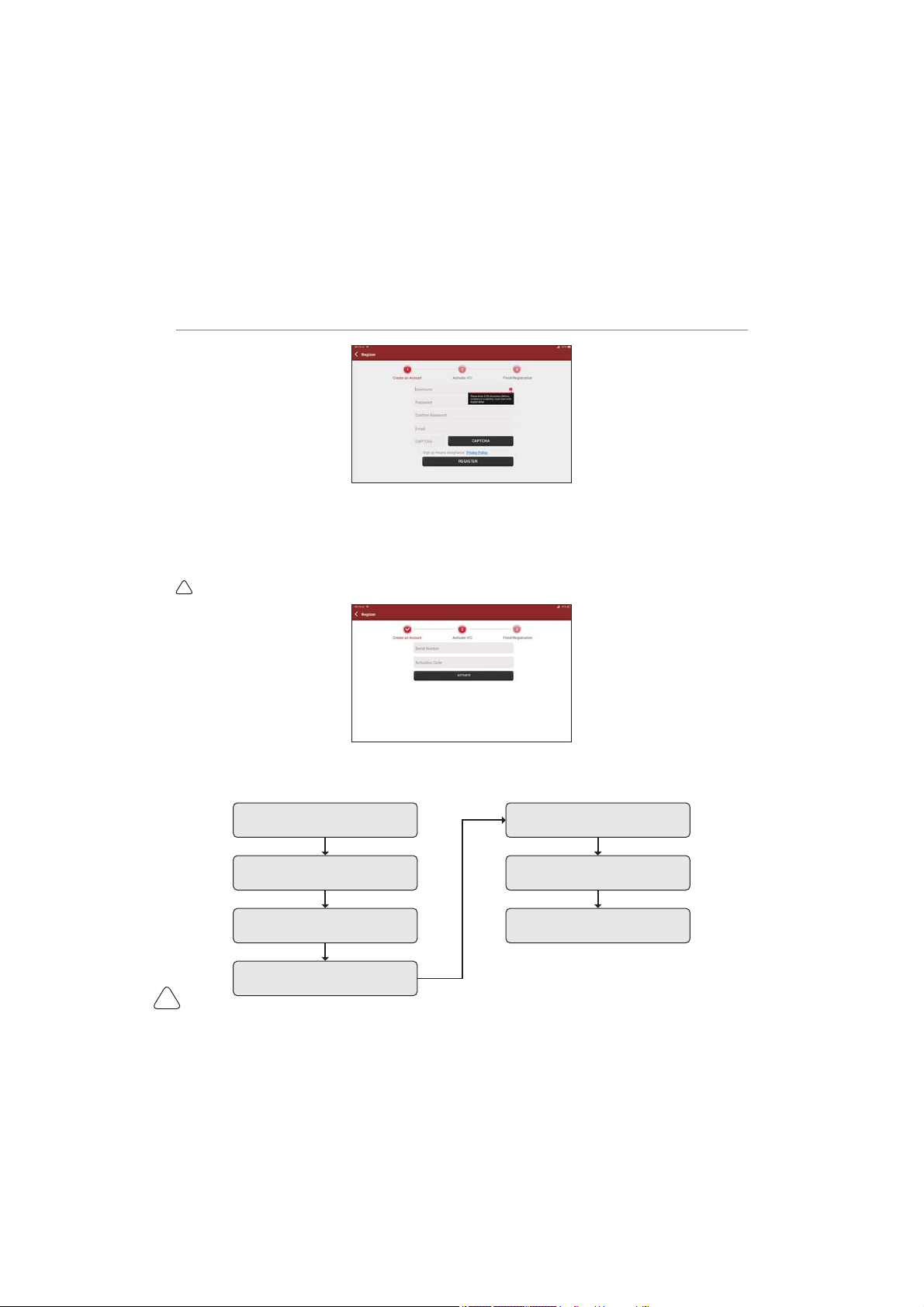
1.1.6 Create an Account
You need to register an account through your e-mail box. If you have owned other products of THINK
series, you can directly log in by using the account available.

www.mythinkcar.com
THINKTOOL Pros+/Pros
3
1.1.7 VCI activation
Enter the connector serial number and activation code to activate and bind the diagnostic connector. If you
have not activated it, you can also click "Settings" on the main interface to enter and select "Activate" to
operate.
7LSV7KHDFWLYDWLRQFRGHLVDQGLJLWQXPEHUDQGLVSDVWHGRQWKHSDVVZRUGOHWWHU
1.2 Diagnosis Flowchart
Register / Create an Account
Connect Diagnostic Connector
BT Connection
Activation
Log in Choose Vehicle Type
Choose System
Ce manuel convient aux modèles suivants
2
Table des matières
Manuels Carte mère populaires d'autres marques

Telit Wireless Solutions
Telit Wireless Solutions SL869-3DR Manuel utilisateur

Gigabyte
Gigabyte GA-9IVDT Manuel utilisateur

Texas Instruments
Texas Instruments ADS8372EVM Manuel utilisateur

Commell
Commell MS-C73 Manuel utilisateur

IBT Technologies
IBT Technologies MB860 Manuel utilisateur

Nvidia
Nvidia TEGRA DG-04927-001_V01 Manuel utilisateur