Thermia EM3 Manuel utilisateur

Thermia AB is not liable or bound by warranty if these instructions
are not adhered to during installation or service.
The English language is used for the original instructions.
Other languages are a translation of the original instructions.
(Directive 2006/42/EC)
© Copyright Thermia AB

Table of Contents
1 Important information/Safety instructions ............................................... 4
1.1 Safety precautions ............................................................ 4
1.2 About the document ........................................................... 4
1.3 Max load ................................................................... 4
2Components and dimensions ........................................................ 6
2.1 Components and hardware ....................................................... 6
3Installation ..................................................................... 7
3.1 General information ........................................................... 7
3.2 Internal installation ............................................................ 7
3.3 External installation ............................................................ 7
4Supported functions .............................................................. 13
4.1 Supported functions ........................................................... 13
4.2 Finishing steps ............................................................... 40
5 Wiring diagram .................................................................. 41
5.1 Table item number ............................................................ 41
Installation Guide Expansion Module 3 (EM3)
Thermia AB ACEM301IG0502 3

1 Important information/Safety instructions
1.1 Safety precautions
Danger Hazardous electrical voltage! The terminal blocks are live and may
cause death through electric shock. All power supplies must be isola-
ted before electrical installation is started.
Warning Before making any electrical work, turn off the power supply connec-
ted to the heat pump.
Warning Electrical installation may only be carried out by an authorized electri-
cian and must follow applicable local and national regulations (IEC
60335-2-40).
Warning Risk of personal injury! Children are not permitted to play with the
product.
1.2 About the document
This manual is only intended for professional and trained installers and electricians with prior experience in installing heat pumps &
accessories. Industrial standards, common branch practice and local regulations must always be followed, even if not explicitly stated in
this document.
1.3 Max load
Max load on 230V feeding relays (marked "FR..") or potential free relays (marked "R..") is 230W with normal motors. Max 850W with soft
starting loads.
Max total load on EM3 is 5A.
Max load on TRIAC output (marked "TR") = 10VA
Total max load on 24V supply to supply mixing valve actuators: 21VA
IMPORTANT! Requires Genesis software version 7.01 or later. Please note that a restart of the control system is required for the installa-
tion to establish communication between the heat pump and the Expansion module. This is indicated by the following icon in the dis-
play top bar (the same symbol is used in "Operating mode" in the display to execute a restart):
Installation Guide Expansion Module 3 (EM3)
ACEM301IG0502 Thermia AB
4

List of supported functions:
▪ID:1 TWC/WCS
▪ID:2 Distribution circuit 2 & 3
▪ID:3 Distribution circuit 4 & 5
▪ID:4 Cooling
▪ID:5 Pool
▪ID:10-17 Legacy (Jumper MUST be on both pins as shown in the picture to the right)
▪Control of internal brine pumps (only available with ID:1-5)
▪Start of external brine pump, 0-10V (Used with ID:1)
ID: 1-5 ID: 10-17
(+10)
0
1
23
4
6
78
9
5
Glossary for abbreviations printed on the EM-card:
▪X: Power supply (in and out, 230VAC)
▪R: Potential free relay
▪FR: Feeding relay (230VAC)
▪TR: TRIAC output (230VAC)
▪MBa1: ModBus communication in
▪MBa2: Modbus communication out
▪AO: Analogue out
▪CL: Current limiter
▪U: Universal input (analogue/digital)
▪D: Digital input
▪T: Temperature sensor input (PT1000)
▪Funktions ID: ID selector
▪MBa TERM: Termination jumper
Installation Guide Expansion Module 3 (EM3)
Thermia AB ACEM301IG0502 5

2 Components and dimensions
2.1 Components and hardware
Components included in kit:
1. EM3 card
2. Mounting screws EM3 card
3. Mounting plate (preinstalled in enclosure with spacer supports)
4. Screws for mounting plate
5. Enclosure
6. Mounting brackets
7. Screws for mounting brackets
8. Sealing plugs
9. Wiring decal
Required/optional components not included:
1. Enclosure connectors (optional)
2. Sealing plugs
3. Power and signal cables
Installation Guide Expansion Module 3 (EM3)
ACEM301IG0502 Thermia AB
6

3 Installation
3.1 General information
General information
The EM3 module can be installed internally inside the heat pump or externally in a separate enclosure.
Installation must be made in an indoor environment.
3.2 Internal installation
For internal installation of EM3, see the below picture of the electrical cabinet in the heat pump for correct placement.
Follow the instructions in the chapter regarding connecting power supply and Modbus communication to set up EM3 with the BM-card.
1. Placement for EM3
2. BM-card
3.3 External installation
Installation Guide Expansion Module 3 (EM3)
Thermia AB ACEM301IG0502 7

3.3.1 Enclosure
The enclosure can be mounted to the wall by putting the screws through the back plane of the enclosure (marked positions inside the
enclosure) or by using the mounting brackets on the corners of the enclosure.
1. Mounting plate
2. Screw
Installation Guide Expansion Module 3 (EM3)
ACEM301IG0502 Thermia AB
8

1. Enclosure
2. Knock out panel
3. Sealing plug
4. Screw
5. Sealing plug for screw holes
6. Mounting bracket
7. Screw for mounting bracket
If more than one enclosure is to be used for the installation it is possible to interconnect a number of enclosures with couplers (not
included).
1. Enclosure connector
Installation Guide Expansion Module 3 (EM3)
Thermia AB ACEM301IG0502 9

3.3.2 Wiring, mounting plate and EM3
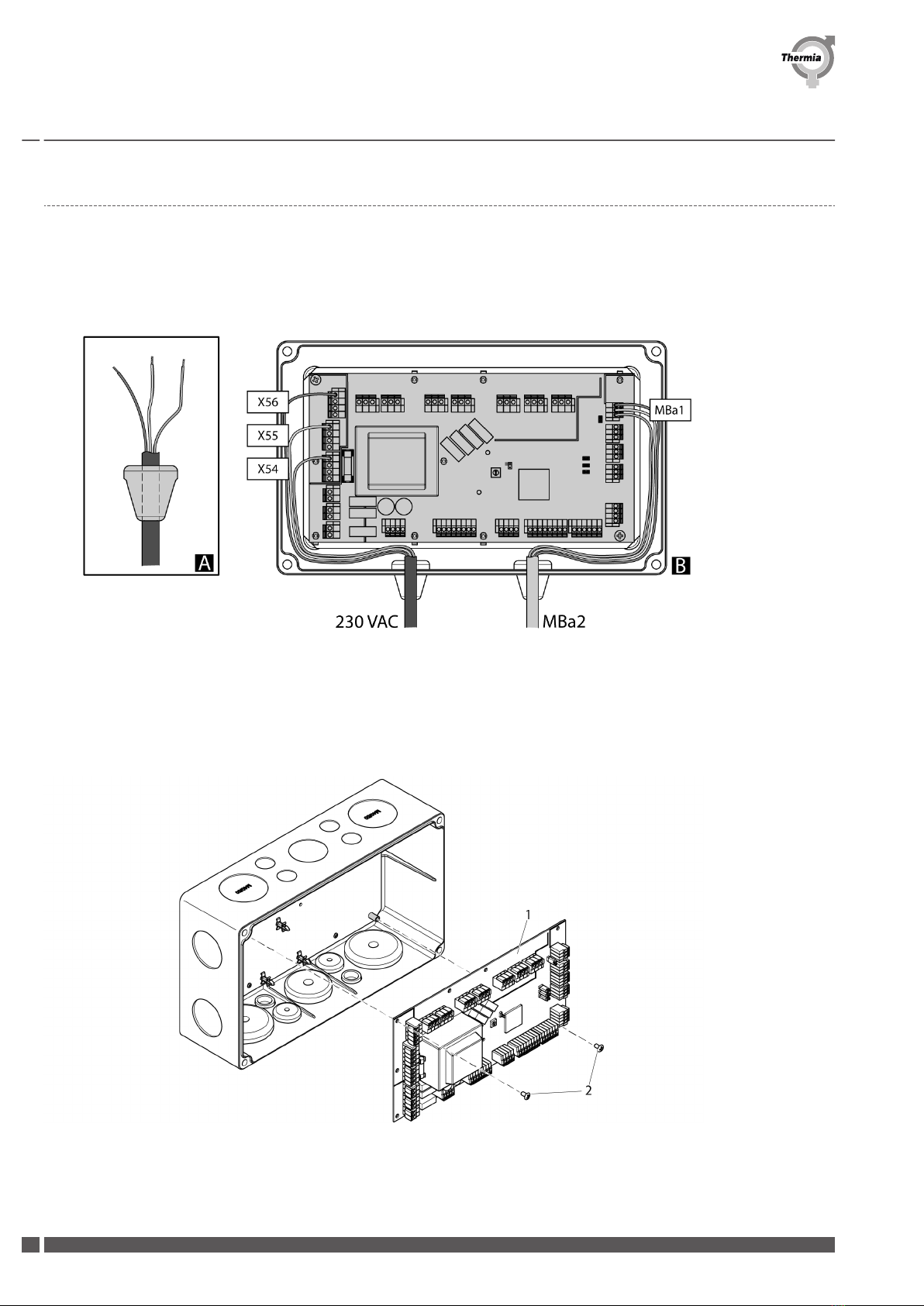
1. Remove the knock out panels as required for routing the wiring into the enclosure.
2. Put sealing plugs on the cables and route all cables into the enclosure. Cut away the outer insulation layer on the cables just inside the
enclosure to facilitate easier routing and connection ot the wires to the EM3 unit terminals. Make sure you leave enough wire length
inside the enclosure to ensure tension free connections on the EM3 terminals and press the sealing plugs into the holes in the enclosure.
A. Cut the outer insulation just inside of the enclosure.
B. Leave enough wire length to ensure tension free connections.
3. Fit the EM3 unit onto the plastic PCB spacer supports on the mounting plate and press down on the EM3 unit so that the spacer
supports locks on to the circuit board. Secure the EM3 unit to the mounting plate with the two screws.
1. EM3 unit
2. Screw
Installation Guide Expansion Module 3 (EM3)
ACEM301IG0502 Thermia AB
10
Table des matières
Manuels Unité de contrôle populaires d'autres marques

Festo
Festo Compact Performance CP-FB6-E Manuel de la liste des pièces

Elo TouchSystems
Elo TouchSystems DMS-SA19P-EXTME Manuel utilisateur

JS Automation
JS Automation MPC3034A Manuel utilisateur

JAUDT
JAUDT SW GII 6406 Series Guide rapide

Spektrum
Spektrum Air Module System Manuel utilisateur

BOC Edwards
BOC Edwards Q Series Manuel utilisateur