
TERRAONION Super HD System 3 PRO Manuel utilisateur

Super HD System 3 PRO / Instruction Manual
SET UP & INSTRUCTION MANUAL
REV. 0.2
SET UP & INSTRUCTION MANUAL
REV. 1.0

Super HD System 3 PRO / Instruction Manual
This manual is a work in progress,
an advanced revision is forthcoming.
Please visit our Discord channel for further assistance:
https://discord.gg/JexuJVW if you have any questions or concerns.

Super HD System 3 PRO / Instruction Manual
Contents
4 - Key Features
5 - Getting Started
6 - Setting Up the MicroSD Card
6 - Adding Bios Images
7 - Adding HuCard Games
7 - Adding CD-ROM Games
8 - Using Original HuCards
9 - AV Output Options
9 - Game reset and return to game selection
10 - Navigating The Menu / Game List
11 - Options
14 - Video Options
17 - Cover View Menu
18 - Firmware Updating
18 - Miscellaneous
19 - Add-on FPGA Cores
19 - Limitations and Caveats

Super HD System 3 PRO / Instruction Manual
Key Features
Super HD System 3 Pro is an all-in-one add-on for your PCEngine, CoreGrafx or SuperGrafx console that allows
you to play the entire family of PCEngine games in brilliant HDMI or RGB video.
480P/720P HDMI output
created from digital video
Play ALL HuCard, CD / Super CD
/ Arcade Card and SuperGrafx
games on ALL consoles
Built in Arcade Card
In Game Trigger to return to the
game menu (both from
controller and rear of unit)
MicroSD slot compatible with large
SD Card support ( >400GB).
Jailbar free, balanced video
and MDfourier balanced audio
RGB Video / Stereo Audio output
via MegaDrive 2 / Genesis 2
9 pin Mini-DIN port
3rd Party FPGA Cores
loaded from the MicroSD card
MicroUSB port
for game developers
Super HD System 3 PRO / Instruction Manual
Getting Started
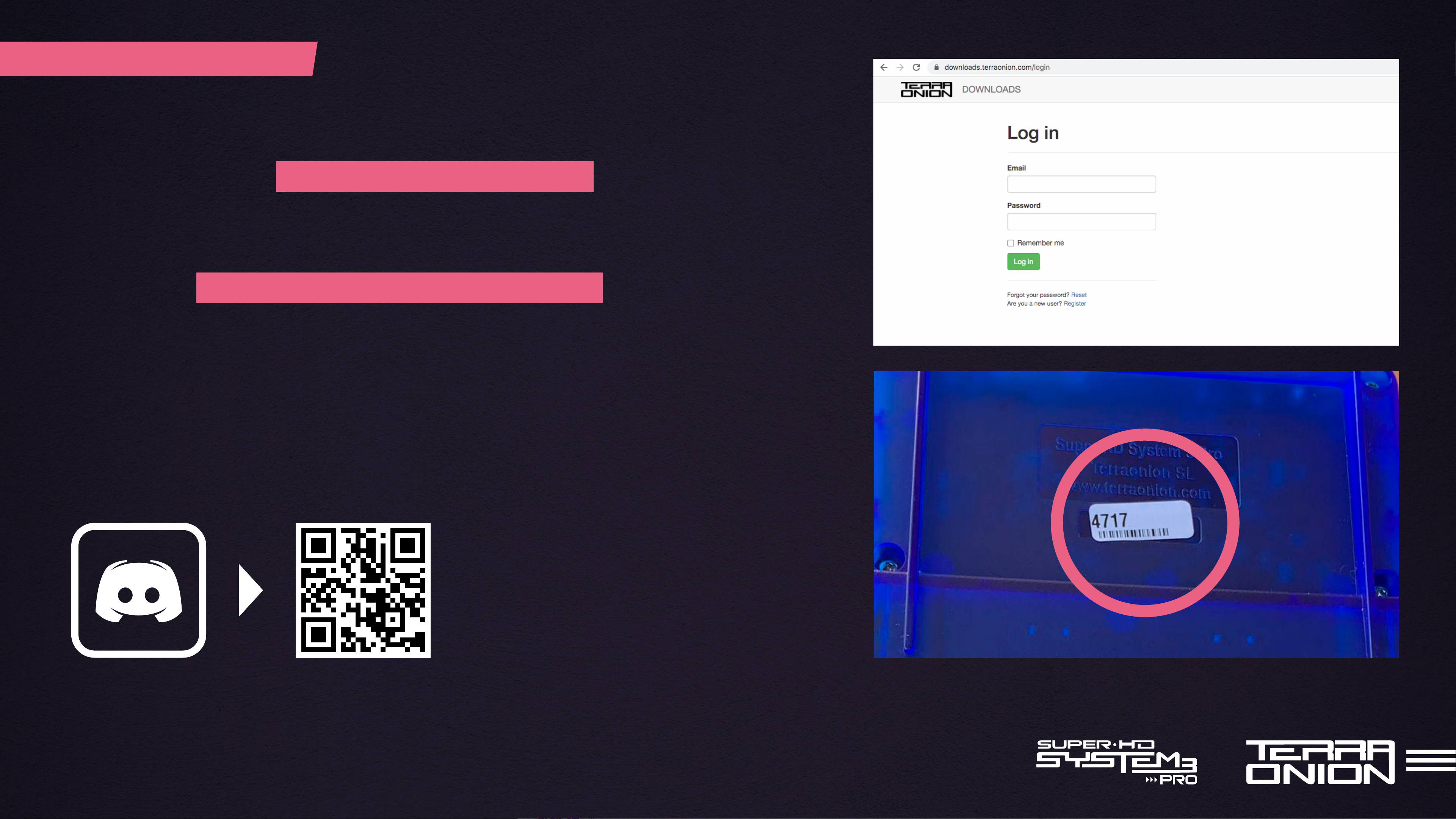
After receiving your Super HD System 3 Pro, the first thing you should do
is register the device at https://downloads.terraonion.com/
Here you will find updated firmwares, manuals and any additional software
we have for it. Firmware updates are serial number specific, so if you have
multiple devices make sure to have all of them registered. See the section
“Firmware Updating” later in the manual about performing the update.
Tip: Need assistance or just want to chat?
Join our Discord: https://discord.gg/JexuJVW

Super HD System 3 PRO / Instruction Manual
Setting Up The MicroSD Card
Adding BIOS Images
The SHDS3 Pro supports both FAT32 and exFAT formatted MicroSD cards up to 400GB+.
It also supports folders/directories, so you can use them to group and organize your games.
The maximum number of games that can be displayed in a folder is 1000.
More than this and they will need to be split up into several folders.
After formatting the MicroSD card, create a folder called “BIOS” in the root
of your MicroSD card. Place the BIOS images ending in .pce in the BIOS folder.
The SHDS3 Pro can display up to 10 different BIOS files to choose from.
Do not exceed this as more than 10 will not display. Additionally you can place a BIOS
file into individual CD-ROM game folders to specifically use a certain BIOS and override
the defaults in the options screen.
Power Off your PC Engine to insert
or remove your MicroSD card from
your Super HD System 3 PRO

Super HD System 3 PRO / Instruction Manual
Adding HuCard Games
Adding CD-ROM Games
Copy the ROM files ending in .pce ( .sgx for SuperGrafx is also supported) to the MicroSD
card. You can organize them however you like by placing them either into the root
of the MicroSD card or into sub folders.
Copy the folder containing the .cue and .bin/.iso/.wav file for each game as-is to the MicroSD card.
The SHDS3 Pro menu will identify the game folder as a CD and will display it as a game to launch instead of a folder
to navigate into. CD-ROM games require a BIOS image to work (see earlier section regarding copying over BIOS images).
Tip: For maximum compatibility, we recommend the CD images checked against redump.org preservation
initiative datafiles. CD images with .mp3 audio (or other compressed audio formats) are NOT compatible.
.pce
.cue/bin
.sgx
.iso
Super HD System 3 PRO / Instruction Manual
Using Original HuCards
Enjoy your original
HuCard and CD-ROM
Games!
You can use original HuCards while the SHDS3 Pro is connected. When it detects an original
system card, it will disable all HuCard emulation, but will keep the CD-ROM block enabled as if
an IFU unit was present so games can use the backup RAM. Because the SHDS3 Pro can’t
detect which kind of HuCard you are using in this way, the extra Super CD-ROM RAM
and the Arcade Card emulation will be disabled.
You can also use your own Super CD-ROM system cards to boot the CD games.
When using original HuCards, the per-game backup RAM mode will be disabled because the
SHDS3 Pro doesn’t know which game name to use and will use the BACKUP.BUP file for all.
SHDS3 Pro does not support SuperGrafx simulation when using original SuperGrafx HuCards,
even on original SuperGrafx hardware, and thus these games are only supported via
the SHSD3 Pro via MicroSD card.

Super HD System 3 PRO / Instruction Manual
AV Output Options
Reset Game
Back to menu
Short Press
Long Press
Game reset and return to game selection
SHDS3 Pro allows you to either use an analog RGB output via a compatible Mini-DIN video cable
or use a digital output using an HDMI cable.
You can’t use both outputs at the same time as the HDMI cable has priority over the analog cable.
So when an HDMI cable is plugged in, analog output will be blank although audio will still be output
from the analog audio pins in the cable.
Using the push button at the back of the SHDS3 Pro you can reset the current game, and also return
to the SHDS3 Pro game selection menu.
• A short press will just reset the current game.
• A long press (over 3 seconds) will reset SHDS3 Pro to the game selection menu.
480P/720P HDMI output
created from digital video
RGB Video / Stereo Audio
output via MegaDrive 2 /
Genesis 2 Mini-DIN port

Super HD System 3 PRO / Instruction Manual
Navigating The Menu/Game List
Use Up and Down to move the highlighted field up and down the game list.
Use Left and Right to advance the game list one page at a time.
Press Button II to enter folders and launch selected games.
Press Button I to go back a folder if you are in a sub folder and to exit the options menu.
Press Select button to open the options menu
Run button is reserved for future menu features
Table des matières
Manuels Matériel informatique populaires d'autres marques

EMC2
EMC2 VNX Series Manuel du propriétaire

Panasonic
Panasonic DV0PM20105 Manuel utilisateur

Mitsubishi Electric
Mitsubishi Electric Q81BD-J61BT11 Manuel utilisateur

Gigabyte
Gigabyte B660M DS3H AX DDR4 Manuel utilisateur

Raidon
Raidon iT2300 Manuel utilisateur

National Instruments
National Instruments PXI-8186 Manuel utilisateur


