
Techkon SpectroDrive Manuel utilisateur

TECHKON
Manual
Scan-Measurement-System
SpectroDrive
Software
ExPresso 3

TECHKON manuals, technical documentation and programs are copyrighted. Reproduction,
translation or transfer to an electronic medium – in whole or in parts – is prohibited.
TECHKON software is the intellectual property of TECHKON GmbH. Purchase of the soft-
ware grants the user a license for the use on one computer only. Programs may only be copied
for back-up purposes. TECHKON can not be held liable for any damages that may occur by the
use of the software.
The TECHKON team takes great care in producing this manual. Nevertheless, we can not fully
guarantee the complete absence of errors. TECHKON GmbH and the authors can not be held
liable neither for any possibly incorrect statements nor their consequences.
Products that are not made by TECHKON GmbH are mentioned for information purposes
only and such statements do not represent trademark infringement.
All registered trademarks
are recognized.
TECHKON products and product names are registered internationally under several intellec-
tual patents and trademarks.
Specications can be subject to change without notice.
Version 1.0, January 2008
You can reach us at the following address:
TECHKON GmbH
Wiesbadener Str. 27 • D-61462 Königstein/Germany
Telephone: +49 (0)6174 92 44 50 • Telefax: +49 (0)6174 92 44 99
E-mail: info@techkon.com • http://www.techkon.com

Welcome
We welcome you among the worldwide community of users of TECHKON products.
We are happy that you have selected this high-quality measurement system. It will be
a valuable tool for your day-to-day quality control tasks. With this manual we invite
you to learn how to use SpectroDrive and the software ExPresso 3.
The manual is divided into three chapters:
Chapter 1: General description of the measurement system
Chapter 2: Installation of
TECHKON SpectroDrive and ExPresso 3
Chapter 3: How to use SpectroDrive and the software ExPresso 3
You will be fascinated how easy the system is to use. You will know how to work with
SpectroDrive after only a few minutes.
Please get the device registered by using the detachable registration card, which is the
last page of this manual. That way we can keep you updated about product news.
Please visit us as well on the internet at http://www.techkon.com.
You will nd useful information about the complete product range and new software
versions.
Do you have any suggestions for improvements or do you require information that
goes beyond the contents of this manual? We will be glad to hear from you. Your sug-
gestions or questions make an important contribution to the continuous optimization
of our documentation and products.
Your TECHKON Team

Content
Chapter 1: General description of the measurement system
1.1 Product description ................................................................................5
1.2 Packing list ...............................................................................................9
Chapter 2: Installation of
SpectroDrive and software ExPresso 3
2.1 Assembly of SpectroDrive.................................................................. 10
2.2 Installation of the software ExPresso 3........................................... 11
Chapter 3: How to use SpectroDrive and the software ExPresso 3
3.1 Operation of SpectroDrive................................................................ 12
3.2 Care and maintenance ........................................................................ 14
3.3 Software overview ............................................................................... 16
3.4 Software settings .................................................................................. 17
3.5 Dening and running a Print job....................................................... 21
Appendix:
Technical specications
Manufacturer certicate
Registration card

Chapter 1
General description of the measurement system
1.1 Product description
TECHKON SpectroDrive, with its automatic color and density measurement capabili-
ties, is the perfect solution to substantially increase press productivity by ensuring
consistent print-to-print color accuracy throughout the press run.
The system consists of the following components: The motorized measurement
system scans the complete color bar on a printed sheet within seconds and simulta-
neously sends the spectral measurement data wirelessly to the PC where all relevant
information for controlling the printing press is displayed.
The measurement device only has one button to start the measurement process.
The PC-software ExPresso 3 has a self-explanatory user interface which can be oper-
ated via touch-screen. Installation is simple as well. After a few minutes the system
is operable and ready to take measurements.
SpectroDrive can be used as a scanning device as well as a hand held instrument for
single measurements. Just take the device from the horizontal track and position it
wherever you want to take a color measurement.
The TECHKON ExPresso 3 software offers a comprehensive tool-set comprising
measurement of spot colors, support of up to 16 print units, face and reverse printing,
display of color density, dot gain, gray balance, CIE L*a*b*-values and recommenda-
tions on how to adjust the ink on the press. This is only an excerpt of the complete
functionality.
Thanks to its modularity, ExPresso 3 is expandable and versatile. The measurement
data can be exported into other software applications that connect real-time to
printing presses to enable a ‘close loop’ turn-key solution. In addition, TECHKON
ExPresso can export measured data to standard applications such as Microsoft Excel.
Manual TECHKON SpectroDrive Chapter 1 - General description Page 5

All advantages at a glance:
Manual TECHKON SpectroDrive Chapter 1 - General description
Page 6
Modular and compact
• works with any sheet or press format
• horizontal track can be shipped in any
length up to 2100 mm
• space-saving measurement device ts
on any table
• delivery contains all components
supplied in a practical carrying case
Easy to handle
• fast, motorized scanning by pressing
the green measurement button on the
touch-screen or on the device itself
• automatic white calibration
• TECHKON ExPresso PC-software
can be operated with or without
the touch-screen
• the device can easily be used as hand
held device for spot measurements
as well
Easy to install
• installation is made within ve minutes
without any major assembly effort
• complete system is maintenance free
• measurement system can be ipped 180°,
if the color bar is on the opposite side
of the printed sheet
• wireless, fast data transmission; no cable
required
• the mounting table can be inclined up to 45°
• no vacuum air suction is necessary to hold
down the printed sheet
Complete measurement information
• any color bar can be measured
(patch size has to match aperture size)
• color bar can be at any location on
the printed sheet
• no limitation in paper thickness
• automatic polarizing lter function
for densitometric and colorimetric
measurements

Manual TECHKON SpectroDrive Chapter 1 - General description Page 7
Accurate
• precise spectral engine with automati-
cally insertable polarizing lter
• patented measurement head for easy
positioning conforming to ISO and
DIN standards
• UV cut lter option available
• robust design for reliable function in
a harsh industrial environment
Fast
• high resolution spectral measurement
of a complete color bar within seconds
(e.g. 500 mm in only 4 seconds!)
• online-wireless data transmission during
scan
• information overview displays relevant
parameters for quality control
Using SpectroDrive as a
hand held unit is simple.
Just position the compact
measurement head above
the sample and press
the green measurement
button. The measure-
ment value is transmitted
instantly to the PC.
SpectroDrive is the
ideal extension to
TECHKON’s renown
hand held instruments:
SpectroPlate is the
perfect tool for accurate-
ly reading printing plates
and SpectroDens is the
mobile, multi-purpose
spectro-densitometer,
which can be used at any
location.
TECHKON SpectroDrive
is delivered as a complete
turn-key system. Within a
few minutes the system is
up and running.
One unique feature of
SpectroDrive is its exi-
ibility to be used with any
press type or format.

Manual TECHKON SpectroDrive Chapter 1 - General description
Page 8
52: 750 mm
74: 970 mm
102: 1250 mm
105: 1280 mm
95 mm
52: 370 mm
74: 530 mm
102: 720 mm
105: 780 mm
170 mm
Dimensions
Two different performance packages
The scan-measurement device SpectroDrive and the MS-Windows software ExPresso
form a complete quality control system for increasing productivity and quality of a
printing press.
There are two different versions available:
SpectroDrive + ExPresso Basic
consists of the spectral measuring de-
vice SpectroDrive and the MS-Windows
software ExPresso Basic with the following
functions:
• ink zone specic density display
• color density for CMYK and spot colors
(spectral density)
• densitometric gray balance
• dot area, dot gain and printing contrast
• slur/doubling value
• target values, references, tolerances,
OK sheet
• face- and reverse printing
• works with any color bar length
• display of single measurements when
used as a hand held device
• supports up to 6 printing units
• measurement data export (e.g. JDF-format)
Formats:
52: for printed sheet 00 (B3+, 370 x 520 mm)
74: for printed sheet 0B (B2+, 520 x 740 mm)
102: for printed sheet 3B (B1+, 720 x 1020 mm)
105: for printed sheet 3B+ (B1+, 780 x 1050 mm)
Special formats (up to 2100 mm system length /
1800 mm scan length) on request
SpectroDrive + ExPresso Pro
contains the same functions as the
“Basic” package and additionally:
• Gray balance display (densitometric)
• ink zone specic colorimetric
∆E display, Lab, LCh, ∆Lab, ∆LCh
• “InkCheck” recommendation for
ink key setting
• display and evaluation according
to ISO 12647, Gracol G7™
• statistical analysis and report
generator
• supports up to 16 printing units

The carrying case protects SpectroDrive and parts
1.2 Packing list
Contents of delivery:
• Measurement device SpectroDrive
• Left holder incorporating charging console and white standard,
horizontal track, right holder
• Two vertical bars
• AC adapter with universal plugs
• Module for wireless data transmission,
USB cable,
• Carrying case, manual with ISO 9000
certicate, screwdriver, 4 screws
• optional: CD with software ExPresso 3,
USB-dongle (CD is at the back of the manual).
System requirements: MS-Windows XP, Vista
Recommended touch-screen: Elotouch 1727L 17”
Optional accessories:
• Print control strip TECHKON TCS, available as EPS- and pdf-les on CD
• Software-upgrades from ExPresso Basic to ExPresso Pro
• Replacement parts: Left holder with charging console and white standard, rechar
geable battery, measurement lamp. All parts are easy to exchange.
Manual TECHKON SpectroDrive Chapter 1 - General description Page 9
Chapter 2
Installation of SpectroDrive and ExPresso 3
2.1 Assembly of SpectroDrive
Manual TECHKON SpectroDrive Chapter 2 - InstallationPage 10
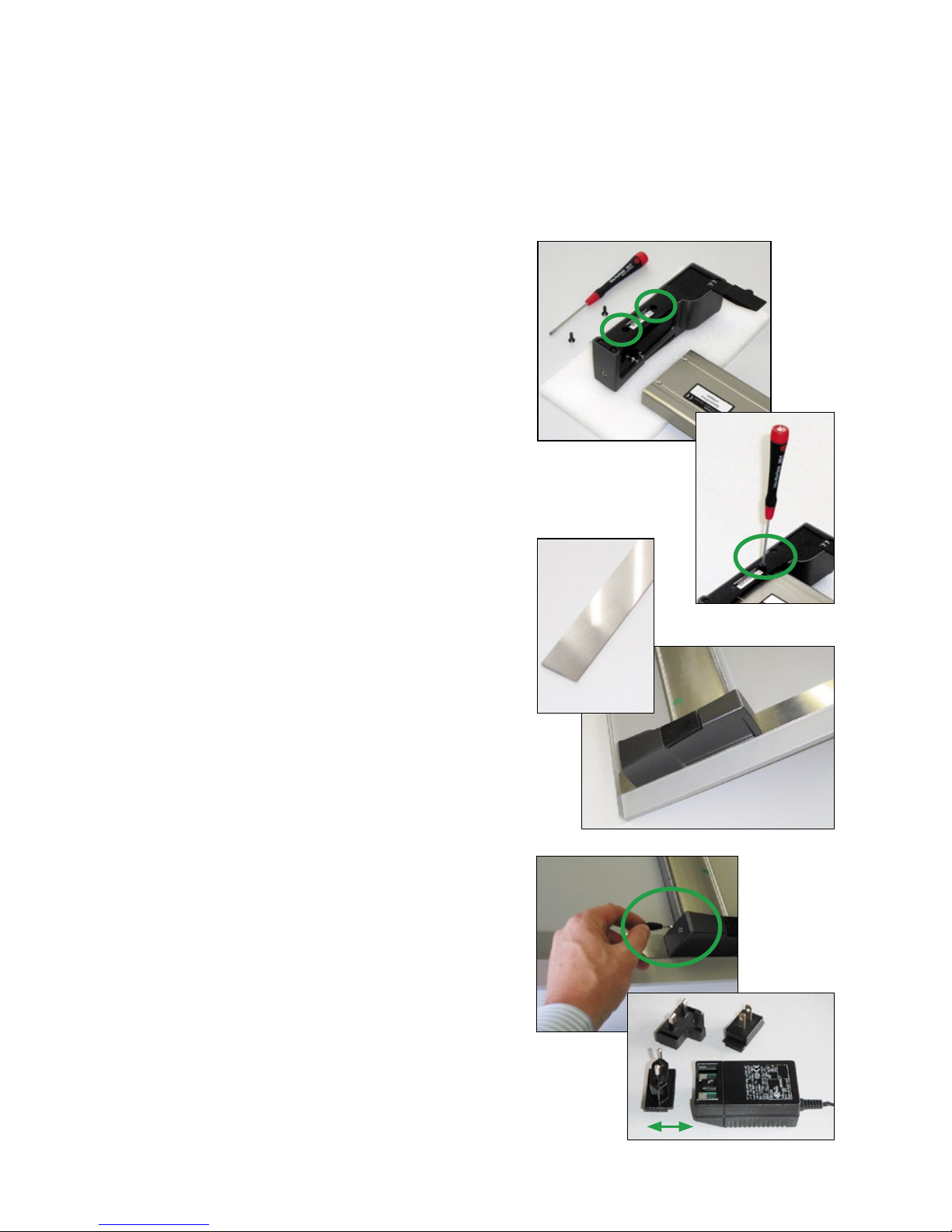
• Connect the horizontal track with the left
and right holder as shown on the images.
Before placing the holders upside down,
put a soft material underneath to avoid
scratches. Before tightening the rst screw,
insert the second screw and assure that the
holder is correctly aligned.
• The two vertical bars are attached vertically at
the right and left side on a at table. Before
taping them with self-adhesive tape it is
important to check that they are parallell and
have the right dstance to each other. We advise
to mark the position with a pencil rst.
Now attach the two vertical bars, which have
self-adhesive tape on the backside, to a
table or console with a at surface.
Preferably the table will have a lay-on edge
for positioning the printed sheet.
Assure, that the vertical bars are parallel
and well aligned in order to hold the left
and right holder which will attach magnetically
to the vertical bars.
• Connect the plug of the AC adapter with the
charging console. The AC adapter can be used
universally for 100 – 240 V. Use only the original
TECHKON SpectroDrive AC adapter!
(Part no.: FRIWO FW 75550/08).
There are three adapter plugs for different
countries. For changing, just pull the plug and
push in the new one.
Autres manuels pour SpectroDrive
3
Table des matières
Autres manuels Techkon Instrument de mesure

Techkon
Techkon DENS Manuel utilisateur

Techkon
Techkon SpectroDens Manuel utilisateur

Techkon
Techkon SpectroDrive Comment utiliser

Techkon
Techkon SpectroDrive Manuel utilisateur

Techkon
Techkon SpectroDrive Manuel utilisateur

Techkon
Techkon Spectro Jet Manuel utilisateur
Techkon
Techkon SpectroDens Manuel utilisateur
Manuels Instrument de mesure populaires d'autres marques


Endress+Hauser
Endress+Hauser Proline Promag 50 Caractéristiques techniques

Siemens
Siemens SITRANS F Coriolis FCT030 Manuel de la liste des pièces

KLINGER
KLINGER CMF V Series Manuel utilisateur

EXFO
EXFO FTB-2 Manuel d'exploitation et d'entretien

Keysight
Keysight M8290A Manuel utilisateur

ADTEK
ADTEK MW-5 Manuel utilisateur