
Synexis SPHERE Manuel utilisateur
1www.synexis.com
+1 844-352-7680
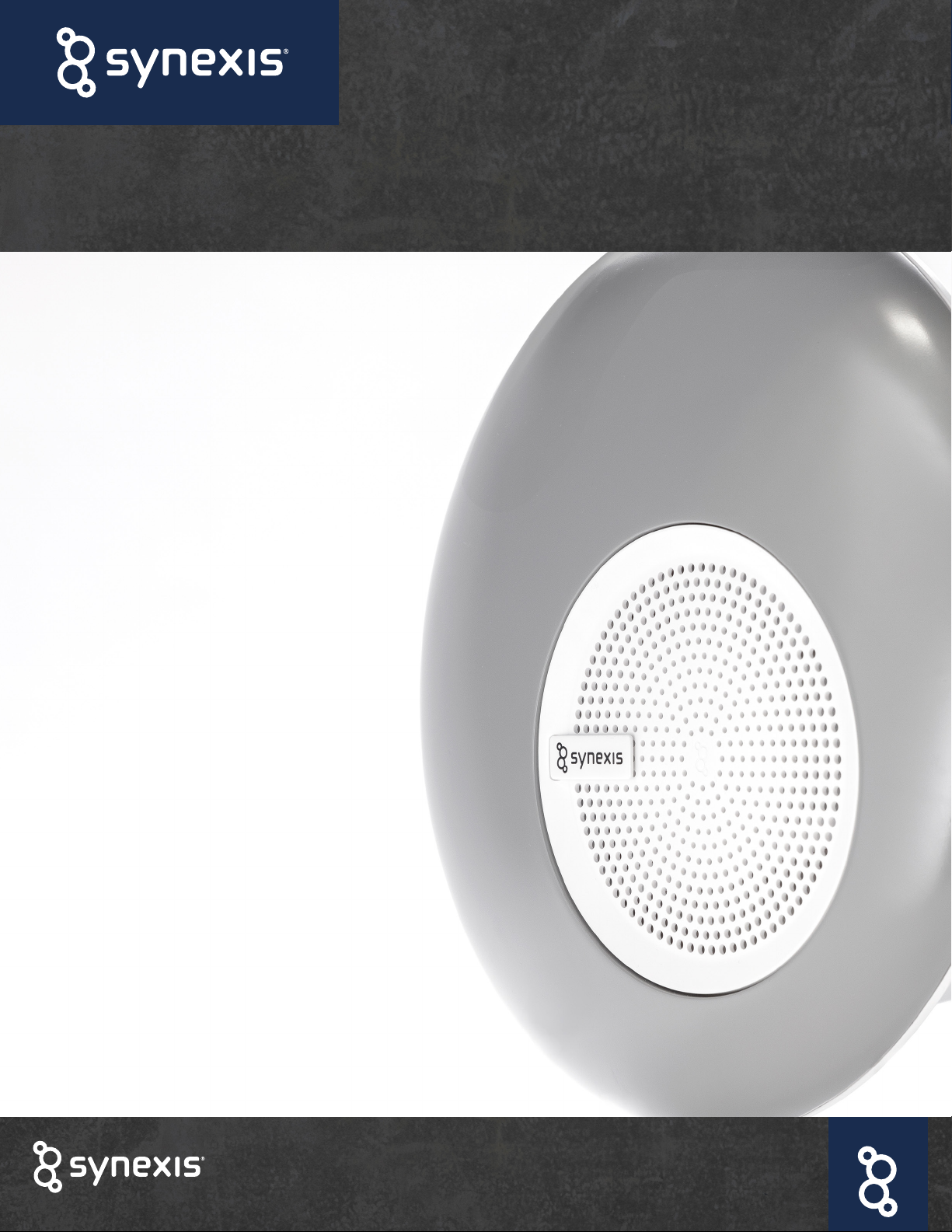
OWNERS MANUAL
SPHERE
SYNEXIS SYSTEM
www.synexis.com
+1 844-352-7680
2www.synexis.com
+1 844-352-7680
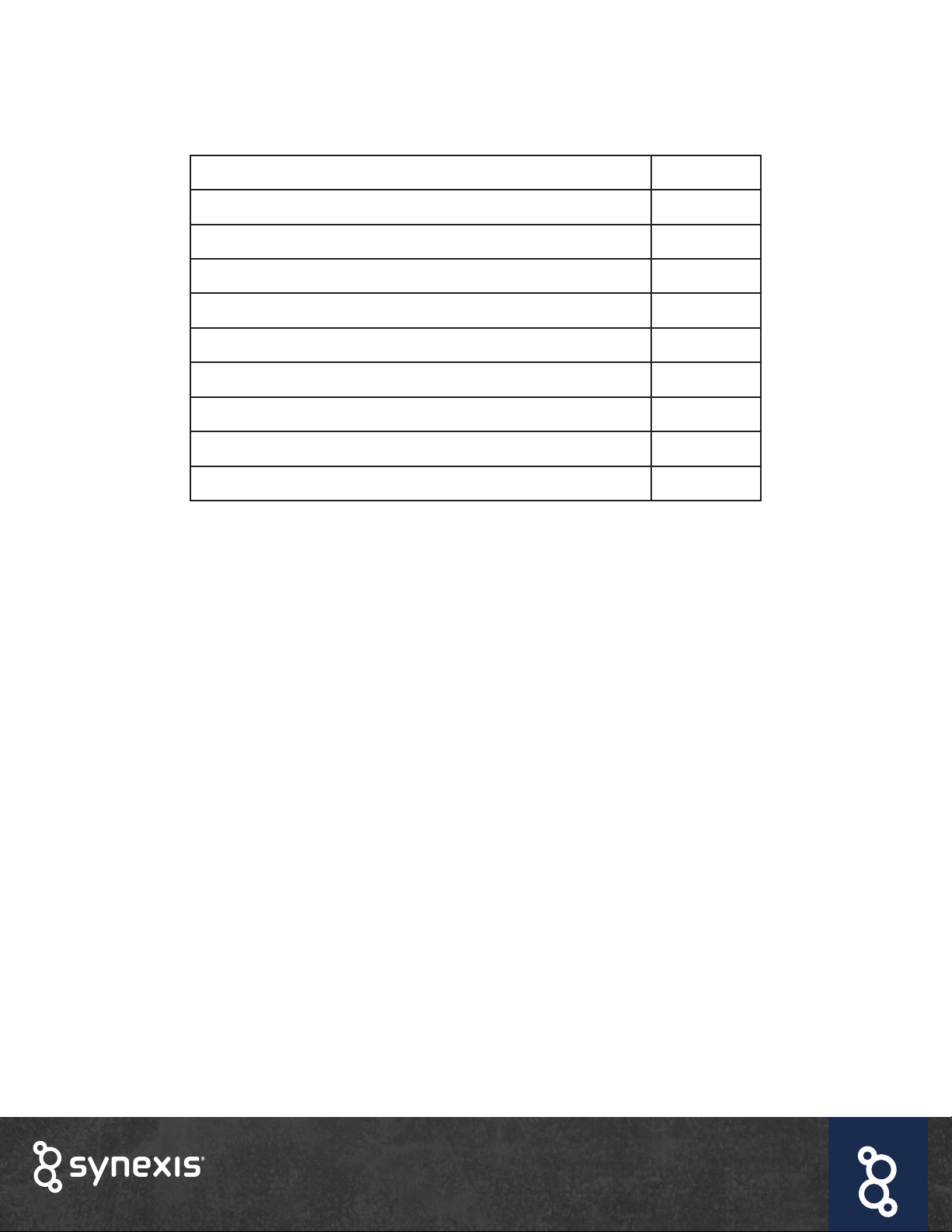
Contents
About Synexis®Dry Hydrogen Peroxide (DHP®) 2
Indications for Use, Legal, Patent Info 3
Welcome, Included Parts 4
System Specications 5
General Safety Instructions 6
Device Placement 7
Installation 8
Troubleshooting, Maintenance 11
Getting the Most from Your DHP System 12
Safety Considerations 13
About Dry Hydrogen Peroxide (DHPTM)
Synexis®is the sole developer of hydrogen peroxide gas and Dry Hydrogen Peroxide (DHP™) Technology
for occupied spaces. Using DHP, our patented microbial reduction technology allows for the natural and
continuous reduction of microbial contamination in occupied spaces. Our microbial reduction systems
are patented for use in the United States and around the world. By encompassing all areas of an
enclosed space, DHP can reach the most important areas of a facility. The critical differentiator of DHP
from other forms of hydrogen peroxide is that DHP can be safely delivered in occupied spaces.
Using ambient humidity and oxygen naturally present in your environment, our technology creates a safe
level of hydrogen peroxide (H2O2) gas, which reduces unwanted microbial contamination in the air and
on surfaces. Because DHP is a true gas, it can reach the toughest and most out-of-reach areas of your
facility. Dry Hydrogen Peroxide is effective because of its state of matter and method of action.

3www.synexis.com
+1 844-352-7680
Indications for Use
This product is not sold as a medical device and is not intended to be used to diagnose any disease
or condition, nor should it be used in the mitigation, treatment, or prevention of any disease or
condition. The Sphere device is a key component to the Synexis®Microbial Reduction System.
Legal Notice
While every attempt is made to ensure the accuracy of the information contained in this manual,
Synexis®accepts no liability for errors or omissions, or any consequences deriving from the use of
information contained herein. This Sphere manual is provided “as is” and without any representation,
term, condition or warranty of any kind, either express or implied. To the extent permitted by law,
Synexis®shall not be liable to any person or entity for any loss or damage which may arise from the
use of this manual. We reserve the right at any time and without any notice to remove, amend or vary
any of the content which appears herein.
Patent Information
8,168,122 | 8,685,329 | 9,034,255 | D744,627 | 9,370,592 | 9,808,013 | D814006 | 9,924,722 | 10,188,766 |
10,232,076 | 10,285,382 | 10,299,482 | 15/567,564 | 15/570,677 | 15/866,208 | 29/637,841 | 16/177,592 |
16/271,331 | 62/833,181 | 16/387,382 | 16/431,032 | 62/914,838 | 16/743,809 | 63/010,659 | 15/866,198
Additional patents pending.
Your Synexis®
Sphere DHP System
is Assembled in the USA!
4www.synexis.com
+1 844-352-7680
Welcome
Thank you for choosing Synexis, developers of Dry Hydrogen Peroxide (DHPTM) and this Sphere device.
Before using the DHP system, please take a few minutes to:
✔
Familiarize yourself with the Sphere device
✔
Familiarize yourself with the installation steps and required tools
✔
Inspect your system and parts
Please contact your Account Representative for questions or additional information.
Included Parts
✔
1 Synexis® Sphere device
✔
1 Custom UV-A Bulb
✔
1 Filter Assembly (x1 Carbon Filter, x1 MERV 11 Filter)
✔
1 Power Cord
✔
1 Quick Start Guide
✔
2 Torx-10 Screwdrivers
✔
1 Stand (already installed) or a wall mount bracket
After opening the box, unpack and inspect your device for damage.
DO NOT OPERATE THIS UNIT IF ANY DAMAGE IS NOTED. If the unit is damaged, contact your
Synexis Account Representative.
5www.synexis.com
+1 844-352-7680
SPHERE
System Specications
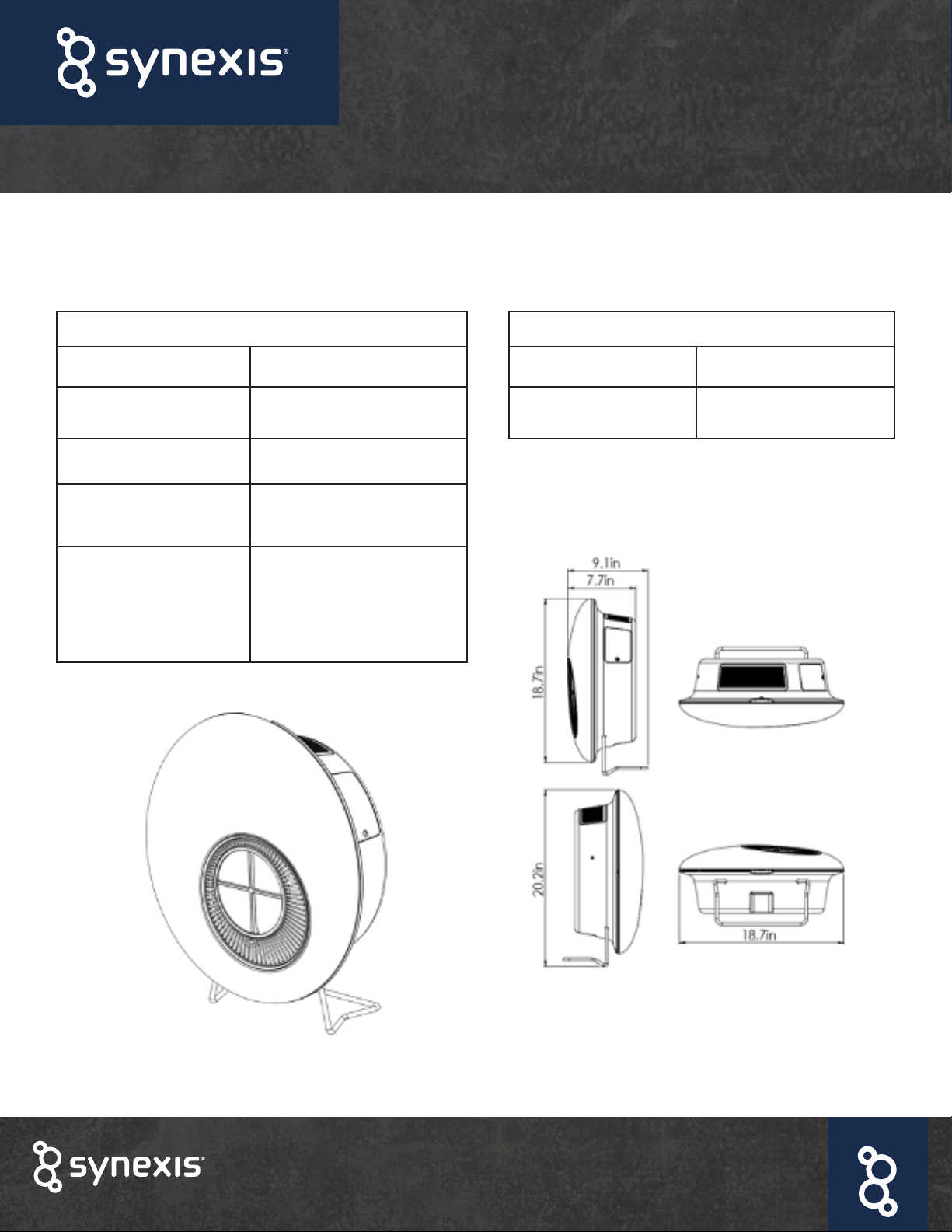
The Sphere is a portable device designed for deployment with or without an inaccessible HVAC
system. The Sphere can be mounted virtually anywhere and requires only a standard 120 VAC outlet.
Specications
Weight 14 lbs.
Material ABS
Color White and Gray
Mounting Options Desktop (Shown),
Wall Mount
Dimensions
Width: 18.7” (47.5 cm)
Height: 18.7” (47.5 cm)
Depth: 7.7” (17.8 cm)
Electrical Requirements
Input Voltage 120 VAC / 60 Hz US
Current 0.73 Amps

6www.synexis.com
+1 844-352-7680
General Safety Instructions
The Sphere is an electrical device. Please read the safety instructions and considerations before use
and take the necessary precautions to reduce the risk of re, electric shock or injury. The DHP Limited
Warranty applies only if the unit is used in accordance with these instructions.
✔
Use the grounded three-prong power cable provided with your device. The plug ts
securely into a grounded three-prong outlet. Do not alter the plug in any way.
WARNING: Electrical shock can cause personal injury or death.
WARNING: This device is designed for indoor installation only.
WARNING: Do not allow the device to become clogged with dust or other debris.
Check it regularly and replace the catalytic sail or lter if they become clogged.

7www.synexis.com
+1 844-352-7680
Device Placement
• Select a location where the air intake and top grille are not obstructed.
• Do not block the air openings.
• Select a dry location. Do not use outdoors or in a wet environment.
• Do not submerge the device in water.
• Do not place ngers and/or objects into the inlet or supply vents.
• Do not allow children or pets to have unsupervised access to this device.
• Do not use any combustible or ammable items on or near this device.
• Do not spill or spray any liquids or aerosols into this device or on the Sail.
• Do not place this device near a heat source.
• Do not sit on or place any object on this device.
8www.synexis.com
+1 844-352-7680
Installation
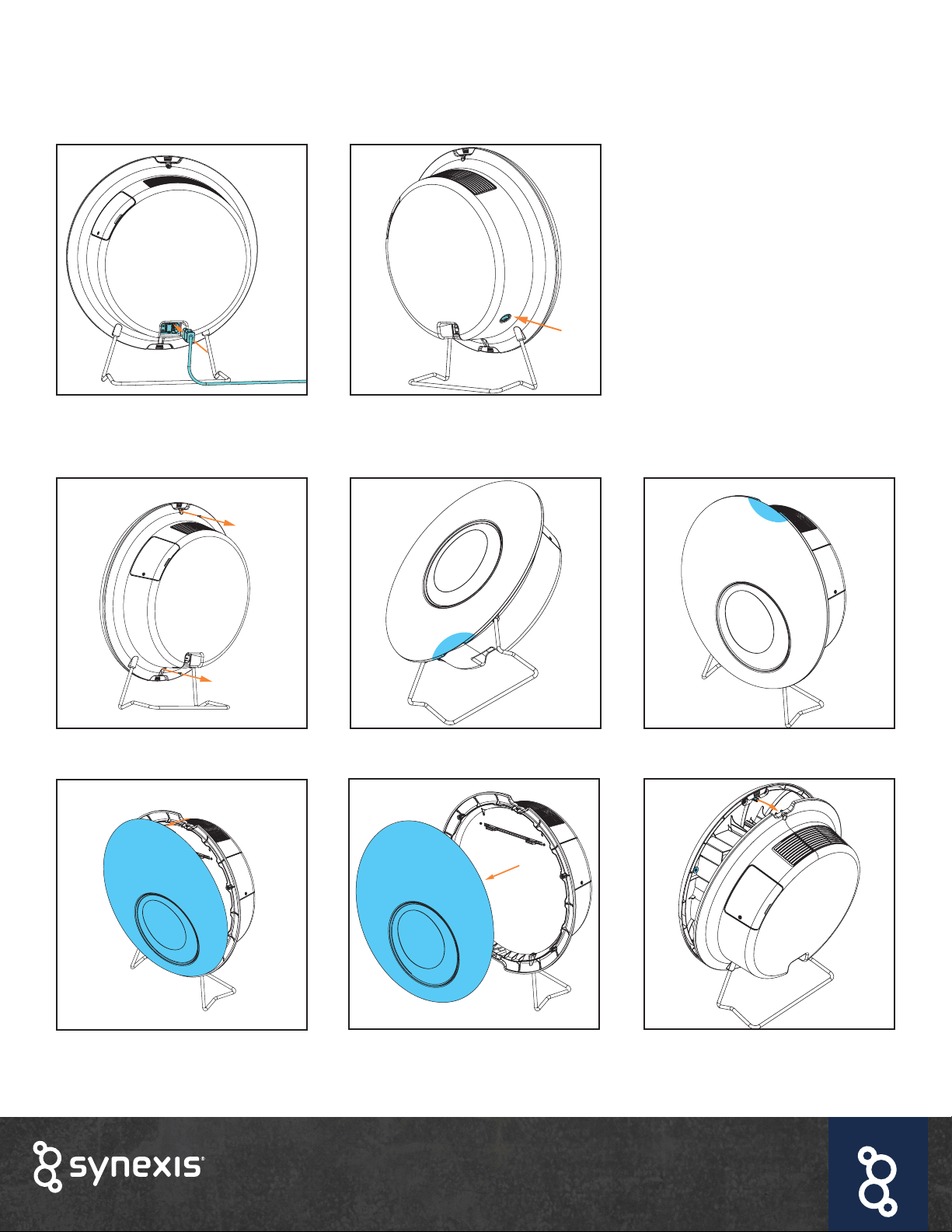
Getting to know your device:
The power cord and power switch are
located on the back of the device.
To adjust the device airow, use
the fan speed control switch
located on the back of the device.
Removing the cover:
Remove the safety screws at the top
and bottom.
Hold the bottom of the device.
The Sphere device includes lters (carbon & MERV 11), fan, and one non-germicidal UV-A bulb.
Grab the recess on the top of the
device.
Pull the top and bottom of the cover
to disengage the magnets.
Remove the cover. To put the cover back on, position
the top and bottom pins over the
slots. Let the magnets reengage.
Fasten the safety screws.
9www.synexis.com
+1 844-352-7680
Installation (cont.)
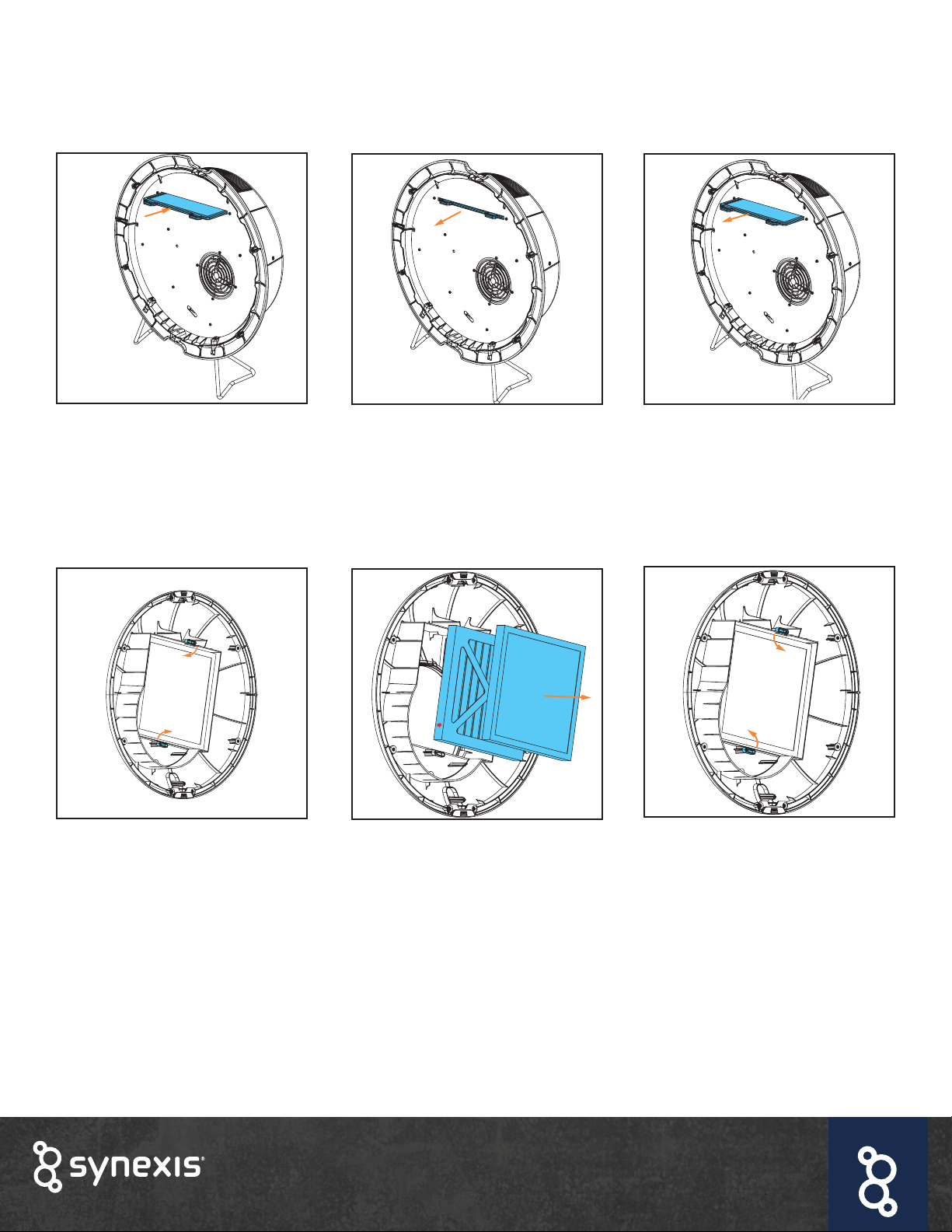
Inserting the sail:
Hold tabs and insert the sail at and
horizontally into the slot near the
top of the device. It does not matter
which direction the sail is installed.
Replacing the sail:
Turn the tabs 90 degrees. Remove the old lters and replace
with new ones*.
Hold the tabs of the sail and pull
towards you.
Remove and insert new sail.
Replacing the lters:
Turn tabs 90 degrees to secure the
new lters in place.
*The pleated MERV 11 lter (white or blue) is placed on the bottom with the arrows pointing towards the fan. The
carbon lter (black) is placed on top, closest to the fan. The carbon lter can be installed in any direction.
10 www.synexis.com
+1 844-352-7680
Installation (cont.)
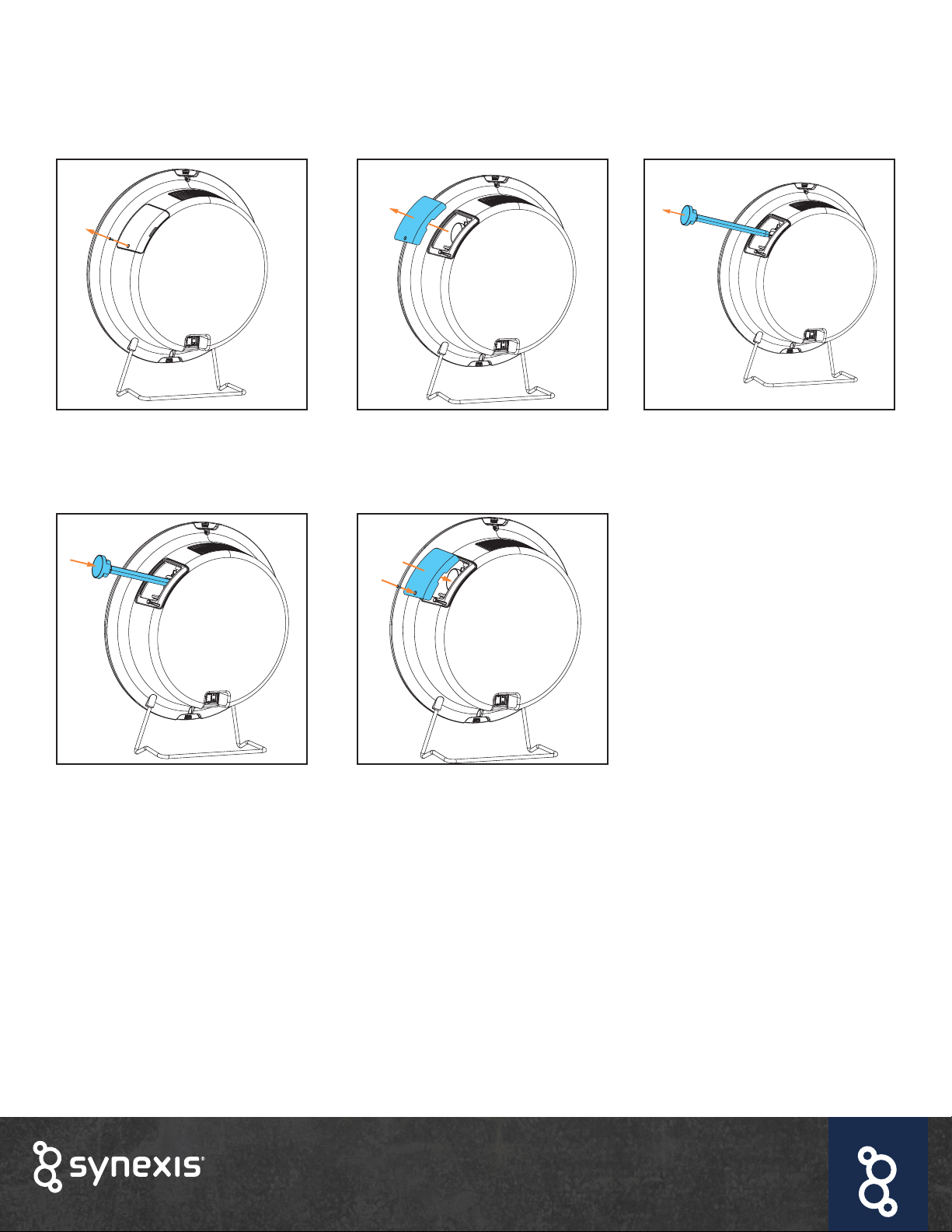
Inserting or replacing the bulb:
Remove the safety screw on the
bulb cover.
Align the 4 pins to the female socket
connectors and insert the new bulb.
Remove bulb cover. Remove bulb if already inserted.
Replace bulb cover and fasten the
screw.
Plug in and power the device on.
For wall mount instructions go to www.synexis.com/manuals
Autres manuels pour SPHERE
6
Table des matières
Autres manuels Synexis Purificateur d'air


