
Status Pro T430 Manuel utilisateur

BA 1146 E
T430 Lasertransmitter
User Guide

2Status Pro – T430 User Guide
CONTENT
User Guide – English
Rotational Laser T430
(BG 832500)
We would like to congratulate you on the purchase of your Status Pro T430 Laser trans -
mitter. Before initial usage you should carefully read the safety instructions as well as the
user guidelines contained in this manual. We wish you every success when using this
measurement instrument.
Please note: User manuals can be amended when improvements or changes to the prod-
uct range have been carried out. Use the link below to make sure you have the most up to
date version of your user manual: www.statuspro.com.
Content
1. SAFETY INSTRUCTIONS . . . . . . . . . . . . . . . . . . . . . . . . . . . . . . . . . . . . . . . . . . . . . . . . . . . . . . . .4
1.1 Class of Laser . . . . . . . . . . . . . . . . . . . . . . . . . . . . . . . . . . . . . . . . . . . . . . . . . . . . . . . . . . . . . .4
1.2 Standards . . . . . . . . . . . . . . . . . . . . . . . . . . . . . . . . . . . . . . . . . . . . . . . . . . . . . . . . . . . . . . . . . .5
1.3 Advice on rechargeable cells . . . . . . . . . . . . . . . . . . . . . . . . . . . . . . . . . . . . . . . . . . . . . . . .5
1.4 Instrument Care . . . . . . . . . . . . . . . . . . . . . . . . . . . . . . . . . . . . . . . . . . . . . . . . . . . . . . . . . . . .6
1.5 Maintenance . . . . . . . . . . . . . . . . . . . . . . . . . . . . . . . . . . . . . . . . . . . . . . . . . . . . . . . . . . . . . . .6
1.6 Calibration and Repair . . . . . . . . . . . . . . . . . . . . . . . . . . . . . . . . . . . . . . . . . . . . . . . . . . . . . . .7
1.7 Liability Exclusion . . . . . . . . . . . . . . . . . . . . . . . . . . . . . . . . . . . . . . . . . . . . . . . . . . . . . . . . . . .7
2. GETTING STARTED . . . . . . . . . . . . . . . . . . . . . . . . . . . . . . . . . . . . . . . . . . . . . . . . . . . . . . . . . . . . .8
2.1 The T430 Keypad . . . . . . . . . . . . . . . . . . . . . . . . . . . . . . . . . . . . . . . . . . . . . . . . . . . . . . . . . . .8
2.2 Power Supply . . . . . . . . . . . . . . . . . . . . . . . . . . . . . . . . . . . . . . . . . . . . . . . . . . . . . . . . . . . . . .9
Rechargeable battery operation . . . . . . . . . . . . . . . . . . . . . . . . . . . . . . . . . . . . . . . . . . . . . .9
2.3 Setting up T430 . . . . . . . . . . . . . . . . . . . . . . . . . . . . . . . . . . . . . . . . . . . . . . . . . . . . . . . . . . .10
Position . . . . . . . . . . . . . . . . . . . . . . . . . . . . . . . . . . . . . . . . . . . . . . . . . . . . . . . . . . . . . . . . . . .10
2.4 Starting the T430 . . . . . . . . . . . . . . . . . . . . . . . . . . . . . . . . . . . . . . . . . . . . . . . . . . . . . . . . . . .11
2.5 Adjust the T430 . . . . . . . . . . . . . . . . . . . . . . . . . . . . . . . . . . . . . . . . . . . . . . . . . . . . . . . . . . . .12
Levelling . . . . . . . . . . . . . . . . . . . . . . . . . . . . . . . . . . . . . . . . . . . . . . . . . . . . . . . . . . . . . . . . . .12
2.6 Control via Infrared . . . . . . . . . . . . . . . . . . . . . . . . . . . . . . . . . . . . . . . . . . . . . . . . . . . . . . . .13

3
CONTENT
Status Pro – T430 User Guide
3. RC310 REMOTE CONTROL . . . . . . . . . . . . . . . . . . . . . . . . . . . . . . . . . . . . . . . . . . . . . . . . . . . . .13
3.1 Function keys on the RC310 . . . . . . . . . . . . . . . . . . . . . . . . . . . . . . . . . . . . . . . . . . . . . . . . .14
3.2 Display of the RC310 . . . . . . . . . . . . . . . . . . . . . . . . . . . . . . . . . . . . . . . . . . . . . . . . . . . . . . .14
Switching on . . . . . . . . . . . . . . . . . . . . . . . . . . . . . . . . . . . . . . . . . . . . . . . . . . . . . . . . . . . . . .14
Switching off . . . . . . . . . . . . . . . . . . . . . . . . . . . . . . . . . . . . . . . . . . . . . . . . . . . . . . . . . . . . . .14
3.3 Configuring the RC310 . . . . . . . . . . . . . . . . . . . . . . . . . . . . . . . . . . . . . . . . . . . . . . . . . . . . . .15
Configuration menu . . . . . . . . . . . . . . . . . . . . . . . . . . . . . . . . . . . . . . . . . . . . . . . . . . . . . . . .15
Reset function . . . . . . . . . . . . . . . . . . . . . . . . . . . . . . . . . . . . . . . . . . . . . . . . . . . . . . . . . . . . .16
3.4 Communication between the RC310 and the R310 Sensor . . . . . . . . . . . . . . . . . . . . . . .16
Laser position without controlling function . . . . . . . . . . . . . . . . . . . . . . . . . . . . . . . . . . . .16
Laser position with remote controlling of the T430 Laser . . . . . . . . . . . . . . . . . . . . . . . .16
Calibration command from the RC310 . . . . . . . . . . . . . . . . . . . . . . . . . . . . . . . . . . . . . . . .17
4. SIGNALS AND SPECIAL FEATURES . . . . . . . . . . . . . . . . . . . . . . . . . . . . . . . . . . . . . . . . . . . . .18
4.1 Power-LED . . . . . . . . . . . . . . . . . . . . . . . . . . . . . . . . . . . . . . . . . . . . . . . . . . . . . . . . . . . . . . . .18
4.2 Battery-LED (green) . . . . . . . . . . . . . . . . . . . . . . . . . . . . . . . . . . . . . . . . . . . . . . . . . . . . . . . .18
4.3 Battery-LED (red) . . . . . . . . . . . . . . . . . . . . . . . . . . . . . . . . . . . . . . . . . . . . . . . . . . . . . . . . . .18
4.4 Levelling-LED for X-/Phi-axis . . . . . . . . . . . . . . . . . . . . . . . . . . . . . . . . . . . . . . . . . . . . . . . .18
4.5 Levelling-LED für X-/Z-Achse . . . . . . . . . . . . . . . . . . . . . . . . . . . . . . . . . . . . . . . . . . . . . . . .19
4.6 LED’s around the Laser Aperture . . . . . . . . . . . . . . . . . . . . . . . . . . . . . . . . . . . . . . . . . . . . .19
Red (Y+)-LED . . . . . . . . . . . . . . . . . . . . . . . . . . . . . . . . . . . . . . . . . . . . . . . . . . . . . . . . . . . . . .19
Red (Y-)-LED . . . . . . . . . . . . . . . . . . . . . . . . . . . . . . . . . . . . . . . . . . . . . . . . . . . . . . . . . . . . . .19
Red (X+)-LED . . . . . . . . . . . . . . . . . . . . . . . . . . . . . . . . . . . . . . . . . . . . . . . . . . . . . . . . . . . . . .20
Red (X-)-LED . . . . . . . . . . . . . . . . . . . . . . . . . . . . . . . . . . . . . . . . . . . . . . . . . . . . . . . . . . . . . .20
Green (Y+)-LED . . . . . . . . . . . . . . . . . . . . . . . . . . . . . . . . . . . . . . . . . . . . . . . . . . . . . . . . . . . .20
Green (Y-)-LED . . . . . . . . . . . . . . . . . . . . . . . . . . . . . . . . . . . . . . . . . . . . . . . . . . . . . . . . . . . .21
Green (X+)-LED . . . . . . . . . . . . . . . . . . . . . . . . . . . . . . . . . . . . . . . . . . . . . . . . . . . . . . . . . . . .22
Green (X-)-LED . . . . . . . . . . . . . . . . . . . . . . . . . . . . . . . . . . . . . . . . . . . . . . . . . . . . . . . . . . . .22
5. TECHNICAL DETAILS . . . . . . . . . . . . . . . . . . . . . . . . . . . . . . . . . . . . . . . . . . . . . . . . . . . . . . . . . .23
6. ACCESSORIES . . . . . . . . . . . . . . . . . . . . . . . . . . . . . . . . . . . . . . . . . . . . . . . . . . . . . . . . . . . . . . . .24
7. PRODUCTS AND SERVICES . . . . . . . . . . . . . . . . . . . . . . . . . . . . . . . . . . . . . . . . . . . . . . . . . . . .28
Status Pro Services . . . . . . . . . . . . . . . . . . . . . . . . . . . . . . . . . . . . . . . . . . . . . . . . . . . . . . . . . . .29
Field Measurement . . . . . . . . . . . . . . . . . . . . . . . . . . . . . . . . . . . . . . . . . . . . . . . . . . . . . . . .29
Repair and Calibration . . . . . . . . . . . . . . . . . . . . . . . . . . . . . . . . . . . . . . . . . . . . . . . . . . . . . .29
Rental Services . . . . . . . . . . . . . . . . . . . . . . . . . . . . . . . . . . . . . . . . . . . . . . . . . . . . . . . . . . . .29
Seminars and Training . . . . . . . . . . . . . . . . . . . . . . . . . . . . . . . . . . . . . . . . . . . . . . . . . . . . . .29
8. NOTES . . . . . . . . . . . . . . . . . . . . . . . . . . . . . . . . . . . . . . . . . . . . . . . . . . . . . . . . . . . . . . . . . . . . . .30

4Status Pro – T430 User Guide
SAFET INSTRUCTIONS
1. Safety Instructions
1.1 Class of Laser
The laser light emitted from a Status Pro Laser has an output rating of < 1 0 mW.
The Laser is placed in the category „Class 2“ and is classified as safe for the use as a
measurement instrument. There are however a few safety aspects to be observed:
Caution!
• Do not stare into the laser beam.
• Do not point the laser beam at other people.
• Observe the local safety guidelines on site and if in doubt consult
the site safety engineer.
• Do not use the equipment in damp or moist locations.
• Ensure shading of the equipment against direct sunlight
or heat sources.
• Fluids or rain as well as extreme temperature conditions may
damage the equipment.
Note
Do not violently shake the laser or other sensors and always
protect against falls. This can damage the structure or the optics
of the instrument resulting in false measurements.
Do not touch rotating parts when in use!

5
SAFET INSTRUCTIONS
Status Pro – T430 User Guide
1.2 Standards
All Status Pro Laser and Receiver Instruments are developed and manufactured according
to the following CE Standards:
• EN 61000-6-3:2007
• EN 61000-6-2:2005
• EN 61000-4-2
• EN 61000-4-3
1.3 Advice on rechargeable cells
If the equipment is being stored for a longer period of time or being powered using mains
then the batteries should be removed to prevent damage of the instrument through leak-
age.
Consider information regarding the duration of a charge cycle and trickle charging.
Rechargeable cells can be recharged around 1000times when treated correctly but there
is no guarantee! Change the rechargeable cells when capacitance wanes.
Note
Help to protect the environment! Empty batteries do not belong
in the household waste disposal system. Only deposit empty or
damaged cells at a collection point specially designed for this
purpose.

6Status Pro – T430 User Guide
1.4 Instrument Care
Your measurement instrument is designed for use in an industrial environment and can
withstand water splashes or light spray as well as dust. Clean the equipment using a soft
cotton cloth and a mild soap solution. Laser apertures as well as sensor areas should only
be cleaned using a soft dry and dust-free cloth. Do not use paper towels to clean glass
surfaces as they could scratch. Avoid contact with grease oil or oil-based solutions when
handling the equipment.
1.5 Maintenance
The mechanical components of your equipment are prone to natural wear and tear! If the
instrument appears to have a technical defect contact the manufacturer.
Do not try to repair or open the sensor casing. Attempted repairs through unauthorized
personnel make the guarantee null and void! Always store the instrument under dry con-
ditions and use the case for transportation.
To ensure trouble-free processing simply fill in the form you will find using the following
link:
www.statuspro.com/doc/Formulare/FORM_RepairCalibration_1032_E.pd
Advice
To be able to identify the equipment when seeking advice always
quote the serial number of the equipment. The manufacturer does
not accept any responsibility for damage incurred through incorrect
maintenance carried out by non-authorized personnel.
SAFET INSTRUCTIONS

7
Status Pro – T430 User Guide
1.6 Calibration and Repair
To guarantee measurement accuracy and reliable operation of your
Status Pro Measurement System it is of utmost importance that the
recommended service intervals be adhered to. The system should be
checked for serviceability and re-calibrated by the Status Pro R&K-
Service every 12 months.
Within the scope of the service checks the complete system will also be
examined for possible wear or damage as well as receiving any software updates. The
date of the next service check for your equipment is stamped on the Status Pro calibration
sticker.
To ensure trouble-free processing of the service and calibration checks simply fill in the
form you will find using the following link:
www.statuspro.com/doc/Formulare/FORM_RepairCalibration_1032_E.pd
1.7 Liability Exclusion
The Status Pro GmbH does not accept responsibility for damage incurred through
incorrect use or handling of the equipment. To ensure correct usage a founded know -
ledge of the equipment is essential. It is of the utmost importance that you read and under-
stand the user guide!
No responsibility will be accepted for damage incurred through ignorance or disregarding
of the operating instructions.
SAFET INSTRUCTIONS
8Status Pro – T430 User Guide
GETTING STARTED
2. Getting started
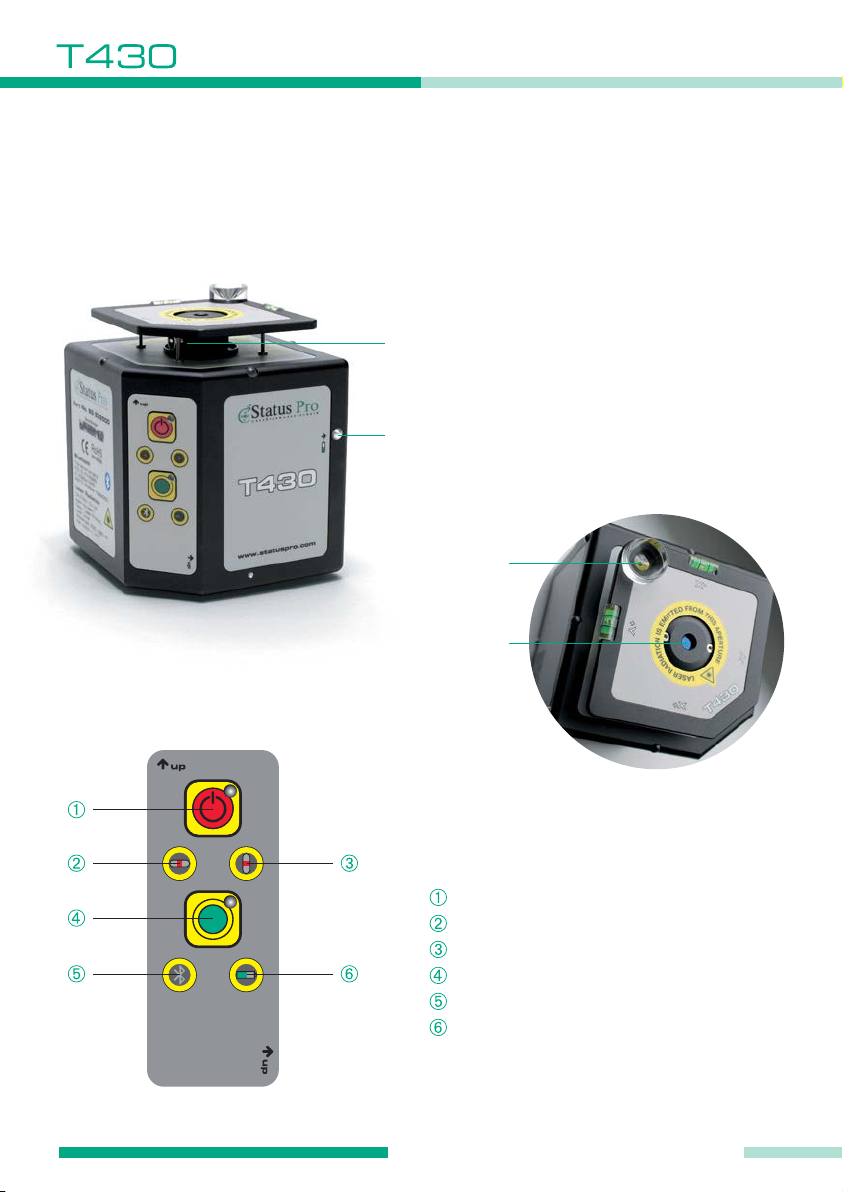
2.1 he 430 Keypad
Laser aperture
(rotating beam)
Opening-button for
battery compartment
Infrared
receiver
Laser aperture
(static beam)
Keypad
Power button
Horizontal spirit level (coarse)
Vertical spirit level (coarse)
Self-levelling button
Bluetooth connection readout
Battery display

9
GETTING STARTED
Status Pro – T430 User Guide
2.2 Power Supply
Rechargeable battery operation
The T430 Rotational Laser operates with standard LI-Ion rechargeable batteries. One
charge cycles extend to 10 hours of measurement time.
It is necessary to charge the batteries on an extern charging station. The battery compart-
ment is located on the back side of the T430. Open the battery compartment by pressing
the button.
Note:
• Put rechargeable battery in according to direction of arrow
• Remove rechargeable battery if T430 is stored for a longer
period (risk of corrosion)

10 Status Pro – T430 User Guide
2.3 Setting up 430
Position
The T430 Laser depending on the task can be positioned vertically (upright) horizontally
(lying or prone) or at a freely selectable angle.
Upright Position
In the upright position the static beam is in the
vertical plane and the rotating beam is in the
horizontal plane.
Lying or prone position
In the prone position the static beam
is in the horizontal plane and the
rotating beam is in the vertical plane.
The T430 can be used without
additional equipment when being
used in the upright position. When
being used without attachments the
laser beam hits the receiver at
around 0 00 mm when R280 or R290
(with magnet adapter) is being used.
GETTING STARTED
Table des matières
Autres manuels Status Pro Instrument de mesure


Manuels Instrument de mesure populaires d'autres marques


Endress+Hauser
Endress+Hauser Proline Promag 50 Caractéristiques techniques

Siemens
Siemens SITRANS F Coriolis FCT030 Manuel de la liste des pièces

KLINGER
KLINGER CMF V Series Manuel utilisateur

EXFO
EXFO FTB-2 Manuel d'exploitation et d'entretien

Keysight
Keysight M8290A Manuel utilisateur

ADTEK
ADTEK MW-5 Manuel utilisateur