Spirent CF400 Manuel utilisateur

Spirent CF400 Installation Instructions |1
KB DOC12615 Ver 7, 3/23
Spirent CF400 Installation Instructions
This document provides instructions for installing and connecting the Spirent CF400
device.
Note: Refer to the Spirent Knowledge Base, SOL13343: Index of Installation Articles,
for software installation information.
In this document...
•Certifications and Standards . . . . 5
•Requirements . . . . 6
•System Description . . . . 8
•Rack Mounting . . . . 11
•Connecting to the CF400 . . . . 13
•Powering up the CF400 . . . . 13
•Accessing the CF400 IPMI Credentials . . . . 14
•Requesting Your CF400 License Key . . . . 15
•Shutting Down or Rebooting the CF400 . . . . 15
•Related Documentation . . . . 15
•How to Contact Us . . . . 16

Spirent CF400 Installation Instructions
2|Spirent CF400 Installation Instructions KB DOC12615 Ver 7, 3/23
Copyright
© 2023 Spirent Communications, Inc. All Rights Reserved.
All of the company names and/or brand names and/or product names referred to in this
document, in particular, the name “Spirent” and its logo device, are either registered
trademarks or trademarks of Spirent plc and its subsidiaries, pending registration in
accordance with relevant national laws. All other registered trademarks or trademarks are
the property of their respective owners. The information contained in this document is
subject to change without notice and does not represent a commitment on the part of
Spirent Communications. The information in this document is believed to be accurate and
reliable, however, Spirent Communications assumes no responsibility or liability for any
errors or inaccuracies that may appear in the document.
Limited Warranty
Spirent Communications, Inc. (“Spirent”) warrants that its Products will conform to the
description on the face of order, that it will convey good title thereto, and that the Product
will be delivered free from any lawful security interest or other lien or encumbrance.
Spirent further warrants to Customer that hardware which it supplies and the tangible
media on which it supplies software will be free from significant defects in materials and
workmanship for a period of twelve (12) months, except as otherwise noted, from the date
of delivery (the “Hardware Warranty Period”), under normal use and conditions.
To the extent the Product is or contains software (“Software”), Spirent also warrants that,
if properly used by Customer in accordance with the Software License Agreement, the
Software which it supplies will operate in material conformity with the specifications
supplied by Spirent for such Software for a period of ninety (90) days from the date of
delivery (the “Software Warranty Period”). The “Product Warranty Period” shall mean the
Hardware Warranty Period or the Software Warranty Period, as applicable. Spirent does
not warrant that the functions contained in the Software will meet a specific requirement
or that the operation will be uninterrupted or error free. Spirent shall have no warranty
obligations whatsoever with respect to any Software which has been modified in any
manner by Customer or any third party.
Defective Products and Software under warranty shall be, at Spirent's discretion, repaired
or replaced or a credit issued to Customer's account for an amount equal to the price paid
for such Product provided that: (a) such Product is returned to Spirent after first obtaining
a return authorization number and shipping instructions, freight prepaid, to Spirent's
location in the United States; (b) Customer provides a written explanation of the defect or
Software failure claimed by Customer; and (c) the claimed defect actually exists and was
not caused by neglect, accident, misuse, improper installation, improper repair, fire, flood,
lightning, power surges, earthquake, or alteration. Spirent will ship repaired Products to
Customer, freight prepaid, based on reasonable best efforts after the receipt of defective
Products. Except as otherwise stated, any claim on account of defective materials or for
any other cause whatsoever will conclusively be deemed waived by Customer unless
written notice thereof is given to Spirent within the Warranty Period. Spirent reserves the
right to change the warranty and service policy set forth above at any time, after
reasonable notice and without liability to Customer.

Spirent CF400 Installation Instructions
Spirent CF400 Installation Instructions |3
KB DOC12615 Ver 7, 3/23
TO THE EXTENT PERMITTED BY APPLICABLE LAW, ALL IMPLIED
WARRANTIES, INCLUDING BUT NOT LIMITED TO IMPLIED WARRANTIES OF
MERCHANTABILITY, NONINFRINGEMENT AND FITNESS FOR A PARTICULAR
PURPOSE, ARE HEREBY EXCLUDED, AND THE LIABILITY OF SPIRENT, IF
ANY, FOR DAMAGE RELATING TO ANY ALLEGEDLY DEFECTIVE PRODUCT
SHALL BE LIMITED TO THE ACTUAL PRICE PAID BY THE CUSTOMER FOR
SUCH PRODUCT. THE PROVISIONS SET FORTH ABOVE STATE SPIRENT'S
ENTIRE RESPONSIBILITY AND CUSTOMER'S SOLE AND EXCLUSIVE REMEDY
WITH RESPECT TO ANY BREACH OF ANY WARRANTY.
Safety Precautions
Warning:Calls attention to operating procedures or practices that should be followed to
avoid bodily injury or damage to equipment.
Caution: Reflects conditions that could cause product damage or data loss.
Note: Describes limitations on the use of the equipment or procedure.
No User-Serviceable Parts
Warning: No user-serviceable parts inside. Do not open.
Waarschuwing: Er zijn geen door de gebruiker te vervangen onderdelen. Niet openen.
Attention: Aucune pièce se trouvant à l'intérieur ne peut être réparée ou remplacée par
l'utilisateur. Ne pas ouvrir.
Battery Warning
Warning: There is the danger of explosion if the battery is replaced incorrectly. Replace
the battery only with the same or equivalent type recommended by the manufacturer. Dis-
pose of used batteries according to the manufacturer’s instructions.
Waarschuwing: Er is ontploffingsgevaar als de batterij verkeerd vervangen wordt. Ver-
vang de batterij slechts met hetzelfde of een equivalent type dat door de fabrikant aanbev-
olen is. Gebruikte batterijen dienen overeenkomstig fabrieksvoorschriften weggeworpen
te worden.
Attention: Danger d'explosion si la pile n'est pas remplacée correctement. Ne la rem-
placer que par une pile de type semblable ou équivalent, recommandée par le fabricant.
Jeter les piles usagées conformément aux instructions du fabricant.
Lasers Warning
Warning: Because invisible radiation may be emitted from the aperture of the port when
no fiber cable is connected, avoid exposure to radiation and do not stare into
open apertures.
Waarschuwing: Aangezien onzichtbare straling vanuit de opening van de poort kan
komen als er geen fiberkabel aangesloten is, dient blootstelling aan straling en het kijken
in open openingen vermeden te worden.
!

Spirent CF400 Installation Instructions
4|Spirent CF400 Installation Instructions KB DOC12615 Ver 7, 3/23
Attention: Avant d'accéder à cet équipement connecté aux lignes électriques, ôter tout
bijou (anneaux, colliers et montres compris). Lorsqu'ils sont branchés à l'alimentation et
reliés à la terre, les objets métalliques chauffent, ce qui peut provoquer des blessures
graves ou souder l'objet métallique aux bornes.
Calibration
At the time of manufacture, all components manufactured by Spirent Communications are
calibrated in accordance with applicable procedures. Spirent Communications equipment
is calibrated using national standards, consensus standards, and ratio-type measurements
based on self-calibration techniques. By design, the equipment has no user adjustments
and does not require further calibration. Products are calibrated within the published
environmental specifications for the products. At the time of shipment, this Spirent
Communications product met its published operating specifications.
Unpacking
Before opening the carton, examine the carton for damage. If damage is not visible,
unpack the carton and check contents for damage. Save all packing materials. If damage is
noted, forward an immediate request to the delivering carrier to perform an inspection and
prepare a damage report. Save the container and packing material until contents are
verified.
Concurrently, report the nature and extent of damage to Spirent Communications
Customer Support so that action can be initiated to repair or replace damaged items, or
instructions issued for returning items.
The responsibility of the manufacturer ends with delivery to the first carrier. All claims for
loss, damage, or nondelivery must be made against the delivering carrier within
10 calendar days of receipt of shipment.
Damaged or Missing Equipment
If any equipment is damaged or missing, contact Spirent Communications Customer
Support. See “How to Contact Us” on page 16 for complete contact information.

Spirent CF400 Installation Instructions
Certifications and Standards
Spirent CF400 Installation Instructions |5
KB DOC12615 Ver 7, 3/23
Certifications and Standards
FCC
CF400 complies with the limits for a Class A digital device in accordance with Part 15 of
the FCC Rules. These limits are designed to provide reasonable protection against harmful
interference when this equipment is operated in a commercial environment. Operation is
subject to the following two conditions:
•This device may not cause harmful interference.
•This device must accept any interference received, including interference that may
cause undesired operation.
This device generates, uses, and can radiate radio frequency energy if not installed and
used in accordance with the instructions in this manual. Operating this equipment in a
residential area is likely to cause harmful interference, and the customer will be required
to rectify the interference at his or her own expense. This product requires the use of
external shielded cables to maintain compliance pursuant to Part 15 of the FCC Rules.
CE
The CE symbol on the product label indicates this network appliance is compliant with the
EMC Directive and Low Voltage Directive of the European Union. This product meets the
following technical standards:
•EN 55032:2015 — “Electromagnetic compatibility of multimedia equipment -
Emission requirements”
•EN 55035:2017 — “Electromagnetic compatibility of multimedia equipment -
Immunity Requirements”
•IEC 62368-1:2014 — “Audio/video, information and communication technology
equipment - Part 1: Safety requirements”
CSA
This product carries the cCSAus mark.

Spirent CF400 Installation Instructions
Requirements
6|Spirent CF400 Installation Instructions KB DOC12615 Ver 7, 3/23
Environmental Considerations
This label is on all Spirent-provided electrical and electronic products that are sold and
shipped (see Figure 1).
Figure 1. Waste of Electrical and Electronic Equipment (WEEE) Label
This label indicates that the product contains material that presents an environmental
concern. Spirent encourages users of Spirent-provided electrical and electronic equipment
to not dispose of the labeled products in waste collection units where the waste is destined
for landfills. Electrical and electronic equipment should be collected separately and
recycled, reused, and processed for recovery and waste treatment in accordance with your
local, regional, and federal laws. If you have any questions regarding this labeling, please
contact your Spirent Communications representative.
Requirements
This section describes the Spirent CF400 power requirements, cable requirements, and
network connectivity. Refer to “System Description” on page 8 for component
descriptions.
Power Requirements
The CF400 requires standard AC input of 100-240 volts, 50/60 Hz.
Cable Requirements
You will need several customer-supplied or Spirent-purchased cables, depending on your
device model and the NIC configuration. For detailed cabling information, refer to the
sections under “Connector Panel” beginning on page 8.
PC Requirements
Refer to the Release Notes for information on the minimum PC requirements.
Supported Hardware and NIC Configurations
Refer to the Release Notes for information on the hardware and NIC configurations that
are supported in each release.

Spirent CF400 Installation Instructions
Requirements
Spirent CF400 Installation Instructions |7
KB DOC12615 Ver 7, 3/23
Network Connectivity
Administrative Port
The CF400 administrative port operates at 1 GbE or 10 GbE.
Tips: • Spirent Communications recommends that the CF400 be connected through a
switch and isolated from your test environment.
•The administrative port can be connected to a different subnet from the test
network. If the CF400 overwhelms the test network, having the
administrative port on a different subnet enables you to access the CF400 and
control the test currently running without contending with a heavily loaded
network.
Test Ports
The CF400 supports NIC configurations for the test ports, as listed in the following table.
Table 1. NIC Configurations for CF400
Device Model 100 GbE
Test
Ports
CF400-01 8

Spirent CF400 Installation Instructions
System Description
8|Spirent CF400 Installation Instructions KB DOC12615 Ver 7, 3/23
System Description
The CF400 is a maintenance-free unit that should not be disassembled. Servicing the unit
yourself jeopardizes your warranty. The primary external components are the network
connector panel and power supply.
Figure 2. CF400 Front View
Connector Panel
This section shows the connector panel and describes the necessary cabling for the CF400.
The 1/10 GbE RJ-45 administrative (admin) port is in the following location for the
CF400.
The network cable connected to the admin port must be an Ethernet CAT-6 cable.

Spirent CF400 Installation Instructions
System Description
Spirent CF400 Installation Instructions |9
KB DOC12615 Ver 7, 3/23
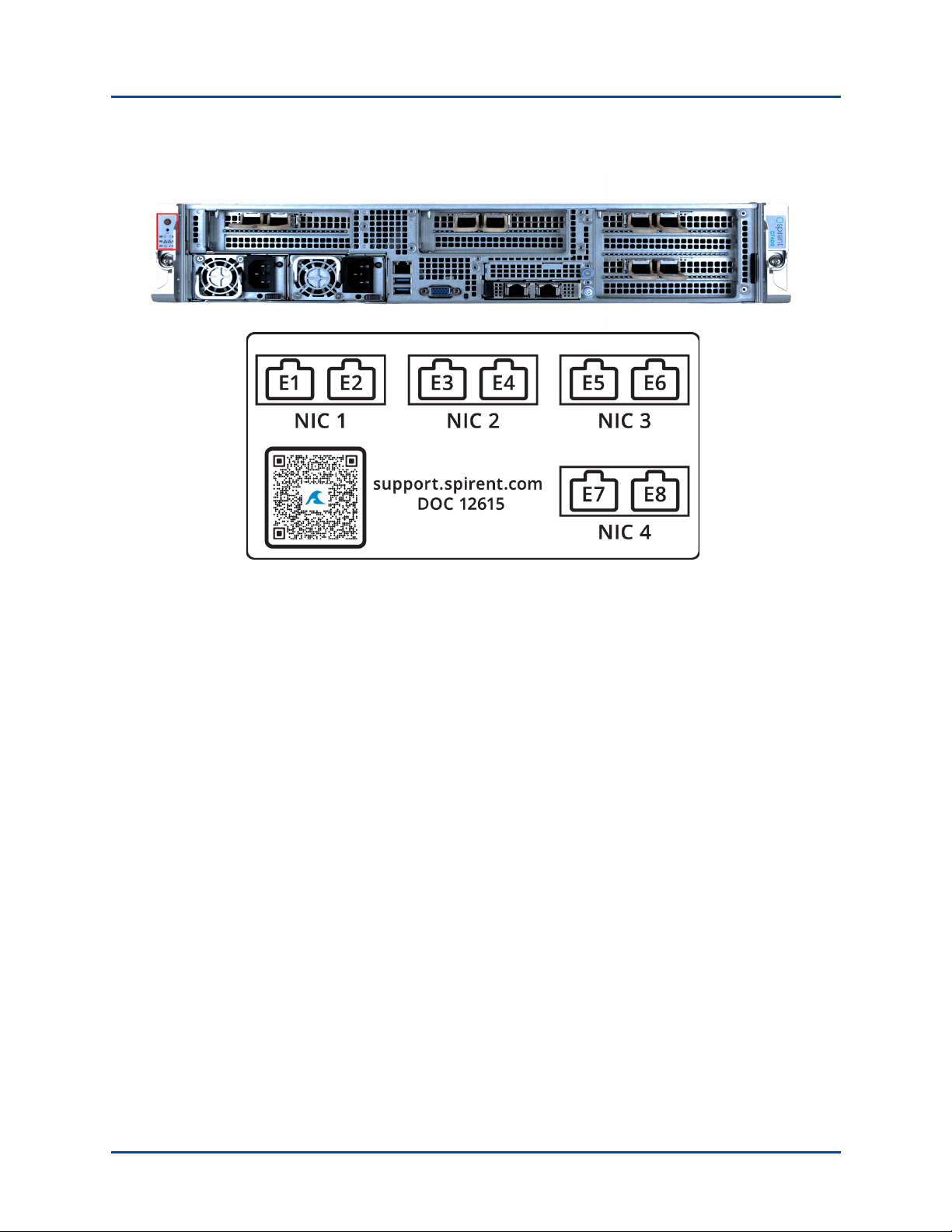
Figure 3. CF400-01 NIC Port Connections
The network transceivers connected to these test ports must be as follows:
•100 Gigabit Ethernet (100GbE)
• Optical transceiver, QSFP28 100GBASE-LR4 SMF 1310NM (Spirent part CMP-
A-ACC-6096A)
• Optical transceiver, QSFP28 100GBASE-SR4 MMF 850NM (Spirent part CMP-
A-ACC-6095A)
•40 Gigabit Ethernet (40GbE)
• Optical transceiver, QSFP+ dual-rate 40GBASE-SR4 850NM MMF (Spirent part
CMP-A-ACC-6089A)
• Optical transceiver, QSFP+ TO 4x10GBASE-LR, SMF (Spirent part ACC-
6090A)
For ACC-6089A and ACC-6090A:
–MTP Female to MTP Female 12 Fibers OM3 50/125

Spirent CF400 Installation Instructions
System Description
10 |Spirent CF400 Installation Instructions KB DOC12615 Ver 7, 3/23
Power Supply and Control Panel
The power supply for the CF400 is controlled by the power button located on the front of
the unit within the control panel (Figure 4). The unit requires two power cords to be
connected before the unit will power up. (Power sockets are located on the front of the
unit.)
Tip: Plug the CF400 into a surge-protected outlet to protect it from electrical surges.
Figure 4. CF400 Power Supply Indicators and Control Panel Functions
Table des matières
Autres manuels Spirent Matériel réseau

Spirent
Spirent PX3-QSFP-DD-8 Manuel utilisateur

Spirent
Spirent DLS 6700 Manuel utilisateur

Spirent
Spirent C1 Manuel utilisateur

Spirent
Spirent TestCenter Manuel utilisateur

Spirent
Spirent A2-400 Manuel utilisateur

Spirent
Spirent VisionWorks 7562 Guide de l'utilisateur

Spirent
Spirent B2-800-QD-4-T1S Manuel utilisateur
Manuels Matériel réseau populaires d'autres marques

Matrix Switch Corporation
Matrix Switch Corporation MSC-HD161DEL Manuel utilisateur

B&B Electronics
B&B Electronics ZXT9-IO-222R2 Manuel utilisateur

Yudor
Yudor YDS-16 Manuel utilisateur

D-Link
D-Link ShareCenter DNS-320L Manuel utilisateur

Samsung
Samsung ES1642dc Instructions d'utilisation

Honeywell Home
Honeywell Home LTEM-PV Instructions de montage