SOYO AVRO 3002 Manuel utilisateur

SOYO AVRO3002 Ethernet Router Manual
1
ad

SOYO AVRO3002 Ethernet Router Manual
2
Table of Contents
01. Introduction………………………………………....…..147H4
1H1.1. Product Overview ......................................................................... 148H4
2H1.2. Package Contents .............................................................................. 149H5
3H1.3. Installation Requirements .................................................................. 150H5
4H2. Installation Guide…………………………………...….151H6
5H2.1. Hardware Setup............................................................................ 152H6
6H2.1.1 Front Panel ................................................................................... 153H6
7H2.1.2 Rear Panel.................................................................................... 154H7
8H3. Default Values…………………………………………..155H8
9H3.1. Password....................................................................................... 156H8
10H3.2. Default Network Settings............................................................. 157H8
11H3.3. Other Default Settings.................................................................. 158H8
12H4. Configuring Your AVRO 3002 – Login………..……159H9
13H5. Configuring Your AVRO 3002 – General Setup….160H10
14H5.1. System......................................................................................... 161H10
15H5.1.1. Time Zone.......................................................................... 162H10
16H5.1.2. Password Settings ............................................................ 163H10
17H5.1.3. Remote Management ....................................................... 164H11
18H5.2. WAN Settings.............................................................................. 165H12
19H5.2.1. Dynamic IP......................................................................... 166H12
20H5.2.2. PPPoE................................................................................ 167H13
21H5.2.3. Static IP.............................................................................. 168H14
22H5.2.4. DNS .................................................................................... 169H14
23H5.3. LAN Settings............................................................................... 170H15
24H5.4. NAT Settings............................................................................... 171H16
25H5.4.1. Address Mapping .............................................................. 172H16
26H5.4.2. Virtual Server..................................................................... 173H16
27H5.4.3. Special Applications.......................................................... 174H17
28H5.5. Firewall ........................................................................................ 175H18
29H5.5.1. Access Control .................................................................. 176H19
30H5.5.2. URL Blocking..................................................................... 177H21
31H5.5.3. Schedule Rule ................................................................... 178H22

SOYO AVRO3002 Ethernet Router Manual
3
32H5.5.4. Intrusion Detection............................................................ 179H23
33H5.5.5. DMZ.................................................................................... 180H25
34H6. UPnP…………………………..………….……….........181H26
35H7. DDNS…………………………..………………….….....182H27
36H8. Tools…………………………..…………………….…..183H28
37H8.1. Configuration Tools .................................................................... 184H28
38H8.2. Firmware Upgrade...................................................................... 185H28
39H8.3. Reset............................................................................................ 186H29
40H9. Status…………………………..…………….…..….….187H30
41H9.1. Internet Connection.................................................................... 188H30
42H9.2. Device Status.............................................................................. 189H31
43H9.3. Security Log ................................................................................ 190H31
44H9.4. DHCP Client Log ........................................................................ 191H32
45H9.5. VoIP Status ................................................................................. 192H32
46H9.6. VoIP Call Log.............................................................................. 193H33
47HGlossary…………………………..……………………….....…..194H34
48H
Compliances
…………………………..…………...….……..….195H41

SOYO AVRO3002 Ethernet Router Manual
4
1. Introduction
1.1. Product Overview
The AVRO 3002 is an advanced embedded telephony gateway and IP
sharing device providing powerful integration of the traditional voice
traffic and the Internet data traffic. It is used for connecting traditional
telephone sets to the data network. Its goal is to provide standard
Internet telephony service and access service to the SOHO and
enterprise users to save long-distance telephony bill. The AVRO 3002
is equipped with digital signal processors (DSPs) that convert analog
and digital voice into IP packets for transport through the IP network
using standard coders/decoders (codecs), including G.711, G.723.1
and G.729.A.
The AVRO 3002 comes with 2 FXS ports, which can provide 2
telephone devices the ability to transmit voice communication over the
Internet. It’s an ideal solution for businesses and corporations that can
immediately reduce their long-distance telecommunications costs.
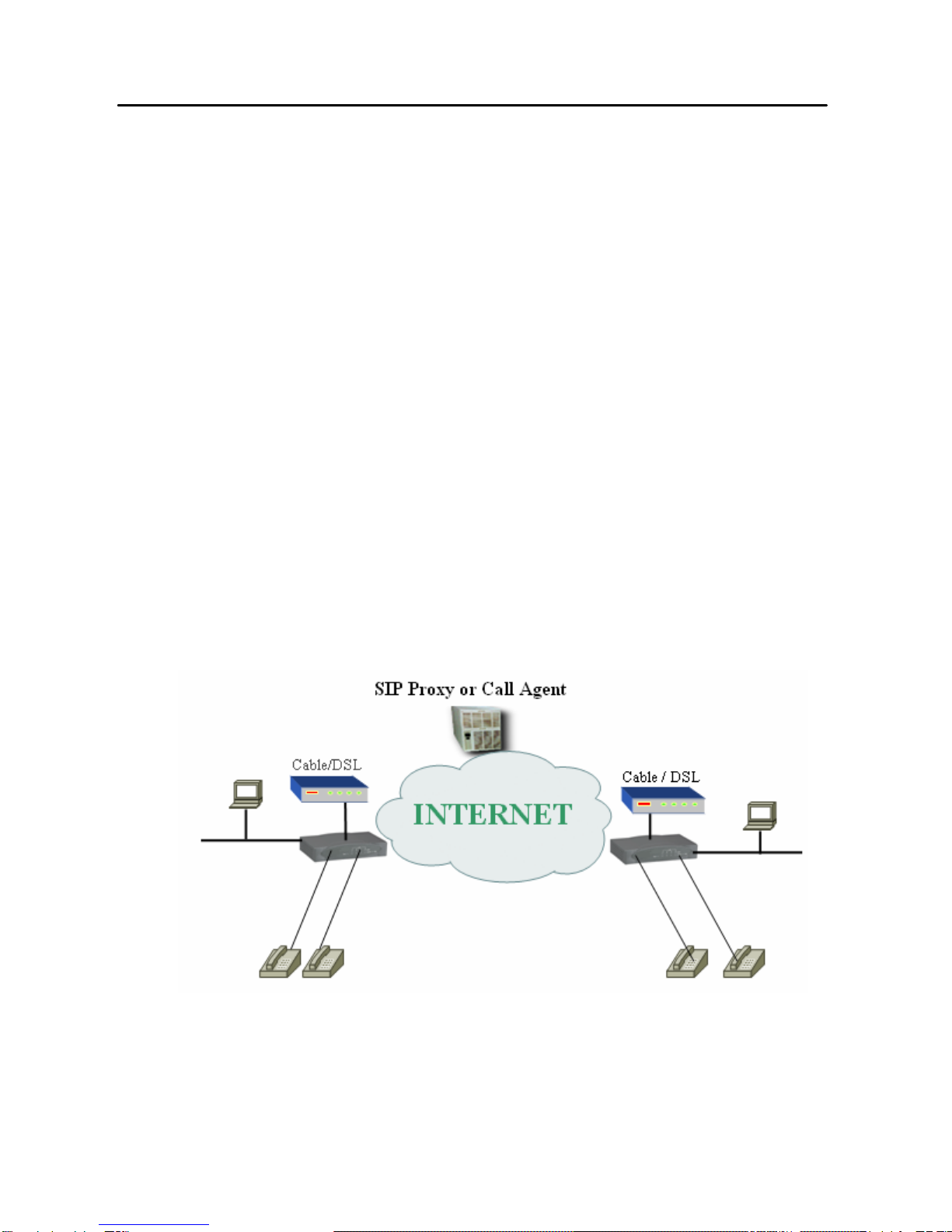
The network architecture of AVRO 3002 is described below:

SOYO AVRO3002 Ethernet Router Manual
5
1.2. Package Contents
•One AVRO 3002
•One Power Adapter
•This Quick Installation Guide
•One User Manual
•One RJ-45 Ethernet Cable
•One RJ-11 Cable
1.3. Installation Requirements
Before proceeding with the installation of your AVRO 3002, please be sure
you have the following:
•A computer with an Ethernet network card installed.
•A CD copy of Microsoft Windows, if your computer is running
Windows 95, 98, ME, or 2000.
•A Broadband Internet connection such as cable or ADSL modem
•An additional Ethernet network cable.
•A Web browser such as Internet Explorer or Netscape.

SOYO AVRO3002 Ethernet Router Manual
6
2. Installation Guide
2.1. Hardware Setup
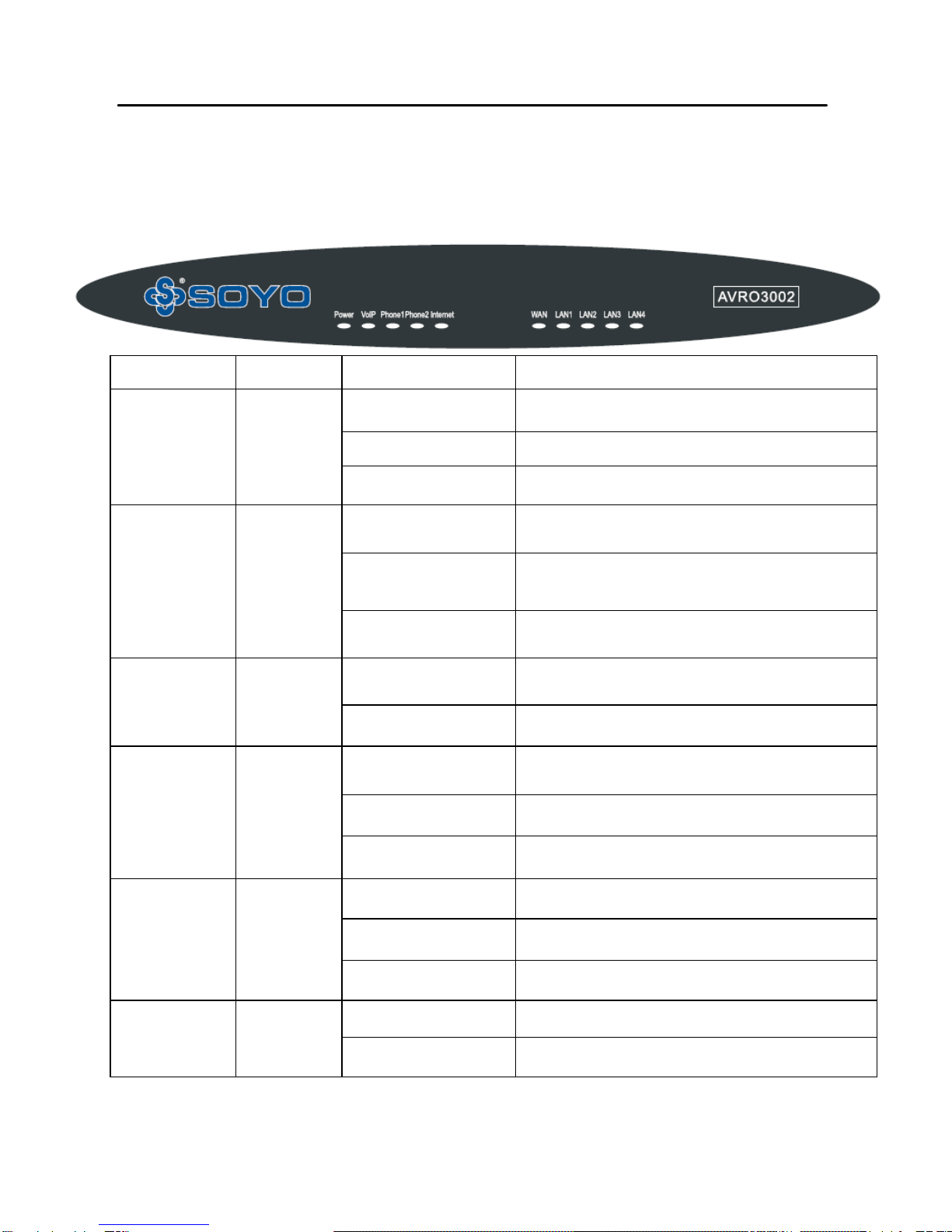
2.1.1 Front Panel
Mode Label Display Color Meaning
On (Green) Power on, normal operation
Blink Firmware loading
Power PWR
Off Power off or failure
On (Green) Green Link /Active : WAN Connection is OK
Blink (Green) Link /Active : data transmitting or receiving
WAN WAN
Off Link /Active : connection is not established
On (Orange) SIP Proxy registration is OK
VoIP Alert VoIP
Off SIP Proxy registration has failed
On (Green) Link /Active : Connection is OK
Blink Link /Active : data transmitting or receiving
LAN 1 – 4
Off Link /Active : connection is not established
On (Orange) Off hook
Blink Ring for Incoming call
Voice Phone1-2
Off On hook
On (Green) Internet connected Successfully
Internet Internet
Off Internet connected Failed

SOYO AVRO3002 Ethernet Router Manual
7
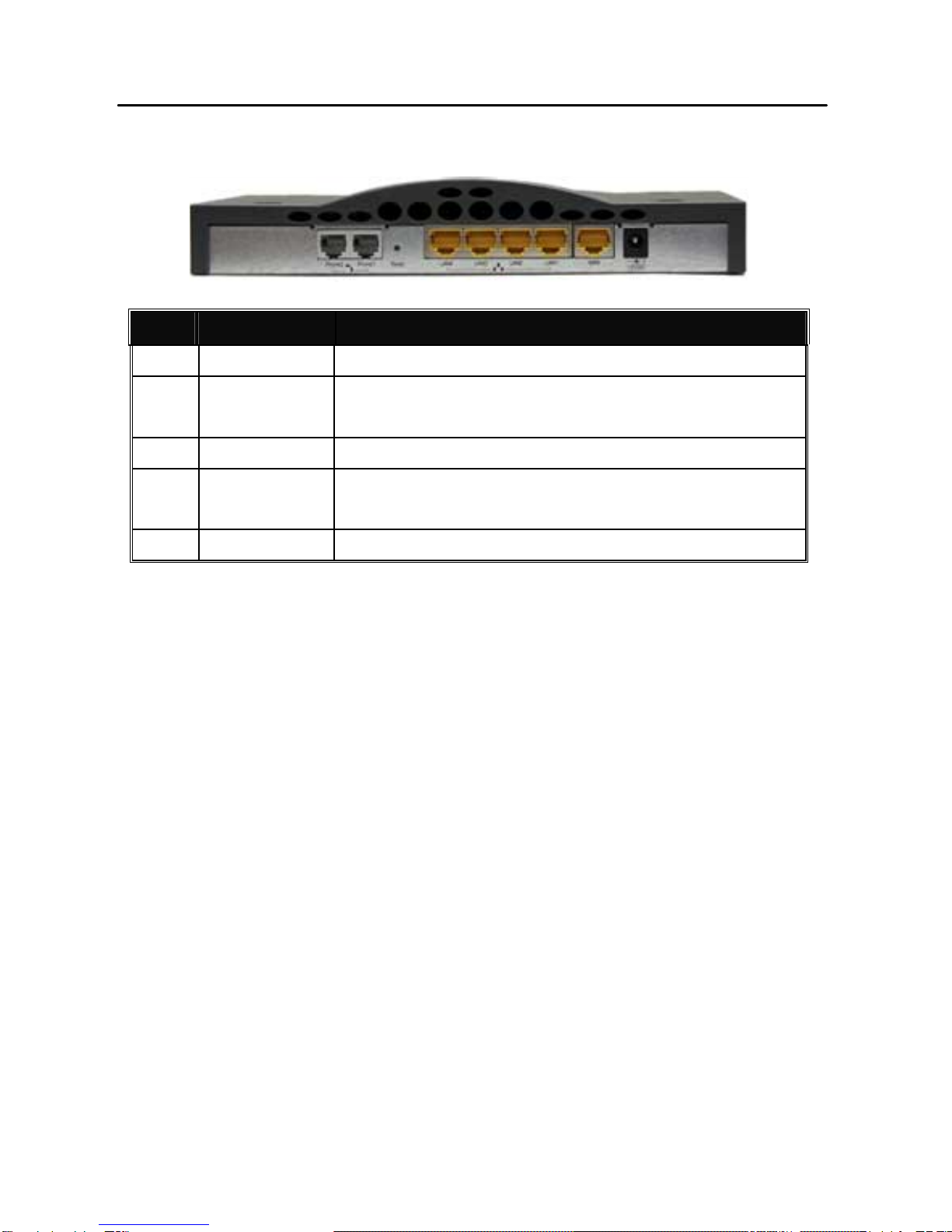
2.1.2 Rear Panel
Item Connector Function
1 12V DC Power connector.
2 RESET
(Reboot) Reset button. Press for one second to reset the device or
press for 5 seconds to reset to the factory default.
3 WAN Connect to Cable or ADSL Modem
4 Local
(1-4)
4 port (10/100Mbps) RJ-45 connector, connect to PC
or local switch/hub.
5 Phone Connect to Phone set (or Connect to PBX CO Line)
2.1.3. Installation Instruction
1. Connecting a Phone set: Connect phone set directly to one of
the two Phone ports on the AVRO 3002
2. Connecting a Computer: Connect computers directly to the
AVRO 3002 on ports 1-4 of the LAN ports. If you have more than
4 computers to plug in, connect a hub or a switch (using its
uplink port) and connect additional computers to that device.
3. Connecting a Cable Modem or DSL Modem: Connect your
Cable or DSL modem to the WAN port on the rear panel.
4. Power: Plug the power cord into the power jack.
5. The device will boot up at this moment. Make sure the LED in
front panel light up correctly.

SOYO AVRO3002 Ethernet Router Manual
8
3. Default Values
3.1. Password
The default password is empty. For security reasons, we highly
recommend you to set up a password after logging into to the
system. If you forget the user password, you can press and
hold the reset button on the back of the router for 5 seconds.
When all the LEDs flash, your AVRO 3002 will be reset to the
factory default.
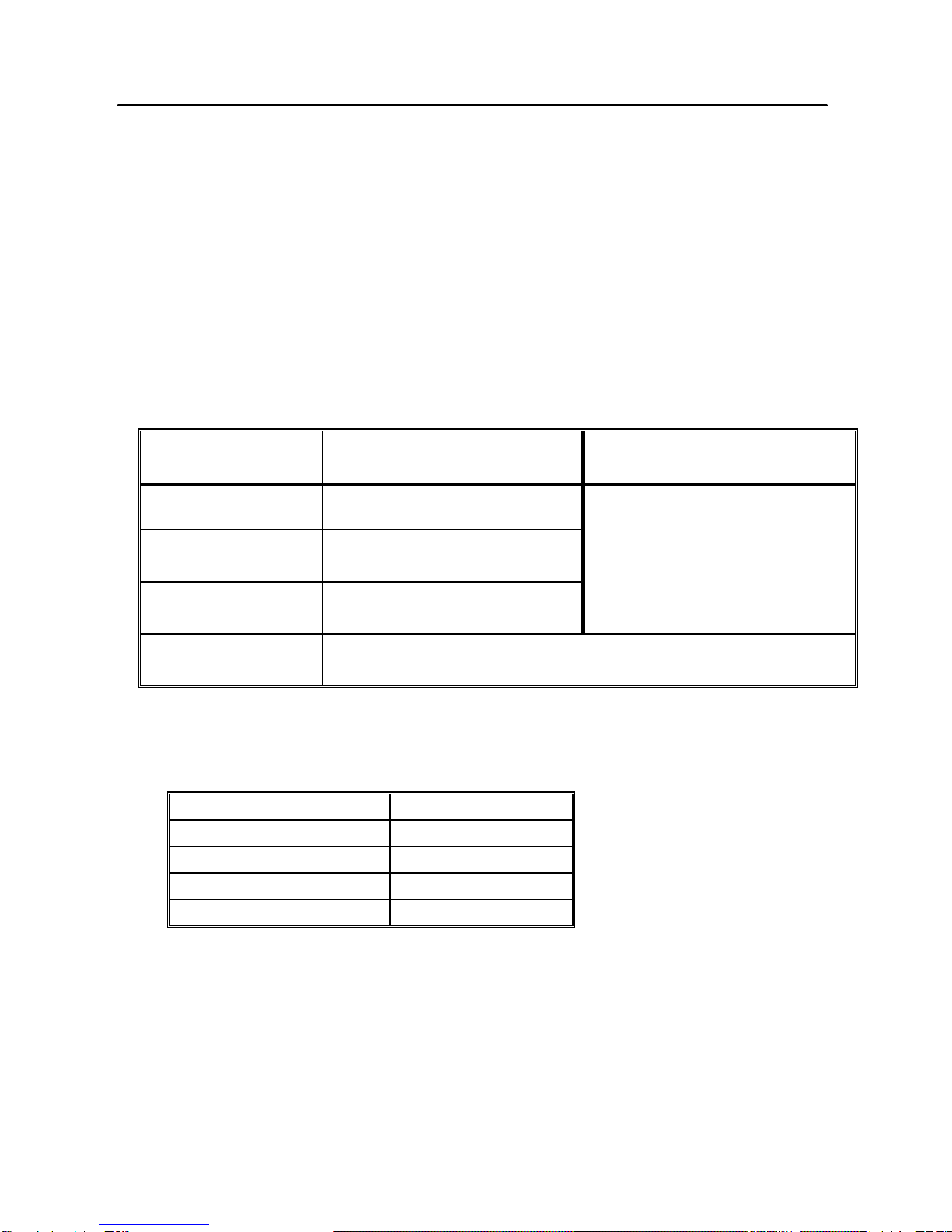
3.2. Default Network Settings
LAN Setup WAN Setup
IP Address 192.168.7.1
Subnet
Mask
255.255.255.0
DHCP
server
Enable
DHCP Client enabled
DHCP IP
range
100 IP addressed from 192.168.7.100 to
192.168.7.199
3.3. Other Default Settings
Time Zone Taipei
Firewall Off
WAN DHCP
UPnP Off
DDNS Off

SOYO AVRO3002 Ethernet Router Manual
9
4. Configuring Your AVRO 3002 – Login
Now that you have successfully configured your computer and retrieved
your new network settings from your AVRO 3002, you are ready to
configure the AVRO 3002’s settings for your LAN.
1. Open your Web browser (i.e., Internet Explorer or Netscape Navigator)
and click the stop button.
2. In the “Address” field type “http://192.168.7.1” and press <ENTER>.
3. The AVRO 3002 login screen will appear. The default Password
setting is empty. For security reasons, you should assign a password
as soon as possible. Note that the password login in case sensitive.
4. Once the user login successfully, the first page will appear as below:

SOYO AVRO3002 Ethernet Router Manual
10
5. Configuring Your AVRO 3002 – General Setup
5.1. System
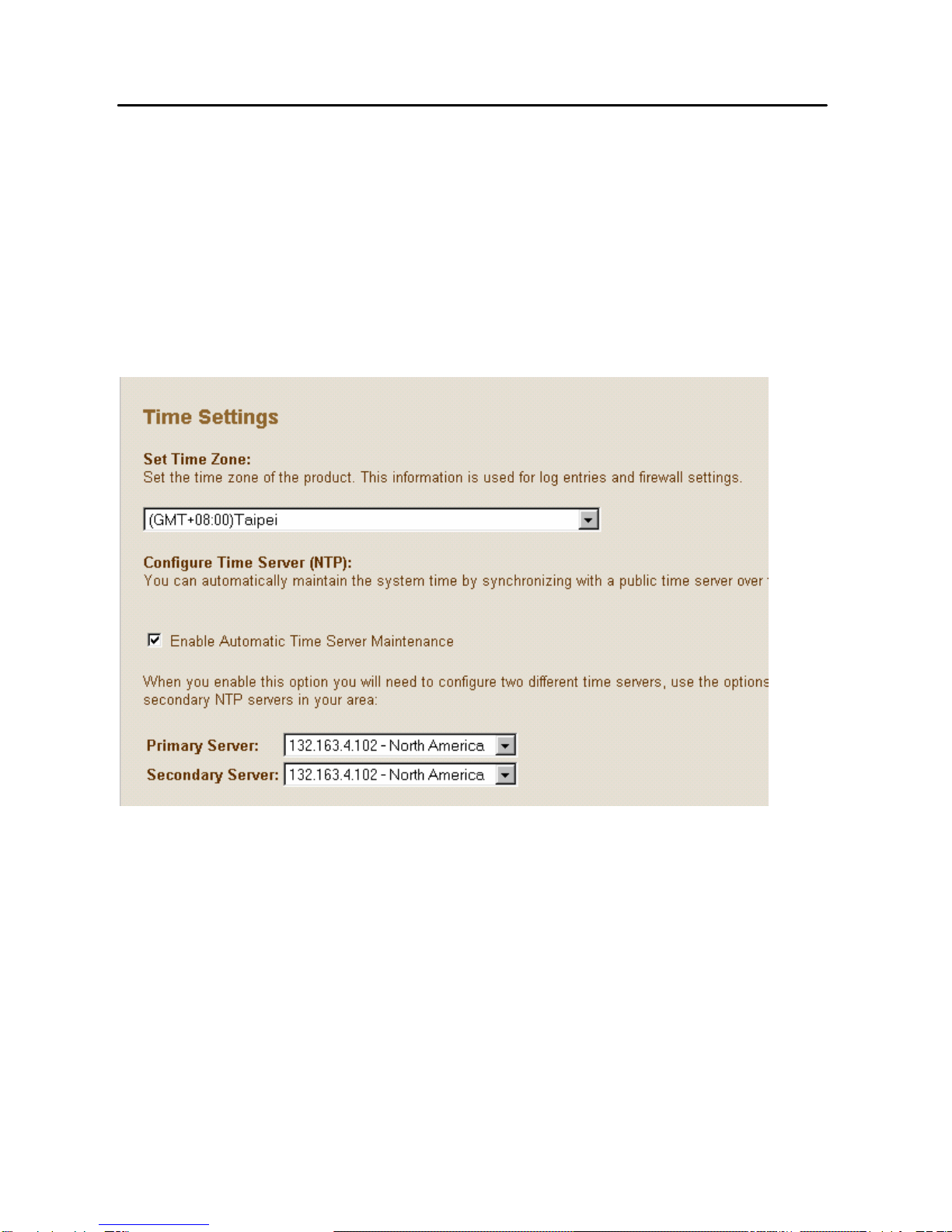
5.1.1. Time Zone
Set the proper time zone and the configure time server for the AVRO 3002.
When you enable Automatic Time Server Maintenance option you will
need to configure time servers, use the options below to set the primary
and secondary NTP servers in your area
5.1.2. Password Settings
Set the password of the user. The Idle Time Out value is used for AVRO
3002 to log out automatically when no access to the web after this timeout
value.
Ce manuel convient aux modèles suivants
1
Table des matières
Langues :
Autres manuels SOYO Routeur réseau
Manuels Routeur réseau populaires d'autres marques

NETGEAR
NETGEAR FS526T - Switch Manuel utilisateur

Korenix
Korenix JetNet 5710G Series Manuel utilisateur

Automated Logic
Automated Logic ZN551 Manuel du propriétaire

Cisco
Cisco ASR 1000 Series Manuel de l'opérateur

EnGenius
EnGenius ESR-9710 Manuel utilisateur

Cisco
Cisco 805 Series Instructions d'utilisation et de sécurité