
Silis Electronique CHAUFFAGE SMS V2 Manuel utilisateur
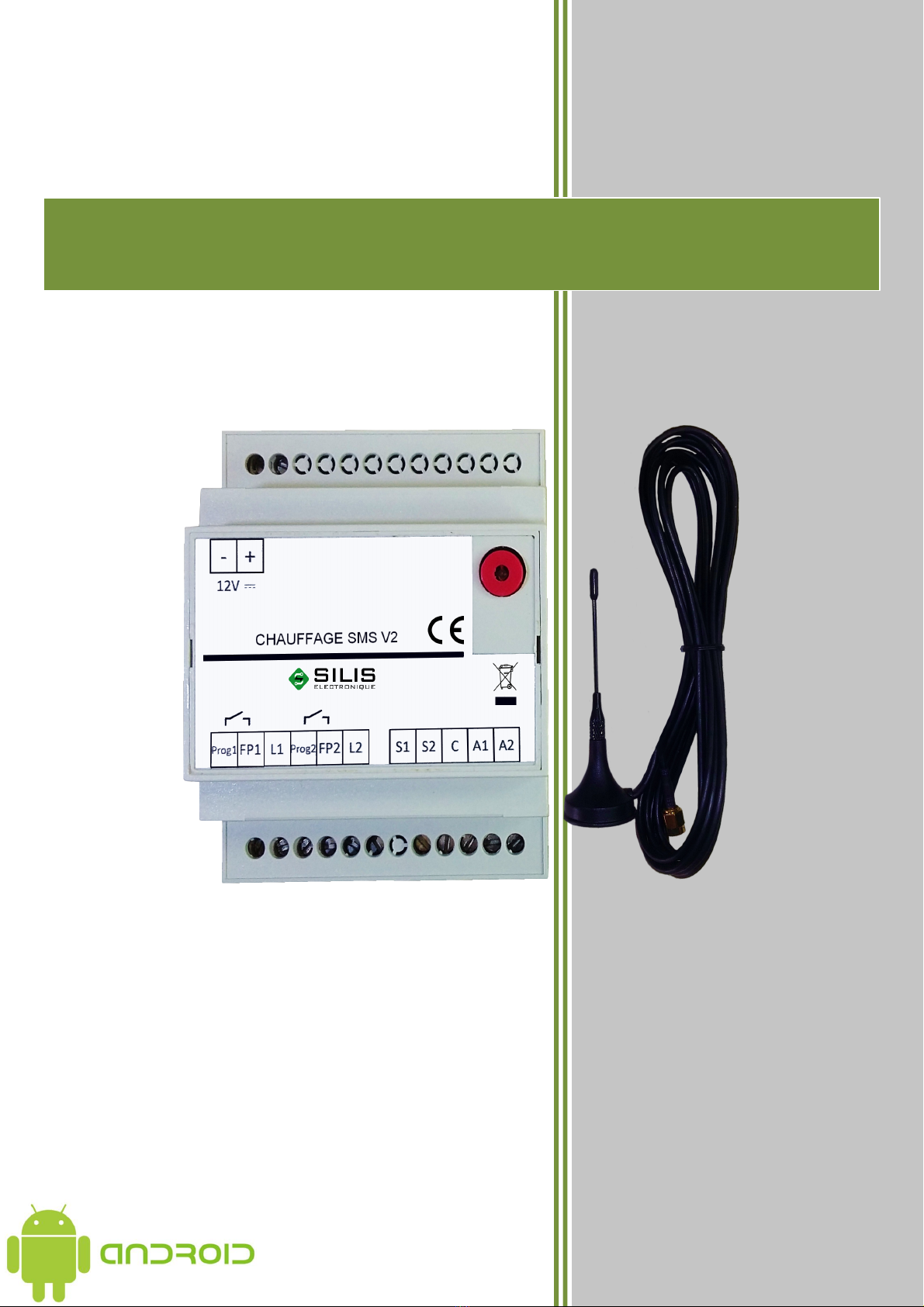
CHAUFFAGE SMS V2

SUMMARY
1Presentation of the product .......................................................................
2Features .................................................................................................... 5
Installation ................................................................................................ 6
-1 Inserting the SIM card ............................................................................................................... 6
-2 Electric heater with pilot wire(1 zone or 2 zones) ...................................................................... 7
- Electric heater without pilot wire(1 zone or 2 zones) ................................................................. 8
-4 Boiler (with circulator or control input) ..................................................................................... 9
-5 Alarms inputs ............................................................................................................................ 10
-6 Outputs ON/OFF ....................................................................................................................... 11
4Usages .................................................................................................... 12
4-1 Setting up .................................................................................................................................. 12
4-2 Administrator change procedure and adding/deleting users ..................................................... 1
4- Description of SMS Commands ............................................................................................... 14
4- -1 Commands to be sent by the user via SMS to the product ................................................. 14
4- -2 Description of SMS Received by the user ......................................................................... 16
4-4 Received Alert Messages .......................................................................................................... 17
5Push button and led indicator ................................................................. 17
6Android application ................................................................................ 18
6-1 Installation ................................................................................................................................ 18
6-2 Description ................................................................................................................................ 20
7Change batteries ..................................................................................... 22
8Specifications ......................................................................................... 2
9Warranty ................................................................................................. 24

1 PRESENTATION OF THE PRODUCT
CHAUFFAGE SMS is designed to bring comfort and economy to the heating of your second
home. It acts directly on the ambient temperature without changing the installed heating nor
programming.
CHAUFFAGE SMS is controlled by your smartphone by sending or receiving SMS. It is not
necessary to take internet subscription (no box needed), you just need to install a SIM card in
the product.
CHAUFFAGE SMS can also be controlled by an application that you can download on our
website (www.silis-electronique.fr) or on the Google Play Store. This application is only
available for ANDROID devices.
For a temperature control in ECO mode that best suits your needs and / or avoids the risk of
frost in winter, you can add its temperature sensor provided.
CHAUFFAGE SMS alerts you when a problem is detected on your system (power failure,
etc). You will receive these alerts directly on your phone through SMS (these alerts will not be
sent to your application).
CHAUFFAGE SMS is compatible with a large number of heating system: electric with or
without a pilot wire (the product works in pilot wire 4 orders), gas boiler, etc.
In addition to the main heating function, additional functions are available such as: 2 alarm
inputs, alarm in case of mains failure, on / off output for controlling another device (only
available in absence of the second heating zone).
Further informations :
CHAUFFAGE SMS uses GSM communications, so you need to subscribe to the
operator of your choice. This one will provide you with a SIM card. This card will
contain all the information about your subscription. In order to avoid the interruption of
the GSM network due to the expiry of a prepaid or limited-price SIM card, we advise
you to avoid this kind of subscription.
The PIN code of the SI card must first be disabled using a mobile phone before
being inserted inside the product.
Important:
For security reasons, you must keep the GSM phone number of the product secret.
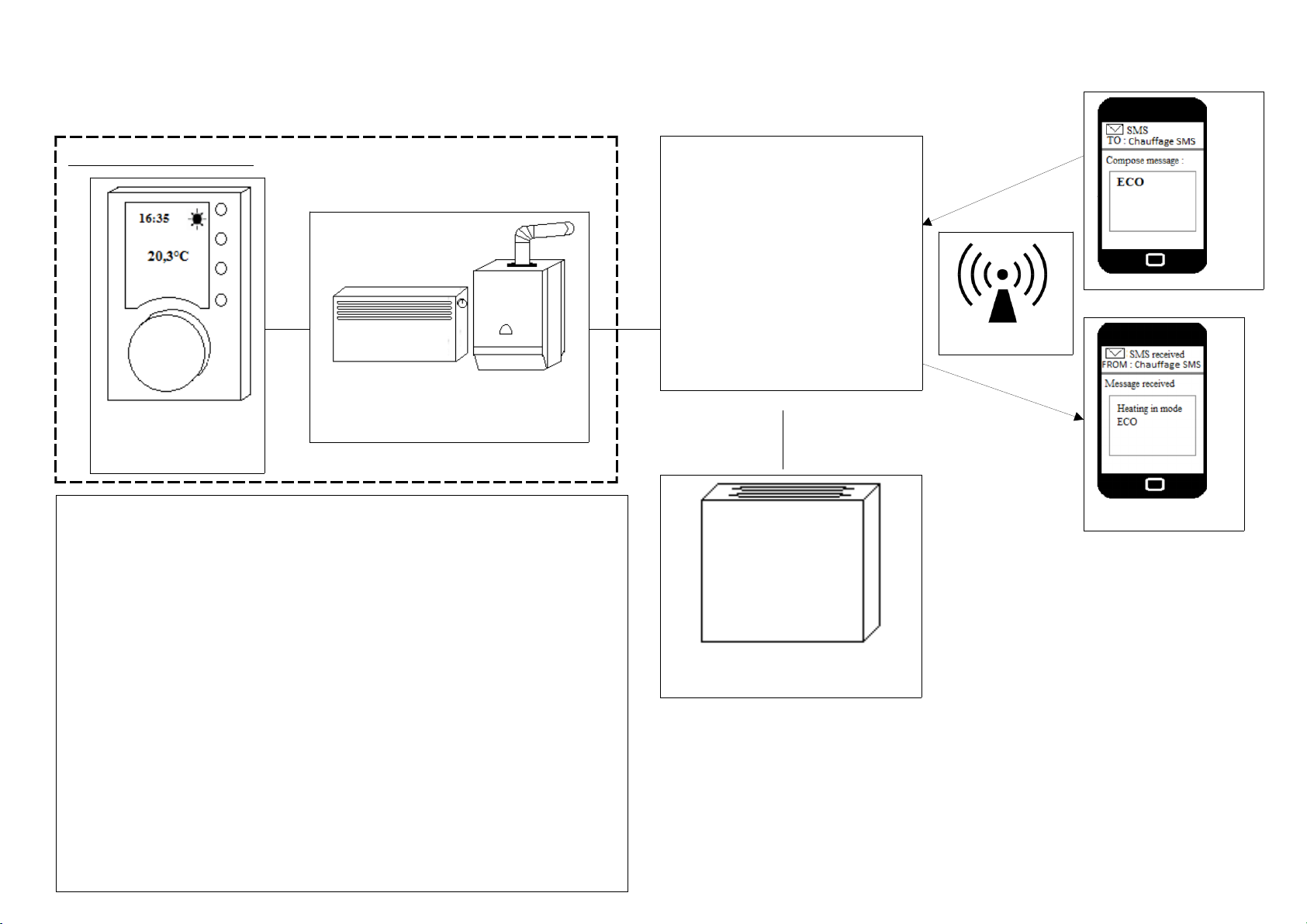
4
Electric Heating or Boiler
Room thermostat
or programmer
Chauffage
S S
* Adding this probe is not required
This sensor allows you to regulate the temperature of your
house to the setpoint chosen (from 6°C, for frost protection
for example, to 20°C). If you feel that there is no risk of
frost in your home, you can do without this probe.
Install the probe at 1.50m from the floor, on an inside wall,
avoiding external influences (sunlight, etc.) and internal
influences (radiators, etc.). Also remember to place the
probe housing so that the air holes are directed up and down
(to facilitate the flow of air inside the probe housing).
Existing installation
Temperature sensor*
2 FEATURES
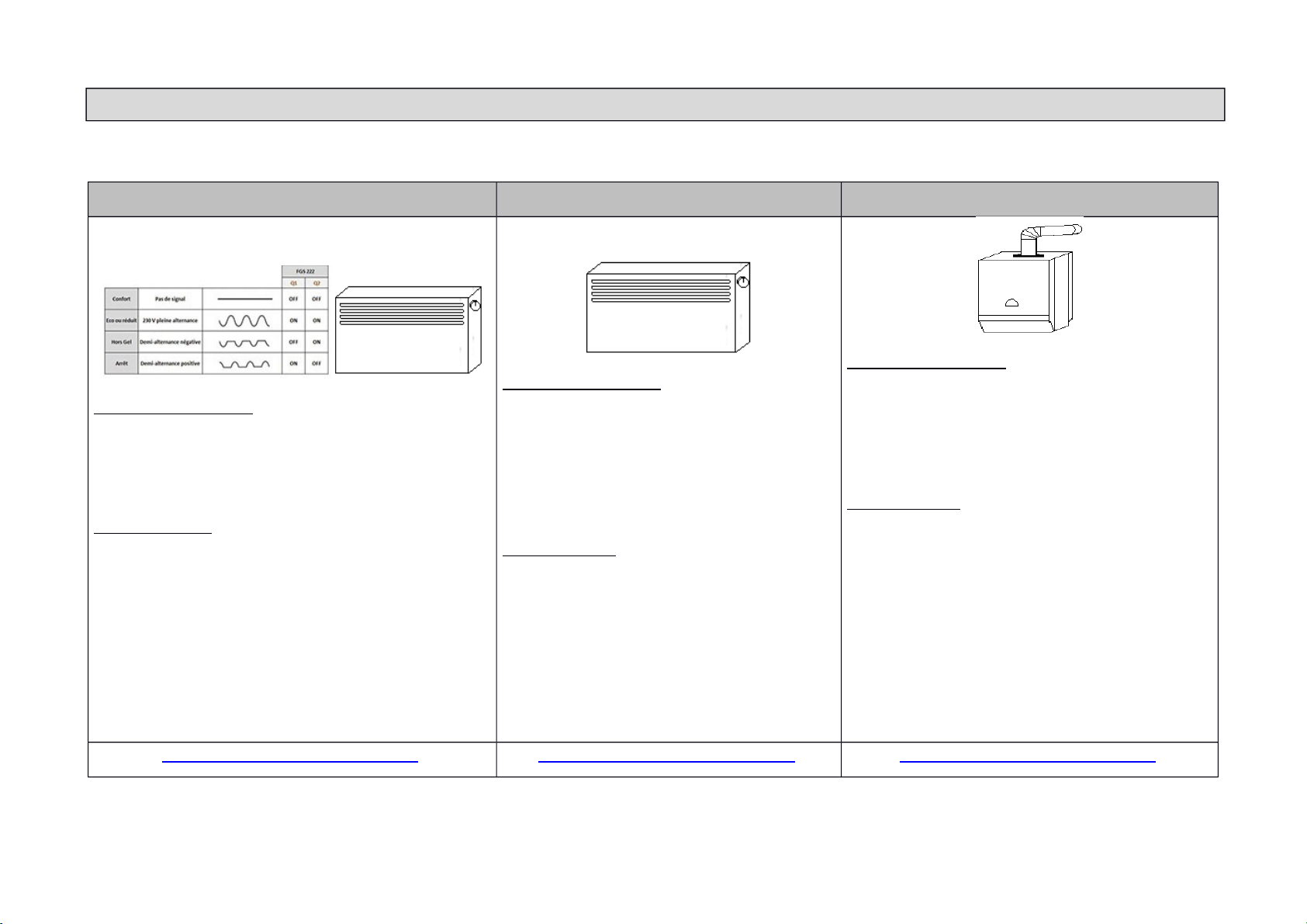
Depending on your existing heating installation, the table below will help you identify the features offered by the product.
Electric heating with pilot wires Electric heating without pilot wires Boiler
“PRESENT” mode: Your heating programmer
manages the pilot wire of the radiators (Chauffage
SMS is at rest). If your installation is devoid of a
heating programmer, the control is managed by your
heater.
“ECO” mode: Chauffage SMS applies a frost
protection signal to the pilot wire on the radiators
(your heating programmer is disconnected from the
pilot wire of the radiators).
If you want to obtain a higher ECO temperature than
frost protection, it is necessary first to install a
temperature sensor and to set this setpoint by SMS.
Then make sure that the heating programmer is not
in the anti-freeze or off position.
“PRESENT” mode: Your heating
programmer manages the regulation of your
radiators (Chauffage SMS is at rest). If your
installation is devoid of a heating
programmer, the control is managed by your
heater.
“ECO” mode: Chauffage SMS manages
the control of your radiators from the
temperature setpoint defined by SMS. In the
absence of a temperature sensor, the heating
is switched off (Attention to the risk of
frost!).
“PRESENT” mode: Your programmer
manages the regulation of your radiators
(Chauffage SMS is at rest). If your installation is
devoid of a heating programmer, the control is
managed by your heater.
“ECO” mode: Chauffage SMS manages the
control of your radiators from the temperature
setpoint defined by SMS. In the absence of a
temperature sensor, the heating is switched off
(Attention to the risk of frost!).
For recent boilers Chauffage S S acts
directly on a dedicated input. For others it
only acts on the water circulator of the
heating circuit.
Refer to wiring diagram on page 7 Refer to wiring diagram on page 8 Refer to wiring diagram on page 9
5

INSTALLATION
For safety reasons this product must be installed in your electrical panel by an authorized
person.
Below you will find wiring diagrams for different types of installation.
-1 INSERTING THE SIM CARD
To install the SIM card, open the Chauffage SMS product box, the SIM connector is on the
back of the circuit board.
Attention to the direction of insertion of the SI card into the connector (cut corner
bottom left).
When inserting the SI card the product must be turned off.
6
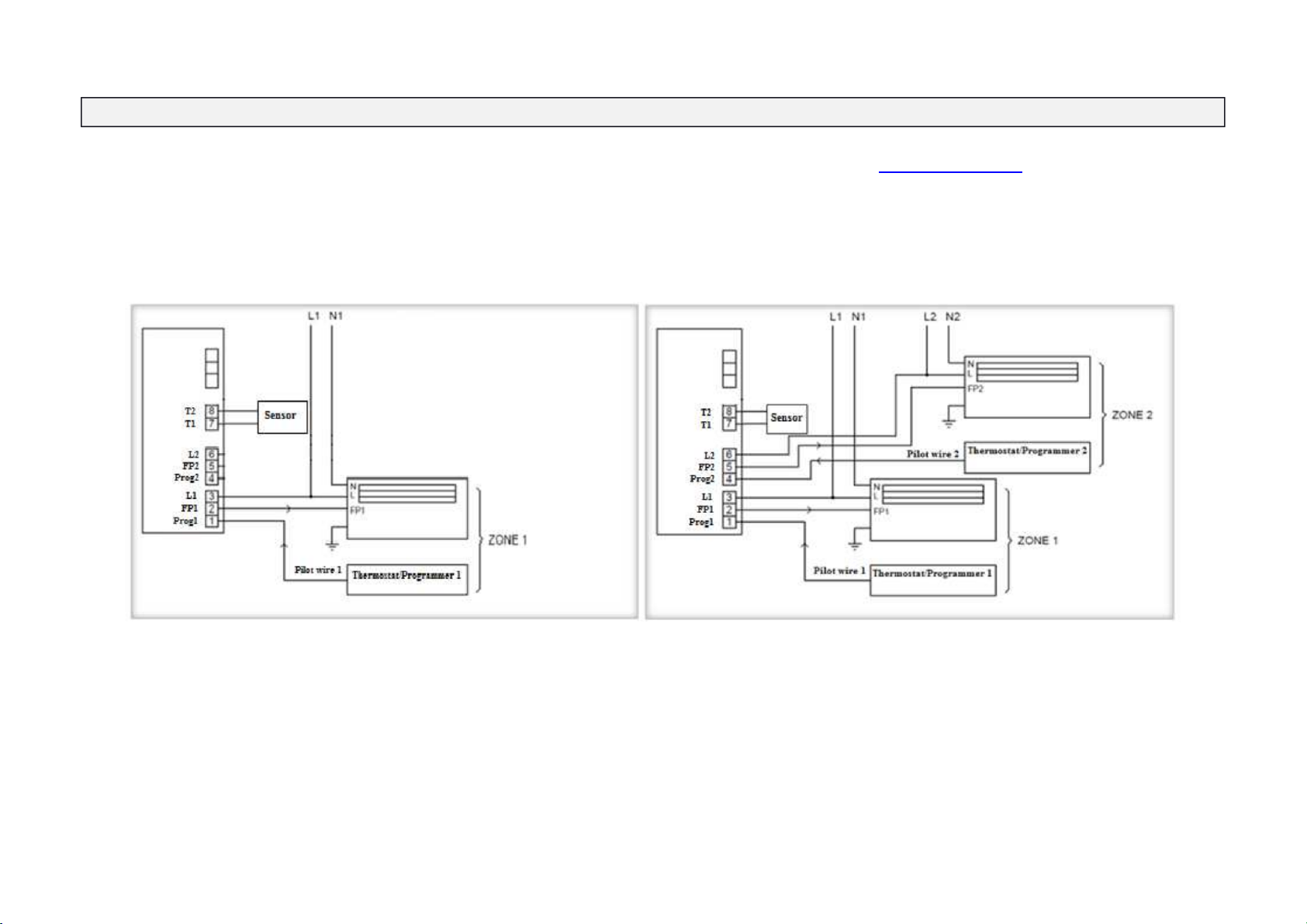
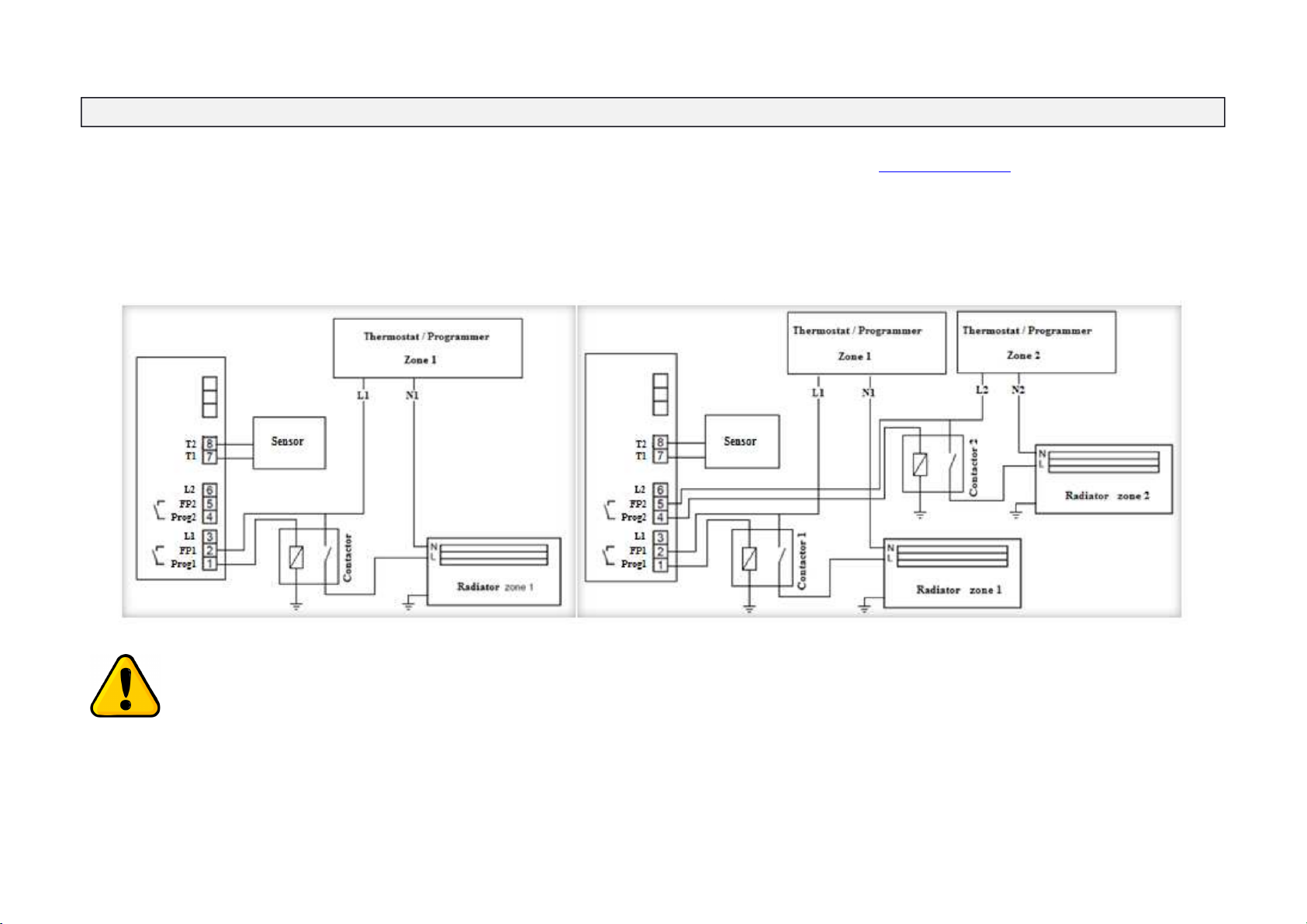
- ELECTRIC HEATER WITHOUT PILOT WIRE(1 ZONE OR 2 ZONES)
If you use the 2 heating zones do not forget to set the second output in heating zone (Z2). For this refer to Chapter 4 (Usages).
The addition of the power contactors is imperative to ensure proper system operation. Without these contactors you risk damaging
the product and thus losing the warranty.
8
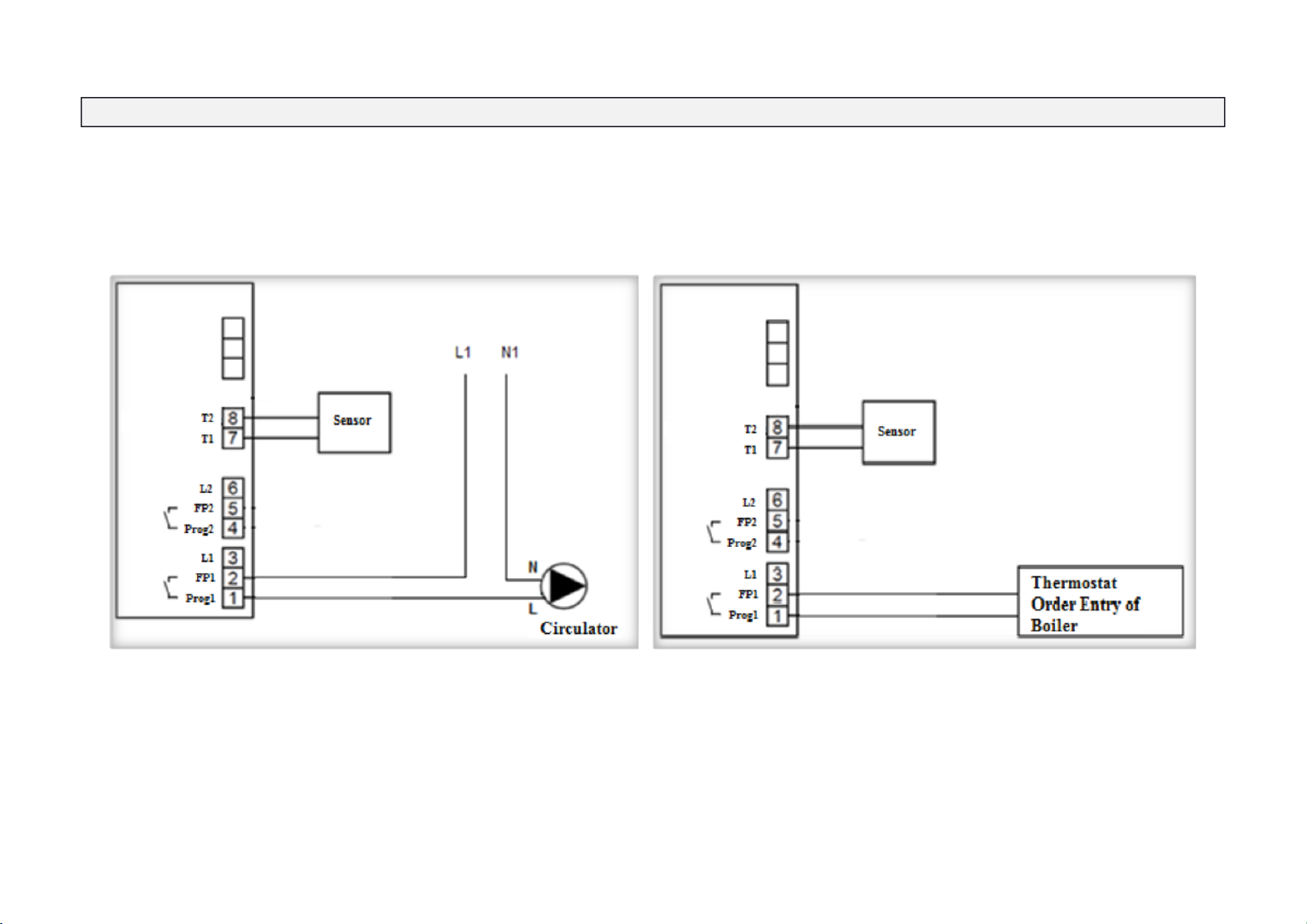
-4 BOILER (WITH CIRCULATOR OR CONTROL INPUT)
9
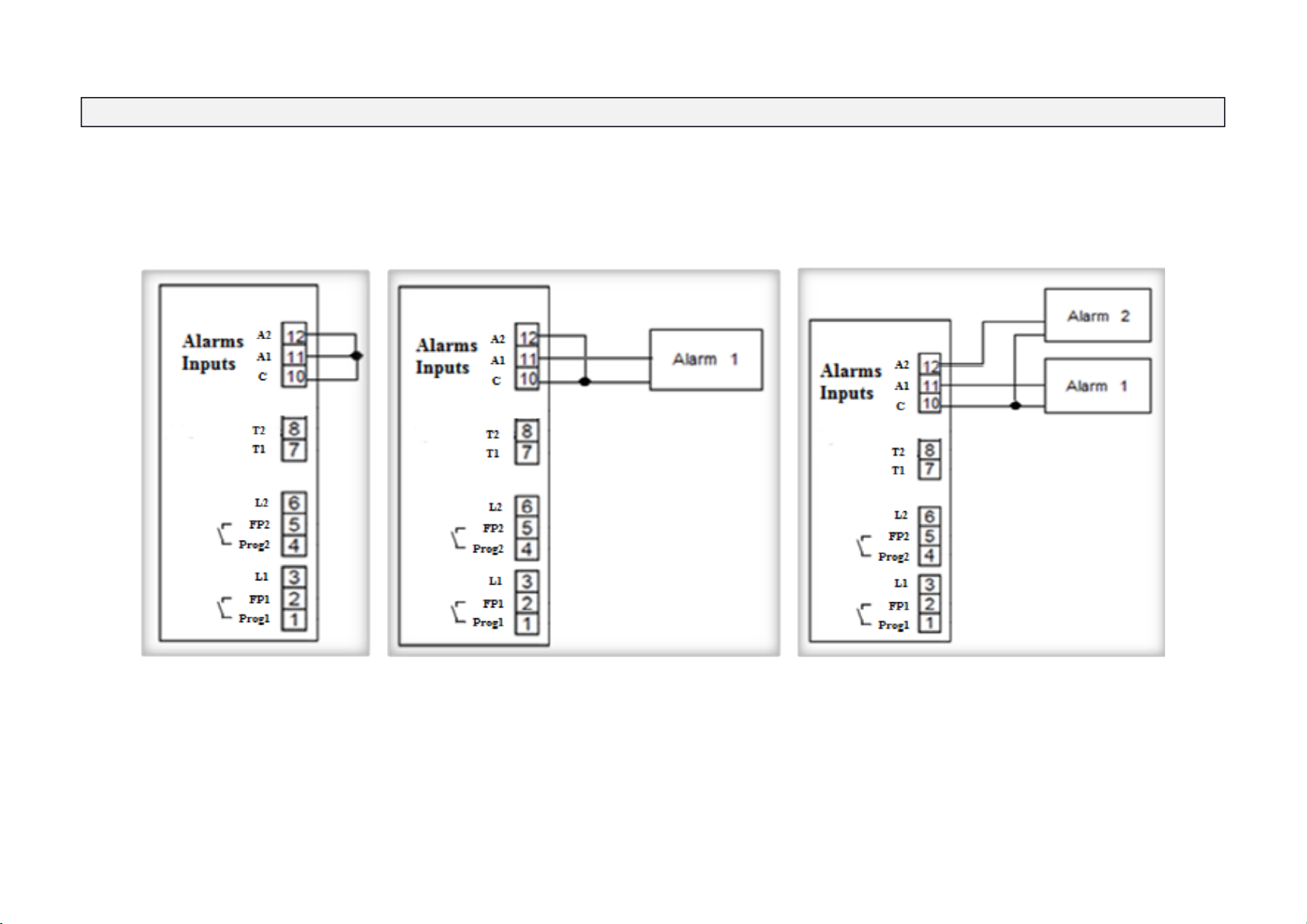
-5 ALARMS INPUTS
You also have the possibility to connect 2 alarm inputs.
You will find below how to wire them according to the number of alarms desired. The information delivered by your alarm must be dry contact type (potential free),
closed at rest. The alarm message is sent when the dry contact of the external alarm opens.
10
Table des matières
Manuels Unité de contrôle populaires d'autres marques

Festo
Festo Compact Performance CP-FB6-E Manuel de la liste des pièces

Elo TouchSystems
Elo TouchSystems DMS-SA19P-EXTME Manuel utilisateur

JS Automation
JS Automation MPC3034A Manuel utilisateur

JAUDT
JAUDT SW GII 6406 Series Guide rapide

Spektrum
Spektrum Air Module System Manuel utilisateur

BOC Edwards
BOC Edwards Q Series Manuel utilisateur


