6
ProgrammingSections
AllprogrammingontheSkyroute
max
transceiverisdoneintheinstaller’sprogrammingmode.Refertothecontrolpanel’sInstallationManual
forinstructions onhowto enterinstaller’sprogramming. From installer’sprogramming,enter section[00][18]to go totheSkyroute
max
programmingsections.
ConfigurationOptions……………………………………Section[006]
ChannelAenable/disable…………..option[1]
This option must be selected when the Cellemetry provider is an “A” side carrier.
ChannelB enable/disable…………..option[2]
This option must be selected when the Cellemetry provider is a “B” side carrier.
HomeSystemonly enable/disable…option[3]
This option must be programmed to ensure that the Skyroute
max
transceiver is communicating using the proper carrier. When
selected, the transceiver will only use towers with the same SID (as programmed in section [007]).
To Activate the Skyroute
max
Module in Home Mode
1.Selectachannel, AorB,inaddress [006] (Option1or2)
2.Program FFintosection[099] torestartthe unit
3.Waitforsignal strength.
4.Enterinaddress[007]theHomeSIDnumberinhexadecimalformat.
5.SelectHome Mode(Option3)anddeactivateAor Bchannelinaddress[006].
Note:Arestartoftheunitisrequiredwhenchangesaremadeinsection [006]. ToperformtherestartprogrammFFinto
section[099]
Skyroute
max
TransceiverSID(SystemID)…………………..Section[007]
Please refer to the SID table included with the Skyroute
max
Module to find out the SID number for your area.
Skyroute
max
TestTime………………………………...………Section[010]
Enter in this section the time of the day (24 hour format) that you want the test transmission to be sent.
NOTE: Keypad will display ENT HEX. Simply enter value from 0000 to 2359.
TestTransmissionDayMask…………………….……….Section[011]
Select in this section the day of the week you want the test transmission to be sent.
STEP 4
Activating the Skyroute
max
Transceiver
Before activating the Skyroute
max
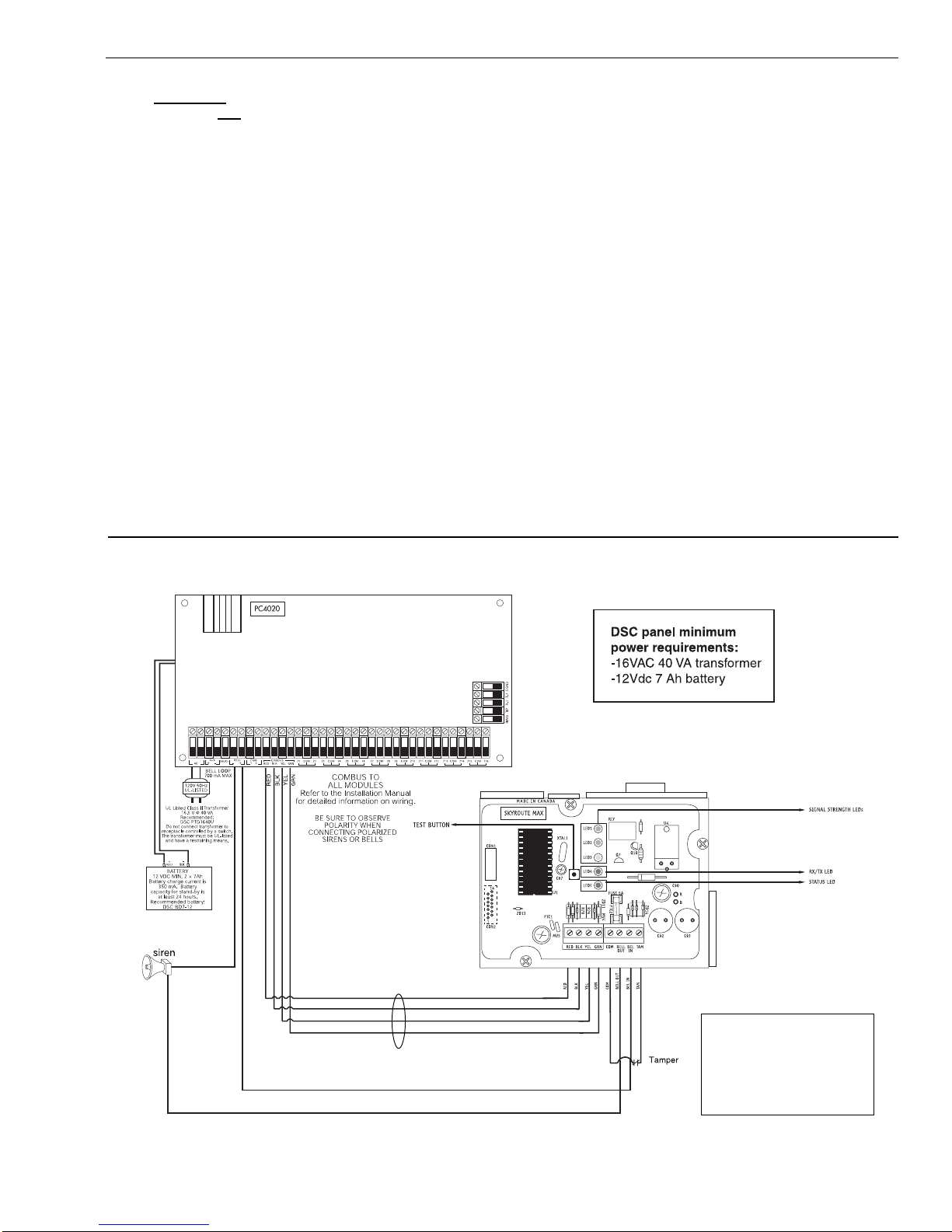
transceiver, ensure that the control panel is wired, programmed and operating properly.
Make sure that the Skyroute
max
transmitter is properly connected to the Combus and to the bell positive circuit. When power
is applied to the system, the Skyroute
max
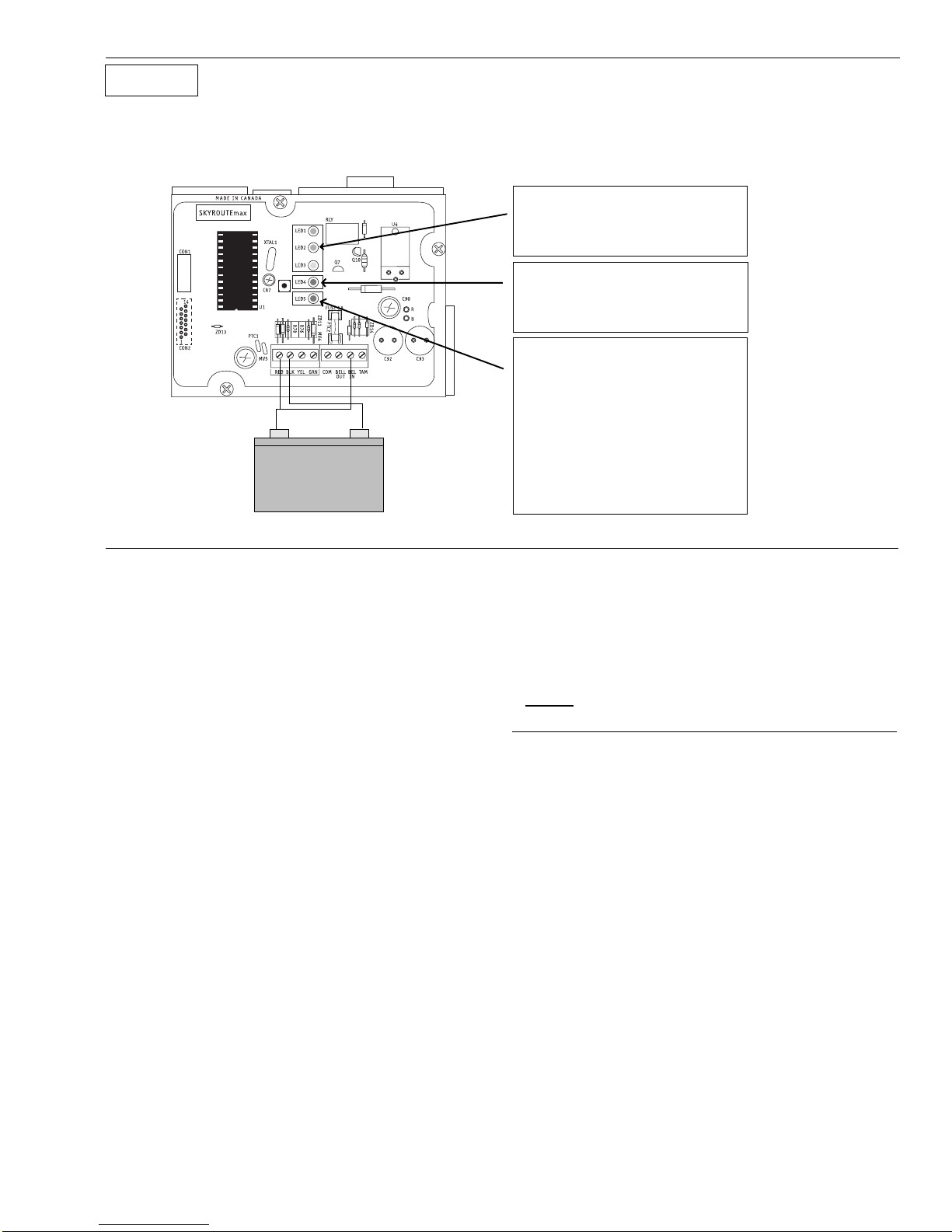
will perform self-diagnostics for a few seconds, before giving visual feedback
by indicating signal strength on LED1, LED2 or LED3. A complete default of the Skyroute
max
module should always be
performed before any other programming is done. See Default section for details.
Calling Connect 24
Once the Skyroute
max
transceiver is indicating the signal strength of the network, and the status indicator (LED5) is
blinking 6 times (not connected to the clearing house), you are ready to call Connect 24’s Voice Response Unit. Follow
the voice prompt and when asked to perform a test, press on SW1 on the Skyroute
max
transceiver to transmit a test
signal. When transmitting, LED4 blinks once. If the test is successful, the VRU will give you a confirmation and LED5 will
then blink steady every second. Refer to the Connect24 information package for more information on the activation
process.
Phone number for VRU: CANADA: 1-877-759-7688 U.S.: 1-888-251-7554
NOTE: The confirmation of a successful test from Connect 24 does not guarantee proper transmission of event to your
central station. You must perform normal tests with your monitoring station after activation with Connect 24.
Transmittingand Receiving
LED4 on the Skyroute
max
module will blink once (1) to indicate the Cellular Tower has received the signal. It will blink twice (2)
to indicate the Alarm Central Station has received and acknowledged the signal.
STEP 5
Testing Your Control to the Central Station
Testallzonesto your Central Stationonthe telephonelineonly. Afterallzonetesting,connect Skyroute
max
and verify communica-
tion to Central Station.