55
55
5
Section 6 - Installing a Skyroute
maxmax
maxmax
max
transceiver
TT
TT
Timeime
imeime
ime--
--
-Saving TSaving T
Saving TSaving T
Saving Tips: By powering up the Skips: By powering up the Sk
ips: By powering up the Skips: By powering up the Sk
ips: By powering up the Skyroute maxyroute max
yroute maxyroute max
yroute maxxon a battery alone (battery ron a battery alone (battery r
on a battery alone (battery ron a battery alone (battery r
on a battery alone (battery red to Bell and Combus red to Bell and Combus r
ed to Bell and Combus red to Bell and Combus r
ed to Bell and Combus red, battery blacked, battery black
ed, battery blacked, battery black
ed, battery black
to Combus black), you can quickly determine a location wherto Combus black), you can quickly determine a location wher
to Combus black), you can quickly determine a location wherto Combus black), you can quickly determine a location wher
to Combus black), you can quickly determine a location where your signal stre your signal str
e your signal stre your signal str
e your signal strength is strong prior to installing the unit.ength is strong prior to installing the unit.
ength is strong prior to installing the unit.ength is strong prior to installing the unit.
ength is strong prior to installing the unit.
The SkThe Sk
The SkThe Sk
The Skyroute max does not have to be active to show signal stryroute max does not have to be active to show signal str
yroute max does not have to be active to show signal stryroute max does not have to be active to show signal str
yroute max does not have to be active to show signal strength.ength.
ength.ength.
ength.
6.1 Location of the Skyroute
maxmax
maxmax
max
Unit
It is very important to determine the best location for maximum signal strength.
Verify signal strength prior to installation!
6.2 Relocating the Skyroute
maxmax
maxmax
max
Transceiver
Since the Skyroute
max
transceiver is a Combus accessory,
it is possible to relocate the module up to 1000 feet from
the main control panel when the panel is not located in a
good cellemetry coverage area (a control panel installed in
a vault for example). When relocating the module, follow
theses rules:
• Maximum of 1000 feet from the main control. Combus
(Red, Black, Yellow, Green) from the panel to the
Skyroute
max
transceiver.
must be used for UL installations.
• The power supply (+ positive) is connected to the Skyroute
max
transceiver (BELL IN) terminal and the power supply
(–negative) to the Skyroute
max
transceiver (COM)
terminal.
• The cabinet must be installed in a secure location and
should have a tamper circuit connected to the Skyroute
max
(TAM and COM) terminals.
6.3 Relocating the Antenna
If a suitable location is not available for proper Cellemetry
coverage, obtain an Antenna Extension Bracket Kit from your
DSC/Sur-Gard supplier. Each kit contains an extension cable,
a mounting bracket, instructions, and all required hardware.
Three lengths of extension cable are available:
Extension Kit Length of cable
LAE-3 3 feet (0.91 m)
LAE-15 15 feet (4.57 m)
LAE-25 25 feet (7.62 m)
Only use the Extension Kits to extend the mounting range of
the antenna. Do not cut or splice the extension cable. The
maximum distance between the Skyroute
max
transceiver and
the antenna is 25 feet (7.62 m) as obtained by using the LAE-25
Extension Kit. Make sure the antenna is in a physically secured
location to avoid tampering.
Secure the TNC connector from the Extension Kit to the
mounting bracket, ensuring that the star washers make solid
electrical contact with the mounting bracket.
Remove the antenna from the Skyroute
max
module and
connect the extension cable to the TNC connector on the
module. Secure the antenna to the TNC connector mounted
on the Extension Kit mounting bracket. Locate the mounting
bracket and antenna away from possible sources of electrical
interference. Moving the antenna just a short distance will
likely be adequate. Temporarily secure the mounting bracket
in the new location and proceed with testing. If the test is
successful, permanently secure the mounting bracket and
antenna at the new location.
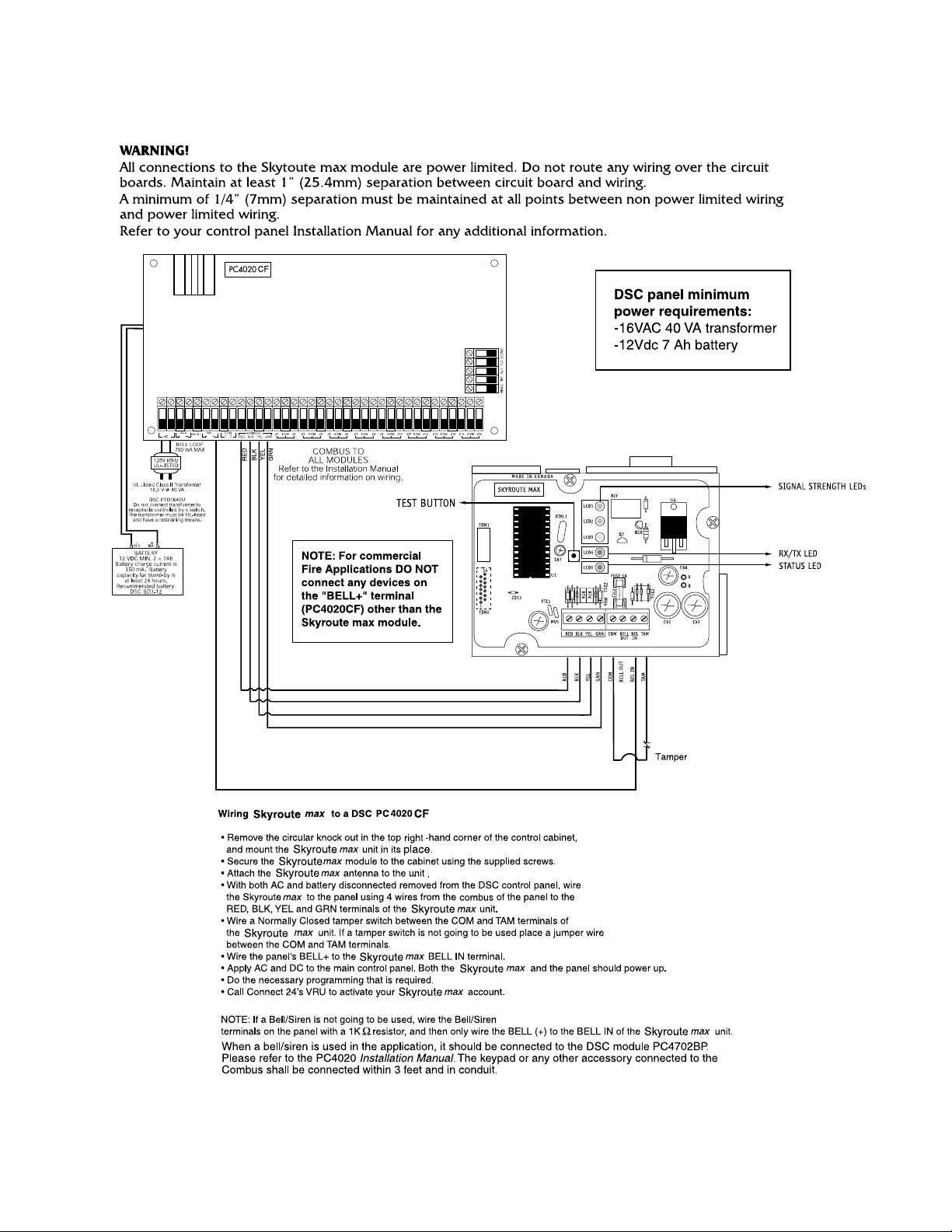
LED 1: Good signal strength
LED 2: Acceptable signal strength
LED 3: Poor signal strength
LED 4: One blink = Transmit TX
Two blinks = Receive RX
LED 5: Status (number of blinks)
1: Normal (activated)
2: Radio not powered-up
3: Failed self-test
4: No cell network
5: Fail to communicate
6: Ready to activate
8: Unit not enrolled with PC4020
+-
12V 7Ah
Battery