Sena TUFFTALK Manuel utilisateur

User’s Guide
www.sena.com
Industrial Bluetooth®Communication System
English

Tufftalk
© 1998-2016 Sena Technologies, Inc. All rights reserved.
Sena Technologies, Inc reserves the right to make any changes and improvements to its product without providing prior notice.
Sena™ is a trademark of Sena Technologies, Inc. or its subsidiaries in the USA and other countries. Prism™, Bluetooth Audio Pack for GoPro®,
Tufftalk™, 20S™, 10S™, 10C™, 10U™, 10R™, 3S™, SMH10™, SMH10R™, SMH5™, SMH5-FM™, SMH3™, SPH10™, SPH10H™, SPH10H-FM™,
SPH10S™, Expand™, Bluetooth Mic&Intercom™, Handlebar Remote™, Wristband Remote™, SM10™, SR10™, SR10i™ are trademarks of Sena
Technologies, Inc. or its subsidiaries. These trademarks may not be used without the express permission of Sena.
GoPro® is a registered trademark of Woodman Labs of San Mateo, California. Sena Technologies, Inc. (“Sena”) is not afliated with Woodman
Labs. The Sena Bluetooth Pack for GoPro®is an after-market accessory specially designed and manufactured by Sena Technologies, Inc. for the
GoPro®Hero3 and Hero4 allowing for Bluetooth capabilities.
The Bluetooth®word mark and logos are owned by the Bluetooth SIG, Inc. and any use of such marks by Sena is under license. iPhone, iPod
touch are registered trademarks of Apple Inc. Zumo™ is a trademark of Garmin Ltd. or its subsidiaries. TomTom™ is the trademark or registered
trademark owned by TomTom International B.V. Other trademarks and tradenames are those of their respective owners.

Tufftalk
English
CONTENTS
1 INTRODUCTION .......................................................................................................5
2 PACKAGE CONTENTS ............................................................................................6
2.1 Over-the-Head Earmuff Type ..................................................................................................6
2.2 Hard Hat Mount Earmuff Type ................................................................................................7
3 INSTALLING THE TUFFTALK..................................................................................8
3.1 Over-the-Head Earmuff Type ..................................................................................................8
3.2 Hard Hat Earmuff Type..........................................................................................................10
4 GETTING STARTED.............................................................................................. 13
4.1 Button Operation...................................................................................................................13
4.2 Powering On and Off.............................................................................................................15
4.3 Charging................................................................................................................................15
4.4 Low Battery Warning.............................................................................................................15
4.5 Checking the Battery Level...................................................................................................15
4.6 Volume Adjustment ...............................................................................................................16
4.7 Sena Softwares .....................................................................................................................16
5 PAIRING THE TUFFTALK WITH BLUETOOTH DEVICES .................................. 17
5.1 Mobile Phone Pairing - Mobile Phone, Bluetooth Stereo Device .........................................17
5.2 Second Mobile Phone Pairing - Second Mobile Phone and SR10 ......................................18
5.3 Intercom Pairing - Other Tufftalk headsets ...........................................................................19
6 MOBILE PHONE .................................................................................................... 20
6.1 Mobile Phone Call Making and Answering...........................................................................20
6.2 Speed Dialing........................................................................................................................20
7 STEREO MUSIC .................................................................................................... 21
8 INTERCOM............................................................................................................. 22
8.1 Two-way Intercom .................................................................................................................22
8.2 Three-way Intercom ..............................................................................................................23
8.3 Four-way Intercom.................................................................................................................25
8.4 Microphone Mute ..................................................................................................................26
9 THREE-WAY CONFERENCE PHONE CALL WITH INTERCOM
PARTICIPANT........................................................................................................ 26
10 UNIVERSAL INTERCOM....................................................................................... 27
10.1 Universal Intercom Pairing....................................................................................................28
10.2 Two-way Universal Intercom .................................................................................................29
10.3 Three-way Universal Intercom ..............................................................................................29
10.4 Four-way Universal Intercom ................................................................................................31
11 AMBIENT MODE.................................................................................................... 33
12 TWO-WAY RADIO ................................................................................................. 33
12.1 Wired Two-way Radio............................................................................................................33
12.2 Wireless Two-way Radio .......................................................................................................34
13 FM RADIO .............................................................................................................. 35
13.1 FM Radio On and Off ............................................................................................................35
13.2 Preset Stations.......................................................................................................................35
13.3 Seek and Save ......................................................................................................................35
13.4 Scan and Save ......................................................................................................................36
13.5 Temporary Preset ..................................................................................................................36
13.6 Region Selection ...................................................................................................................36
14 FUNCTION PRIORITY........................................................................................... 37

Tufftalk
15 CONFIGURATION SETTING ................................................................................ 37

15.1 Assigning Speed Dial ...........................................................................................................38
15.2 Enabling/Disabling Audio Boost ...........................................................................................39
15.3 Enabling/Disabling Voice Activated Phone Answering........................................................39
15.4 Enabling/Disabling Voice Activated Intercom ......................................................................40
15.5 Enabling/Disabling HD Intercom ..........................................................................................40
15.6 Enabling/Disabling Voice Prompts .......................................................................................41
15.7 Enabling/Disabling RDS AF ..................................................................................................41
15.8 Enabling/Disabling Sidetone.................................................................................................41
15.9 Enabling/Disabling Advanced Noise Control™ ...................................................................42
15.10 Delete All Bluetooth Pairing Information.............................................................................42
15.11 Universal Intercom Pairing..................................................................................................42
15.12 Exit Voice Conguration Menu............................................................................................43
16 FIRMWARE UPGRADE ......................................................................................... 44
17 TROUBLESHOOTING ........................................................................................... 44
17.1 Intercom Failure.....................................................................................................................44
17.2 Intercom Reconnection.........................................................................................................44
17.3 Fault Reset.............................................................................................................................45
17.4 Factory Reset ........................................................................................................................45
18 OPERATION QUICK REFERENCE ...................................................................... 46
CERTIFICATION AND SAFETY APPROVALS ........................................................... 47
• FCC Compliance Statement......................................................................................................47
• FCC RF Exposure Statement.....................................................................................................48
• FCC Caution ..............................................................................................................................48
• CE Declaration of Conformity ....................................................................................................48
• Industry Canada Statement ......................................................................................................48
• Bluetooth License .....................................................................................................................49
• NRR Information.........................................................................................................................49
• WEEE (Waste Electrical and Electronic Equipment).................................................................50
SAFETY INFORMATION.............................................................................................. 51
• Product Storage and Management...........................................................................................51
• Product Use ...............................................................................................................................51
• Battery........................................................................................................................................52
PRODUCT WARRANTY AND DISCLAIMER .............................................................. 53
• Limited Warranty ........................................................................................................................53
• Warranty Exclusions ..................................................................................................................54
• Warranty Service........................................................................................................................56
• Return for Full Refund................................................................................................................56

Tufftalk
5
English
1 INTRODUCTION
Thank you for choosing the Sena Tufftalk, Industrial Bluetooth
Communication System. Tufftalk allows you to communicate effectively
in high-noise industrial environments. The Tufftalk offers passive noise
cancellation with the level of noise entering a person’s ear attenuated
with up to the NRR of 24. Using the Ambient Mode feature, you can
efciently hear nearby voice signals without having to take off the
headset. Using the PTT feature, you can make two-way radio calls
through the headset. Using its Bluetooth features, you can call
handsfree on your Bluetooth mobile phone, listen to stereo music, or
have intercom conversations in full duplex with other members.
The Tufftalk is compliant with the Bluetooth 4.1 supporting the following
proles: Headset Prole, Hands-Free Prole (HFP), Advanced Audio
Distribution Prole (A2DP), and Audio Video Remote Control Prole
(AVRCP). Please check with the manufacturers of other device to
determine their compatibility with this headset.
Please read this User’s Guide carefully before using the headset. Also
check www.sena.com for the latest version of the User’s Guide and
additional information related to Sena Bluetooth products.
The Tufftalk features:
• Bluetooth 4.1
• Multi-way intercom up to 4 connections
• Bluetooth intercom up to 1.4 kilometers (0.85 miles) using long
antenna, 0.8 kilometers (0.5 miles) using short antenna*
• Passive noise cancellation with up to the NRR of 24
• Ambient Mode that intakes nearby voice signals
• Built-in two-way radio adapter
• Smartphone App for iPhone and Android
• Universal Intercom™
• Intuitive voice prompts
• Advanced Noise Control™
• Easy operation by versatile Jog Dial
• Water resistant for use in inclement weather
• Built-in FM radio tuner with a station scan and save function
• Firmware upgradeable
* in open terrain

Tufftalk
6
Key Specications:
• Bluetooth 4.1
• Supporting proles: Headset Prole, Hands-Free Prole (HFP),
Advanced Audio Distribution Prole (A2DP), and Audio Video
Remote Control Prole (AVRCP)
2 PACKAGE CONTENTS
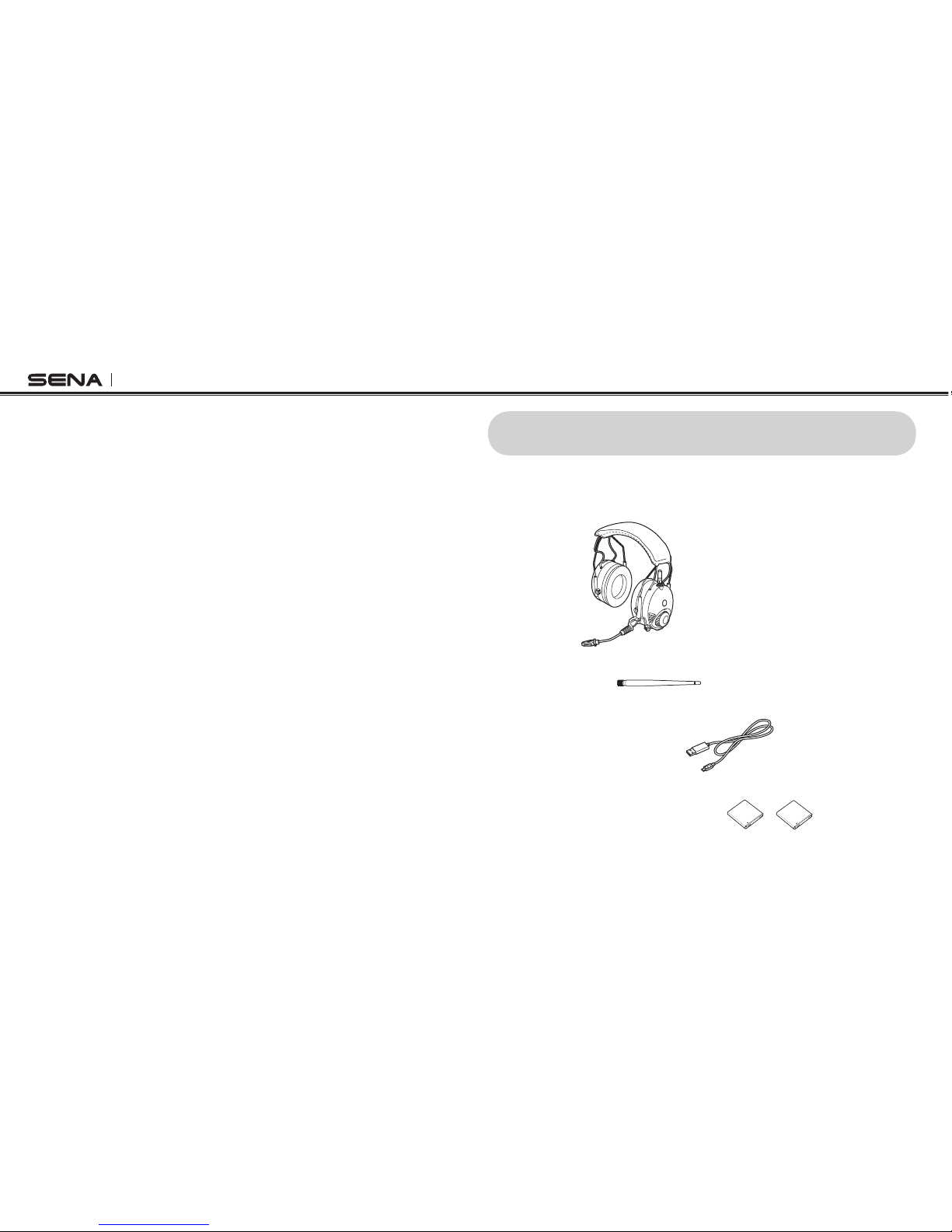
2.1 Over-the-Head Earmuff Type
•Headset
•LongAntenna
•USBPower&DataCable
•Li-ionRechargeableBattery(2)

Tufftalk
7
English
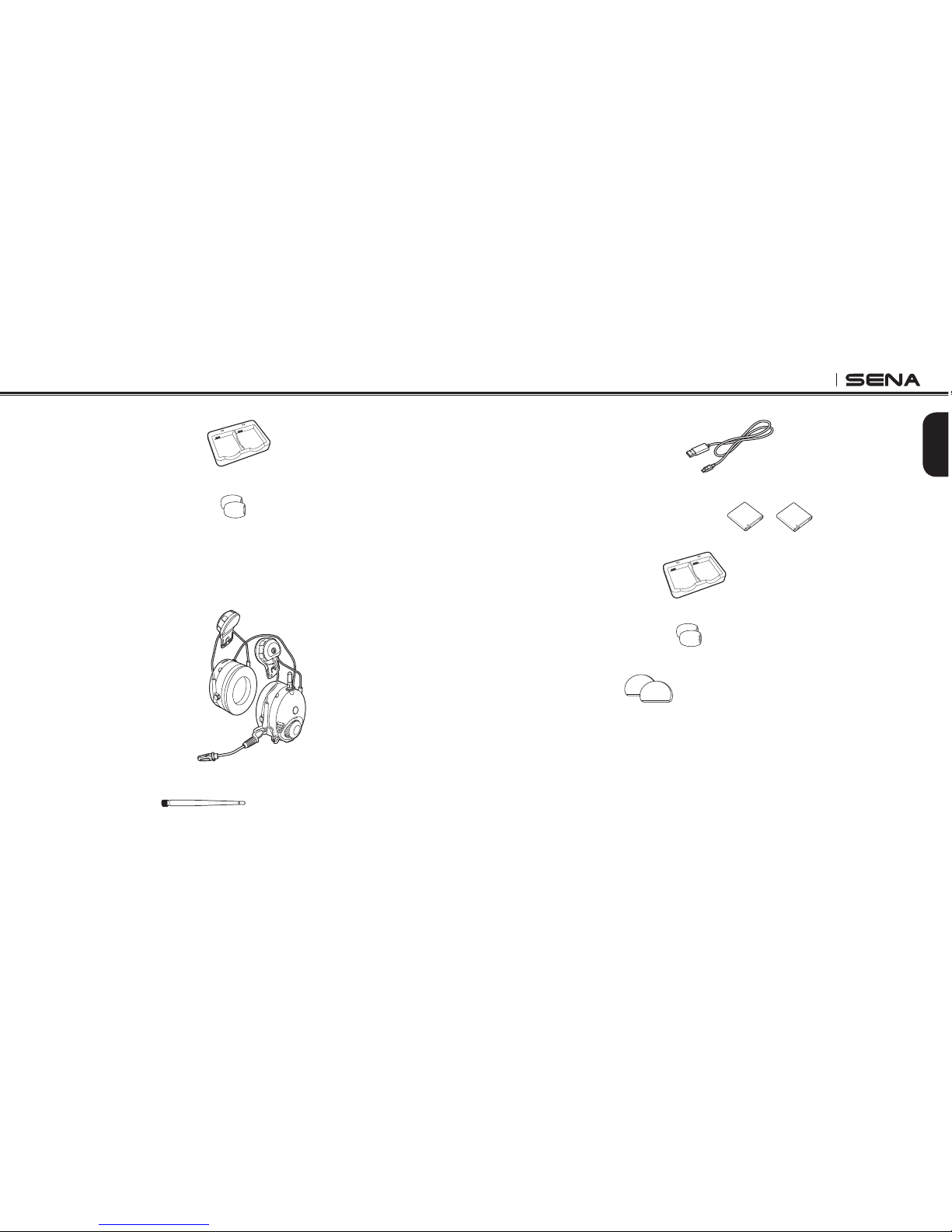
•USBPower&DataCable
•Li-ionRechargeableBattery(2)
•DualBatteryCharger
•MicrophoneSponge(2)
•RubberPad(2)
•DualBatteryCharger
•MicrophoneSponge(2)
2.2 Hard Hat Mount Earmuff Type
•HeadsetMainUnits
•LongAntenna

Tufftalk
8
3 INSTALLING THE TUFFTALK
3.1 Over-the-Head Earmuff Type
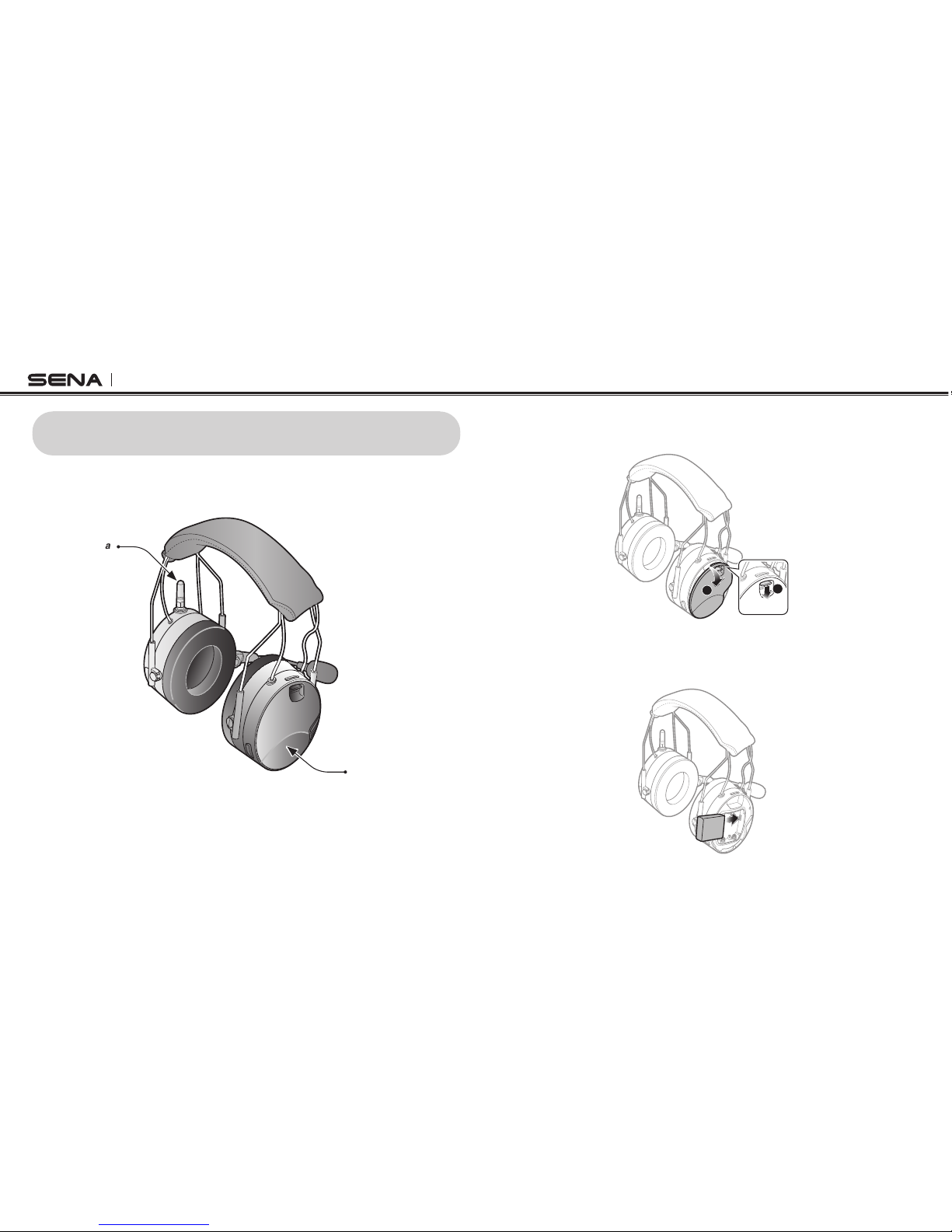
Right Speaker Cover
Short Antenna
Tufftalk Headset
3.1.1 Installing the Battery
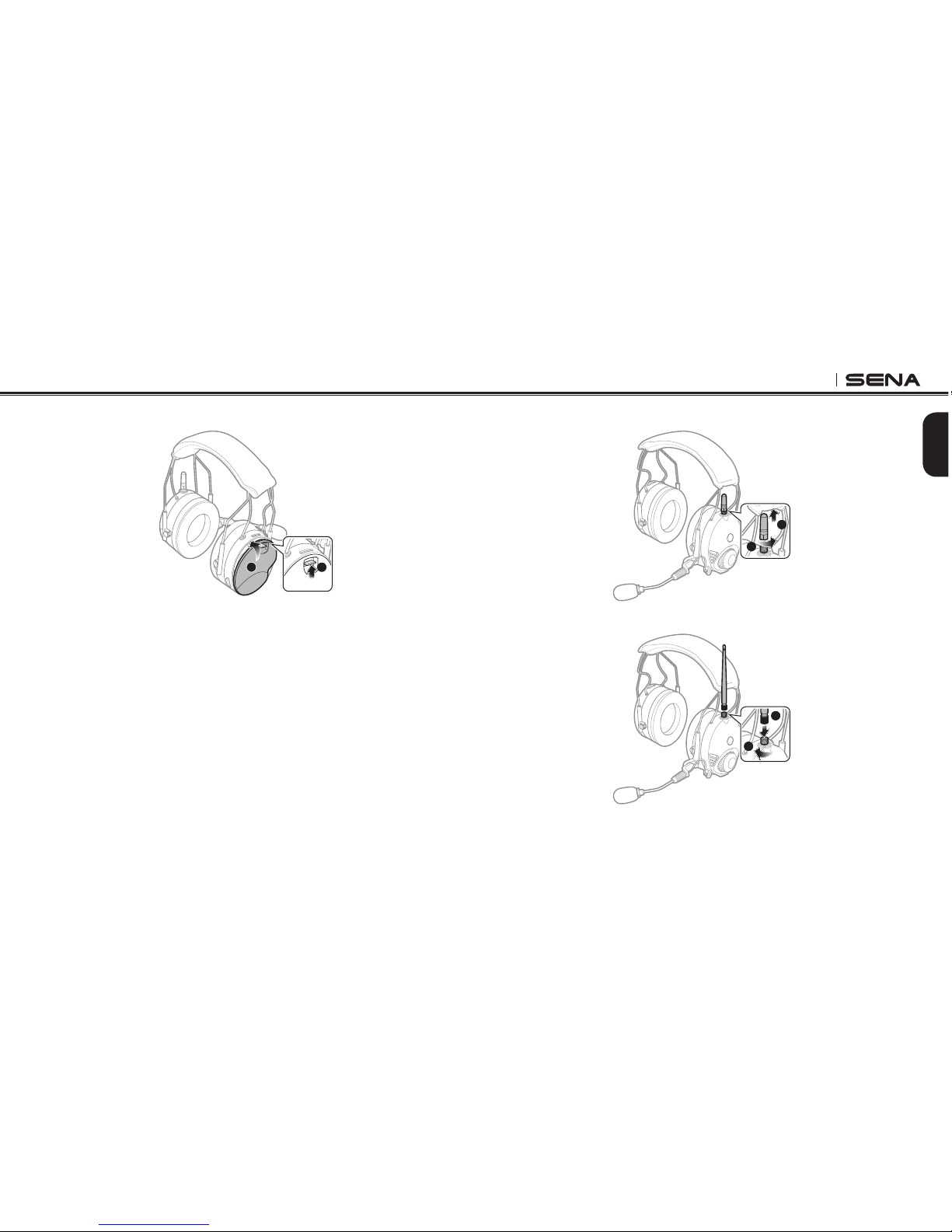
1. Open the right speaker cover by lowering the slide lock.
21
2. Place the Li-ion rechargeable battery inside the battery
compartment. You can use three AAA batteries (sold separately)
as an alternative power source for the Tufftalk.

Tufftalk
9
English
3. Close the cover and lock it into place by raising the slide lock.
12
3.1.2 Replacing the Antenna
A short antenna is installed on the headset by default. However, if you
wish to have an increased intercom distance, you may replace the
short antenna with the long antenna.
1. Unfasten the short antenna by rotating it counter clockwise.
1
2
2. Take the long antenna and fasten it tightly into position.
1
2

Tufftalk
10
3.2 Hard Hat Earmuff Type
Right Speaker Cover
Short Antenna
Tufftalk Headset
3.2.1 Installing the Headset
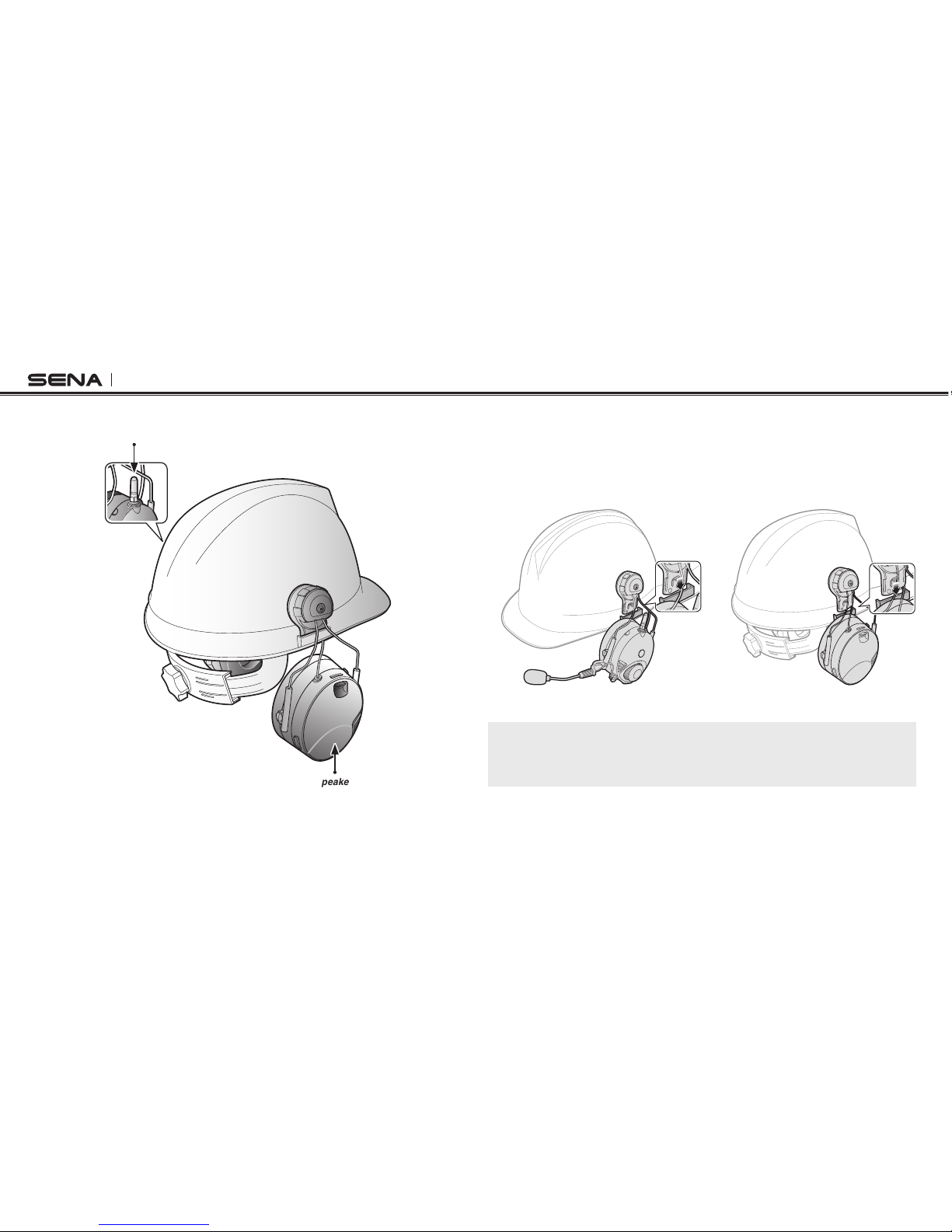
1. Attach the headsets to each side of the hard hat by sliding them
into the left and right slots of the hard hat. The headset with the
microphone and the antenna should be mounted on the left side
of the hard hat.
2. Organize the cables under the hard hat suspensions.
Note:
If the rubber pad on the inner surface of the bracket-top begins to fray,
replace it with the included pad.
Autres manuels pour TUFFTALK
1
Table des matières
Autres manuels Sena Casque audio