
Ronix 8512 Manuel utilisateur

8512
CORDLESS DRIVER DRILL

USER MANUAL 1
SPECIFICATIONS
Model 8512
Battery type Lithium-lon
Rated voltage 12V
No-load speed 0-350
0-1350(rpm)
Max clutch 10mm
Max screw diameter (mm) 8mm
Allowable temperature 5-40
Charger input 200-240 V
Drill weight 1.04 kg
PARTS LIST
Mode Selector Switch
Torque Collar
Automatic Chuck
LED Lamp
On/Off Switch
Battery
Reverse Switch

CORDLESS DRIVER DRILL
2
GENERAL SAFETY RULES
(FOR ALL BATTERY OPERATED TOOLS)
WARNING:
Read and understand all instructions. Failure to follow all instructions listed
below, may result in electric shock, fire and/ or serious personal injury.
WORK AREA
1. Keep your work area clean and well lit. cluttered benches and dark
areas invite accidents.
2. Do not operate power tools in explosive atmospheres, such as in
the presence of flammable liquids, gasses, or dust. Power tools create
sparks which may ignite the dust or fumes.
3. Keep bystanders, children, and visitors away while operating a power
tools. Distractions can cause you to lose control.
Electrical Safety
4. A battery operated tool with integral batteries or a separate battery
pack must be recharged only with the specified charger for the battery.
A charger that may be suitable for one type of battery may create a risk
of fire when used with another battery.
5. Use battery operated tool only with specifically designated battery
pack.
Use of any other batteries may create a risk of fire.
PERSONAL SAFETY
6. Stay alert, watch what you are doing, and use common sense when
operating a power tool. do not use tool while tired or under the influence
of drugs, alcohol, or medication. A moment of inattention while operating
power tools may result in serious personal injury.

USER MANUAL 3
7. Dress properly. Do not wear loose clothing or jewelry, contain long
hair. Keep your hair, clothing, and gloves away from moving parts. Loose
clothes, jewelry, or long hair can be caught in moving parts.
8. Avoid accidental starting. Be sure switch is in the locked or off position
before inserting battery pack. Carrying tools with your finger on the
switch or in serting the battery pack into a tool with the switch on invites
accidents.
9. Remove adjusting keys or wrenches before turning the tool on. A
wrench or a key that is left attached to a rotating part of the tool may
result in personal injury.
10. Do not overreach. Keep proper footing and balancd at all times.
Proper footing and balance enable better control of the tool in unexpected
situations.
11. Use safety equipment. Wear eye protection. Dust mask, non-skid
safety shoes, hard hat, or hearing protection must be used for appropriate
conditions.
TOOL USE AND CARE
12. Use clamps or other practical way to secure and support the
workplace to a stable platform. Holding the work by hand or against
your body is unstable and may lead to loss of control.
13. Do not force tool. Use the correct tool for your application. The correct
tool will do the job better and safer at the rate for which it is designed.
14. Do not use tool if switch does not turn it on or off. A tool that cannot
be controlled with the switch is dangerous and must be repaired.
15. Disconnect battery pack from tool or place the switch in the locked
or off position before making any adjustments, changing accessories,
or storing the tool. such preventive safety measures reduce the risk of
starting the tool accidentally.
16. Store idle tools out of reach of children and other untrained persons.
Tools are dangerous in the hands of untrained users.
17. when battery pack is not in use, keep it away from other metal objects
like: paper clips, coins, keys, nails, screws, or other small metal objects

CORDLESS DRIVER DRILL
4
that can make a connection from one terminal to another. Shorting the
battery terminals together may cause sparks, burns, or a fire.
18. Maintain tools with care. Keep cutting tools sharp and clean. Properly
maintained tools with sharp cutting edge are less likely to bind and are
easier to control.
19. Check for misalignment or binding of moving parts, breakage of parts
and any other condition that may affect the tool’s operation. If damaged,
have the tool serviced before using. Many accidents are caused by
poorly maintained tools.
20. Use only accessories that are recommended by the manufacturer
for your model. Accessories that may be suitable for one tool may create
a risk for injury when used on another tool.
SERVICE
21. Tool service must be performed only by qualified repair personnel.
Service or maintenance performed by unqualified personnel may result
in a risk of injury.
22. When servicing a tool, use only identical replace ment parts.
Follow instructions in the maintenance section of this manual. Use of
unauthorized parts or failure to follow Maintenance instructions may
create a risk of shock injury.
SPECIFIC SAFETY RULES
DO NOT let comfort or familiarity with product (gained from repeated
use) replace strict adherence to cordless drill safety rules. If you use this
tool unsafely or incorrectly, you can suffer serious personal injury.
1. Hold tool by insulated gripping surfaces when performing an operation
where the cutting tool may contact hidden wiring. Contact with a “live”
wire will also make exposed metal parts of the tool “live” and shock the
operator.
2. Be aware that this tool is always in an operating condition, because it
does not have to be plugged into an electrical outlet.

USER MANUAL 5
Always be sure you have a firm footing.
4. Be sure no one is below when using the tool in high locations.
5. Hold the tool firmly.
6. Keep hands away from rotating parts.
7. Do not leave the tool running. Operate the tool only when hand-held.
8. Do not touch the drill bit or the workpiece immediately after operation;
they may be extremely hot and could bum your skin.
9. Some material contains chemicals which may betoxic. Take caution
to prevent working dust inhalation and skin contact. Follow material
supplier safety data.
SYMBOLS
The following show the symbols used for tool.
V …………….. volts
−……….....….. direct current
n°………...…… no load speed
…/min ……… revolutions or reciprocation per minute
IMPORTANT SAFETY INSTRUCTIONS FOR BATTERY
1. Before using battery cartridge, read all instructions and cautionary
markings on (1) battery charger, (2) battery, and (3) products using
battery.
2. Do not disassemble battery cartridge.
3. if operating time has become excessively shorter, stop operating
immediately. It may result in a risk of overheating, possible bums and
even an explosion.
4. if electrolyte gets into your eyes, rinse them out with clean water and
seek medical attention right away. It may result in loss of your eyesight.
5. Always cover the battery terminals with the battery cover when the
battery cartridge is not used.
6. Do not short the battery cartridge:
(1) Do not touch the terminals with any conductive material.

CORDLESS DRIVER DRILL
6
(2) Avoid storing battery cartridge in a container with other metal objects
such as nails, coins, etc.
(3) Do not expose battery cartridge to water or rain A battery short can
cause a large current flow, over heating, possible bums and even a
breakdown.
7. Do not store the tool and battery cartridge in locations where the
temperature may reach or exceed 50C (122F).
8. Do not incinerate the battery cartridge even if if is severely damaged
or is completely worn out. The battery cartridge can explode in a fire.
9. Be careful not to drop or strike battery.
IMPORTANT SAFETY INSTRUCTIONS FOR CHARGER
1. Before using battery charger, read all instructions and cautionary
markings on (1) battery charger, read all instructions and cautionary
markings on (1) battery charger, (2) battery, and (3) products using
battery.
2. CAUTION: To reduce risk of injury, charge only mosta reachargeable
batteries. Other types of batteries may burst, causing personal injury
and damage.
3. Non-rechargeable batteries cannot be charged with this battery
charger.
4. Use a power source with the voltage specified on the nameplate of
the charger.
5. Do not charge the battery cartridge in presence of flammable liquids
or gases.
6. Do not expose charger to rain or snow.
7. Never carry charger by cord or yank it to disconnect from receptacle.
8. After charging or before attempting any maintenance or cleaning,
unplug the charger from the power source. Pull by plug rather than cord
whenever disconnecting charger.
9. Make sure cord is located so that it willnot be stepped on, tripped
over, or otherwise subjected to damage or stress.
10. Do not operate charger with damaged cord or plug-replace them

USER MANUAL 7
immediately.
11. Do not operate or disassemble charger if it has received a sharp
blow, been dropped, or otherwise damaged in any way, take it to a
qualified serviceman. Incorrect use or reassembly may result in a risk of
electric shock of fire.
12. The battery charger is not intended for use by young children or
infirm persons without supervision.
13. Young children should be supervised to ensure that they do not play
with the battery charger.
14. Do not charge battery cartridge when tempera ture is BELOW 10C
(50F) or ABVE 40C (104F).
15. Do not attempt to use a step-up transtormer, an engine generator or
DC power receptacle.
TIPS FOR MAINTAINING MAXIMUM BATTERY LIFE
1. Charge the battery before completely discharged. Always stop tool
operation and charge the battery when you notice less tool power.
2. Never recharge a fully charged battery cartridge. Overcharging
shorten the battery service life.
3. Charge the battery with room temperature 10C-40C (50F-104F). let a
hot battery cool down before charging it.
4. Charge the nickel Metal Hydride battery when you do not use for more
than six months.
FUNCTIONAL DESCRIPTION
CAUTION:
Always be sure that the tool switched off and the battery cartridge is
removed before adjusting or checking function on the tool.

CORDLESS DRIVER DRILL
8
INSTALLING OR REMOVING BATTERY CARTRIDGE
- Always switch off the tool before insertion or removal of the battery
cartridge.
- To remove the battery cartridge, withdraw it from the tool while pressing
the buttons on both sides of the cartridge.
- To insert the battery cartridge, align the tongue on the battery cartridge
with the groove in the housing and slip it into place. Always insert it all
the way until it locks in place with a little click. If not, it may accidentally
fall out of the tool, causing injury to you or someone around you.
- Do not use force when inserting the battery cartridge. If the cartridge
does not slide in easily, it is not being inserted correctly.
SWITCH ACTION
CAUTION:
- Before inserting the battery cartridge into the tool, always check to
see that the switch trigger actuates properly and returns to the “OFF”
position when released.
To start the tool, simply pull the switch trigger. Tool speed is increased
by increasing pressure on the switch trigger. Release the switch trigger
to stop.
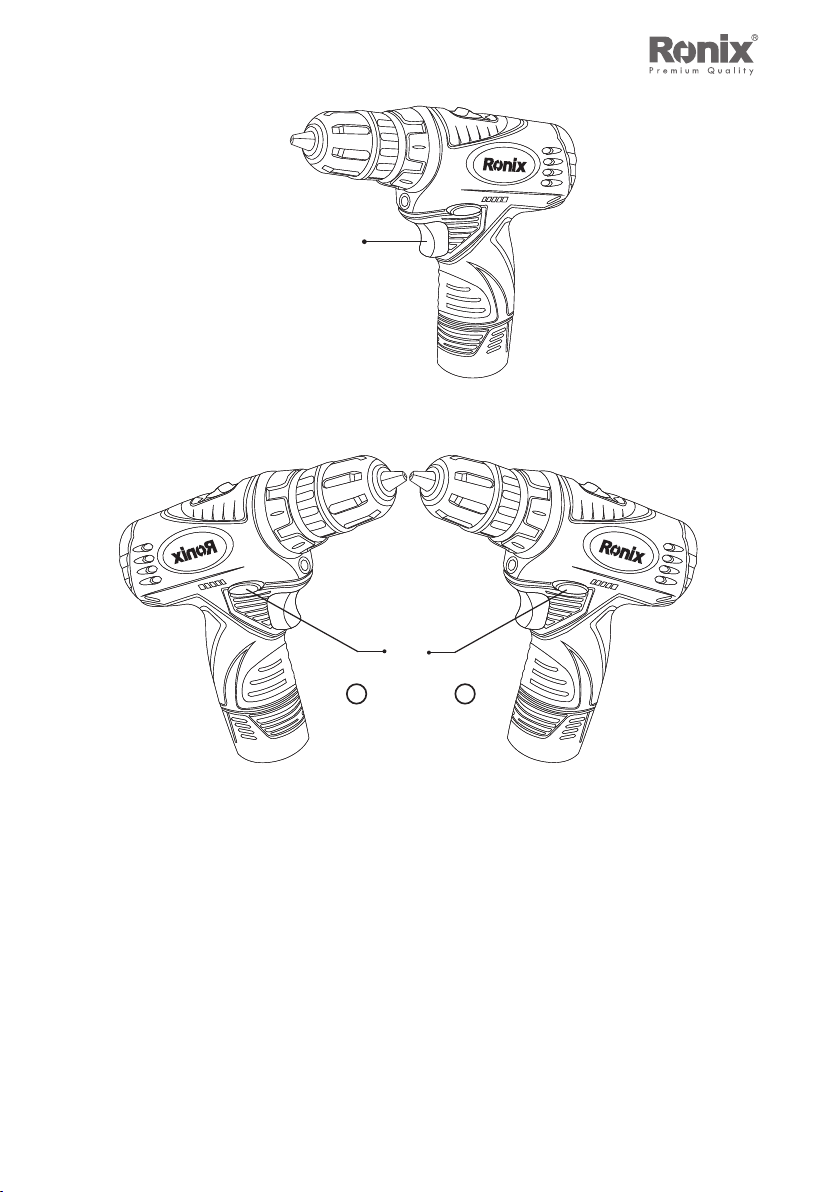
1.Button
2.Battery Cartridge
1
2
8
USER MANUAL 9
1
1.Switch Trigge
B
A
1
1.Reversing Switch Lever
ELECTRIC BRAKE
This tool is equipped with an electric brake. If the tool consistently fails
to quickly stop after switch trigger release, have tool serviced at a Ronix
service center.
9
Table des matières
Autres manuels Ronix Percer

Ronix
Ronix 2111 Manuel utilisateur

Ronix
Ronix 221 Series Manuel utilisateur

Ronix
Ronix RS-0005 Manuel utilisateur

Ronix
Ronix 8900 Manuel utilisateur

Ronix
Ronix 2214 Manuel utilisateur

Ronix
Ronix 2214K Manuel utilisateur

Ronix
Ronix 2213 Manuel utilisateur

Ronix
Ronix 8105K Manuel utilisateur

Ronix
Ronix 8012 Manuel utilisateur
Ronix
Ronix 2110 Manuel utilisateur

Ronix
Ronix 8905K Manuel utilisateur

Ronix
Ronix 2106C Manuel utilisateur

Ronix
Ronix 2112 Manuel utilisateur

Ronix
Ronix 8101K Manuel utilisateur

Ronix
Ronix 2221 Manuel utilisateur

Ronix
Ronix 8612 Manuel utilisateur

Ronix
Ronix 2210C Manuel utilisateur

Ronix
Ronix RP-8812 Manuel utilisateur

Ronix
Ronix 2290 Manuel utilisateur

Ronix
Ronix 2513T Manuel utilisateur


