Reed Instruments Smart Series Manuel utilisateur

www.REEDInstruments.com
Instruction
Manual
R1640
Thermocouple
Thermometer
W
A
R
R
A
N
T
Y
W
A
R
R
A
N
T
Y
1 YEAR
1 AN
G
A
R
A
N
T
I
E
G
A
R
A
N
T
I
E
W
A
R
R
A
N
T
Y
W
A
R
R
A
N
T
Y
G
A
R
A
N
T
I
E
G
A
R
A
N
T
I
E
W
A
R
R
A
N
T
Y
W
A
R
R
A
N
T
Y
G
A
R
A
N
T
I
E
G
A
R
A
N
T
I
E
White background
Transparentbackground
White
Black
1 YEAR1AN
www.calcert.com sales@calcert.com1.888.610.7664 0
5
10
15
20
25
30

Table of Contents
Introduction .................................................................................................3
Product Quality............................................................................................3
Safety ..........................................................................................................3
FCC Statement............................................................................................4
FCC RF Exposure Statement ..............................................................4
IC Statement ...............................................................................................5
IC RF Exposure Statement..................................................................5
Features.......................................................................................................6
Included.......................................................................................................6
Specications.......................................................................................... 7-8
Instrument Description ................................................................................9
Display Description ...................................................................................10
REED Smart Series App............................................................................11
Operating Instructions..........................................................................12-13
Power ON/OFF..................................................................................12
Backlight ...........................................................................................12
Establishing Bluetooth®Connection ................................................12
Connecting Thermocouples..............................................................12
Measuring Temperature Procedure ..................................................13
Enabling/Disabling Data Hold............................................................13
Enabling/Disabling Auto Power OFF.................................................13
Battery Replacement.................................................................................14
Applications...............................................................................................14
Accessories and Replacement Parts ........................................................15
Product Care .............................................................................................15
Product Warranty ......................................................................................16
Product Disposal and Recycling ...............................................................16
Product Support........................................................................................16
www.calcert.com sales@calcert.com1.888.610.7664 0
5
10
15
20
25
30

Introduction
Thank you for purchasing your REED R1640 Thermocouple Thermometer,
Bluetooth®Smart Series. Please read the following instructions carefully
before using your instrument. By following the steps outlined in this
manual your meter will provide years of reliable service.
Product Quality
This product has been manufactured in an ISO9001 facility and has been
calibrated during the manufacturing process to meet stated product
specications. If a certicate of calibration is required, please contact the
nearest authorized REED distributor or authorized Service Center. Please
note an additional fee for this service will apply.
Safety
• Never attempt to repair or modify your instrument. Dismantling your
product, other than for the purpose of replacing batteries, may cause
damage that will not be covered under the manufacturer's warranty.
Servicing should only be provided by an authorized service center.
• Magnetic eld warning; please keep a minimum distance of 4 inches
(10cm) between pacemaker and meter.
www.calcert.com sales@calcert.com1.888.610.7664 0
5
10
15
20
25
30

FCC Statement
This device complies with Part 15 of the FCC Rules. Operation is subject
to the following two conditions:
1. This device may not cause harmful interference.
2. This device must accept any interference received, including
interference that may cause undesired operation.
Note: This equipment has been tested and found to comply with the limits
for a Class B digital device, pursuant to Part 15 of the FCC Rules. These
limits are designed to provide reasonable protection against harmful
interference in a residential installation. This equipment generates uses
and can radiate radio frequency energy and, if not installed and used in
accordance with the instructions, may cause harmful interference to radio
communications. However, there is no guarantee that interference will
not occur in a particular installation. If this equipment does cause harmful
interference to radio or television reception, which can be determined by
turning the equipment off and on, the user is encouraged to try to correct
the interference by one of the following measures:
• Reorient or relocate the receiving antenna.
• Increase the separation between the equipment and receiver.
• Connect the equipment into an outlet on a circuit different from that to
which the receiver is connected.
• Consult the dealer or an experienced radio/TV technician for help.
Warning: Any changes or modications not expressly approved by
the party responsible for compliance could void the user's authority to
operate this equipment.
FCC RF Exposure Statement
This product complies with FCC portable RF exposure limit set forth for
an uncontrolled environment and is safe for the intended operation as
described in this manual.
www.calcert.com sales@calcert.com1.888.610.7664 0
5
10
15
20
25
30

IC statement
This device contains licence-exempt transmitter(s)/receiver(s) that comply
with Innovation, Science and Economic Development Canada’s licence-
exempt RSS(s). Operation is subject to the following two conditions:
1. This device may not cause interference.
2. This device must accept any interference, including interference that
may cause undesired operation of the device.
This Class B digital apparatus complies with Canadian ICES-003.
CAN ICES-003(B)/NMB-003(B)
IC RF Exposure Statement
This product complies with the Canadian portable RF exposure limit
set forth for an uncontrolled environment and is safe for the intended
operation as described in this manual.
www.calcert.com sales@calcert.com1.888.610.7664 0
5
10
15
20
25
30

Features
• Displays 2 temperature measurements simultaneously
• Easy to operate, designed for one hand operation
• Integrated display provides exibility for use without mobile device
• Magnetic backing allows instrument to be mounted to metallic surfaces
• Data Hold function
• User selectable °F , or °C
• Low battery indicator and auto shut off
• Tripod mount for long-term monitoring
When used with REED Smart Series App:
• Real-time data logger
• User selectable sampling rate from 1 to 120 seconds
• Bluetooth® 5.0 provides connectivity to instruments up to
246' (75m) away
• Connect, measure and datalog up to 6 instruments, simultaneously
• Easy setup with automatic app integration for compatible REED Smart
Series instruments
• Export data via Excel or PDF and create custom reports that can be
emailed from mobile device
Included
• Thermocouple Thermometer
• 2 x Beaded Wire Probes
• 4 x AAA Batteries
www.calcert.com sales@calcert.com1.888.610.7664 0
5
10
15
20
25
30

Specifications
Measuring Range: -328 to 2501°F (-200 to 1372°C)
Accuracy: >-148°F (-100°C):
±0.05% rdg. + 1.8°F (1°C)
<-148°F (-100°C):
± 2.7°F (1.5°C)
*(Tested at 23±5°C)
Resolution: 0.1°F/°C
Thermometer Type: Contact (Type-K)
Temperature Inputs: 2
Display: Multi-Line Enhanced Black Twisted
Nematic (EBTN) LCD
Display Size: 1.3" (34mm)
Backlit Display: Yes
Data Hold: Yes
Datalogging Capabilities: Yes (with Smart Series App)
Real-Time Clock and Date Stamp: Yes (with Smart Series App)
Customizable Sampling Rate: Yes
Overrange Indicator: Yes
Auto Shut-off: Yes (adjustable)
Tripod Mountable: Yes
Magnetic Backing: Yes
Low Battery Indicator: Yes
Power Supply: 4 x AAA Batteries
Battery Life: Approx. 50 hours
(sampling time dependent)
Connectivity: Bluetooth®5.0
Bluetooth®Range: Up to 246' (75m)
Max # of Connected Devices: 6
continued...
www.calcert.com sales@calcert.com1.888.610.7664 0
5
10
15
20
25
30

Software: REED Smart Series App
(iOS and Android)
App Supported Languages: English, French
Product Certications: CE, UKCA, FCC, IC ID
Maximum Operating Altitude: 6561' (2000m)
Operating Temperature:
32 to 122°F (0 to 50°C)
Storage Temperature: 14 to 122°F (-10 to 50°C)
Operating Humidity Range: 10 to 90%
Storage Humidity Range: 10 to 90%
Dimensions: 6.4 x 1.5 x 1" (163 x 38 x 25mm)
Weight: 3.3oz (95g)
www.calcert.com sales@calcert.com1.888.610.7664 0
5
10
15
20
25
30

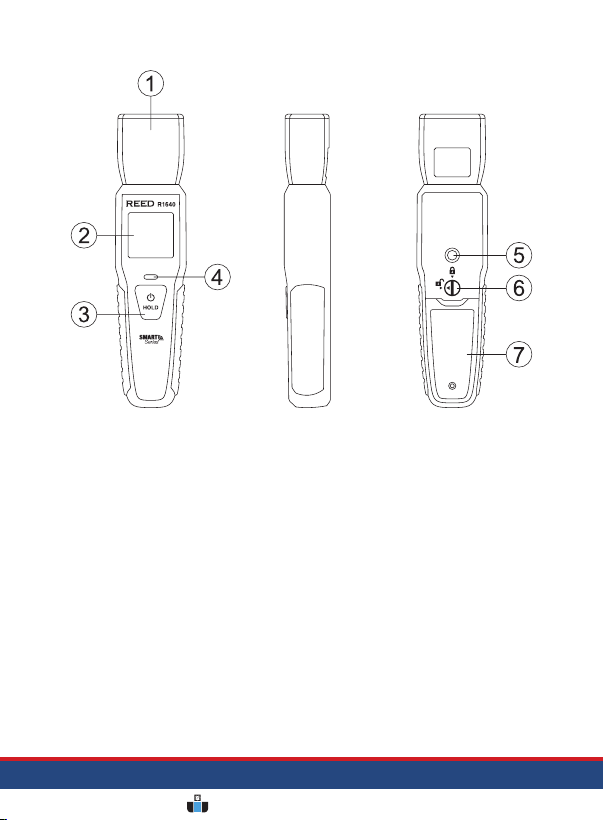
Instrument Description
1. Thermocouple Input Jacks
2. LCD Display
3. POWER/HOLD Button
4. Bluetooth®Status
Indicator Light
5. Tripod Mounting Screw
6. Battery Cover Lock
7. Battery Cover
www.calcert.com sales@calcert.com1.888.610.7664 0
5
10
15
20
25
30

Display Description
1. T1 (Channel 1) & T2
(Channel 2) Thermocouple
Input Indicators
2. Temperature Measurement
Value for T2 Thermocouple
3. Temperature Unit
of Measure
4. Temperature Measurement
Value for T1 Thermocouple
5. Data Hold Indicator
6. Thermocouple
Type Indicator
7. Bluetooth®Indicator
8. Low Battery Indicator
www.calcert.com sales@calcert.com1.888.610.7664 0
5
10
15
20
25
30
Autres manuels pour Smart Series
2
Ce manuel convient aux modèles suivants
2
Table des matières
Autres manuels Reed Instruments Thermomètre

Reed Instruments
Reed Instruments SMART Series Manuel utilisateur

Reed Instruments
Reed Instruments R2000 Manuel utilisateur

Reed Instruments
Reed Instruments FS-200 Manuel utilisateur

Reed Instruments
Reed Instruments R2330-NIST Manuel utilisateur

Reed Instruments
Reed Instruments R2450SD Manuel utilisateur

Reed Instruments
Reed Instruments R2020 Manuel utilisateur

Reed Instruments
Reed Instruments C-370 Manuel utilisateur

Reed Instruments
Reed Instruments R2320 Manuel utilisateur

Reed Instruments
Reed Instruments R2400 Manuel utilisateur

Reed Instruments
Reed Instruments R2340 Manuel utilisateur