
PulseRain Reindeer FRV2100 Manuel utilisateur

858-877-3485 |850-408-9550 | info@pulserain.com
PulseRain Reindeer (FRV2100)
RISC-V Soft CPU
Quick Start Guide
--Validated with
Lattice MachXO3D
Breakout Board
Jul, 2020
Doc# QSG-0962-0127, Rev 0.9.2
Copyright © 2020
PulseRain Technology, LLC.
858-877-3485 858-408-9550
https://www.pulserain.com

Table of Contents
1 Introduction .............................................................................................................1
1.1 System Overview ...........................................................................................................................1
1.2 Supply of Power.............................................................................................................................2
1.3 Programming Cable and USB /UART Cable....................................................................................2
1.4 Lattice Diamond Software .............................................................................................................2
2 GitHub Repository....................................................................................................2
3 Program the Breakout Board...................................................................................2
4 Prepare the Breakout Board for UART.....................................................................3
5 Using Arduino IDE .................................................................................................... 7
5.1 Install Arduino IDE .........................................................................................................................7
5.2 Setup Arduino IDE..........................................................................................................................8
5.3 Write Sketches.............................................................................................................................10
6 Build the FPGA Image from RTL Code....................................................................13
7 Generate Memory Init File.....................................................................................14
PulseRain Reindeer(FRV2100) for Lattice MachXO3D –Quick Start Guide
Page 1of 14
1Introduction
1.1 System Overview
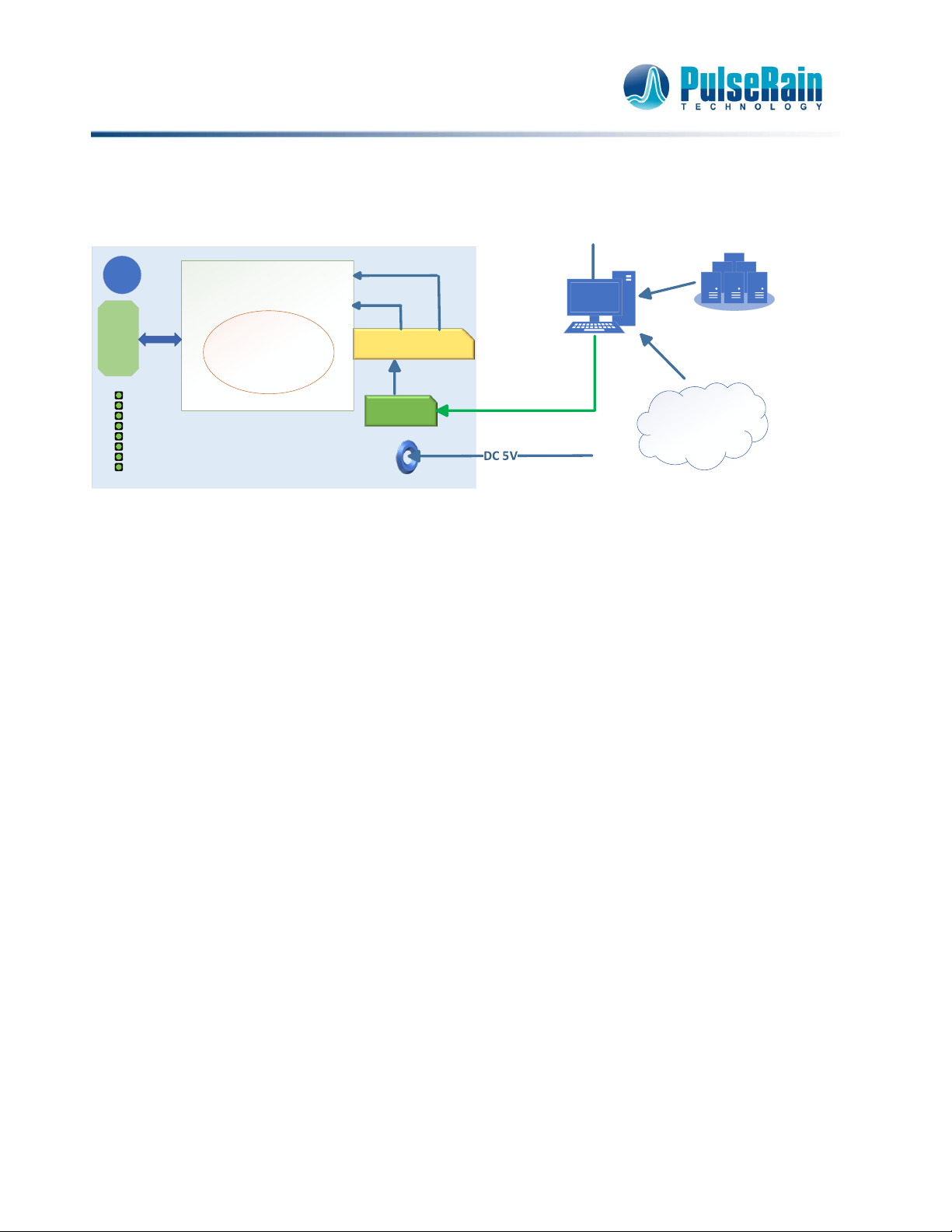
Figure 1-1 System Overview
PulseRain Reindeer (FRV2100) is a soft CPU of Von Neumann architecture. It supports RISC-V RV32I[M]
instruction set, and features a 2 x 2 pipeline. It strives to make a balance between speed and area, and offers
a flexible choice for soft CPU across all FPGA platforms.
And at this point, it has also been successfully ported to the Lattice MachXO3D Breakout Board (“Breakout
Board” for the rest of the document), with the following configurations:
•RV32I processor core, Von Neumann Architecture
•32KB Block RAM for code and data
•1 UART
•32 bit GPIO for both input and output
As shown in Figure 1-1, to further facilitate the software development for RSIC-V, an Arduino board support
package has been provided on GitHub for the Breakout Board, with which the software developers can write
code for RISC-V directly in Arduino IDE.
And the following components can also be found on the Breakout Board, as illustrated in Figure 1-1.
•A Lattice LCMXO3D-9400HC FPGA
•8 LEDs
•1 Reset Button
•Connectors for FPGA IO ports
•FTDI 2232H for USB connection
Lattice MachXO3D
Breakout Board
USB
PulseRain Reindeer
RISC-V Soft MCU
MachXO3D
LCMXO3D – 9400HC
FTDI 2232H
DIP-SW
Diamond Software
and
Arduino IDE
GITHUB
https://github.com/PulseRain/Arduino_RISCV_IDE
LED
MPSSE
UART
Reset
Button

PulseRain Reindeer(FRV2100) for Lattice MachXO3D –Quick Start Guide
Page 2of 14
1.2 Supply of Power
The Breakout Board can be powered a Mini-USB cable.
1.3 Programming Cable and USB /UART Cable
As indicated in Figure 1-1, the Mini-USB cable also serves as both a programming cable and a USB/UART
cable.
1.4 Lattice Diamond Software
The Lattice Diamond software is needed to compile the RTL code and program the FPGA. The Lattice Diamond
can be found at
https://www.latticesemi.com/Products/DesignSoftwareAndIP/FPGAandLDS/LatticeDiamond
And users can also request a free license for this software from Lattice website.
2GitHub Repository
The complete code of PulseRain Reindeer (FRV2100) for MachXO3D Breakout Board can be found on GitHub
at
https://github.com/PulseRain/Reindeer_MachXO3D
To check out (clone) the repository, run the following commands under Cygwin on Windows:
$ git clone https://github.com/PulseRain/Reindeer_MachXO3D.git
$ cd Reindeer_MachXO3D
$ git submodule update --init --recursive
3Program the Breakout Board
The repository above has a pre-built FPGA image for PulseRain Reindeer(FRV2100) MCU. To program the
Breakout Board with this image, do the following:
1. Connect the Breakout Board to PC through a Mini-USB Cable.
2. Launch Diamond Programmer,
Set the Device to be LCMXO3D-9400HC
Set Operation to be FLASH Erase, Program, Verify
As shown in Figure 3-1, point the File Name to
Reindeer_MachXO3D\build\lattice\MachXO3D_Breakout\breakout\MachXO3D_breakout_a.jed,

PulseRain Reindeer(FRV2100) for Lattice MachXO3D –Quick Start Guide
Page 3of 14
Figure 3-1 Diamond Programmer
The FPGA image above contains PulseRain Reindeer(FRV2100) RISC-V core, and it will light up the led in a
rotating fashion. Please set DIP-SW 1 and 2 for LED pattern, and set DIP-SW 3 and 4 for LED refreshing rate.
4Prepare the Breakout Board for UART
The RISC-V core needs a UART for programming and communication. The MachXO3D Breakout board carries
a FTDI FT2232H chip, with 2 channels. Channel A is used for FPGA programming. And Channel B can be used
as a UART for RISC-V.
However, to enable the UART, some extra work has to be done:
1. For the Breakout Board (Rev A), the resistors R14 and R14 are DNI on the board. They should be installed
(0 Ohm or simply connect with bard solder), as shown below in Figure 4-1:

PulseRain Reindeer(FRV2100) for Lattice MachXO3D –Quick Start Guide
Page 4of 14
Figure 4-1 Lattice MachXO3D Breakout Board (Rev A)
2. The EEPROM for the FT2232H needs to be reconfigured. To do that, please install the FT_PROG utility
from Future Technology Devices International Ltd.
3. Launch FT_PROG utility, press F5 to scan the devices, set Hardware Specific/Port B/Hardwareto be RS232
UART, as illustrated below in Figure 4-2:

PulseRain Reindeer(FRV2100) for Lattice MachXO3D –Quick Start Guide
Page 5of 14
Figure 4-2 FTDI FT_PROG Utility
4. Press Ctrl+P to program the FT2232H on the Breakout Board.
5. Open Windows Device Manager, right click "Universal Serial Bus controller / USB Serial Converter B",
then choose Properties, as shown below in Figure 4-3.


PulseRain Reindeer(FRV2100) for Lattice MachXO3D –Quick Start Guide
Page 7of 14
7. Unplug and re-plug the Mini-USB Cable. If everything goes ok, you should be able to find a new COM
port in Windows Device Manager, as shown in Figure 4-5.
Figure 4-5 USB Serial Port in Windows Device Manager
5Using Arduino IDE
5.1 Install Arduino IDE
PulseRain Reindeer(FRV2100) RISC-V MCU can be developed and programmed through Arduino IDE. On
Windows 10, the Arduino IDE can be installed as an App directly from Windows App store. Otherwise, the
Windows installer for Arduino IDE can be found at Arduino Website:
https://www.arduino.cc/en/Main/Software
PulseRain Reindeer(FRV2100) for Lattice MachXO3D –Quick Start Guide
Page 8of 14
5.2 Setup Arduino IDE
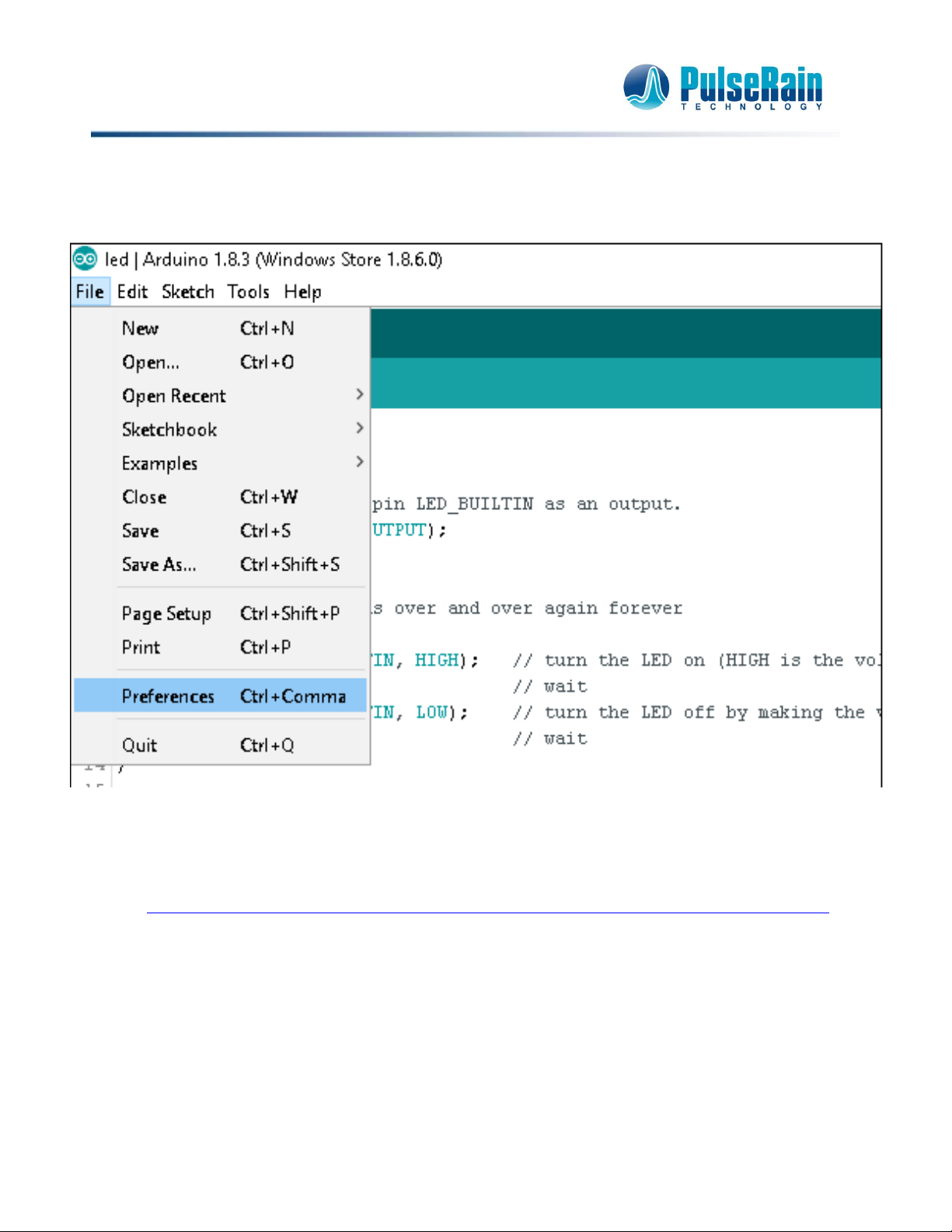
After the Arduino IDE is installed, launch it and click the menu File / Preferences, as shown in Figure 5-1:
Figure 5-1 Arduino IDE, Preferences Menu
1) The File / Preferences menu will bring out a dialog like the one shown in Figure 5-2. Please set the
"Additional Boards Managers URL" to
https://raw.githubusercontent.com/PulseRain/Arduino_RISCV_IDE/master/package_pulserain.com_index.json
(If this input box is not empty, use semicolon to separate multiple URLs.) And click OK to close the
dialogue.
Table des matières
Manuels Matériel informatique populaires d'autres marques

EMC2
EMC2 VNX Series Manuel du propriétaire

Panasonic
Panasonic DV0PM20105 Manuel utilisateur

Mitsubishi Electric
Mitsubishi Electric Q81BD-J61BT11 Manuel utilisateur

Gigabyte
Gigabyte B660M DS3H AX DDR4 Manuel utilisateur

Raidon
Raidon iT2300 Manuel utilisateur

National Instruments
National Instruments PXI-8186 Manuel utilisateur


