
PULSE+ MV-374 Manuel utilisateur

MV-374 / MV-378
VoIP GSM Gateway
User Manual
MV-374
MV-378

【Content】
1.Introduction............................................................................................................ 1
2.Function description ............................................................................................. 1
3.Parts list ................................................................................................................. 1
4.Dimension : 30x28x4 cm....................................................................................... 2
5.Chart o the device ................................................................................................ 3
6.Web Page Setting .................................................................................................. 4
7.System In ormation. .............................................................................................. 5
8. Route ..................................................................................................................... 5
8.1 Mobile TO LAN Settings .............................................................................................. 6
8.2 Call Back Service (50 sets) ......................................................................................... 8
8.3 Mobile to LAN Speed Dial Settings............................................................................ 9
8.4 LAN to Mobile Settings............................................................................................... 10
8.5 Dial Peer Status .......................................................................................................... 12
9.Mobile ................................................................................................................... 13
9.1 Mobile Status ............................................................................................................... 13
9.2 Mobile Setting.............................................................................................................. 14
9.3 Mobile / Forward Setting :.......................................................................................... 17
9.4 Mobile / SMS Agent :.................................................................................................. 19
9.5 Send Bulk of SMS via Microsoft Excel .................................................................... 21
9.6 use AT Co and via Telnet or your progra ...................................................... 29
10.Network .............................................................................................................. 30
11.SIP Setting.......................................................................................................... 33
11.1 Service Do ain Setting ........................................................................................... 33
11.2 Ports Setting .............................................................................................................. 35
11.3 Codec Settings:......................................................................................................... 36
11.4 Codec ID Setting...................................................................................................... 37
11.5 DTMF Setting ........................................................................................................... 38
11.6 RPort Function: ......................................................................................................... 39

11.7 SIP Responses ......................................................................................................... 40
11.7.1 486(busy here), 503(Service unavailable): .............................................. 40
11.7.2 180 Ring on/off: ............................................................................................ 40
11.7.3 183(Session Progress)................................................................................ 40
11.7.4 Dial Peer ........................................................................................................ 41
11.8 Other Settings ........................................................................................................... 45
12. STUN Setting..................................................................................................... 46
13.System Authority............................................................................................... 47
14.Update ................................................................................................................ 48
15.Save Change ...................................................................................................... 51
16.Reboot ................................................................................................................ 52
17.Speci ication ...................................................................................................... 53
17.1 Protocols .................................................................................................................... 53
17.2 TCP/IP ........................................................................................................................ 53
17.3 Codec ......................................................................................................................... 53
17.4 Voice Quality ............................................................................................................. 53
17.5 GSM (MV-374/MV-378)........................................................................................... 54
18. Simple Steps ..................................................................................................... 55
19. Appendix: Setup MV-37x with Asterisk .......................................................... 56


-1-
1.Introduction
MV-374/MV-378 is a 4 / 8 channels VoIP GSM Gateway for call
ter ination (VoIP to GSM ) and origination (GSM to VoIP). It is SIP
based and co patible with Asterisk. It can enable to ake 4 / 8 calls
si ultaneously fro IP phones to GSM networks and GSM network to IP
phone.
2.Function description
2.1 VoIP(SIP)、GSM conversion.
2.2 50 sets of LAN->MOBILE routes setting,50 sets of MOBILE->LAN
routes setting.
2.3 Voice response for setting and status (dial in fro obile).
2.4 Series connections to save bills.
2.5 Standard SIP(RFC2543,RFC3261) protocol,
Co unicates with other gateway or PC.
3.Parts list
Please check the parts for any issing parts. If do, please contact
our agents:
3.1 「MV-374/MV-378」ain body
3.2 Power adaptor AC-DC (110V AC – 12V DC) or (220V AC – 12V DC)
3.3 Network cable
3.4 Antenna: MV-374:1 pcs / MV-378: 2 pcs
3.5 Rack- ount accessories (co patible with 19“Rack) – option
3.6 User Manual

-2-
(3.5) option
4.Dimension : 30x28x4 cm
(3.1)
MV-374
(3.2) MV-374
(3.4)
(3.3)
(3.1) MV-378
(3.2) MV-378

-3-
5.Chart o the device
5.1 Antenna:Antenna connector.
5.2 WAN: RJ-45 internet connector,standard RJ-45 socket,connect to HUB.
5.3 DC 12V:Power input.
5.4 SIM Card
5.5 LINK Indicator:Light up when network is connected.
5.6 CH3:an indicator light of VoIP3
5.7 CH4:an indicator light of VoIP4
5.8 PWR (Power LED):Light up when power is nor al.
5.9 reboot button: reboot ch1-2 without power off
5.1
5.3
5.4
5.2
5.5 5.6 5.7 5.8
5.9

-4-
6.Web Page Setting
When the IP setting is done, the operator ay setup all the rest
para eters via web page. Browse the IP address fro Internet
Explorer (e.g. http://192.168.0.100)。The following page shows up:
Enter the userna e and password for authentication. (default
userna e=voip, password=1234). The page follows when the
userna e and password are correct.

-5-
7.System In ormation.
7.1 When you login the web page, you can see the de o syste current
syste infor ation like fir ware version, co pany… etc in this
page.
7.2 Also you can see the function lists in the left side. You can use
ouse to click the function you want to set up.
8. Route
Important:
The route table -50 sets can share by two channels(1,2 ch / 3,4 ch /
5,6 ch / 7,8 ch ) . The setting,please refer 9.2 Mobile setting
ex: Mobile 1 use the route table for ite 0-24,
Mobile 2 use the route table for ite 25-49
-6-
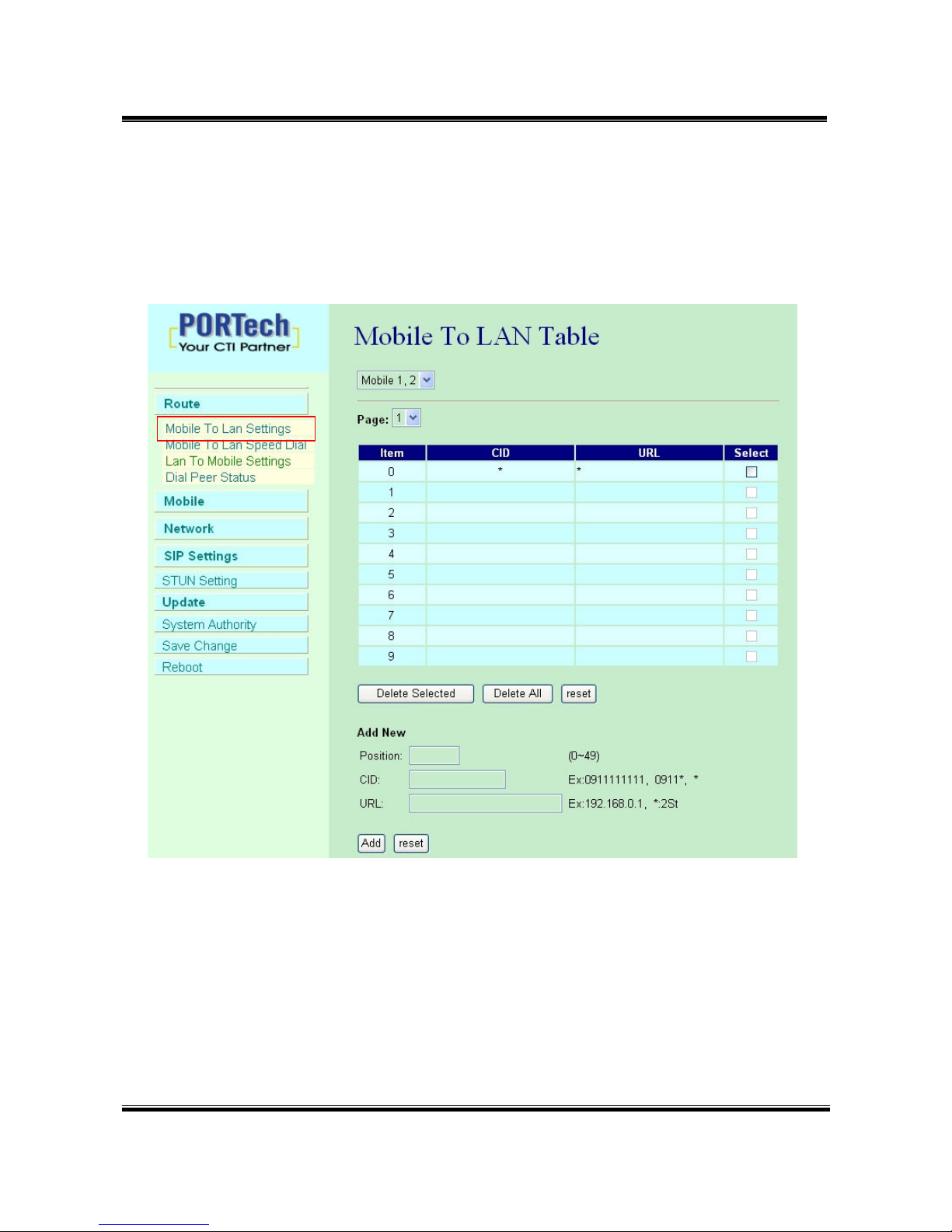
8.1 Mobile TO LAN Settings
The operator ay assign 50 sets of routing rule to transfer the call
inco ing fro MOBILE to LAN.
The MV-374/MV-378 will transfer to the URL according to the caller ID of
the Mobile.
*CID:
(1) ay enter the whole nu ber, e.g. 0911111111
(2) only part of the nu ber (prefix) e.g. 0911* eans any nu ber
starting with 0911 will be accepted
Ce manuel convient aux modèles suivants
1
Table des matières
Autres manuels PULSE+ Porte


Manuels Porte populaires d'autres marques

LST
LST M500RFE-AS Manuel utilisateur

Kinnex
Kinnex Media Gateway Manuel utilisateur

2N Telekomunikace
2N Telekomunikace 2N StarGate Manuel utilisateur

Mitsubishi Heavy Industries
Mitsubishi Heavy Industries Superlink SC-WBGW256 Manuel utilisateur

ZyXEL Communications
ZyXEL Communications ZYWALL2 ET 2WE Manuel utilisateur

Telsey
Telsey CPVA 500 - SIP Manuel utilisateur


