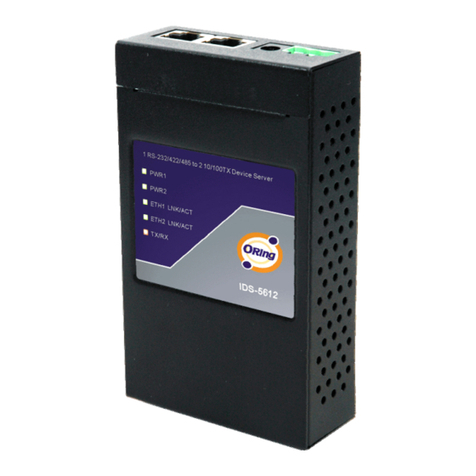
ORiNG IDS-5011F Series Manuel utilisateur

Industrial Device Server User’s Manual
IDS-5011F Series
Version 1.0
May 2008.
ORing Industrial Networking Corp.
4F., NO.3, Lane235, Baociao Rd.Sindian City,
Taipei County 23145 Taiwan, R.O.C.
Tel: + 886 2 2918 3036
Fax:+ 886 2 2918 3084
Website : www.oring-networking.com

Table of Content
GETTING TO KNOW YOUR DEVICE SERVER ...............................................................................................1
1.1 About the IDS-5011F Serial Device Server.......................................................................................1
1.2 Software Features ............................................................................................................................1
1.3 Hardware Features ...........................................................................................................................2
HARDWARE INSTALLATION .......................................................................................................................3
2.1 Install IDS-5011F on DIN-Rail...........................................................................................................3
2.1.1 Mount IDS-5011F on DIN-Rail .....................................................................................................3
2.2 Wall Mounting Installation .................................................................................................................4
2.2.1 Mount IDS-5011F on wall.............................................................................................................5
HARDWARE OVERVIEW ............................................................................................................................8
3.1 Front Panel .......................................................................................................................................8
3.2 Front Panel LEDS.............................................................................................................................9
3.3 Top Panel........................................................................................................................................10
3.4 Bottom Panel ..................................................................................................................................10
3.5 Rear Panel......................................................................................................................................12
CABLES ................................................................................................................................................13
4.1 Fibers..............................................................................................................................................13
MANAGEMENT INTERFACE .....................................................................................................................14
5.1 DS-Tool...........................................................................................................................................14
5.1.1 Install IDS-Tool...........................................................................................................................14
5.1.2 Using DS-Tool ............................................................................................................................16
5.1.2.1 Explore device servers .....................................................................................................16
5.1.2.2 Configure device servers..................................................................................................17
5.1.2.3 Configure serial port .........................................................................................................24
5.2 Configuration by Web Browser .......................................................................................................33
5.2.1 Connect to the Web page ..........................................................................................................33
5.2.1.1 System .............................................................................................................................35
5.2.1.2 Port serial setting..............................................................................................................39
5.2.1.3 Management ....................................................................................................................47

IDS-5011F Series User’s Manual
5.2.1.4 Save/Reboot.....................................................................................................................51
5.3 Configuration by SSH Console .......................................................................................................52
5.3.1 Connect to DS............................................................................................................................52
TECHNICAL SPECIFICATIONS ..................................................................................................................53


IDS-5011F Series User’s Manual
1 ORing Industrial Networking Corp.
Getting to Know Your Device Server
1.1 About the IDS-5011F Serial Device Server
IDS-5011F is an innovative 1 port RS232/422/485 to 1 port fiber optical
device server. The option of the fiber port can be multi-mode
(IDS-5011F-MM) or single mode (IDS-5011F-SS) for different
requirement of transmission distance. To assure the agility and security
of critical data, IDS-5011F offers many powerful features for SW
redundant functions.
The IDS-5011F can simultaneously transfer data into 5 host PCs. This
feature assures all critical data that saved in different host PC from
Ethernet breaking or host PCs failure
Secondly, the IDS-5011F provides dual redundant power inputs on DC power jack and terminal
block. IDS-5011F also provides NAT pass through function so that users are able to manage
IDS-5011F inside or outside the NAT router. It is easy for different IP domain users to use
IDS-5011F. Therefore, IDS-5011F is the best communication redundant solution for current
application of serial devices with fiber optical interface.
1.2 Software Features
NAT-pass through: User can manage IDS-5011F through NAT router
Redundant Power Inputs: 12~48VDC on power jack and terminal block
Redundant multiple host devices: 5 simultaneous in Virtual COM, TCP Server, TCP Client
mode, UDP。
Secured Management by HTTPS and SSH。
Versatile Modes: Virtual Com, Serial Tunnel, TCP Server, TCP Client, UDP
Event Warning by Syslog, Email, SNMP trap, and Beeper

IDS-5011F Series User’s Manual
ORing Industrial Networking Corp 2.
Various Windows O.S. supported: Windows NT(5.0)/2000/XP/2003/VISTA
1.3 Hardware Features
Redundant Power Inputs: 12~48 VDC on terminal block and power jack
Operating Temperature: -10 to 60oC
Storage Temperature: -20 to 85 oC
Operating Humidity: 5% to 95%, non-condensing
Casing: IP-30
100BaseFX multi-mode or single-mode fiber port
Dimensions(W x D x H) : 72mm(W)x125 mm(D)x31mm(H)

IDS-5011F Series User’s Manual
3 ORing Industrial Networking Corp.
Hardware Installation
2.1 Install IDS-5011F on DIN-Rail
Each IDS-5011F has a Din-Rail kit on rear panel. The Din-Rail kit helps IDS-5011F to fix on
the Din-Rail. It is easy to install the IDS-5011F on the Din-Rail:
2.1.1 Mount IDS-5011F on DIN-Rail
Step 1: Slant the IDS-5011F and mount the metal spring to Din-Rail.
Figure 2-1
Metal
Spring

IDS-5011F Series User’s Manual
ORing Industrial Networking Corp 4.
Step 2: Push the IDS-5011F toward the Din-Rail until you heard a “click” sound.
Figure 2-2
2.2 Wall Mounting Installation
Each IDS-5011F has another installation method for you. A wall mount panel can be found in
the package. The following steps show how to mount the IDS-5011F on the wall:

IDS-5011F Series User’s Manual
5 ORing Industrial Networking Corp.
2.2.1 Mount IDS-5011F on wall
Step 1: Remove Din-Rail kit.
Figure 2-3

IDS-5011F Series User’s Manual
ORing Industrial Networking Corp 6.
Pozidrive
Step 2: Use 6 screws that can be found in the package to combine the wall mount panel.
Just like the picture shows below:
Figure 2-4
The screws specification shows in the following two pictures. In order to prevent IDS-5011F
from any damage, the size of screws should not be larger than the size that used in
IDS-5011F.
Figure 2-5
Ce manuel convient aux modèles suivants
3
Table des matières
Autres manuels ORiNG Serveur

ORiNG
ORiNG IDS-1112 Manuel utilisateur

ORiNG
ORiNG IDS-342GT Manuel utilisateur

ORiNG
ORiNG IDS-5042-WG Series Manuel utilisateur

ORiNG
ORiNG IDS-181A Manuel utilisateur

ORiNG
ORiNG IDS-5042 Series Manuel utilisateur

ORiNG
ORiNG IDS-312L Manuel utilisateur

ORiNG
ORiNG IDS-5012 Manuel utilisateur

ORiNG
ORiNG IDS-1112 Manuel utilisateur

ORiNG
ORiNG IDS-342GT+ Manuel utilisateur

ORiNG
ORiNG IUSB-9000 Series Manuel utilisateur