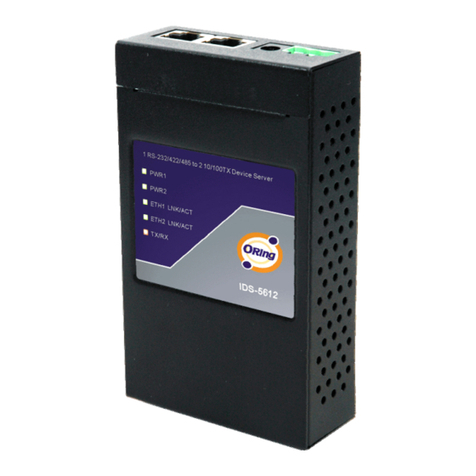
Q I G Quick Installation Guide
PRINTED ON RECYCLED PAPER
Quick Installation Guide
Q I G
Specifications
Power
Redundant Inp ut power
Dual DC inputs. 12~48VDC on 4 pin terminal block
* Supplied by SELV s ource evaluated by UL 61010-1 or 61010-2-201 power supply only.
* Fourni p ar la source SELV éval uée uniquement par l'alimentation UL 6 1010-1 or
61010-2-201.
Physical Characteristic
Enclosure IP-30 Metal (non U L certified)
Dimension (W x D x H) 26(W)x75(D)x1 10(H) mm (1.02 x 2.95 x 4.33 inch.)
Weight (g)
Environmental
-40 to 85 C (-40 to 185 F)
o o
Storage Temperature
5% to 95% Non-conde nsing
Operating Humidity
Regulatory Approvals
FCC Part 15B, CISPR 32 (EN55032 c lass A)
EMI
EN61000-4-2 (ES D)
EN61000-4-3 (RS )
EN61000-4-4 (EF T)
EN61000-4-5 (Su rge)
EN61000-4-6 (CS )
EN61000-4-8
EN61000-4-11
EMS
IEC60068-2-27
Shock
IEC60068-2-32
IEC60068-2-6
Vibration
Free Fall
Warranty
5 ye ars
RS-232
Flow Control
EN60950-1, UL61 010-1, UL61010- 2-201
Safety
-40 to 70 C (-14 to 140 F)
o o
Operating Temperatur e
ORing Device Server
Model
10/100Base-T(X) Ports in Au to
MDI/MDIX 2
Physical Ports
Technology
Stop Bits
Network Protocol
Data Bits
IDS-312L
1, 1.5, 2
TxD, RxD, RTS, CTS, DTR, DSR, DCD, GND
227g
XON/XOFF, RTS/C TS, DTR/DSR
7, 8
Power Consump tion(Typ.) 0.05A-0.1A
Overload current protection Present
Reverse polarity protection Present
Version 1.2
Serial Ports
Connector DB9 x 1
Operation Mode
Serial Baud Rat e 110 bps to 921.6 Kbps
RS-232/422/485
Industrial Device Server
D e v i c e
S e rv e r
For pin assignments for different types of cables, please refer to the following
tables.
10/100 Base-T(X) RJ-45
Pin Number MDI port MDI-X port
1 TD+(transmit) RD+(receive)
2 TD-(transmit) RD-(receive)
3 RD+(receive) TD+(transmit)
4 Not used Not used
5 Not used Not used
6 RD-(receive) TD-(transmit)
7 Not used Not used
8 Not used Not used
10/100 Base-T(X) RJ-45
Pin Number Assignment
1 TD+
2 TD-
3 RD+
4 Not used
5 Not used
6 RD-
7 Not used
8 Not used
Note: “+” and “-” signs represent the polarity of the wires that make up each wire pair.
DB9 serial port
The device can be connected to a serial device using a DB9
cable. The DB9 connector supports RS232 / RS422 / RS485
operation modes. Please refer to the following table for the pin
assignments of the DB9 connector.
5 4 3
2
1
9 8 7 6
DB9 male connector
Wiring
This device supports dual redundant power supplies, Power Supply
1 (PWR1) and Power Supply 2 (PWR2). The connectors for PWR1
and PWR2 are located on the terminal block.
STEP 1: Insert the negative/positive DC wires into the V-/V+
terminals, respectively.
STEP 2: To keep the DC wires from pulling loose, use a small flat-
blade screwdriver to tighten the wire-clamp screws on the front of
the terminal block connector.
Power inputs
Grounding and wire routing help limit the effects of noise due to electromagnetic
interference (EMI). Run the ground connection from the ground screws to the grounding
surface prior to connecting devices.
Grounding
Configurations
After installing the device and connecting cables, the green power LED should turn on.
Please refer to the following table for LED indication.
PWR-1 P WR-2
V1+V1- V2+V2-
1. Launch the Internet Explorer and type in IP address of the device. The default static IP address is
192.168.10.2
Follow the steps below to log in and access the system:
Resetting
To restore the device configurations back to the factory defaults, press the button for a fewReset
seconds. Once the power indicator starts to flash, release the button. The device will then reboot
and return to factory defaults.
Protocol ICMP, IP, TCP, UDP, DHCP, BOOTP, SSH, DNS, SNMP, V1/V2c, HTTPS, SMTP
RS-422 Tx-, Tx+ , Rx+, Rx-
RS-485 4 wire: Tx-, Tx+, Rx+, Rx-
2 wire: Data-, Data
PWR 1/2 Green On Power is on and function normally
ETH 1/2 Green On Port is connected
Blinking Data Transmitted
RX / TX
Amber On Receiving Serial data
Green On Transmitting Serial data
Dip Switch
SW No. Description
#1 150K / 1K Ohm Pull High/Low Resistor
#2
#3 Enable / Disable Terminal Resistor
Pull
Hi
/Low
Term.
Res.
IDS-312L
IDS-312L
Parity odd, even, n one, mark, space
2. Log in with the default user name “admin” and password is “admin” also. however, you can set
up a password later in the management page. After logging in, you should see the following
screen. For more information on configurations, please refer to the user manual. For information on
operating the device server using ORing’s DS-Tool management utility, please go to ORing website.
*****
ORing Industrial Networking Corp.
Copyright© 2017 ORing
All rights reserved.
TEL: +886-2-2218-1066
FAX: +886-2-2218-1014
Address 3F No 542 2 Zhongzheng Rd Xindian Dist New: ., . - , ., .,
Taipei City 23148 Taiwan,
Website: www.oringnet.com
E-mail: support@oringnet.com
Contact for maintenance and repair service:
!
Up to 2000m
Operating Altitude
!
Warning [AVERTISSEMENT]
Take into consideration the following guidelines before wiring the device
[Tenez compte des directrices suivantes avant de câbler l’appareil.]
1. Terminal block is mating with Plug and suitable for 12-24AWG. Torque value 4.5 lb-in.
[Le bornier est compatible avec les connecteurs et convient pour 12-24AWG.
Valeur de couple 4,5 lb-in.]
2. The temperature rating of the input connection cable should higher than 105°C
[La température de service nominale du câble d’entrée doit être supérieure à 105 °C]