
Nanoxia Deep Silence 5 Manuel utilisateur


EN
I. Introducon
• Specicaons
• Accessories
• Features
II. Installaon Instrucons
1. Installaon of the motherboard
2. Installaon of the power supply
3. Installaon of external drives
3.1 Opcal drives
3.2 Ulizing the external 3.5 inch bay
4. Installaon opons of HDD’s
4.1 Mounng of hard disk drives
4.2 Conversion and removal of the HDD-cages
5. Removing the front panel
6. Fan assembly
6.1 Front fans
6.2 Fans under the top cover
6.3 Fan at the boom of the case
7. The 2-channel fan controller
7.1 Connecng the fans to the fan control
7.2 Operaon of the fan control
8. Installaon of a water cooling soluon
8.1Installaon of a radiator or compact water cooling behind the front
8.2 Installaon of a slim radiator or compact water cooling under the top cover
9. The I/O-Panel
10. Connecng the front connectors to the motherboard
10.1 USB 2.0
10.2 USB 3.0
10.3 HD Audio
10.4 AC 97
III. Support
____________________________________________________________02
__________________________________________________________02
___________________________________________________________02
______________________________________________________________03
___________________________________________________06
___________________________________________06
___________________________________________07
_____________________________________________07
_____________________________________________________07
______________________________________08
_____________________________________________09
__________________________________________09
_______________________________10
________________________________________________12
_________________________________________________________12
_________________________________________________________12
_____________________________________________13
_________________________________________13
_____________________________________________14
__________________________________14
__________________________________________15
_____________________________________15
___________15
____17
_________________________________________________________17
________________________17
__________________________________________________________17
__________________________________________________________18
________________________________________________________18
____________________________________________________________19
_______________________________________________________________20
01

I. Introducon
Congratulaons on the purchase of your new Nanoxia Deep Silence 5 big tower. We are con-
dent that you will be delighted by your new PC case for many years to come.
Nanoxia’s Deep Silence series have been designed and developed by an experienced team of
developers in Germany. The silent opmized PC cases are of the highest quality and combine
the best possible funconality with the highest level of exibility.
The Deep Silence 5 Tower provides plenty of space for your most demanding projects. Due to
the fully modular hard drive cages, the case oers maximum versality and compability, both
for water cooling project and the installaon of high-end systems with air cooling.
Specicaons
Dimensions: 552 x 232 x 550 mm (Height x Width x Depth)
Material: 1.0 mm steel
External drive bays: 3 x 5.25 inch (tool-free)
1x 5.25 inch /w 3.5 inch adapter (tool-free)
Internal drive bays: 11 x 3.5/2.5 inch bays (decoupled)
Rubber sealings for
tube holes
EPS extension Fan screws Stand-os for mainboard Screws for mainboard
mounng
Screws for HDD mounng
Screws for 3.5” mounng
frame
Mounng screws for
2.5“HDD/SSD
Mounng screws for PSU Thumbscrews
Accessories
02

EN
If you are missing any of the items listed above, please contact our customer service
immediately:
support@nanoxia-world.com (Germany and Europe);
support.overseas@nanoxia-world.com (internaonal)
Features:
- Watercooling-ready
- Complete customizable soundproong with high quality materials meeng industrial
standards
- Tool-free mounng of opcal drives
- 2 x USB 3.0, 2 x USB 2.0
- 10 Slots for expansion cards
- Max. VGA length: 338 mm (up to 468 mm with the HDD cages removed)
- Room for CPU coolers with a maximum height of up to 185 mm
- Mounng hole for CPU cooler in the motherboard tray
- Cable management with 9 rubberised holes in the motherboard tray
- Stepless 2-channel fan control for up to 6 fans
- Nanoxia VentCover (noise indulated): 2 x top cover
Noise Insulaon
The Nanoxia Deep Silence 5 has been developed with the aim to oer the buyer a low-noise
case, while at the same me allowing for extremely low system temperatures. The sound insu-
laon design of the Deep Silence 5 is based on mulple interacng design elements:
The most important part is the large scale lining of the case with sound-absorbing insulaon
materials. These materials are manufactured specically to meet the requirements of the
developers of the Nanoxia Deep Silence case series. The insulaon consists of a bitumen fabric
layer and a foam compound that acts equally against airborne sound, while the bitumen fabric
layer specically reduces the vibraonal characteriscs of the case.
Included are special rubber seals which can be used to alternavely close the tube holes above
the rear chassis fan, in case you don’t need to use them.
The removable Nanoxia VentCovers mask the 120/140 mm fan holes in the case top. They
allow the user to choose between the least possible noise and improved case venlaon.
Another design element for opmum sound insulaon is the use of two sound-insulated front
doors. The doors are equipped with sound-absorbing foam.
03

The hard disk drives are installed on trays which feature rubber grommets that are designed
to absorb any vibraons caused by the HDDs. The power supply is isolated from the case by a
exible rubber framework and also rests on rubber contact points on the boom of the PSU.
The whole concept of sound proong of the Deep Silence 5 meets the highest expectaons.
Venlaon System
The Nanoxia Deep Silence 5 has an integrated venlaon system consisng of three 140 mm
Deep Silence fans and a built-in 2-channel fan controller. A total of up to six fans can be moun-
ted.
The Nanoxia VentCover under the top can be removed at any me and allow the installaon of
120 mm or 140 mm fans for opmized heat dissipaon.
The Deep Silence axial ow fans have been specically opmised for very quiet operaon. The
range of fan speeds and controls was designed to enable each user to adjust the case venla-
on to their own needs.
All air intake openings (front and boom) are readily accessible and have easy to clean dust l-
ters. Behind the lower front door of the Deep Silence 5 are two “Easy Access Panels”, allowing
an easy access to both the dust lter and the front 140 mm fans.
Standard Equipment:
Front: 2 x 140 mm Nanoxia Deep Silence fans (max. 1,100 rpm)
Rear: 1 x 140 mm Nanoxia Deep Silence fan (max. 1,100 rpm)
Oponal Equipment:
Top cover: 2 x 120/140 mm fans
Boom: 1 x 120/140 mm fan (removal of the HDD-holder necessary)
04

EN
Watercooling-ready
The Nanoxia Deep Silence 5 like any other Nanoxia case has been prepared for the installaon
of a water cooling system.
Therefore you can install radiators or a compact water cooling soluon under the top cover as
well as behind the front panel.
Top cover: 120/140/240/280 mm slim radiator
Before installing a water cooling system under the cover, please ensure if there is sucient
distance to the motherboard components. We recommend mounng the radiator behind the
front of the case.
Front: 120/240 mm radiator
Behind the front panel, a 120 or 240 mm radiator can be mounted. Please note that the front
HDD-cages must be removed for this - the HDD cage on the secondary mounng rail can usu-
ally remain in the case.
If you want to mount a compact water cooling system behind the front, you should check
before the installaon, whether the factory hoses between cooler and radiator are of sucient
length.
Rubber hose guides:
The Deep Silence 5 oers four rubber hose guides, so that the appropriate water cooling com-
ponents can be operated or mounted externally.
On the next pages you can nd some useful ps and explanaons for the opmal use of your
new case and for the installaon of your hardware.
05

II. Installaon Instrucons
1. Installaon of the motherboard
You can mount E-ATX, XL-ATX, ATX, M-ATX and Mini-ITX motherboards in the Deep Silence 5. In
order to ensure an easy installaon of your motherboard, we suggest the following procedure:
a) Please consult the following charts to nd your motherboard form factor:
E-ATX XL-ATX, ATX Micro-ATX Mini-ITX
b) Aach the stand-os according to your
motherboard form factor.
c) Aach the included EPS extension cable
on to your motherboard – do not connect it
to the power supply yet.
06

EN
d) Next you should mount the CPU cooler - for very large CPU coolers, the aachment of the
EPS extension cable aer installaon can be dicult.
e) Now place the motherboard gently inside
the case and lead the EPS extension cable
through the opening provided in the top le
of the mainboard tray.
f) Fix the motherboard to the motherboard tray.
g) Aer the installaon of the power supply, you can connect the EPS extension cable to the
EPS-connector on the PSU at the back of the motherboard-tray.
2. Installaon of the power supply
Please install the power supply according to the pictures below and secure it with the included
PSU screws.
3. Installaon of external drives
You can install up to four external drives in the Deep Silence 5. An adapter frame for mounng
a 3.5 inch drive is included.
3.1 Opcal drives
To install the opcal drives, please remove both side panels. The installaon of opcal drives is
tool-free.
07

Remove the 5.25 inch cover by pulling the
lateral lng lever cauously towards you
and take out the cover
Then loosen the lock on both sides by
dragging the black slider backwards (1).
Then slide the drive into the desired
posion.
Lock the holder by pushing the slider back
to its original posion (2).
3.2 Ulizing the external 3.5 inch bay
If you for example desire to place a 3.5 inch card reader, you can use the internal adaptor for
this purpose. Please remove the 5.25 inch cover rst. Open the two quick release of the 5.25
inch bay and remove the mounng frame. Then aach the card reader in the frame, as shown
below.
Then place the frame with the card reader
back into the slot and lock the quick release.
Finally, aach the included 3.5 inch front
panel carefully on top of the card reader.
Alternavely, the adaptor can be used for the installaon of an addional 3.5 inch hard drive.
1
2
08
EN
4. Installaon opons of HDD’s
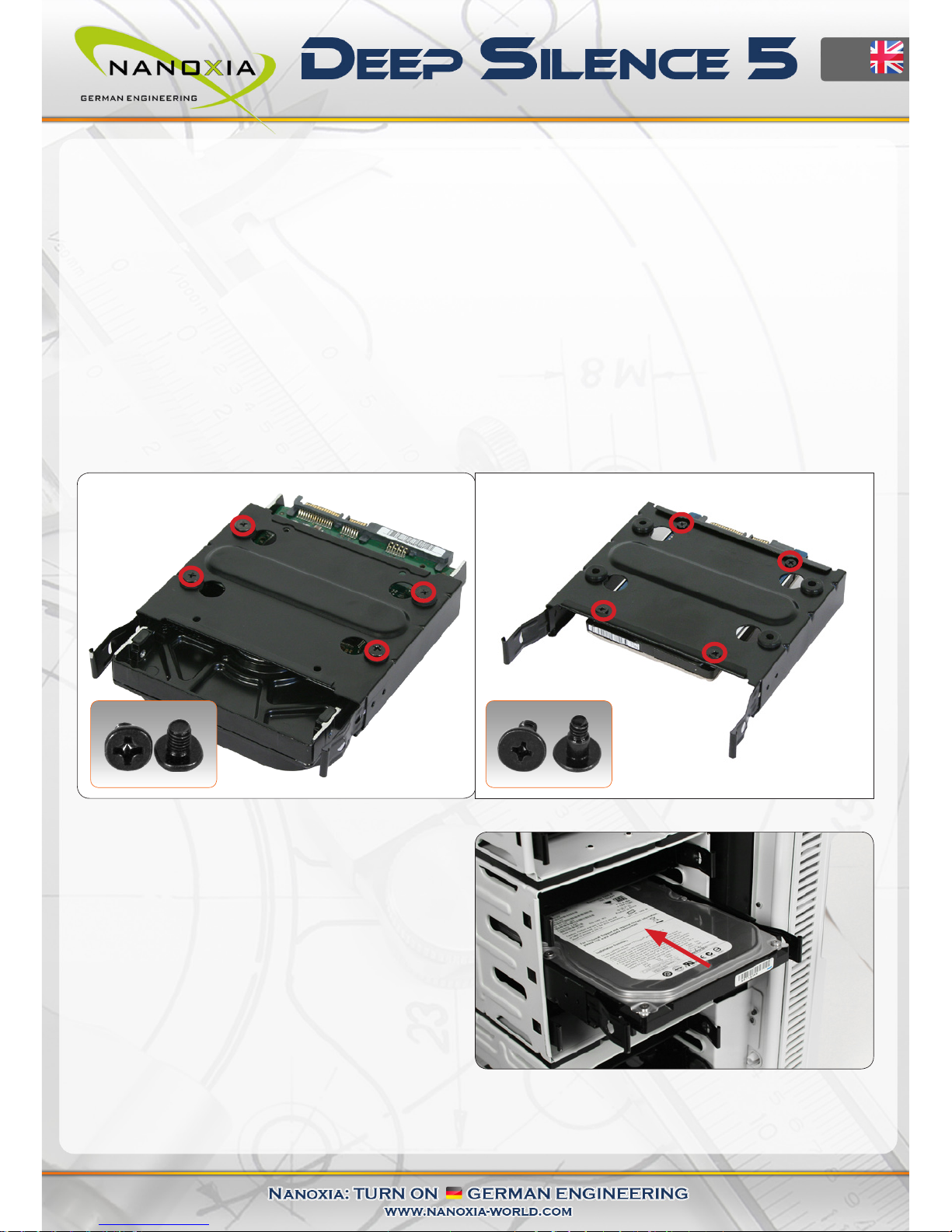
The Deep Silence 5 allows you the decoupled mounng of 11hard disk drives.
4.1 Mounng of hard disk drives
Install the 2.5 or 3.5 inch hard drives in the illustrated mounng frames. In order to extract the
frame, squeeze the protruding brackets and pull the slide out gently.
To install a hard drive into a bracket insert the disk so that the connectors point to the back and
aach the hard drive using the screws provided.
For the ng of 3.5 inch hard drives
please use the holes in gure 4A
For the ng of 2.5 inch hard drives
please use the holes in gure 4B
To lock the drive, push the bracket with the
drive back installed back into the slot unl
the bracket is re-engaged.
gure 4A gure 4B
09
Autres manuels pour Deep Silence 5
1
Table des matières
Autres manuels Nanoxia Enceinte

Nanoxia
Nanoxia PROJECT S MINI Manuel utilisateur

Nanoxia
Nanoxia Deep Silence 6 Revision B Manuel utilisateur

Nanoxia
Nanoxia CoolForce 1 Manuel utilisateur

Nanoxia
Nanoxia Deep Silence 5 Rev. B Manuel utilisateur

Nanoxia
Nanoxia Deep Silence 3 Manuel utilisateur

Nanoxia
Nanoxia Deep Silence 1 Revision B Manuel utilisateur

Nanoxia
Nanoxia DEEP SILENCE 2 Manuel utilisateur

Nanoxia
Nanoxia Deep Silence 5 Manuel utilisateur

Nanoxia
Nanoxia CoolForce 2 Manuel utilisateur


