
MUFU V10S Manuel utilisateur

V10S
Moto Cam
User Manual

1
Thank you for purchase MUFU moto cam. This product is specifically
designed to record real time video hen riding a scooter or motorcycle.
The content in this document is for informational purpose only and is
subject to change ithout prior notice. We have made every effort to
ensure that this User Guide is accurate and complete, ho ever, no liability is
assumed for any errors or omissions.
The manufacturer reserves the right to change the technical specifications
or accessories ithout prior notice.
Notice
1. Please peel off the protective film from the camera lens before use.
2. Do not touch the lens ith your fingers. Finger grease may be left on the
lens, resulting in unclear videos or pictures. Inspect and clean the lens
ith a soft, non-abrasive cloth regularly.
3. Please charge the unit to full before first use using the provided USB
Type-C cable or optional charge station. Please do not use another
brand of charging cable to avoid a potential equipment malfunction. The
red LED on the camera ill illuminate hen charging, and ill turn off
upon reaching full charge.
4. If the unit ill not be used for an extended period of time, please charge
at least once every 6 months to maintain the battery's health and avoid
lo -voltage related damage.
5. Please do nload MUFU MoTo app from iOS app store or Google Play
Store before use. The Wi-Fi pass ord is 12345678.
6. By default, Wi-Fi is ON for 3 minutes hen the camera is po ered on. If
it doesn’t connect to the MUFU MoTo app ithin 3 minutes, the camera
ill disable Wi-Fi automatically to save po er. To turn on again Wi-Fi,
simply po er the camera OFF then ON again.
NOTE: An active Wi-Fi connection will affect total recor ing time.
7. Recommend to use microSD card V30 or higher and capacity 16GB or
higher (up to 128GB).
8. Format microSD card regularly and synchronize date/time.
(Recommended: Once per month.)
9. In a high humi ity environment or when travelling between areas with

2
a large temperature ifference, light moisture or fog may appear on
the lens. This is normal. If this happens, remove the microSD car , an
remain the microSD car slot cover opening, let the microSD car slot
face up for several hours until the internal moisture or fog evaporates,
an then reinsert the car an resume use.
10. Due to local la s and for your o n safety, DO NOT operate the camera
or MUFU MoTo app hile driving or riding.
11. Use the MUFU MoTo app to synchronize your date and time before first
use.
12. This product is intended only for non-commercial use, ithin the
maximum limits permitted by la . We take no responsibility for any
losses as a result of use of this product.
13. The camera may get arm during use; this is normal.
14. Improper use or operation of the camera may result in damage to the
camera or its accessories and ill void the arranty.
Prohibition of co-location
This device and its antenna(s) must not be co-located or operated in
conjunction ith any other antenna or transmitter.
WEEE Notice
Disposal of Waste Electrical an Electronic Equipment an /or Battery by
users in private househol s in the European Union
This symbol on the product or on the packaging indicates that
this cannot be disposed of as a household aste. You must
dispose of your aste equipment and/or battery by handling it
over to the applicable take-back scheme for the recycling of
electrical and electronic equipment and/or battery. For more
information about recycling of this equipment and/or battery,
please contact your city office, the shop here you purchased
the equipment or your household aste disposal service. The
recycling of materials ill help to conserve natural resources and ensure
that it is recycled in a manner that protects human health and environment.

3
CE Regulatory Notice
The product here ith complies ith the requirements of IEC 62368-1:2014,
the EMC Directive 2014/30/EU, the RED-Directive 2014/53/EU and the RoHS
Directive 2011/65/EU.
EU Health Protection: This equipment should be installed and operated ith
minimum distance 20cm bet een the radiator & your body.
FCC Regulatory Compliance
This device complies ith Part 15 of the FCC Rules. Operation is subject to
the follo ing t o conditions: (1) this device may not cause harmful
interference, and (2) this device must accept any interference received,
including interference that may cause undesired operation.
Note: This equipment has been tested and found to comply ith the limits
for a Class B digital device, pursuant to Part 15 of the FCC Rules. These limits
are designed to provide reasonable protection against harmful interference
in a residential installation. This equipment generates, uses and can radiate
radio frequency energy and, if not installed and used in accordance ith the
instructions, may cause harmful interference to radio communications.
Ho ever, there is no guarantee that interference ill not occur in a
particular installation.
If this equipment does cause harmful interference to radio or television
reception, hich can be determined by turning the equipment off and on,
the user is encouraged to try to correct the interference by one or more of
the follo ing measures:
-- Reorient or relocate the receiving antenna.
-- Increase the separation bet een the equipment and receiver.
-- Connect the equipment into an outlet on a circuit different from that to
hich the receiver is connected.
-- Consult the dealer or an experienced radio/TV technician for help.
Warning: changes or modifications not expressly approved by the party
responsible for compliance could void the user’s authority to operate the
equipment.

4
Contains FCC ID: 2ACFIGM2WM
RF Exposure Compliance
This equipment complies ith FCC radiation exposure limits set forth for an
uncontrolled environment. This equipment should be installed and operated
ith minimum distance 20cm bet een the radiator and your body. This
transmitter must not be co-located or operating in conjunction ith any
other antenna or transmitter.
Regulatory Notice
This document provides country- and region-specific non- ireless and
ireless regulatory notices and compliance information for your
product. Some of these notices may not apply to your product.
Disposal of a battery into fire or a hot oven, or mechanically crushing
or cutting of a battery, that can result in an explosion.
Leaving a battery in an extremely high temperature surrounding
environment that can result in an explosion or the leakage of
flammable liquid or gas.
Wi-Fi Signals are unable to pass through the building. The limit of
signal transmission is 5m.
Wi-Fi Operation Channel: Ch1~Ch11
The product employs ireless data communication hich may
interfere, or be interfered by, a near-by camcorder.
Never use this camcorder in the vicinity of a micro ave oven or at
places here there is radio interference.
Radio ave reception may be orsened in specific environments.
Please be advised that if another camcorder is also using the same
2.4GHz band as this product, the processing speed of both
camcorders may slo do n.
The radio frequency (RF) generated by this RF electronic camcorder
may cause adverse effects on the operation of other electronic
camcorders and result in malfunctioning. Wireless transmitters and

5
circuitry may also interfere ith other electronic camcorders.
Therefore, do observe the follo ing precautions:
•Aircraft: Never use a radio transmitter hen you are in an airplane.
Please s itch off the Wi-Fi function of the camcorder.
•Vehicle: The radio frequency transmitted by this camcorder may
affect the electronic system in a motorized vehicle. Please consult
the manufacturer or dealer of your vehicle on the possible effect.
•Pacemaker: In order to prevent any potential interference to a
pacemaker, anyone ho uses a pacemaker should be advised, that,
hen using this camcorder, a minimum distance of 15cm (6 inch)
should be kept bet een the camcorder and the pacemaker; and
never put this camcorder in a chest pocket. In case of any doubt of
interference, s itch off the camcorder immediately.
•Medical Camcorder: If you use a personal medical camcorder,
consult the camcorder manufacturer or your physician to confirm if
your camcorder is sufficiently shielded from the RF transmission of
this camcorder.
•Medical Facilities: Hospitals and medical institutes may use facilities
that are sensitive to an external RF energy. Observe such
instructions hen the medical care personnel or any posted sign
requests you to s itch off any camcorder that may interfere the
radio frequency.
•Explosion sites or any location ith a posted sign: In order to
prevent interfering ith an explosion activity, observe all the
signage and instructions in the Explosion Area or in a zone ith a
“S itch Off 2- ay Radios” sign by s itching off camcorders that
may interfere ith the radio frequency.
MUFU is NOT responsible for the loss of any data/content during
operation.
By using
the
pro uct
, it is assum
e that you agree to
all of
the above statement
s
.

6
Step 1: Check What’s Insi e
The package contains the follo ing items. If any items are missing
or damaged, please contact the original place of purchase
immediately.
Main Unit 3-in-1 Mount
Hex Wrench
Safety Cord USB Cable (type C)
User Manual
7
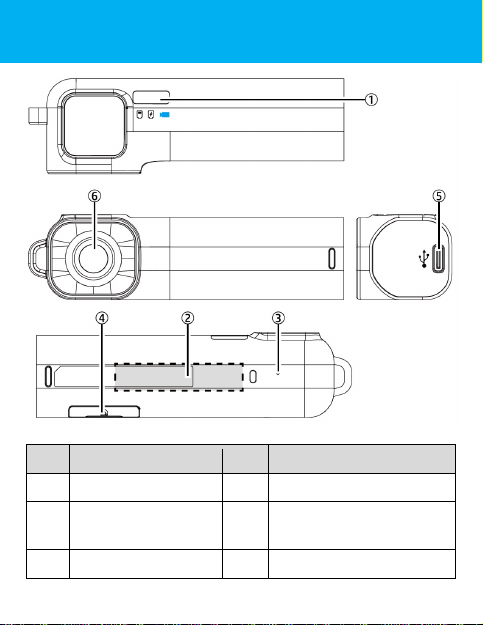
Step 2: Pro uct Overview
No
Description
No
Description
1
LED
indicator
4
microSD
slot / Reset
2
Po er on/off
sensor area 5 USB port (type C)
3
Microphone
6
Lens

8
Step 3: Insert microSD Car
Insert the micro SD memory card ith the pins facing for ard and
the Main Unit lens facing for ard too. (See belo for proper
installation orientation.) Once the memory card locks into place,
replace the slot cover securely over the slot.

9
The slot cover must be tightly sealed to prevent moisture from
entering, causing the lens to fog. Insert the lo er edge of the slot
cover, then press the top edge and sides of the slot cover to create
a good seal. See belo .
(1) (2)
(3) (4)
(5)
Table des matières
Autres manuels MUFU Appareil photo numérique


