
Memmert BASIC Mode d'emploi

SERVICE - UIS
BASIC EXCELLENT PERFECT
set
off
on
Th Fr
Mo Tu We Sa Su t3
t2
t1
STERI DEFRO
PRINT SETUP
loop
t4 3
4
2
1
°C rh
mb
%CO
mb
2
IN 1 IN 2 OUT IN 1 IN 2 OUT
MIN
AUTO
MAX
°C
h
on
off
U
I
S
page 1
Universal ovens
Incubators
Sterilisers
Service Instructions

SERVICE - UIS page 2

SERVICE - UISpage 3
1. Contents
1. Contents...................................................................................................................................................................... 3
2. Safety notes................................................................................................................................................................. 4
3. Repair instructions ....................................................................................................................................................... 5
4. Fault finding and error messages..................................................................................................................................5
4.1 Additional error messages on 3-phase ovens (Model Uxx 700-800) ....................................................................6
5. Tools required .............................................................................................................................................................. 6
6. Removing the housing cover ........................................................................................................................................ 7
7. Overall view control chamber ....................................................................................................................................... 8
8. Replacing the power unit ...........................................................................................................................................10
9. Changing fuses .......................................................................................................................................................... 10
10. Replacing main switch module incl. turn control ........................................................................................................11
11. Replacing controller (BASIC) .......................................................................................................................................12
12. Replacing controller (EXCELLENT) ...............................................................................................................................13
13. Replacing controller (PERFECT) ................................................................................................................................... 14
14. Replacing temperature limiter TB................................................................................................................................ 15
15. Replacing control chamber fan................................................................................................................................... 16
16. Replacing Pt100 temperature probe ...........................................................................................................................16
17. Changing the circulating fan motor............................................................................................................................17
18. Adjusting and dismantling the inner door on incubators (Ixx) .....................................................................................18
19. Door – maintenance and adjustment .........................................................................................................................19
19.1. Dismantling the door.......................................................................................................................................19
19.2. Adjusting the door...........................................................................................................................................19
19.3.Door closure – maintenance and dismantling .....................................................................................................20
20. Replacing the door seal..............................................................................................................................................22
21. Changing the working chamber seal ..........................................................................................................................22
22. Replacing the heating ................................................................................................................................................23
22. Wiring diagram..........................................................................................................................................................26
24. Index .........................................................................................................................................................................34
25. Address and customer service ....................................................................................................................................35

SERVICE - UIS page 4
2. Safety notes
Always before dismantling the equipment – pull out the mains supply
plug!
Work involving opening the housing must only be carried out by a
qualified electrical technician!
Please observe the safety notes and instructions in the Operating
Instructions supplied with the equipment!
Dismantling the equipment may give access to unfinished metal edges,
therefore always wear gloves during all work!
Observation of the notes in these Service Instructions is essential for
correct operation of the oven. Disregarding these instructions results in
exclusion of warranty, guarantee and damage claims!
On first start-up after any maintenance or repair the equipment should
not be left unsupervised until steady conditions have been reached!

SERVICE - UISpage 5
3. Repair instructions
These instructions describe service and maintenance operations as well as steps for dismantling of BASIC,
EXCELLENT and PERFECT ovens.
Unless otherwise described, assembly takes place in the reverse order.
Alterations in technical matters are reserved. Measurements are not binding.
4. Fault finding and error messages
Fault details
Fault details
Fault cause
Fault cause
Fault rectification
Fault rectification
Section
Section
General faults
General faults
Controller display
remains dark
Fuse 100 mA (80 mA) has blown Check fuse and replace if nec. Section 9
Main fuse 15 A has blown Check fuse and replace if nec. Section 9
Power unit faulty Replace power unit Section 8
Temperature can not be
set and oven can not
be operated by turn
control.
Turn control faulty Replace main switch module incl. turn control Section 10
Oven “blocked” by UserID card Unblock using UserID card siehe
Betriebs-
anleitung
Error messages in monitor indication
Error messages in monitor indication
Warning – symbol
alight continuously
Mechanical-action temperature limiter has switched off
the heating
- Switch off oven and allow to cool down.
- Check Pt100 temperature probe.
- Check temperature limiter
- The oven is again ready for operation only after fault
has been rectified and the oven has cooled down.
Section 14
Warning – symbol
flashing
Monitor controller has switched off the heating because
temperature difference
between working controller and monitor controller is
too small.
Increase temperature difference between monitor
temperature and working temperature.
If nec. replace Pt100 temperature probe on monitor
controller
Section 16
Error message „E-3“ Pt100 temperature probe of monitor controller is
faulty.
Replace Pt100 temperature probe of monitor controller
on connector J3
Section 16
Error message
„E-3” alternating with
temperature display
Pt100 temperature probe of monitor controller is
faulty. Monitor controller operates in emergency mode
with temperature value of working controller Pt100
temperature probe
Replace Pt100 temperature probe of monitor controller
on connector J3.
Section 16
Error message in timer display
Error message in timer display
Error message „E-0“ Serious configuration error (e.g. incorrect oven type or
incorrect temperature range)
Replace controller Section 11-
13
Error message „CONF”
(display only appr. 10
sec after switching on)
Checksum error (error on storing the setpoints, e.g. fan
speed)
The fault can be rectified by the controller itself after
repeating the storage function of a setpoint parameter.
If the fault is repeated or can not be rectified, the
controller has to be replaced
Section 11-
13
Error message „E-L1” in
timer display
Interruption in communication to power unit Check connecting cable.
If nec. replace power unit
Section 8
Error messages in temperature display
Error messages in temperature display
Error message „E-3” Pt100 temperature probe of working controller faulty Replace Pt100 temperature probe of working controller
on connector J4
Section 16
Error message „E-3”
alternating with
temperature display
Pt100 temperature probe of working controller is
faulty. Working controller operates in emergency mode
with the temperature value of monitor controller Pt100
temperature probe.
Replace Pt100 temperature probe of working controller
on connector J4.
Section 16
Error message „E-1.1” Power unit triac 1 faulty Replace power unit Section 8
Error message „E-1.2” Power unit triac 2 faulty Replace power unit Section 8
Error message „E-2.1” Power unit faulty Replace power unit Section 8
Error message „E-2.2” Power unit faulty Replace power unit Section 8

SERVICE - UIS page 6
4.1 Additional error messages on 3-phase ovens (Model Uxx 700-800)
Error messages in timer display
Error messages in timer display
Error message „E-L1”
in timer display
Communication to power unit phase L1 address#0
interrupted
Check fuse.
Check connecting cable.
If nec. replace power unit
Section 8
Error message „E-L2”
in timer display
Communication to power unit phase L2 address#1
interrupted
Check fuse.
Check connecting cable.
If nec. replace power unit
Section 8
Error message „E-L3”
in timer display
Communication to power unit phase L3 address#2
interrupted
Check fuse.
Check connecting cable.
If nec. replace power unit
Section 8
Error message „E-LA” Communication to all power units interrupted Check fuse
Check connecting cable
Check coding switch setting
If nec. replace power unit
If nec. replace controller
Section 8
Section 11-13
Error messages in temperature display
Error messages in temperature display
Error message „E-1.1” Power unit phase L1 address #0 triac 1 faulty Replace power unit phase L1 address #0 Section 8
Error message “E-1.2” Power unit phase L1 address #0 triac 2 faulty Replace power unit phase L1 address #0 Section 8
Error message „E-1.3” Power unit phase L2 address #1 triac 1 faulty Replace power unit phase L2 address #1 Section 8
Error message „E-1.4” Power unit phase L2 address #1 triac 2 faulty Replace power unit phase L2 address #1 Section 8
Error message “E-1.5” Power unit phase L3 address #2 triac 1 faulty Replace power unit phase L3 address #2 Section 8
Error message “E-1.6” Power unit phase L3 address #2 triac 2 faulty Replace power unit phase L3 address #2 Section 8
Error message „E-2.1” Power unit faulty Replace power unit Section 8
Error message „E-2.2” Power unit faulty Replace power unit Section 8
Error message „E-2.3” Power unit faulty Replace power unit Section 8
Error message „E-2.4” Power unit faulty Replace power unit Section 8
Error message „E-2.5” Power unit faulty Replace power unit Section 8
Error message „E-2.6” Power unit faulty Replace power unit Section 8
5. Tools required
Torx screwdriver size 8 and 10
Phillips screwdriver
Side-cutter pliers
Flat pliers for pulling off the connecting cables
Socket keys/spanners SW5.5 SW10 SW13
Hexagon socket driver 2 mm for door hinge
Multimeter with voltage and resistance ranges
Cable binder
Adhesive tape for identifying cables and assemblies

SERVICE - UISpage 7
6. Removing the housing cover
Pull off the mains plug !
Unscrew 4 screws on the back of the oven
Slightly raise the cover at the back and pull out towards the back
During re-assembly, check that there are spring washers underneath the screws in order to ensure
secure protective earth connection to the cover
•
•
•
•
back of the oven

10
7
1
6
12
2
8
6
5
4
13
3
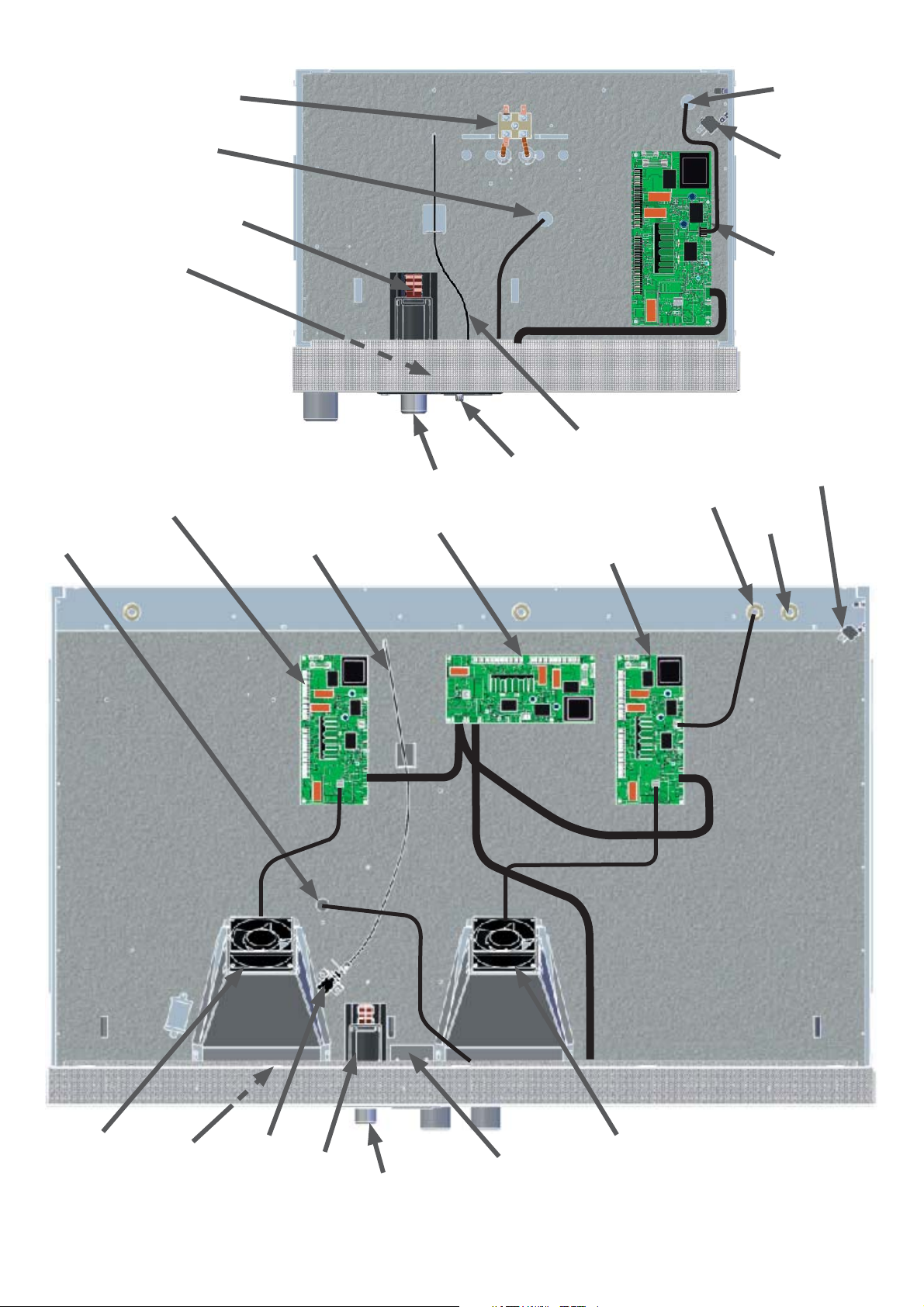
7. Overall view control chamber
1 = main switch
2 = power unit
3 = controller (see also Section 11-13)
4 = turn control
5 = air flap (xxB/xxE)
6 = heater terminals
7 = control chamber fan (not on xxB and Ixx)
8 = main connection terminal
9 = air flap servo (P only)
10 = air flap spindle
11 = feed-through heating (600 – 800)
12 = feed-through Pt100 temperature probe
13 = feed-through temperature limiter
14 = chip card reader (xxP only)
Example SNE 500
8
11
7
10
12
12
1
914
1
6
8
10
2
3
3
45
13
4
13
2 (phase L3 address#2)
2 (phase L1 address#0)
2 (phase L2 address#1)
Example INB 200
Example UFP 800
SERVICE - UIS page 10
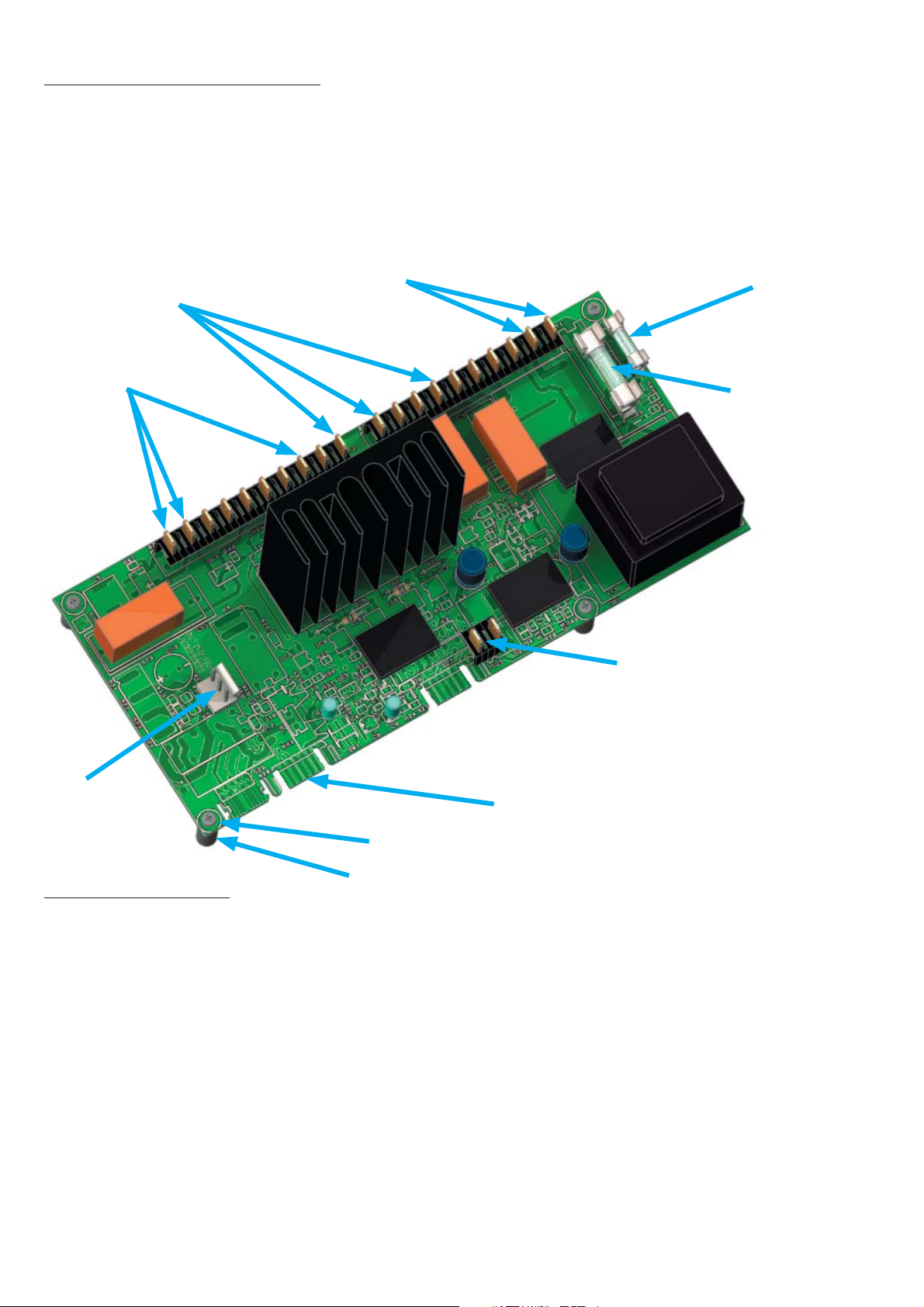
8. Replacing the power unit
Pull out the mains supply plug!
Remove the housing cover
Pull off all cables from power unit
(if nec. apply markers to unmarked cables)
Release 4 screws from power unit (ensure that spacers are not lost)
•
•
•
•
•
9. Changing fuses
Pull out the mains supply plug !
Remove the housing cover
The two fuses are located on the power unit (see above)
Check the fuse resistance with a continuity tester.
If the fuse is OK the resistance is only a few Ohm.
To change the fuse, place an insulated screwdriver from the side underneath the fuse and twist it to
lift out the fuse from its holder. Push the new fuse from above into the holder.
Main oven fuse: 15 A fast 32 x 6.3 mm (American)
Fuse controller/display: EXCELLENT / PERFECT 100 mA slow 20 x 5 mm
BASIC 80 mA slow 20 x 5 mm
•
•
•
•
•
•
Screw
Spacer
Main oven fuse
Fuse
controller/display
S25/26
Temperature limiter
Circulating fan
S30
Fan
Heating
S 28 Controller/display
Main terminal
supply
black=S20
N=S1
L=S2
blue=S13
brown=S19
Ce manuel convient aux modèles suivants
2
Table des matières
Autres manuels Memmert Four

Memmert
Memmert SE 200 Manuel utilisateur

Memmert
Memmert UE 200 Manuel utilisateur

Memmert
Memmert UFTS Manuel utilisateur

Memmert
Memmert UF160TS Manuel utilisateur

Memmert
Memmert VO200 Manuel utilisateur

Memmert
Memmert UN Manuel utilisateur

Memmert
Memmert UN PLUS Series Manuel utilisateur

Memmert
Memmert UN Series Manuel utilisateur

Memmert
Memmert UF450plus Manuel utilisateur

Memmert
Memmert UE 800 Manuel utilisateur


