MD CV-Programmer Manuel utilisateur

DCC Programmierer/Tester
Bedienungsanleitung
DCC programming and testing unit
User manual

2
Einleitende Information Introduction
Sehr geehrte Kunden, wir empfehlen Dear customer, we strongly
die Produktdokumentation und vor recommend that you read these
allem auch die Warnhinweise vor der manuals and the warning notes
Inbetriebnahme gründlich zu lesen und thouroughly before installing and
diese zu Beachten. operating your device.
HINWEIS: Vergewissern Sie sich, ob die NOTE: Make sure that the outputs
Ausgangsspannungen zu ihrem Verbrauch- are set to appropriate value
er passen, da dieser sonst zerstört werden before hooking up any other
kann! Für Nichtbeachtung übernehmen wir device. MD can’t be responsible
keine Haftung. For any damage if this is
disregarded.
HINWEIS: Funktionsausgang A3

3
Inhaltsverzeichnis Table of Contents
Grundlegende Informationen General information 4
Funktionsumfang Summary of functions 5
Lieferumfang Scope of supply 6
Inbetriebnahme Hook-Up 7
Anschlussbuchsen Connectors 8
Produktbeschreibung Product description 9
Garantie, Reparatur Warranty, Service, Support 13
Hotline Hotline 14

4
Grundlegende Informationen General information
Wir empfehlen die Anleitung gründlich We recommend studying this manual
zu lesen, bevor Sie Ihr neues Gerät in thoroughly before installing and
Betrieb nehmen. operating your new device.
HINWEIS: Einige Funktionen sind nur mit NOTE: Some funktions are only
der neusten Firmware nutzbar, führen available with the latest firmware.
Sie daher bei Bedarf ein Update durch. Please make sure that your device
is programmed with the latest
firmware.

5
Funktionsumfang Summary of Funktions
▪CV Programmiermodul CV-Programmer module
▪Decoder-Tester (Mini-Zentrale) Decoder-Test-Unit (Mini-Control-Unit)
▪DCC CV/Register Lesen/Schreiben möglich DCC CV/Register read/write possible
▪DCC Update für mXion DCC Module DCC update for mXion DCC modules
▪USB Programmieradapter für mXion & MD USB programming module for mXion & MDs
▪Softwareupdate mXion Module mit Zusatzkabel Software updates for mXion with cable
▪SUSI Testbereich mit SUSI Anschluss SUSI testing area with SUSI plug
▪SUSI Soundupdates für alle Dietz®/Uhlenbrock® SUSI sound updates for all Dietz®/Uhlenbrock
und mXion SX6 Soundmodule mit SUSI Anschluss and mXion SX6 sound modules with SUSI.
▪Unterstützt alle Decoderfabrikate Usable for all Decoder manufactures
▪Decodervorlagen XML nutzbar Decoder templates XML available
▪Updatebar Self updateable

6
Lieferumfang Scope of supply
▪Bedienungsanleitung Manual
▪MD CV-Programmer MD CV-Programmer
▪USB-Kabel USB cable
▪15V/1A Netzteil 15V/1A Supply

7
Inbetriebnahme Hook-Up
Bauen bzw. platzieren Sie Ihr Install your device in compliance with
Gerät sorgfältig nach den Plänen the connecting diagrams in this manual.
dieser Bedienungsanleitung. The device is protected against shorts and
Die Elektronik ist generell gegen excessive loads. However, in case of a
Kurzschlüsse oder Überlastung connection error e.g. a short this safety
gesichert, werden jedoch Kabel feature can’t work and the device will be
vertauscht oder kurzgeschlossen destroyed subsequently.
kann keine Sicherung wirken und Make sure that there is no short circuit
das Gerät wird dadurch ggf. zerstört. caused by the mounting screws or metal.
Achten Sie ebenfalls beim befestigen
darauf, dass kein Kurzschluss mit
Metallteilen entsteht.

8
Anschlussbuchsen Connectors
Programmier/Testgleis
Programming/Test track
USB®
USB®
Trafo
Supply
Direktupdates für mXion Decoder
über MDTerm und Spezialkabel
Direct updates for mXion decoders
with MDTerm and special cable
SUSI Test und Soundupdates von SUSI
Soundmodulen SX6, Dietz® micro und
Uhlenbrock® IntelliSound®
SUSI test and sound updates with SUSI
sound modules SX6, Dietz® micro und
Uhlenbrock® IntelliSound®
Auf Gerät Steckplatz
On-Device placement

9
Produktbeschreibung Product description
Der CV-Programmer ist das ideale Gerät für alle The CV programmer is the ideal device for
Anwendungen rund um die digitale Modellbahnwelt. everyone applications around the digital
Neben dem klassischen CV und Register programmieren model railway world. In addition to classic CV
sowie div Funtkionen für leichte Programmierung wie and register programming as well as functions
Bitstellungen, Lange Adressen und Listen/Vorlagen for easy programming like bit positions, long
besteht die Möglichkeit, dass man addresses and templates, the possibility that
programmierte Werte gleich testen kann. Sie haben one can test programmed values immediately.
mit dem MD-DCC-TOOL die Möglichkeit, Decoder They have with the MD-DCC-TOOL the pos.
zu testen. Dabei verwandelt sich der Programmer in to decoder completely to test. This turns the
eine Mini-Zentrale, mit der man alle Funktionen/Decoder programmer in a mini-control center, with
testen kann. Weichen können auch dauerhaft hin/her all functions/decoders can test. Turnouts can
geschaltet werden (Toggle-Test). Auch der Roco-Modus also be permanent back/forth (toggle test).
wird unterstützt. Für Fahrdecoder können 14,28 und Also the Roco mode is supported. For
128 Fahrstufen gewählt und getestet werden. driving steps are selected and tested.
Des Weiteren können alle mXion Decoder über das Furthermore, all mXion decoders can use
the module (and with the software MDTerm)
Modul (und mit der Software MDTerm) geupdatet updated become. There are 2 basic options
werden. Hierzu gibt es 2 grundlegende Möglichkeiten.
1. Der Decoder ist selbstupdatefähig (bspw. 1. The decoder is self-updatable (e.g.
DRIVE-XL). Dann geht das Update über das DRIVE-XL). Then the update goes over the
Programmiergleis. programming track.
2. Der Decoder ist nicht selbstupdatefähig, dann 2. The decoder is not self-updatable, then
funktioniert das Update über den „Update“does the update work via the „Update“
Anschluss und das optionale Spezialkabel. connection and the optional special cable
dieses wird in den Steckplatz mit den 3 this will be in the slot with the 3 holes
Löchern eingesteckt. Der Vorgang geht inserted. The process works also via MDTerm.
ebenso über MDTerm.
Außerdem können mit Hilfe des Programmers alle Besides, with the help of the programmer all
SUSI fähigen Module getestet und programmiert SUSI enabled modules are tested and
werden, entweder eingesteckt im Decoder programmed be either plugged in the decoder
oder direkt an der SUSI Buchse des Programmers. or directly to the SUSI jack of the
programmer.

10
Besonders anzumerken ist die Funktion SUSI Of particular note is the function SUSI sound
Soundmodule wie unsere mXion SX6 aber auch modules like our mXion SX6 but also the
der Firma Dietz® und Uhlenbrock® mit Sounds company Dietz® and Uhlenbrock® with
bespielen zu können. Dazu stecken Sie das einfach sounds to be able to play. Just plug it in for that
das Soundmodul in die SUSI Buchse des the sound module into the SUSI socket of the
Programmers. Über MD-DCC-TOOL unter programmer. About MD-DCC-TOOL under
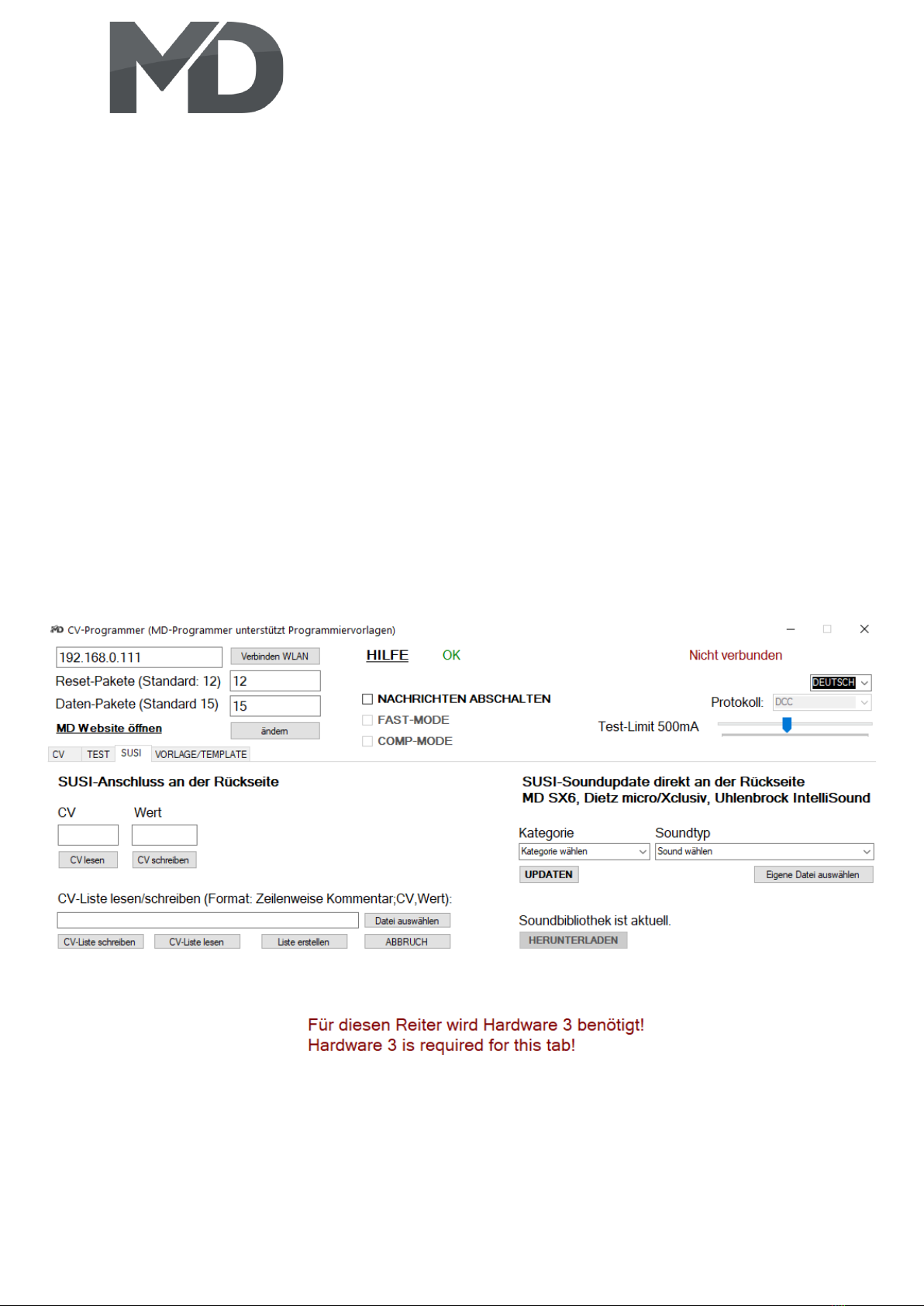
„SUSI“finden Sie im rechten Teil die Soundbibliothek. SUSI you will find the sound library in the
Diese können Sie herunterladen. Wir erweitern right part. You can download these. We
nach und nach alle Dietz® Sounds mit 4 eigenen expand gradually all Dietz® sounds with 4
exklusiven Sounds. Diese erkennen Sie an der own exclusive sounds. These recognize you
Endung „DSU“. Die Sounds liegen auf F25-28. at the ending „DSU“. The sounds are on
Sie können hier einfach einen Sound F25-28. You can just have a sound here select
auswählen und auf das Soundmodul spielen. and play on the sound module. When
Bei der Erstellung eigener Sounds nehme you want to create your own sounds, take
Sie bitte Kontakt mit uns auf. please to contact us.
Table des matières
Manuels Carte mère populaires d'autres marques

Telit Wireless Solutions
Telit Wireless Solutions SL869-3DR Manuel utilisateur

Gigabyte
Gigabyte GA-9IVDT Manuel utilisateur

Texas Instruments
Texas Instruments ADS8372EVM Manuel utilisateur

Commell
Commell MS-C73 Manuel utilisateur

IBT Technologies
IBT Technologies MB860 Manuel utilisateur

Nvidia
Nvidia TEGRA DG-04927-001_V01 Manuel utilisateur