Magtek ExpressCard 2000 Instructions d'utilisation et de sécurité

MagTek I 1710 Apollo Court I Seal Beach, CA 90740 I Phone: (562) 546-6400 I Technical Support: (888) 624-8350
www.magtek.com
ExpressCard 2000
Instant Issuance Card Personalization System
XY Transport Ribbon Cable Replacement Procedure
September 22, 2014
Manual Part Number:
99875704-1.01
REGISTERED TO ISO 9001:2008

ExpressCard 2000| Instant Issuance Card Personalization System | XY Transport Ribbon Cable Replacement Procedure
Page 2
Copyright © 2006 - 2014 MagTek, Inc.
Printed in the United States of America
Information in this publication is subject to change without notice and may contain technical inaccuracies
or graphical discrepancies. Changes or improvements made to this product will be updated in the next
publication release. No part of this document may be reproduced or transmitted in any form or by any
means, electronic or mechanical, for any purpose, without the express written permission of MagTek, Inc.
MagTek® is a registered trademark of MagTek, Inc.
MagnePrint® is a registered trademark of MagTek, Inc.
Magensa™ is a trademark of MagTek, Inc.
MagneSafe™ is a trademark of MagTek, Inc.
ExpressCard 2000is a trademark of MagTek, Inc.
Microsoft® and Windows® are registered trademarks of Microsoft Corporation.
All other system names and product names are the property of their respective owners.
Table 0.1 - Revisions
Rev Number
Date
Notes
1.01
09/22/2014
Initial release derived from 99875607-5.01-DRAFT

ExpressCard 2000| Instant Issuance Card Personalization System | XY Transport Ribbon Cable Replacement Procedure
Page 3
SAFETY
This product has been evaluated by multiple safety certification agencies, including
Underwriters Laboratories (UL) and the United States Federal Communications
Commission (FCC Class A and Class B), and is designed to protect both the user and the
device. This document is written specifically to work in conjunction with these safety and
integrity features to protect the user and the device. It is very important to follow all steps
in the product documentation carefully, in the order in which they are described, and at
the recommended times. Failure to do so could result in personal injury, and / or cause
damage to the device, and / or void the product warranty.
The information within this manual has been prepared for use by trained professional
service personnel and is not intended for general use. To maintain the safety and integrity
of the machine, follow the procedures described in this manual carefully.
For your personal safety and to prevent damage to the device, disconnect power from the
device before you connect or disconnect any cable, electronic board, or assembly.
SAFETY REQUIREMENTS
Caution: Never do any of the following:
DO NOT use a ground adapter plug to connect equipment to a power socket-outlet that lacks a ground
connection terminal.
DO NOT attempt any maintenance function that is not specifically described in this manual or in
other ExpressCard 2000 instructional documents published by MagTek.
DO NOT override or “cheat” electrical or mechanical interlock devices.
DO NOT use EC2000 supplies or cleaning materials for other than their intended purposes.
DO NOT operate the equipment if you or anyone else have noticed unusual noises or odors.
Consider the following before operating the ExpressCard 2000:
Connect the EC2000 to a properly grounded AC power socket-outlet. If in doubt, have the socket-
outlet checked by a qualified electrician. Improper connection of the device’s grounding conductor
creates a risk of electric shock.
Place the EC2000 on a solid surface that can safely support the device’s weight support the weight of
the EC2000 PLUS the weight of a person leaning against the device (such as a service technician).
Be careful when moving or relocating the device. Use proper lifting techniques.
Use materials and supplies specifically designed for MagTek devices. Using unsuitable materials
may result in poor performance, and in some cases may be hazardous.

1 - Table of Contents
ExpressCard 2000| Instant Issuance Card Personalization System | XY Transport Ribbon Cable Replacement Procedure
Page 4
Table of Contents
Table of Contents ............................................................................................................................... 4
1Required Tools, Materials, and Documents ........................................................................... 5
1.1 Required Tools..................................................................................................................... 5
1.2 Suggested Tools .................................................................................................................. 5
1.3 Required Materials ............................................................................................................. 5
1.4 Suggested Materials........................................................................................................... 5
1.5 Required Software and Documents................................................................................. 5
2Introduction ................................................................................................................................. 6
3XY Transport Ribbon Cable Replacement Procedure ........................................................... 7
3.1 Prepare the Device ............................................................................................................. 7
3.2 Remove / Re-install the XY Transport Ribbon Cable .................................................... 8

1 - Required Tools, Materials, and Documents
ExpressCard 2000| Instant Issuance Card Personalization System | XY Transport Ribbon Cable Replacement Procedure
Page 5
1Required Tools, Materials, and Documents
1.1 Required Tools
Part Number
Quantity
Description
33011008
1 ea.
ASM TOOL KIT,FIELD SERVICE,EC2000
1.2 Suggested Tools
Part Number
Quantity
Description
N/A
1 ea.
Flashlight
1.3 Required Materials
Part Number
Quantity
Description
33070992
1 ea.
ASM REPLACEMENT KIT,XY CABLE,EC2000
1.4 Suggested Materials
Part Number
Quantity
Description
33011009
1 ea.
ASM KIT,STARTER,SPARE,FIELD SERVICE,EC2000
1.5 Required Software and Documents
MagTek recommends loading the following required software and documents on a USB thumb drive or
service laptop before visiting the customer site.
Part Number
Quantity
Description
99875600
1 ea.
MNL USER INSTALL & OPERATION MANUAL,EC2000
99875607
1 ea.
MNL HARDWARE SERVICE MANUAL,EC2000

2 - Introduction
ExpressCard 2000| Instant Issuance Card Personalization System | XY Transport Ribbon Cable Replacement Procedure
Page 6
2Introduction
This procedure describes how to replace the XY transport ribbon cable in the ExpressCard 2000
(EC2000), and is based on content in 99875607 ExpressCard 2000 Hardware Service Manual. It
assumes the reader is familiar with basic operation of the ExpressCard 2000’s user and maintenance
functions, so many of the cross-references to deeper “how-to”procedures from that manual have been
removed for brevity.
The information in this document is intended for use by trained professional service
personnel only. It is not intended for general use. To maintain the safety and integrity of
the device, it is important to follow the procedures laid out in this document as-written and
in the order provided.
CAUTION: For your personal safety, and to prevent damage to the device, disconnect
power from the ExpressCard 2000 before you connect or disconnect any cable, electronic
board, or assembly.

3 - XY Transport Ribbon Cable Replacement Procedure
ExpressCard 2000| Instant Issuance Card Personalization System | XY Transport Ribbon Cable Replacement Procedure
Page 7
3XY Transport Ribbon Cable Replacement Procedure
3.1 Prepare the Device
Prepare the device for service by following these steps:
1) Offer the customer the opportunity to remove any proprietary or security-sensitive consumables from
the device, including card stock, image printer ribbons, indent cartridges, and tipper foils. Some
consumables contain negative imprints of cardholder data and must be handled securely.
2) Make sure the device is powered on and connected to the network.
3) Open the top access door.
4) Inspect the device for any items that do not belong inside the cover, and remove them (examples
include loose mechanical parts, cards, insect or animal leavings, or jewelry).
5) Power down the device.
6) Disconnect the device’s power and network cables and any security hardware.

3 - XY Transport Ribbon Cable Replacement Procedure
ExpressCard 2000| Instant Issuance Card Personalization System | XY Transport Ribbon Cable Replacement Procedure
Page 8
3.2 Remove / Re-install the XY Transport Ribbon Cable
This section provides information for replacing just the XY transport ribbon cable, which occasionally
must be replaced without replacing the entire module. For instructions on removing and re-installing the
entire XY transport module, see 99875607 ExpressCard 2000 Hardware Service Manual or
33070932 ExpressCard 2000 XY Transport Module Replacement Procedure.
Figure 3-1 - XY Transport Showing Ribbon Cable (FRONT VIEW)
To remove the XY transport module’s ribbon cable, follow these steps:
1) Open the top access door (see 99875607 ExpressCard 2000 Hardware Service Manual).
2) Move the XY transport to the front of the device to expose its cable and its connection to the circuit
board (“breakout board”) on the base plate of the device (see Figure 3-2 and see 99875607
ExpressCard 2000 Hardware Service Manual for details).

3 - XY Transport Ribbon Cable Replacement Procedure
ExpressCard 2000| Instant Issuance Card Personalization System | XY Transport Ribbon Cable Replacement Procedure
Page 9
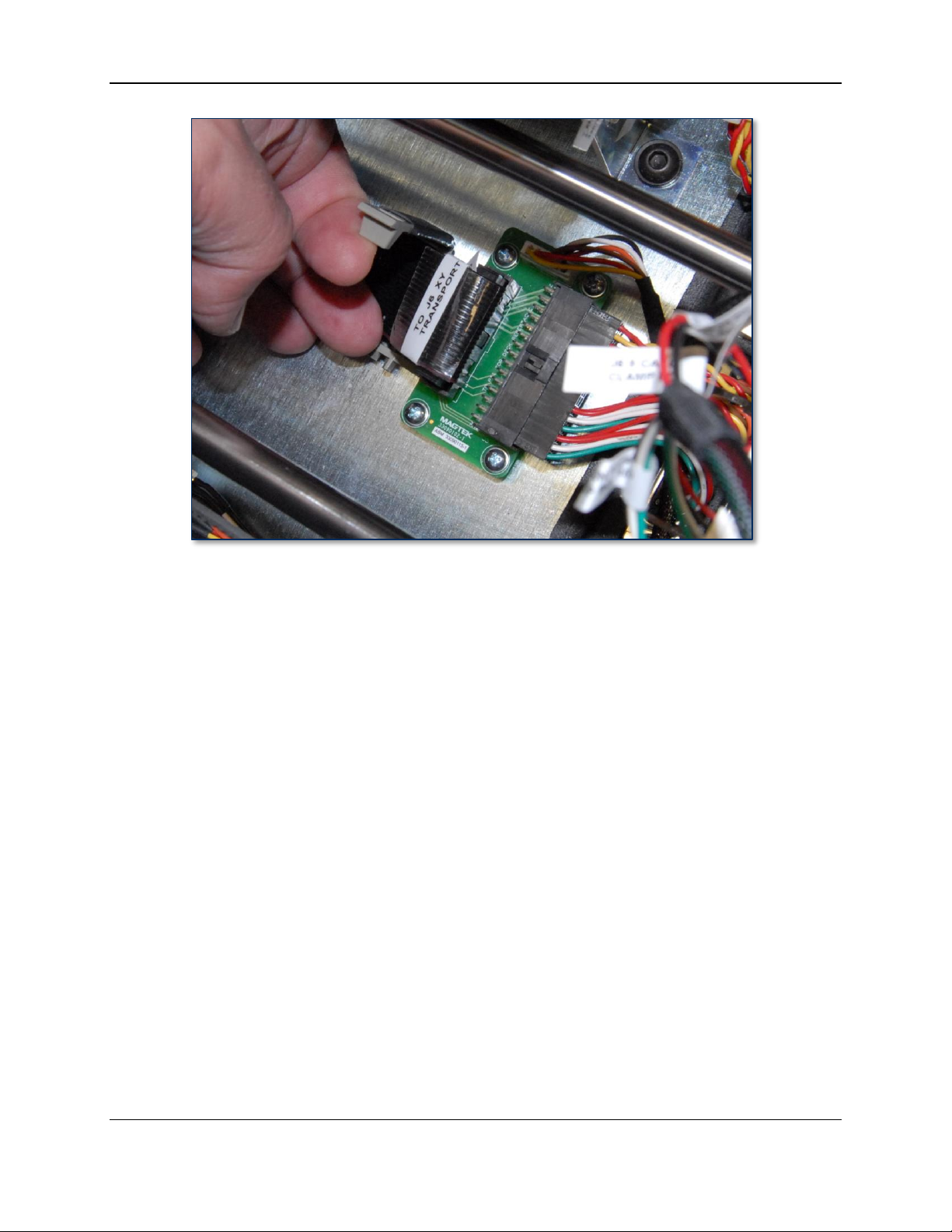
Figure 3-2 - XY Transport at Front of Device Exposing Breakout Board (TOP VIEW)
3) On the rear side of the XY transport, locate the two retaining clips that secure the ribbon cable to the
transport. Lift both clips firmly toward the ceiling to unlock and eject the cable from the circuit
board, then disconnect the ribbon cable. See Figure 3-3.
Figure 3-3 - Unlocking XY Transport Ribbon Cable (TOP VIEW FROM LEFT / REAR LEFT VIEW)
4) Open the clip that secures the ribbon cable to the top deck plate.

3 - XY Transport Ribbon Cable Replacement Procedure
ExpressCard 2000| Instant Issuance Card Personalization System | XY Transport Ribbon Cable Replacement Procedure
Page 10
5) Disconnect the ribbon cable from the breakout board on the top deck plate, and set the cable aside.
6) If there is adhesive on any of the connectors, peel or gently scrape it off and discard it.
Autres manuels pour ExpressCard 2000
8
Table des matières
Autres manuels Magtek Matériel informatique
Manuels Matériel informatique populaires d'autres marques

EMC2
EMC2 VNX Series Manuel du propriétaire

Panasonic
Panasonic DV0PM20105 Manuel utilisateur

Mitsubishi Electric
Mitsubishi Electric Q81BD-J61BT11 Manuel utilisateur

Gigabyte
Gigabyte B660M DS3H AX DDR4 Manuel utilisateur

Raidon
Raidon iT2300 Manuel utilisateur

National Instruments
National Instruments PXI-8186 Manuel utilisateur