
MachPower UFR106 Manuel utilisateur

USER MANUAL
INFRARED FOREHEAD THERMOMETER
EN
MANUALE D'USO
TERMOMETRO FRONTALE AD INFRAROSSI
ITA
GUÌA DE USO
TERMÓMETRO INFRARROJO DE FRENTE
ES
UFR106
Shenzhen Urion Technology Co.,Ltd.
Floor 4-6th of Building D,Jiale Science&Technology Industrial Zone,No.3,
ChuangWei Road,Heshuikou Community,MaTian Street, GuangMing New
District,518106 ShenZhen,CHINA
MADE IN CHINA
Shanghai International Holding Corp. GmbH (Europe)
Eiffestrasse 80, 20537 Hamburg,Germany
Importatore / Importer:
Mach Power Italy s.r.l.: Via Alberigo Albricci, 8 - 20122 Milano (MI) Italy
ATTENTION: The operators must carefully read and completely understand the present
manual before using the product.
ATTENZIONE: Gli operatori devono leggere e capire completamente questo manuale
prima di utilizzare il prodotto.
ATENCIÓN: Los operadores tienen que leer y entender completamente este manual
antes de utilizar el producto.
HC-IRDFT
HC-IRDFT(manual).indd 1 07/09/20 15:10

HC-IRDFT(manual).indd 2 07/09/20 15:10

3
ENG
INDEX
1. Description
2. Use safety manual
3. Features
4. Other instructions
5. Precautions before use
6. Product structure
7. LCD display description
8. Product scope and contraindications
9. Technical index
10. Operating instructions
11. Reference temperature
12. Advice
13. Care and maintenance
14. Waste disposal instructions
15. Electromagnetic compatibility warning
16. Symbol Description
17. Product accessories list
4
4
5
5
5
5
6
6
6
8
12
13
14
15
15
16
16
HC-IRDFT(manual).indd 3 07/09/20 15:10

1. DESCRIPTION
This product is a non-contact infrared forehead thermometer that
professionally measures the temperature of the forehead of the hu-
man body. According to the difference of human skin, the measured
temperature will be different; The temperature caused by different
parts of the human body will be different because the more exposed
the human body. The part is more “affected” by the ambient tempe-
rature.
2. USE SAFETY MANUAL
• Please read this manual carefully before use.
• The operating temperature of this product is 10°C ~ 40°C, the
optimal temperature is 25°C.
• Do not use this product in an environment above 40°C or
below 0°C.
• Do not place this product near charged objects to avoid electric
shock.
• Please do not use this product in an environment with relative
humidity greater than 85%.
• Do not place this product too close to the electromagnetic range.
(E.g. radio, mobile phone, etc.).
• Please do not expose this product to the sun, or near the stove, or
contact it with water.
• Do not bump or drop the product, and do not use it if it is damaged.
• Sweat, hair, hat or scarf on forehead can affect the accuracy of the
measurement.
• Make sure the measurement distance is within 5 cm.
• When forehead sweating or other reasons cause the forehead
temperature does not reflect the body temperature normally, please
measure from the earlobe.
• When cleaning is required, wipe the surface of the meter lightly
with alcohol.
• Contact the distributor if there is any problem with the product and
cannot repair the product by yourself.
It is forbidden to take body temperature measurement when the
ambient temperature changes greatly.
4
HC-IRDFT(manual).indd 4 07/09/20 15:10
5
ENG
3. FEATURES
1. Non-contact high-precision temperature measurement
2. Can choice of °C or °F
3. Alarm value can be set
4. Buzzer function (can be on or off)
5. LCD display with backlight can be used by users in dark
6. Automatic range selection; resolution is 0.1°C (0.1°F)
7. Can store the latest 20 measurement data
8. Automatic data retention and automatic shutdown.
4. OTHER INSTRUCTIONS
Non-contact infrared forehead thermometer is a professional ther-
mometer for measuring human forehead. It is widely used in home
use. This product cannot replace the diagnosis of doctors.
5. PRECAUTIONS BEFORE USE
Power On Self Test
Aim at the measured object, press the measurement switch, the LCD
will display all the numbers and characters of the self-test, and the
self-test screen appears. This screen is displayed for about 1 second.
6. PRODUCT STRUCTURE
Structural composition
It is mainly composed of infrared probe assembly, main circuit board
assembly, LCD display assembly and housing assembly.
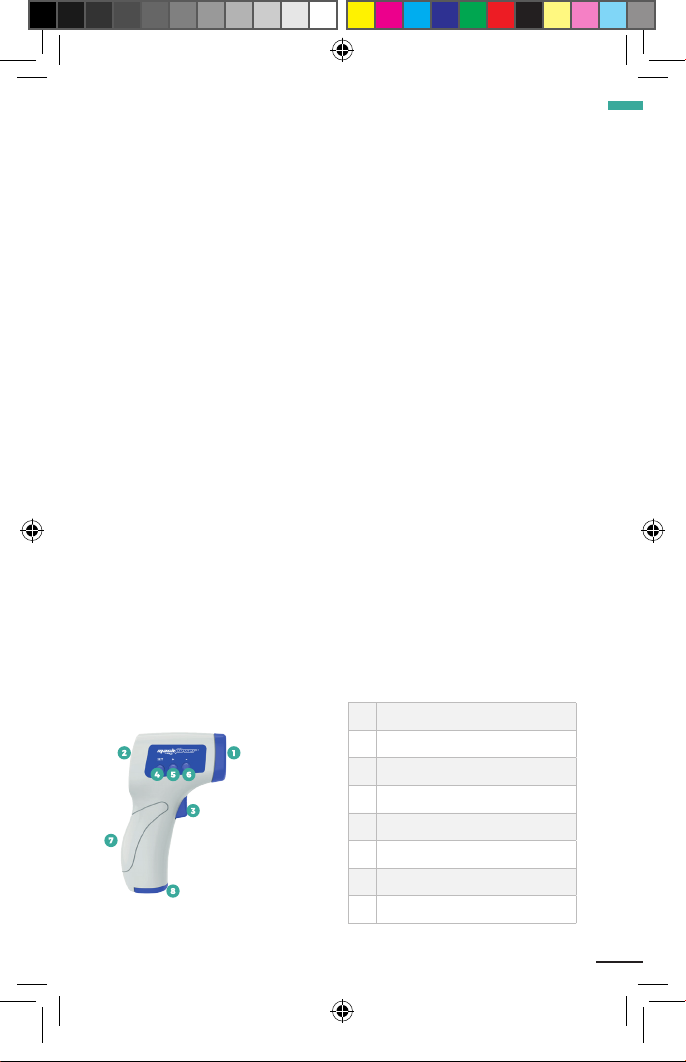
1Infrared sensor
2LCD Display
3Measurement switch
4Set Key
5Up Button
6Down Button
7Handle
8Battery cover
HC-IRDFT(manual).indd 5 07/09/20 15:10

6
7. LCD DISPLAY DESCRIPTION
8. PRODUCT SCOPE AND CONTRAINDICATIONS
8.1 The scope of products
The body temperature of the subject is displayed by measuring the
heat radiation from the forehead.
8.2 Product contraindications
1. Conditions such as birth defects, congenital malformations, septic
shock, and circulatory failure may severely affect forehead tempera-
ture measurement.
2. Suffering from mental disorders.
3. Suffering from severe heart, liver and kidney diseases.
9. TECHNICAL INDEX
9.1 Basic parameters
Show exact bits 0.1°C(0.1°F)
Power DC 3V(2 AAA batteries in series)
Size (mm) 149 x 97 x 45
Weight (g) 110
HC-IRDFT(manual).indd 6 07/09/20 15:10

7
ENG
9.2 Measuring range
Human body
mode temperature range
32.0~42.9°C / 89.6~109.2°F
Measuring distance range 3-5cm (The best distance is 3 cm)
Automatic shut-down About 10s
9.3 Measurement accuracy
32°C~34.9°C ±0.3°C
35°C~42°C ±0.2°C
42.1°C~42.9°C ±0.3°C
9.4 Service life
Product lifespan is 3 years.
9.5 Software release version
V1.0
9.6 Work, storage, transportation, and environmental
requirements
1. Operating environment
• Operating temperature: 10°C~40°C, best 25°C;
• Relative humility: ≤85%;
• Atmospheric pressure: 70kPa~1060kPa
• Power: DC 3V(2 AAA batteries in series)
2. Storage and transportation environment
• Storage temperature: -20°C~+55°C;
• Relative humility: ≤93%;
• Non-corrosive gas, well-ventilated room.
• The transportation requirements are stipulated in the order contract,
and the severe impact, vibration and rain and snow splashing during
transportation must be prevented.
HC-IRDFT(manual).indd 7 07/09/20 15:10

8
10. OPERATING INSTRUCTIONS
10.1 Battery instructions
At the bottom of the handle, there is an oval with an arrow on it.
Please push the battery cover forward with your hand in the direction
of the arrow.
Note for battery installation and replacement
1. After the battery cover is opened, place the battery in the direction
of the positive and negative electrodes at the place where the
batteries are installed. Pay attention to the correct orientation of the
positive and negative electrodes.
2. Wait for 10 minutes to warm up for the first time or immediately
after inserting a new battery.
3. When the battery power is low, the symbol will appear on the
display, prompting to replace the new battery, open the battery
compartment cover (see 6 product structure), pay attention to the
positive and negative polarity when replacing the new battery. Im-
proper placement may cause damage to the product.
4. Remove the battery when it has not been used for a long time to
prolong its service life and prevent damage due to battery leakage.
10.2 Temperature measurement steps
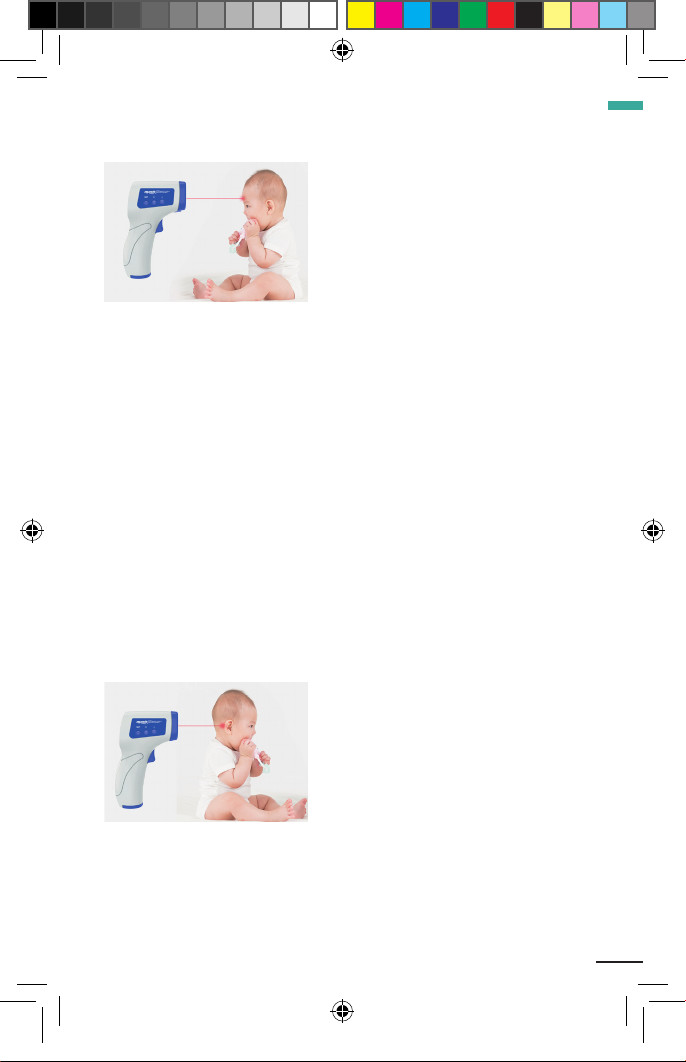
1. Point the thermometer at the center of the forehead(above the
center of the eyebrow) and keep it vertical, about 3-5 cm away. Press
the measurement switch and the temperature will be displayed
HC-IRDFT(manual).indd 8 07/09/20 15:10
9
ENG
immediately.
2. When the measurement switch is pressed, the current measure-
ment temperature value is displayed on the display, and the measu-
rement data can be automatically stored Note:
• Before measuring, make sure that there is no hair, sweat, makeup
or hats on it.
• When forehead sweating or other reasons cause the forehead
temperature does not reflect the body temperature normally, please
measure after aiming at the earlobe, and make sure that there is no
hair, sweat, cosmetics or hat covering.
• The non-contact infrared forehead thermometer has not been used
for a long time, the first time the machine is opened for environmen-
tal temperature detection, and the boot time is extended by 1 to 2
seconds.
• A person’s body temperature changes at different times of the day
and is also affected by other external conditions, such as age, gender,
and skin color.
HC-IRDFT(manual).indd 9 07/09/20 15:10

10
10.3 function description
10.3.1 The three display states are as follows:
10.3.2 Check the historical measurement temperature:
10.3.3 Setup:
Long press the setting key for 3 seconds to enter the setting mode
or exit the current setting mode; In the setting mode, short press the
setting key to select the function option (f1-f2-f3-f4-f5),and press the
“+” / “-” key to modify the parameters.
10.3.4 Measurement temperature unit please select (F1):
In normal measurement mode, press the setting key for more than
3 seconds until the LCD displays F1 option; Press “+” to select Celsius
(°C), press “-” to select Fahrenheit (°F);Short press the setting key to
save the current selection and enter the next option, long press 3
seconds to save the current setting and exit the setting function.
HC-IRDFT(manual).indd 10 07/09/20 15:10
Table des matières
Langues :
Autres manuels MachPower Thermomètre


